The Need for DevSecOps

One of the things that happens with many companies that start adopting DevOps is that they release new features constantly. They publish their lists of changes, and they try to attract customers and grow their businesses. They may make some mistakes, but they fix those quickly and keep pushing forward. That’s the idea, and it works well.

However, many of the developers (and most managers), don’t think about the security side of their changes. This piece looks at the way hackers and criminals view DevOps, often using release notes and feature changes as a target to focus their efforts. In this way, they exploit holes and vulnerabilities in software to attack data storage. The examples include S3 buckets of storage and Elasticsearch, which is notoriously poorly secured by many people.

I’m sure there are hacks that also expose relational data stores and NoSQL stores, but those are often more secure and harder to directly attack. Certainly, hackers do get credentials and can query data, it’s more often I hear about data breaches from other sources than direct relational database access. SQL Injection is definitely still an issue, and I hope that more and more developers are learning patterns that avoid these vulnerabilities.

DevOps works. I think it’s great. However, it’s not enough to trust developers to build features without including static code analysis, pen testing, and other security evaluations before you release code. Often developers can build features just as fast with good patterns as bad. Use automation to catch bad patterns and force developers to learn new ones.

Also, avoid letting developers implement data stores out of convenience and speed. Ensure that strong security practices, long passwords, service accounts, secrets, and more are implemented from the start. It’s easy to shortcut these, but it’s also harder to explain to customers and investors why we didn’t do better.

If you’re a developer, the main thing to keep in mind is that you will often be the scapegoat for these issues. Upper management might not support you and pressure you to move faster, but when there are issues, they’ll also be quick to blame you and let you go first. Push back and ensure that you have the tools and the process to evaluate if you are building problematic code. Always use long passwords, and document what you do for others to follow.

And if your boss insists on cutting corners, get that in writing. It might not save your job, but that documentation has served me well in the past when issues come to light.

Steve Jones

Listen to the podcast at Libsyn, Spotify, or iTunes.
Posted in Editorial | Tagged , | 2 Comments

A Staffing Disaster

There was a failure recently at an Azure data center in Australia when a utility power sag caused equipment to trip offline at one of the Azure data centers in Australia. You can read about it here, but essentially the headline is that there were only three people on site when the incident occurred, and that caused them to be unable to restart the equipment in time before an outage occurred.

In a little more detail, there weren’t enough people to quickly restart the equipment chillers after the incident. The staff had to access the equipment on a roof when 13 of the units didn’t restart. They were able to get to 8, but when they got to the last 5, the temperature of the water had risen to a level that wouldn’t allow a restart. So they had to power down some computer equipment and go through a more lengthy process to get everything running.

This sounds bad, but in reality, this is exactly the type of thing I’ve seen in private data centers, who almost never have all the staff they need, or the knowledge necessary, to deal with large-scale failures. While I haven’t seen the chillers, I have seen people trip electrical systems and be unable to restart or reset UPS’s or generators for hours until qualified staff could come in. If you read the incident history, there is a good retroactive of what happened, and then some actions taken to try and prevent this in the future. They increased staff levels but also identified some places where the previous staffing level would have been fine with some equipment and protocol updates.

I wish more organizations would review incidents and examine them with an eye towards not only what happened and where there were failures, but how to prevent issues in the future. Too often I see people going through this exercise in order to blame someone and “prevent this from ever happening again”, which usually means we fire someone and don’t change anything else. We need psychological safety in reviews of actions to get better.

As we build more complex systems, or even more complex organizations with lots of teams, people, equipment, procedures, etc., it’s easy to build in lots of points of failure without realizing there will be problems in the future. My goal often these days is to assume I’ll have some inexperienced or less capable staff and design processes and systems to survive issues. To keep things simple, and not get too cute with engineering. I like robust, resilient systems that anyone can operate, not those that require me to ensure my senior superstars are always on call.

Of course, it often takes the senior superstars to design and test these systems and protocols, which is a good use of their time.

Many businesses struggle with staffing, in many areas. Technology groups are no different, and we have to learn to work smarter, not assume we will just get more staff and solve our problems.

Steve Jones

Listen to the podcast at Libsyn, Spotify, or iTunes.
Posted in Editorial | Tagged , | 1 Comment

A New Word: Ghough

ghough – n. a hollow place in your psyche that can never be filled; a bottomless hunger for more food, more praise, more attention, more affection, more job, more sex, more money, more hours of sunshine, more years of your life; a state of panic that everything good will be taken from you too early, which makes you want to swallow the world before it ends up swallowing you.

I think most people have some sort of ghough, longing for more. It’s a human, and a very America, thing. There’s never enough. You wish you had something more.

As I age, I have less of this, though I do feel the passage of time. No panic about passing away yet, but I can imagine I will at some point. It’s why I find myself more willing to have adventures in life, even at a slightly uncomfortable financial cost. I never know how long I’ll be here.

Of the list above, I think money sometimes intrudes. I think about travel with my wife, or things that have to be fixed on the ranch, and I think “more money” would solve things. However, I know that’s not really the case, and I try to calm my psyche down, reminding it that I need to manage and live within constraints, enjoying and appreciating what I have.

From the Dictionary of Obscure Sorrows

Posted in Blog | Tagged , | 2 Comments

Quick Filtering in SSMS–#SQLNewBlogger

I saw someone limit the databases they see in SSMS, which isn’t something I often do, but I thought this was great.

A Long List

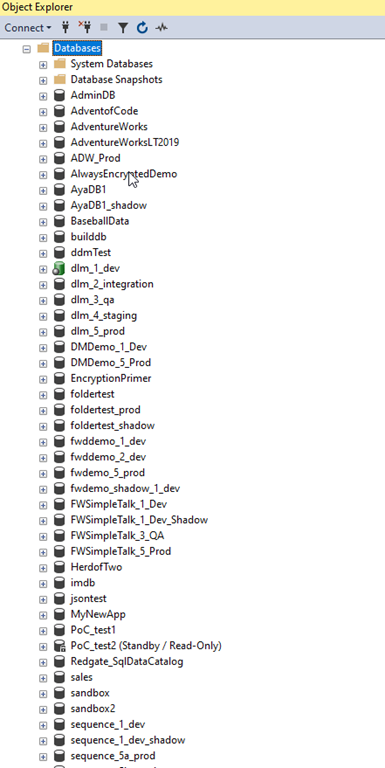
This is the list of databases on a demo instance I have. While it’s a lot since I do a lot of testing with customers and colleagues, I see plenty of people will lists of databases longer than this.

2023-09-18 09_39_38-Window

I also watch them scroll like I do when trying to find an object in a database.

However, for demos, this is a lot, so I like to slim things down. I used to have a script to detach all the databases and then attach the ones I need, but that’s time consuming and once in awhile, I need a different database, so that’s an issue.

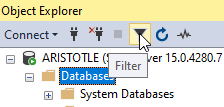
I saw the someone filter their list by clicking the filter button in the Object Explorer. This is the funnel button shown here:

2023-09-18 13_57_35-Window

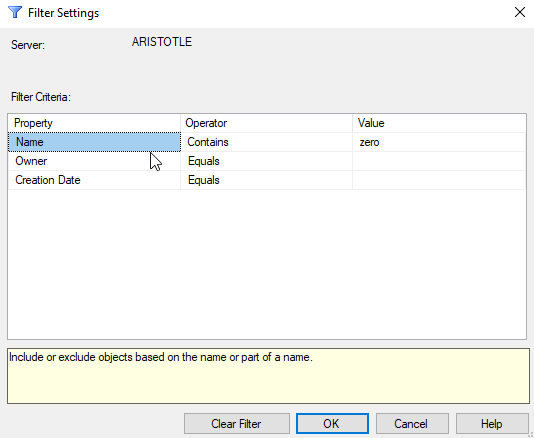
Once you click this, a dialog appears that let’s you enter your filter criteria. I’ll use a simple filter of “zero” to limit to those databases in my zerodowntime demo.

2023-09-18 09_39_25-Window

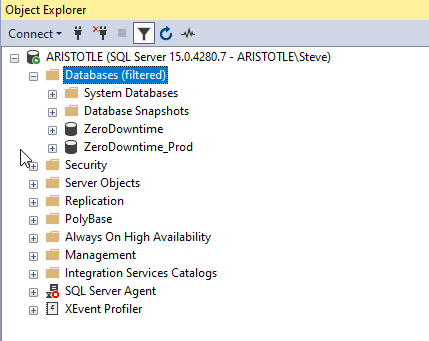
Once I click “OK”, I see only those databases listed.

2023-09-18 09_39_18-Window

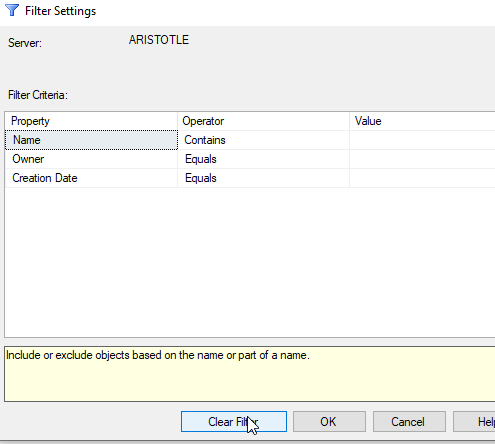
If I want to get everything back, I can click filter again and then delete my criteria, or click “Clear” filter. That gets me the entire list back.

2023-09-18 09_39_32-Window

Easy.

SQLNewBlogger

This post was something I jotted a note about when I saw someone do this. The note was literally “write about filtering in SSMS object explorer”. I took that and wrote this post in 10 minutes, including time to grab screen shots.

You could do this as well, showcasing the knowledge that you’re learning to use tools better, which make you more productive. Employers love that.

Write your own post with more advanced filtering.

Posted in Blog | Tagged , , , | 2 Comments