I came across a post recently on the Microsoft Fabric blog about the evolution of SSIS 2025..I hadn’t heard much about SSIS in SQL Server 2025, so I thought this might provide some info on the investments that Microsoft is still making in Integration Services. I’ve run into a few people in the past year who are still heavily invested in SSIS and run packages daily. SSIS seems to be a technology that isn’t even close to dying for many organizations.
The blog starts well, delving into the security investments with the change to the SqlClient and TLS 1.3, as well as supporting Strict Encryption. I don’t know many people using this level of security, but it’s good to have SSIS support stronger security. There is also an upgrade for SSIS packages targeting Fabric Data Warehouses if they modify their approach.
There is also a mention of lift and shift into Fabric Data Factory as an early access program. I wonder how many organizations are looking to still run SSIS packages, but upgrade to Fabric. I’m sure there must be some, and I’m interested if any of you are in this situation. Many of us buy SQL Server licenses, so I would hope Microsoft could invest in a few new SSIS tasks, like SFTP at the least.
The rest of the post covers Fabric and Azure Data Factory, not SSIS. I understand that Microsoft would prefer everyone abandon SSIS and move to ADF/Fabric, but that’s not what a lot of customers want to do. Many of us have no real need for complexity beyond what SSIS does. What I’d really like to see is a local version of ADF. Many of us still run our own systems and plan to do so for years. If there isn’t going to be an investment in SSIS, which I do understand, then invest in a local version of ADF.
I doubt Microsoft has much interest in doing work here, especially as the trend towards lakehouses and Parquet files seems to drift further from the idea of SSIS moving data between systems. However, there is still a need for many organizations that might want to build packages to export their data to a data lake on-premises. They might prefer to host their own storage, use Polybase to query those files, and maybe grow into Fabric and Power BI over time.
Giving options is something Microsoft has often done in the past. Their successes often open the door wider for others to build on their platforms. Their failures are often in places where they try to force everyone to work in a particular way with a particular technology. Expecting everyone to move to ADF/Fabric feels like one of the latter decisions.
A customer was testing Redgate Data Modeler and complained that it auto-generated PK names. I had to test and discover if I could make things better, and I could. This post shows how.
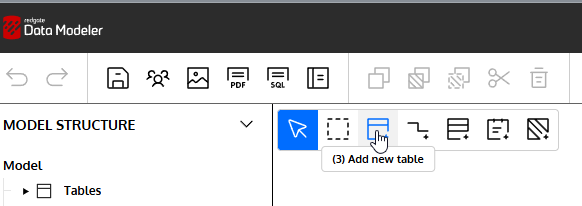
I can easily add a new Table to my diagram. I’ll click the New Table icon in the menu.
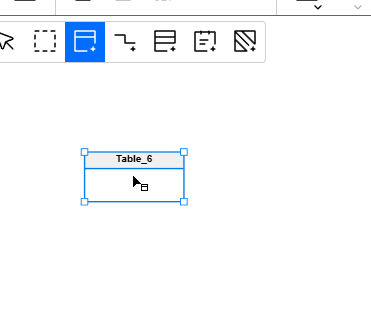
When I click in the design surface, I get a new table.
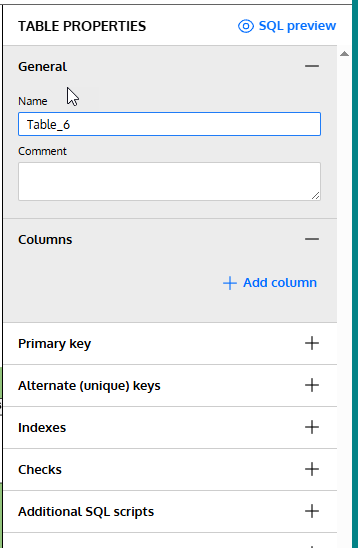
On the right, I see the table properties. I’ll need to fill these in.
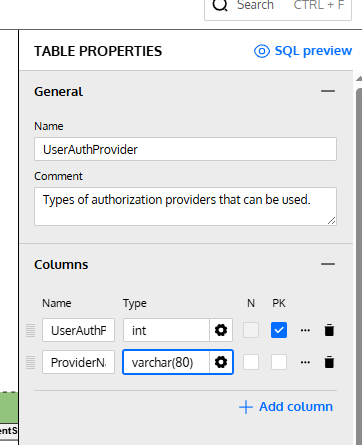
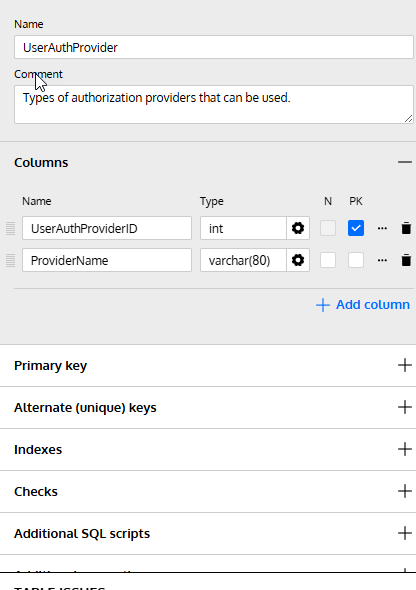
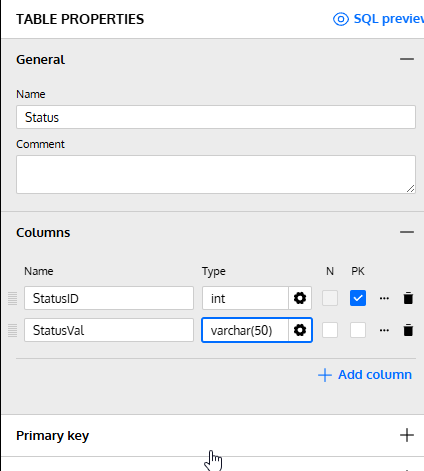
Let’s change the name and add a few columns to this design. Note that for the first column I checked the PK box. This will be my primary key.
These are fine for now. Let’s now add adjust the PK.
Setting the Primary Key Constraint Name
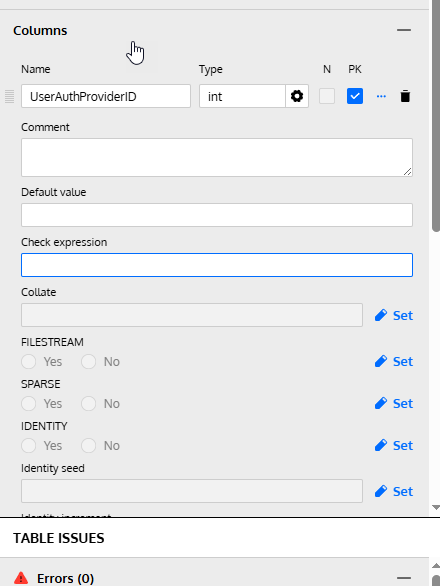
If I click the three dots next to the PK check, I get a lot of properties for the column, not the PK.
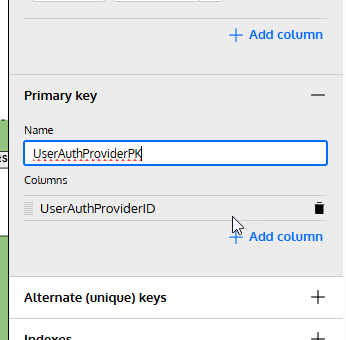
I need to go below the columns. Notice the sections below the column area. One of these is for the Primary Key.
If I expand this, I can see the name field and columns. This was blank, but I typed in a name that makes sense to me. I could add columns as well here.
Checking the SQL
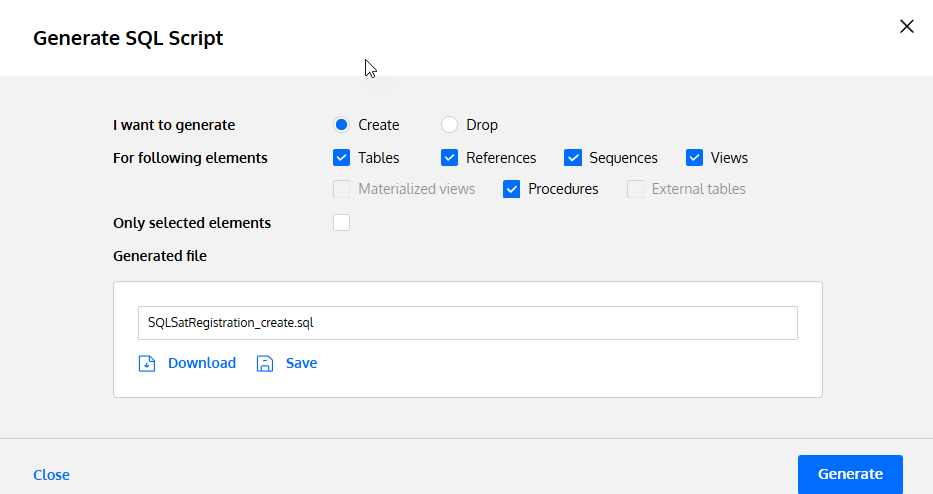
If I click the Generate SQL button from the top menu, I get a dialog.
I click the Save button, which will save this to the file specified. I’ve set this in my project before (which is another post), but I am trying to save to a single file for my code that updates.
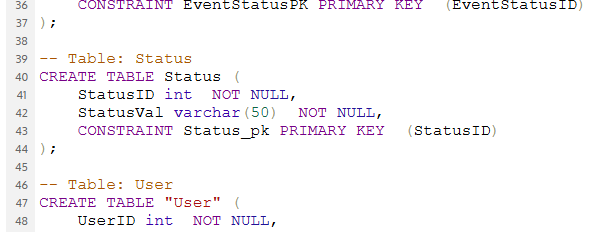
When I open this code, here is the relevant part of the file. Note that my PK is named appropriately.
What happens if I don’t do that? I added another table, marked a PK, and this is what I see. First, my table (there is nothing set under the PK tab):
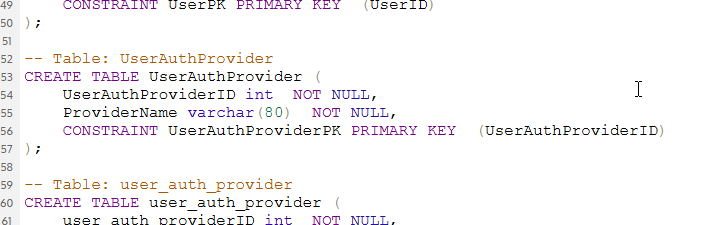
The SQL code shows a standard similar to mine, but different. I think a lot of people use the underscores, so I’m not surprised this is the setting.
Not bad, but not what I want.
Summary
The Redgate Data Modeler is a basic tool for now, but it does let you set a specific PK name if you want to enforce a standard. This can’t be set as a default, but I’ve submitted a feature request to change this.
At least I can customize what I want as I build something.
Give Redgate Data Modeler a try and see if it helps you and your team get a handle on your database.
I ran across a post that discusses what makes you a senior engineer (via Brent Ozar). The main point of the post is that there is a core skill that separates senior engineers from others, which is reducing ambiguity. When a senior engineer gets an ill-defined (or ill-communicated) request, they can deliver a solid, or even great, result.
When someone says “performance is poor,” what do you do with that? Can you build a plan to identify the issues and solve them? Or do you expect the customer to explain what is slow and why it’s slow? Do you ask what metrics they have showing things are slow? A senior engineer can ask questions to find the problem and then determine how to move forward.
The post also discusses the way many companies hire senior people, often basing decisions on years of experience and answering specific questions in an interview or on a test. It’s hard to interview and test a person who is given a vague requirement and develops a solution. Most interviewers don’t want to have to wprl that hard and compare what might be very disparate answers to ambiguous questions. How can you judge two people who give very disparate answers to questions with no clear answer?
It’s hard, and I know this because when I’ve run interviews that lightly describe a situation and let the candidate lead me to the next question, so that I can see how they work and think. It’s very hard to judge the end result and rate the candidate as effective. Often, I find myself deciding if I like the person more and if they fit in our company. That’s if I think they can probe to find information and make decisions when that information is incomplete. If they can’t probe and find a way to solve the problem without direction, that’s an issue.
And that really is the senior skill. In all fields, not just engineers or DBAs. Managers, customer service, analysts, and more. Can someone handle an unstable atmosphere and clarify, identify, simplify, and present a way forward? If they can, then they are likely someone to consider for a senior role. They still need expertise in their area, but can they get things done when they aren’t being directed?
Are they self-starters?
That might be the main thing I consider for senior people. Can they drive themselves and get things done, things we need done, but without a lot of direction and hand-holding? If a senior person struggles to move forward without more direction or supervision, then maybe they aren’t really a senior-level employee.
With the AI push being everywhere, Redgate is no exception. We’ve been getting requests, demands, suggestions, and more about how to add AI into our products and help developers and DBAs be more productive.
One of the areas we’ve started to add some AI is in Flyway Desktop (FWD), with a few features designed to help reduce the cognitive load and context switches needed while developing code, and help users better understand what changes they’re making in their systems. This post looks at one of those changes, which is in preview (as of Jan, 2026).
I’ve been working with Flyway and Flyway Desktop for work more and more as we transition from older SSMS plugins to the standalone tool. This series looks at some tips I’ve gotten along the way.
Understanding Deployment Scripts
In Flyway, we call the deployment scripts “migration scripts”, but they are the same thing. These are scripts that are changing, altering, or evolving our database schema in some way. New or altered objects, various schema items, and more.
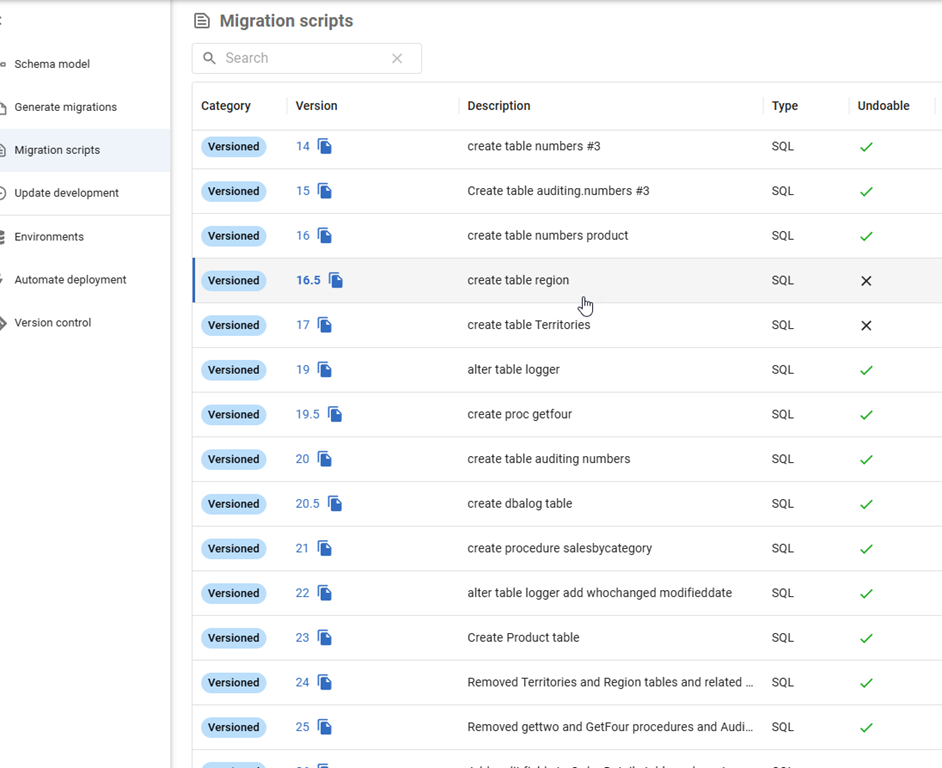
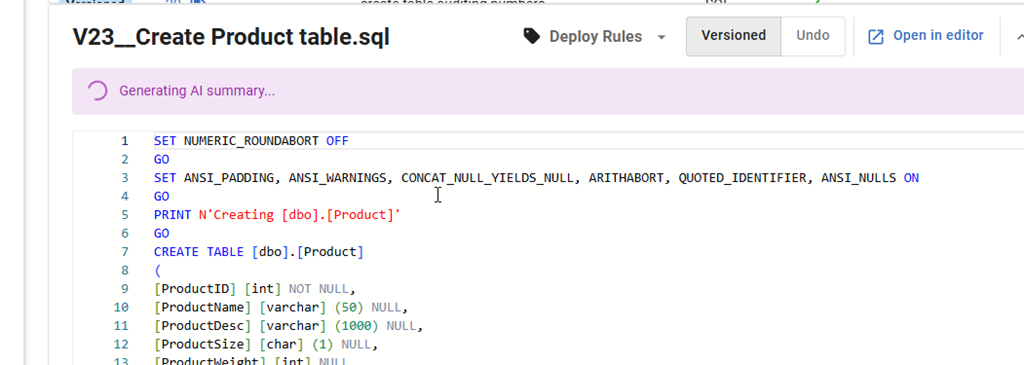
When a developer creates a migration script, they often do this close to the time they are making the changes in development. Not always, but I find a lot of customers change something, test it, and then make the migration script. Guidance for a lot of customers is to keep the migration scripts simple and easy. For example, here’s one I have that creates a simple table. If you look in the image on v23, which says “Create Product Table” in the description, that is what it does.
If I click on this line, I see the script shown below the name (V23__Create Product Table.sql). The new thing just below in this image is that an AI summary is being generated.
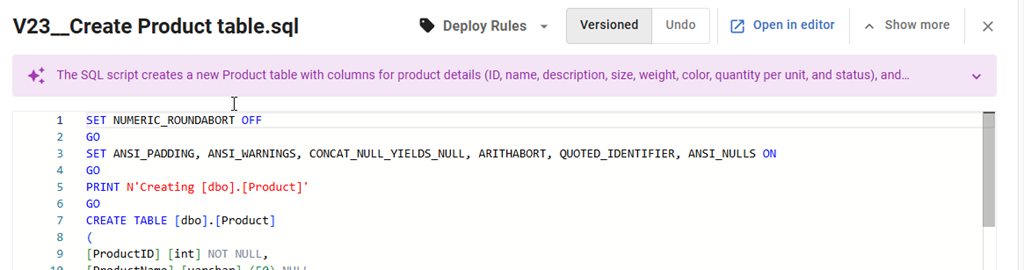
In a few seconds, this changes. I get the summary of the table. In this case, it says I have a new table with some columns.
If I expand this with the drop-down on the right, I see the full summary. This includes telling me a PK is being created, which is good info. I could look through the code, but the settings, the PRINT statements and more make this harder than it should be.
What about a more complex script? If I pick a different one, such as V24__Removed Territories and Region tables and related constraints and procedures, I get an OK description that lets me know a few things are being changed. I wish this had a little more detail in it, such as the tables on which FKs are being dropped, and maybe a list.
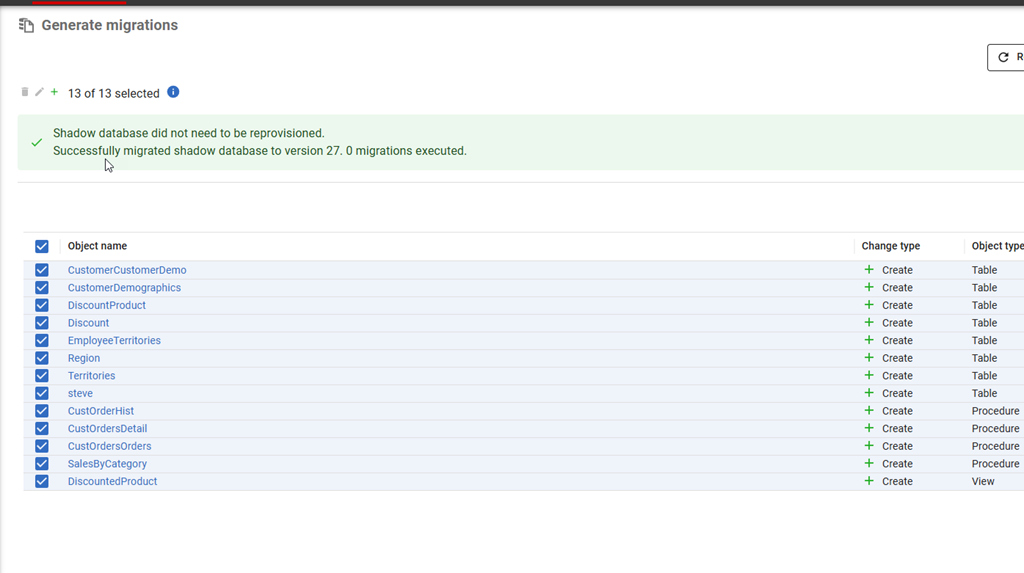
Let me create a whole new set of objects. In this case, I’ve added some discount features in a bunch of tables. Here is the list of objects I added to the migration script.
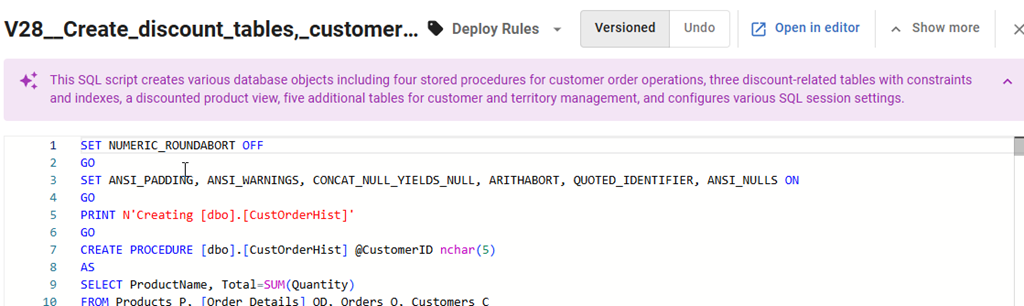
When I generate the migration script and then click on it in the Migration Scripts tab, I see this description.
That’s an interesting description, as I see that there are territory and customer tables, which I’d forgotten I added. I was working on them and added them, but hadn’t committed them. I added the discount stuff (3 tables and a view) in a dev session today, and then selected everything to save and include in a migration script.
This is one of those areas where the summary helps me remember what’s in here, and in this case, I’d want to delete this script and re-generate it with a different set of object changes. Then a second migration script with other changes.
Enabling AI Features in Flyway
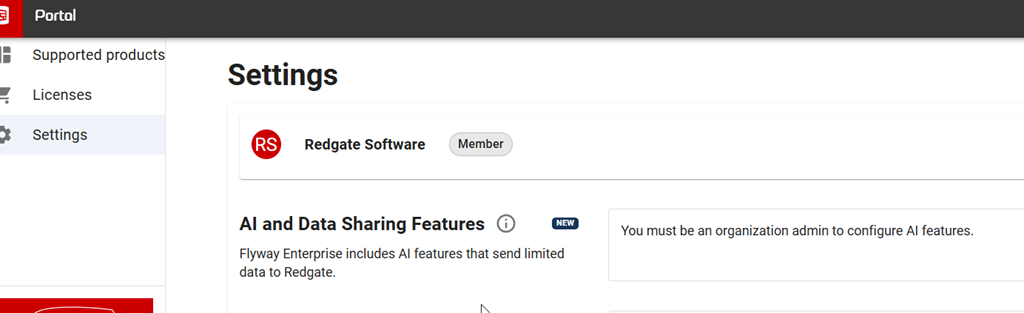
This is a preview feature as of Jan 5, 2026 as I write this. To get this in your FWD, your organization needs to have enabled AI features in your portal. I’m just a member, but whoever is an admin for your Redgate products would find it here.
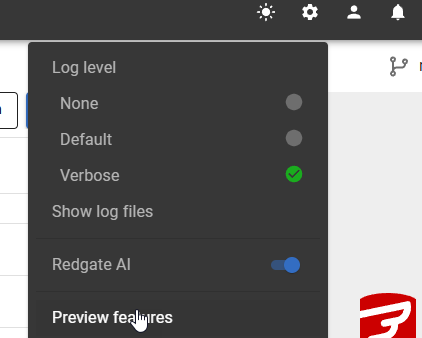
In FWD, you need to look at the Preview Features item under the config menu.
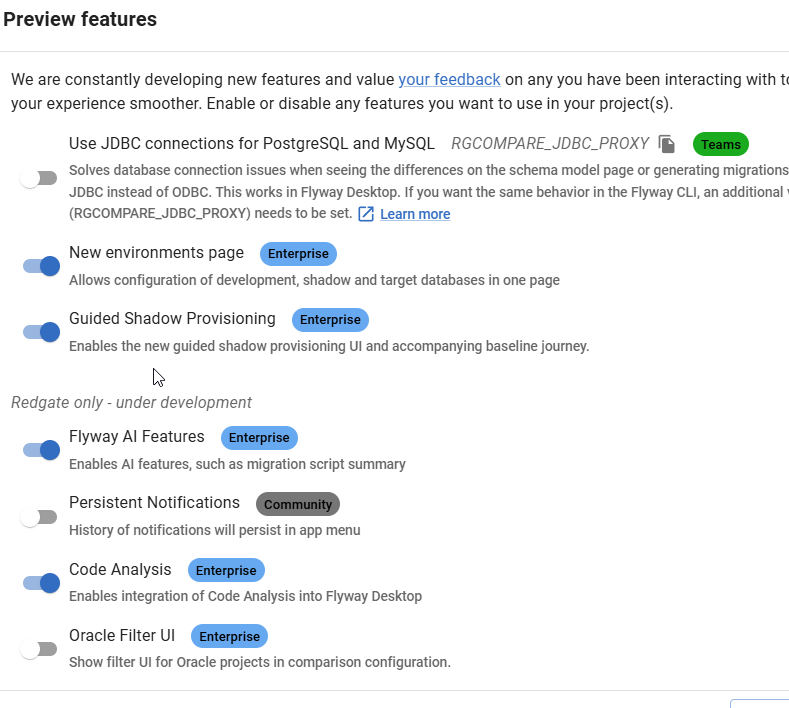
In this area, you can enable or disable features as needed. I see these marked as Red-gate only, but I think they are supposed to be released to some customers by this time. It’s likely I need to upgrade my FWD, which I’ll do when I have time.
Once you do this, you should start seeing some AI stuff with the purple/pink shaded area and the sparkle icon that we’re all seeing everywhere.
Summary
This post shows one of the Flyway AI features that we’re adding to help you deal with the chaos and complexity of database development in your environment. This features tries to summarize the details in your migration script and provide you a summary.
This isn’t perfect, but as you look at scripts, it fairly quickly gives you a look at what’s included without you having to read all the code. You should double check the code and be sure it’s what you expect, but if you’re looking through a few scripts for a particular change or impact, this might help save you time.
There is a limit to the amount of stuff we send to the LLM to summarize. I can’t remember (or find) the limit, but very large scripts aren’t summarized, and you’ll see a message to that effect.
This feature is documented, but we are likely to enhance and change it a bit, so all feedback is welcome. If your organization doesn’t want you using AI, and you could share some schema from a migration script, I’d be happy to test it for you and see what summary is produced and send it back to you. Ping me on X/LinkedIn/BlueSky if you want.
Flyway is an incredible way of deploying changes from one database to another, and now includes both migration-based and state-based deployments. You get the flexibility you need to control database changes in your environment. If you’ve never used it, give it a try today. It works for SQL Server, Oracle, PostgreSQL and nearly 50 other platforms.







 Voice of the DBA