The SPU

Ever since I heard about the SQLOS and all the work that went into producing an operating system for SQL Server inside of the host OS, I’ve thought that perhaps there might be value in specializing the environment for a database platform. Given the importance of databases, especially relational ones, and the need to get every bit of performance out of hardware, I wondered if we wouldn’t see a version of SQL Server that is installed directly on the hardware, without a host OS.

In some sense, I guess that’s what a PaaS database is in Azure, but I thought we might see that for the download-and-install version. I doubt that will ever happen now with the growth of the cloud.

Instead, maybe there’s a better way to improve performance without requiring SQL Server (or Oracle, PostgreSQL, etc.) to implement some of the OS features they’d need. Perhaps we could change the hardware around and use a SQL Processing Unit (SPU). The SPU is another specialized chip. Like a GPU for graphics, or even some of the other chips that are made specifically for mobiles, storage, or networking, this one would be focused on database needs. Apparently, there are a few companies that are researching how they might build chips that focus specifically on the types of computations that data analysis requires.

I don’t know how practical this is, or whether we’d see any major database vendor attempt to port to a new chip. Perhaps they’d add instructions that could use one of these chips inside a regular system, similar to how a GPU can offload work. That might seriously improve performance, something that a lot of our customers would appreciate. Especially if this happens without spending a lot of developer time rewriting old code.

That’s not to say that developers shouldn’t learn to write better code. They ought to, mostly so that their initial attempt at producing reports or batches of data handles a wide variety of data values and workloads without stressing the hardware. More efficient code is always the best way to attack any problem. Even if you had a very efficient SPU, chances are that your workload will still grow to overwhelm the hardware at some point, especially as the number of users grows.

Monitoring helps find problem queries, but it’s up to developers to change their habits, grow their knowledge, and produce better code sooner. Then we can use hardware to deal with the large numbers of users that need to access the system.

Steve Jones

Listen to the podcast at Libsyn, Stitcher, Spotify, or iTunes.

Posted in Editorial | Tagged , | Comments Off on The SPU

Daily Coping 19 Dec 2022

Today’s coping tip is to give kind comments to as many people as possible today.

Not an easy tip for me to follow as I’ve been a little home bound after a lot of travel. I did get to the gym and the grocery, and I did make an effort to find something to say about people I interacted with that was pleasant and complementary.

I started to add a daily coping tip to the SQL Server Central newsletter and to the Community Circle, which is helping me deal with the issues in the world. I’m adding my responses for each day here. All my coping tips are under this tag.

Posted in Blog | Tagged , , | Comments Off on Daily Coping 19 Dec 2022

A SQL Compare Picklist

Recently a customer was trying to sync up production and development. They’d somewhat lost control of both environments and wanted to build a plan of how to sync them. This post covers a process I suggested to them to tackle this challenge.

This is part of a series I have on SQL Compare from Redgate Software. It’s an amazing piece of software that you should try if you haven’t. Download an eval today.

The Scenario

Production is running. It’s got all sorts of objects, and most of them are probably valid. You’d be surprised how often I find broken code in production. Anyway, way want to ensure developers have visibility into what production looks like.

However.

Development is also in progress. They have lots of changes they’ve made in development, some of which need to be pushed to prod, some of which are in flight. They don’t want to just sync prod->dev or dev->prod.

How they get things deployed and keep track of work isn’t something I asked. I’m not judging; I know most people are just trying to get through the day.

So they wanted to know what’s different and mark those objects for someone to work on.

The Solution

This is just one way to solve the problem. My approach here is to create a picklist of work that can be assigned to others. Since the customer has SQL Compare and is familiar, I used this tool to help me.

First, we back up development.

Next, I created a project that points from prod->dev. Worse case, we break development and restore it. We certainly don’t want to “break” production with too many mouse clicks.

For the sake of this demonstration, let’s say these are the databases:

  • Production:  way0utwest_prod
  • Development: way0utwest

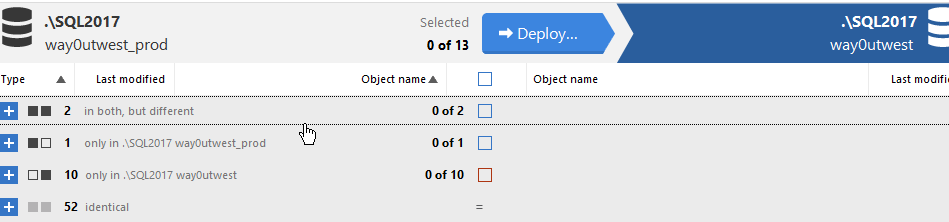
I set this up in SQL Compare, ensuring I have things pointing the right direction.

2022-12-16 16_57_06-(local)_SQL2017.SimpleTalk_1_Dev v localhost.SimpleTalk_1_Dev.scp_

When I compare the databases, I see changes that are in all states. Some only in one or the other, some different, some the same. At this point, I don’t really care about counts or what’s different, so I don’t need to expand this list.

2022-12-16 16_59_30-SQL Compare - E__Documents_SQL Compare_SharedProjects_(local)_SQL2017.SimpleTalk

Now I select all objects and click “Deploy” at the top, which takes me to the next screen. Here I’ll create the script. Click Next.

2022-12-16 17_00_17-Deployment

At the next screen, I see the deployment script, but I’ll click the Summary tab. This gives me a list of what changes would be made to dev. Keep in mind we are trying to clean up development.

2022-12-16 17_01_39-A holiday gift for you - Message (HTML)

The summary gives me a list of the change at a high level. What operations on which objects. You can see I have a number of objects in the image above. In the upper right side of the image there is also a “Copy” button. Click this.

Now paste this into any editor. I’ll use Notepad. Now I have a list of changes needed for each object.

2022-12-16 17_03_15-_Untitled - Notepad

This is the picklist of work. Someone needs to go through this. You could paste this into Teams/Slack or anywhere, but really, this is the gross list of things to go through.

From here, they can take each item and create a work ticket for this. A work item in Azure DevOps Boards, a ticket in Jira, an entry on a Kanban board, it doesn’t matter. Use your work system to create these work items and then assign to people.

If necessary, repeat this process as you move forward until you have a list of things that ensure all objects from prod are in development. You also then delete things in dev that you will not deploy, and leave those items that are in flight.

You could also select the various categories in SQL Compare (different in both, only in one) above and generate separate pick lists for the types of work needed.

Ultimately the developers will know how to resolve these issues, so let them do the work. Just organize it for them.

Posted in Blog | Tagged , , , | Comments Off on A SQL Compare Picklist

Improving Skills at Work

A large part of the success I’ve had in my career has come from growing my skills, both technical and soft, throughout the years. I’ve always been driven to learn more and improve my ability to accomplish the tasks I’ve been assigned. Or those that I’ve sought out and tackled. A little initiative has been valuable in many successful reviews in the past.

There is a shortage of skilled IT workers. There are numerous job openings that I see in many companies, at least outside of some of the large tech firms. Many of those have been laying off workers, especially in some of their divisions that haven’t been as successful as expected during the last few years.

At the same time, a lot of companies are becoming more discriminating about who they hire. They don’t just need bodies, they need skilled bodies that can do the work they are struggling with, often in the DevOps, cloud, and data analysis areas.

While a lot of you reading this newsletter will have data skills, are they the ones companies need? Do you understand Git, DevOps, builds, and pipelines? Are you familiar with cloud technologies and gluing systems together remotely? Can you handle python, Spark, Power BI, or business requests to do something with AI/ML?

I’m often not surprised that many senior data people don’t have exposure to these technologies and aren’t sure how to gain skills. I am surprised that more employers aren’t upskilling existing people or reskilling them in new areas. It seems far too many companies don’t invest in their people, even in today’s world where hiring is both very expensive and time-consuming. It’s also frustrating when you can’t find qualified candidates.

There’s a good article on upskilling and reskilling and the importance of having a plan inside your organization. This goes hand in hand with a number of presentations from companies at the various DOES conferences over the years. The successful companies that embrace a digital transformation (whatever that means), DevOps, and the Cloud have ways to bring their current employees along. They invest in their people, requiring them to grow, but assisting them on the journey.

Not everyone wants to move to the cloud or DevOps or AI/ML. That’s fine, but my view is you have to embrace some change in your career if you want to create new opportunities for yourself and have choices in your future roles.

If your company doesn’t do enough to help you grow into new roles with new skills, maybe send them this article. Make a business case that you can do more with some help, and you’re willing to invest some effort yourself to grow. Managers know hiring is hard, and if you’ve been a good employee, I think they often are willing to invest in you.

If they’re not, then many you ought to think about that a bit and find out what you can do better so that they will invest in you. Not everyone makes it through corporate transformations, but many do if they are flexible and put in some effort.

Steve Jones

Posted in Editorial | Tagged , | Comments Off on Improving Skills at Work