Creating a HEAD utility for Windows 10

One of the things I did often in my first career job was create utilities that we could use as a network support team. I was an intern coming from university, where I used SunOS and Solaris all the time. I was used to a command line for a lot of work. While DOS worked well, there were things I missed, like whoami, head, tail, etc.

I rebuilt a bunch of those as DOS batch files for myself, but I expanded this to more useful things. We supported over 1000 people, and finding their phone extensions was a pain, especially in the early 1990s with phones that had cords and pagers. We had a common file share that contained a text phone directory, so I built 411.bat, which took a parameter and searched that file for a matching name. Then returned the line of data. It was immensely helpful to us.

The other day I had a large file that I wanted a glimpse of. I opened it in Notepad++ (this was GBs of data), but it took time. That made me think I’d really like HEAD on Windows. I tried it, but it’s not there.

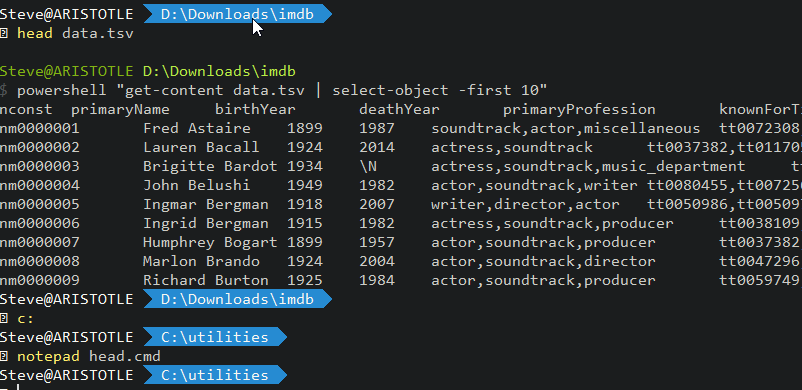
So I built it. This is my command file:

powershell “get-content %1 | select-object -first 10”

I save this in a utilities folder in my path. Then in other folders, I can run it and get a glimpse of text files I’m importing or working with. Way, way faster than Excel or trying to open this in another program. I often have a cmd open, so this is useful to me. You can see it working below.

2022-08-04 08_55_24-C__utilities

Posted in Blog | Tagged , | 1 Comment

Reducing Debt and Increasing Security

Many of us know that reducing financial debt in our lives leads to a bit more security in our minds. We are better able to cope with unexpected expenses when we have the ability to get credit or pay for something in cash. If you’ve ever had a major house repair, car calamity, or (hopefully not) medical issue, you know what I mean. At least in the US. That last one is less of an issue in many other countries.

We know that our code has technical debt, and often we fight a battle with project managers and business people over whether we should spend time paying down that technical debt or developing new features. We certainly can do both, but often that’s not a choice we are given. If we do get the chance to reduce technical debt, it’s a tiny fraction of the time that is allocated to adding something new.

There might be a better argument for reducing some technical debt: security. There’s an article that talks about the security risk posed by moving too fast and not ensuring there is rigorous security testing. This is a common problem in many companies that adopt some parts of DevOps, but forget that quickly deploying new code isn’t the only principle. We also need to learn from our mistakes and quickly correct them.

I am a big fan of releasing often, especially for security purposes, but those releases need to build on each other with not only new code but refactored old code that doesn’t perform well or has a security issue. More importantly, we need to ensure when we find issues in code, that all developers are aware of the problem and don’t repeat the issue. We also need to update our testing to ensure that humans don’t continue to write code in a style that causes known issues. We want to avoid antipatterns in our code.

This is less of a developer issue than a managerial one. The C-suite and all management that are involved in software need to prioritize security so that known issues are fixed quickly. This also should involve ensuring that technical debt is kept under control as a lot of this poorly written code increases the chances that a vulnerability is in the code. Either because the code isn’t well written or because developers avoid touching the code in the future.

The best solutions, to me, involve DevOps. Make small changes, deploy them, instrument them, and learn if they work well. If not, fix them quickly. While this might end up delaying some features, ultimately it ensures that our software is in better shape, with a reduced risk of simple security mistakes upsetting our customers.

Steve Jones

Listen to the podcast at Libsyn, Stitcher, Spotify, or iTunes.

Posted in Editorial | Tagged , | Comments Off on Reducing Debt and Increasing Security

Daily Coping 15 Aug 2022

I started to add a daily coping tip to the SQLServerCentral newsletter and to the Community Circle, which is helping me deal with the issues in the world. I’m adding my responses for each day here. All my coping tips are under this tag.

Today’s tip is to make some tasty food for someone who will appreciate it.

My daughter left for college last week. A few days before she left, I asked her what she might like for dinner. She is gluten sensitive, so while I can cook a lot of things, I often need to modify or prepare things for her.

She asked for a few things, which I enjoy cooking and the rest of the family enjoys. We did a tasty Greek dinner:

I also made pineapple sorbet, which everyone enjoyed.

Posted in Blog | Tagged , , | Comments Off on Daily Coping 15 Aug 2022

Initial FSD Thoughts with a Tesla Subscription

This is part of a series that covers my experience with a Tesla Model Y.

I subscribed to the Tesla FSD in July, since I had a couple trips planned where I’d be driving longer distances on the highways. I wanted to see how well it worked and what value there was from the subscription.

Cost-wise, this is a good way to try things out. The FSD cost is US$12,000. If I subscribe, it is US$199. Worth a month to test this out and see what it gets me. The additional items for FSD (and Enhanced Autopilot) are:

  • Navigate on autopilot
  • Auto lane change
  • Auto park
  • Summon
  • Smart Summon
  • Traffic Control and Stop Sign Control

Note: This isn’t the beta version of FSD that everyone is writing about. This is production, which is less capable. I could have opted into the beta, but decided not to.

Subscription was easy. I clicked a few buttons on the app and within minutes, I had new options in my Autopilot screen. I clicked on a few and set up some confirmations and enabled options.

I then tried it on some shorter trips. Overall, I appreciated the ability for the car to stop at stop lights and stop signs, though the confirmation from me wasn’t great. However, I don’t completely trust the car, so I liked it.

I also did like the lane change on the highway. Often when I’ve used Autosteer, I get behind a slow person at some point and I’d like to be able to change lanes. It did work well when I confirmed a lane change and waited for other cars that were close to pass (or fall back) before the car moved lanes. I could not initiate these changes, however. I had to wait for the car to ask if it could change lanes.

There still is some phantom breaking and some weird speed changes at times, so it’s not anywhere close to perfect, but I liked the feature.

I don’t think this is worth US$200 a month for these features, but maybe at $100 I’d use it I drove more. I just don’t go on enough longer rides to use this very often.

I’ll write a few posts and shoot video of a couple of the features.

Posted in Blog | Tagged , | Comments Off on Initial FSD Thoughts with a Tesla Subscription