This is part of a series that covers my experience with a Tesla Model Y.
It’s been a bit over six months as I write this, and I decided to take a few hours and think about the first half year with the Model Y. The good, the bad, the annoying, the amazing, and give some thoughts on what I think.
First, I still love the car. My wife loves the car, and she tells people about this all the time.
It’s fun to drive, it’s comfortable overall, and it meets our need. Range anxiety isn’t a thing, though planning is. I would definitely buy this car again, and would look to get another Tesla in the future.
I’m going to review the car in a few different ways, looking at it from someone that drives the car most days and thinks about what I like and don’t like.
Build Quality
I’ll address this first, as this was something many people have talked about in the last few years. My Tesla was built in late summer 2021 and this was a time when people were concerned about paint, door fit, and more. I’ve seen complaints about seats wearing and other issues with the interior.
While I think my doors are not perfectly aligned, when I looked at a few other cars and gave them the same level of inspection level, I see issues there. I haven’t found any paint issues or problems with the fit and finish changing over time.
The exterior is dirty because I live on a ranch, but overall I don’t see any major issues with the way things look. I did end up cracking one of the aftermarket mud flaps when I hit a pothole, but the car still looks good when it is clean.
My view of build quality is that it’s in line with every other car I’ve owned.
Charging
We’ve rarely charged the car away from the house. In fact, my Teslamate data shows this pie chart for charging:
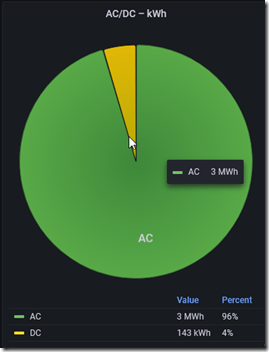
96% of our charges were on AC, which makes sense. I actually think we’ve only charged at a DC charger away from the house 6 or 7 times.
There are two parts to the charging experience: getting a charger and the effort to charge.
We purchased a Tesla 240V wall charger, which we had mounted in the garage. This device cost $500 and the install was $250. I’ll get a little over $200 in a tax credit, so this is essentially a $500 cost for me. If I had not had a sub panel in the garage, I would guess the install would have been another $200-300. I think it cost me about $500 to get the subpanel installed, which included a long cable run from the main panel.
The process of charging is plugging the car. I unwind a cable from the house and plug it in. Before I leave, I unplug it and wind the cable back up on the wall. That has worked very well for our use of the car on a regular basis. I love having the “tank full” every morning, and ready for long drives.
Note: This has changed a bit for us. I used to charge overnight, but with solar power at the ranch, I now charger during the day. I don’t know that it matters for us, but it feels good to be using the sun to charge my car.
We have started to worry less about charging, and I tend not to charge every day. If we don’t have plans, we’re likely to drive no more than 75 miles in a day. Most days, I would go 28 if I go to the gym and grocery. That means I tend not to worry about plugging in an charging if the car is over 50% and we don’t have plans.
We stopped the scheduled charging since that doesn’t work for our lives, and I tend to just plug in when I see the charge around 50% or lower. Or if I know we will be taking a long trip. We have a coaching gig Sunday, and that will require a 140+ mile trip, so I’ll be sure the car is charged Saturday afternoon.
Charging on a few road trips has been great at Superchargers. We have learned that we need to allow for 20-30 minutes to get a good charge, we need to make sure we map the locations of chargers, and plan on charging when the car is below 50%. Unlike a petrol car, you don’t want to “top off” the charge from 80-90% on a trip. You want to charge when the car is closer to empty.
The one time we’ve tried a third party charger it didn’t work. The estimate was 10 hours to add 50% charge and in the 5 minutes we sat there, we got no power flowing. Reliability is a challenge for an electric car charging network.
As for costs, my last 31 days show a cost of $60 for 434kWh. I’ve driven 1495 miles in the last month. that gives me a $0.04/mile cost. Comparing that to myX5 and old Prius, with gas costing US$4.12/gal near me, I’ve got this for a total cost of the cars:
- 1495 Miles
- Tesla: $60
- X5: $279.98 (22mpg)
- Prius: $139.99 (44mpg)
The X5 cost is a little light as premium is more expensive, in the $4.20 range.
Overall, this is cheaper to operate, and charging isn’t a big deal 99% of the time. However, you do have to think about this more than just finding a gas station. This isn’t much different than our trips through Montana and Wyoming where you need to do a little gas planning as well.
The Driving Experience
This is a fun car to drive around. It’s crazy fast, in fact, I find it a bit too fast many times. When I’ve been in “standard” mode, at times I want to pass someone or react to a situation and hit the accelerator too hard. My head will bounce off the headrest and my neck jerks a bit. Overall, I don’t need a car this fast. If I do, it’s a couple clicks to change the speed. I tend to stick with chill mode.
The handling is good, and the car responds well to turns. However, it’s a big sedan and is quite heavy. As a result, there is a lot of power, but the car doesn’t whip around turns. It has a lot of weight that I feel moving through turns. Definitely not as nimble as my 914 or 911, but the acceleration makes up for that.
The regenerative braking is amazing. I one pedal drive most of the time, though the brakes get used regularly as stop lights appear or people in front of me slow quicker than expected. With the colder weather, the regen isn’t always at full power early in my drives, so brakes get used in the mornings if I go out early.
The seats are a tough narrow, and I can feel them on my hips and shoulders. I’ve gotten used to it, but it was a little annoying at first. I had different complaints with my X5, but still not great seats. I loved the seats in my 911, and I hate the seats in my wife’s RAM 3500. Overall, the Tesla is nice and comfortable overall.
Autopilot is good in places, horrible in others. I think it’s really designed to keep you going straight on a road for a period of time. I use it on the highway to relax a bit and ensure I stay in a lane when tired. It’s especially useful at night after a long day. However, you need to keep your feet nearby and hands on the wheel. I used to wish I could zone out, but now I appreciate this as an assist feature and helpful on longer trips. It also encourages me to drive a bit slower as it limits the speed to +5mph over the limit at lower speeds and 80mph overall. I’m amazed how many people blow by me on big city streets and the highways.
Visibility is good overall, except directly in the rear. I haven’t used the rear cameras while driving, and tend to look out the side windows and have the side camera on when turning. I was a little annoyed early on with the limited view, but over six months I haven’t found it to be an issue. The roof is wonderful, when I take a moment to look at the blue sky or stars.
The sound system is very nice, with plenty of speakers and bass for music. I love the quick steering wheel controls to scroll volume up or down or stop music. It’s easy to quickly change and manage music from the touchscreen as well. The Bluetooth integration is fantastic and sound works great for phone calls. What’s more, I love the car lowering the volume when I open a door.
Things That Are Annoying
The big thing I find annoying are the windshield wipers. The automatic setting works OK in rain, but in snow or slushy weather it either is too aggressive or too cautious, usually too fast or too slow. In slow moving snow flurries, where I’d often manually hit the button every minute or two I find the wipers sometimes constantly running and squeaking. I think there’s more AI than sensor reading here, which I find silly.
The second annoying things are automatic high beams. I think these are also more AI driven than sensor driven as I rented a branch new Altima recently and the headlights worked much better.
The Tesla lights are slow to flip to high at times, and too slow to flip down at times. We have rolling hills, and at times an oncoming car will see the lights flip to high and low a couple times. The choice to change to high or low with a wide median when there are cars that are in the distance seems strange. I think I am a bit conservative and try not to bother other drivers and the Tesla is less worried about this. At the same time, there are times I want to see if there is wildlife and the car won’t flip to high. The most annoying place is my gravel driveway. The headlights seem to refuse to change to high beams.
The rest of my annoyances are fairly small, but here’s a quick list with notes:
- door handles – they are slightly awkward and they get buried under snow.
- cup holders – a bit small for an American
- no under seat storage – It’s a flat platform and stuff will roll or slide back and forth. I need a third party box under each seat, but it’s annoying to do this.
- camera errors – bright sun gives me errors, which doesn’t build confidence. I also get this at night sometimes, and I think this is reflections. I think Lidar/radar could help reduce these.
- changing UI – I’ve had things move a few times in 6 months, and while I appreciate this, I find it annoying. Hard to find things and no great “search” like I use in the Windows Control Panel.
- heating/cooling – not good enough in the back seat, but since I’m not really in the back, I don’t care so much.
- front defroster – always runs to a high speed, which makes conversation difficult. Most things remember the last setting, why not this one?
- no charging port on passenger side – right would be more convenient for me.
- internet – it’s very slow. In fact, it seems like it’s gotten slower over time. Loading a web page works like 3G, not LTE. YouTube is very slow as well, and even in Denver it can stutter or pause videos.
- refresh/update apps – Spotify especially seems to be really slow to update playlists and sometimes can’t play a song as something changed. I wish there were a refresh button.
- Glovebox USB port – every once in awhile, the USB drive I have in the glovebox is loosely connected or isn’t recognized. It’s very annoying. I wish there were a better clip to ensure this is connected and better diagnostics to check this.
- driver lane departure assist – slight drifts cause this to beep a lot, and if I get too many, it turns off. The opposite of what I’d want.
Unused Features
The main thing I never use is the frunk. I dropped a spare bag with some clothes and water, an emergency bag for CO that I’ve had in all cars, but I’ve only accessed it twice for a spare jacket. Otherwise, never use this. I think the lack of automatic open/close and it being a pain to close might be one reason.
Most of the entertainment is lost on me. I’ve watched YouTube a few times, but never played the games or used the sound stuff.
There are a few USB Ports and I got an adapter to give me some USB-A plugs, but I never use them. The wireless charging is just amazing, so I think the plugs are pretty much completely unused by us.
Cruise control – I rarely use this, and I used to use it in the BMW constantly on the rolling country hills out here. It’s too unreliable and tends to slow in strange ways as it sees hills or oncoming cars, so I find it more annoying than useful.
Things I Appreciate
There are a few things that I really like about the car and I think Tesla has done a good job with implementing.
Mobile App – As I need to pay some attention to charging, I like being able to check the state of the car, or if I plugged it in. I like being able to turn on heat or AC in extreme weather.
Keyless entry – It’s weird that I don’t need to turn the car on or off, or use a key. I actually got out of the rental and started to leave before my wife reminded me to turn it off and grab the key. I’ve gotten used to walking up to grab the handle and get in. Or get out and walk away. It’s convenient in a way that no other car has been. It rarely fails, maybe 2-3 times in 6 months.
Data – lots of data available, which I find interesting as a data person.

Wireless charging – fantastic and convenient
Overall, still the best car I’ve owned and I’d buy another one if given the chance.





 Voice of the DBA
