A Lack of Error Handling

I saw a post by Brent Ozar the other day, and it was a bit disturbing to me. A survey he posted on Twitter showed most people don’t bother with error handling in T-SQL. I’m not surprised, though I wonder if people think about the “rare” as including all the one single statement queries they write. I certainly don’t expect error handling for simple queries when they are a single statement used to return data to a client.

However, in stored procedures and multi-statement batches, I see the same thing as the results Brent published. Very little error handling. I’ve tried in my demos to add it and be sure that I set a good example, even though most of the time I’m showing code that just always works. I know what data I’ll enter for a demo, and I don’t run into issues. 

Many years ago, decades actually, when I was in college and early in my career, I saw many application software packages written without a lot of error handling. This included C/C++ at the time, which seems crazy. In the last decade, I’ve seen a lot more robust error handling (and testing) added to the work of many application developers. It’s the request that my professors and more than a few bosses always made, but in the late 80s/early 90s, few people actually followed through with. In the 2010s, this seems to be more common, and not surprisingly, software quality has improved.

In many ways, database developers are less mature than application software developers in many ways. Less error handling, less automated testing, and that’s understandable. We haven’t had great tools or patterns to help us easily adopt these practices as a habit. In addition, the way in which code is compiled and then executed doesn’t make this easy for us. The platform and structure of the language create complexity that isn’t present in application languages.

If you haven’t written this in the past, as Brent notes, there’s not need to worry about going back now. Either your code is working or not working, and if it’s the former, no reason to revisit it. However, I might ask that you experiment with error handling for new code. Learn how to use these structures to protect against your users entering strange data. Something they are likely to do.

Steve Jones

Posted in Editorial | Tagged | Comments Off on A Lack of Error Handling

Tracking My Range for a Tesla Model Y Charging Solution

This is part of a series that covers my experience with a Tesla Model Y. If you are thinking of ordering one, I’ve got a referral code. You get 1,000 free Supercharger miles and so do I. Use: http://ts.la/john92950

I’ve been on the fence about ordering a Level 2 charger, essentially a 240V charger. It gives you a quick recharge, but they are expensive. Tesla offers one for $500, and the other ones I’ve considered are more expensive. I’ve watched a few videos on whether it makes sense, trying to decide, but one of the interesting things I’ve seen people talk about is how far you drive and how often.

This is really to decide what type of charging I need to mess with. Do I live with 110, normal US outlet. Use a 220V outlet or get a charging device.

Tl;dr – I found that often a 110 would charge me across a couple days, but in a busy week I might be losing mileage. That leads me to think a 220V charging system is needed. I also am bad about carrying things with me, so I don’t want to depend on remembering to bring my cable and adapters. As a result, I bought the Tesla charger.

Building a System to Capture Data

Tracking data is something we want to do automatically where possible, but since I have an older 2012 car, I can’t easily access the mileage at any time. I also don’t have a great way to track when the car has some home and when it leaves.

I don’t care about individual trips, as I’m unlikely to charge on the road when I’m near the house. If I go to the mountains, perhaps I’ll charge, but not on many other trips.

The data I wanted to capture was this:

  • start mileage
  • end mileage
  • time to next trip

I started an Evernote note to track this and tried to fill it out, but I wasn’t great at following the process. I forgot to open Evernote and write things down too often. Plus, entering numbers and times and dates proved to be cumbersome on a mobile.

The best was to do this was to create an Excel sheet and walk back to the car to grab mileage. Or text myself the current mileage (or start/end time) for a trip. Then I could easily enter the three values above in my Excel sheet.

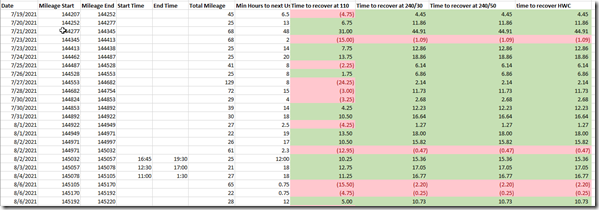
I ended up with a sheet that looks like this:
2021-08-16 11_59_51-TeslaCharging.xlsx - Excel

From left to right, these are the columns:

  • Date
  • Mileage start
  • Mileage end
  • start time (usually skipped)
  • end time (usually skipped)
  • Total mileage (subtract the items above)
  • Time to next trip (hours until I left again)
  • Charging surplus or deficit in time at different levels (4 columns)

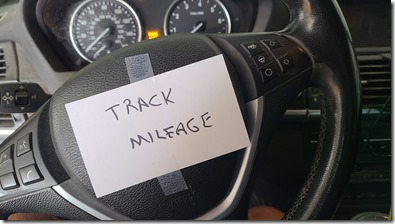
This worked well, but I struggled to actually get the mileage into the sheet on my phone. As a result, I decided to do this a fairly simple way. I put a reminder in my car.
20210803_110116 (1)

The helped me remember to track the end mileage and go type it in when I returned home.

Computing Charge Time

The various charging methods result in different recovery for range across time. This was a little confusing to think about at first, but essentially, based on charts from Tesla and others, I went with this idea. If I charge in these ways, here is the range I recovery in an hour:

  • US 110V outlet – 4mph
  • US 220V/30A plug – 22mph
  • US 220V/50A – 30mph
  • Tesla Wall Charger – 42mph

We don’t think about time with petrol cars. The difference between adding 5 gallons and 20 gallons is a tiny amount of time at a filling station, so it’s really cost there. However, for electric, time matters, because adding a “full tank” could be hours.

My computation in the sheet is based in the mileage driven. I take that as the amount of charge I want to recover. To determine if I do that, I take the mileage and divide by the various charge amounts above.

In Excel, this looks like =+G18-(F18/$H$2) for the 18th row. As a better example, supposed I went 40 miles on a trip, and I had 1 hour to charge before my next trip. I’d end up with these values for my charging columns:

  • US 110V outlet – 9 hours (red)
  • US 220V/30A plug – .82 hours (red)
  • US 220V/50A – .33 hours (red)
  • Tesla Wall Charger – 0.05 hours (green)

The red numbers mean I wouldn’t have recovered my mileage before the next trip. The green numbers mean I wouldn’t. The value tells me how much time I’d need to recover the charge. For the example above, I’d need 9 more hours, 10 total, to recover from a 40 mile trip. For the Tesla Wall Charger (TWC), I’d have recovered with 0.05 hours to spare.

Analysis

On most days, before trips the next day, I’d have recovered charge using 110. Not always, but most days. Not all trips, but across days. Often across two days, I’d certainly recover. However, this is in the summer, not winter, and I definitely have a different pattern in the winter, with volleyball practices and tournaments, not to mention more heating while sitting in the car.

The concerning trips were a few 70-100mi days, which do happen regularly for me in the winter, where I wouldn’t have recovered in 20 hours.

I do have a 220v/30A plug in the garage for a house vacuum that I never use. I also was considering the NEMA 14-50 plug, which is 200V/50A. However, with both those, I’d need to use the cable that came with the car, which means it wouldn’t be back in the car unless I put it there.

A friend noted that I wouldn’t often use the cable unless I was at someone else’s house or at a campground. A campground is possible for me as a place I might go, and possibly friend’s houses, but likely I’d be looking for a Supercharger or a public station. I also think I might see if I could get the condo association to make a plug available in Keystone for me, which means I’d definitely want the mobile cable.

Knowing how Murphy’s Law strikes with me often, I’m not thrilled with the idea of not having a cable with me. I could buy a second one, but that’s a US$520 charge, as opposed to the US$500 Wall charger. An adapter set is also $220, which seems pricey. I could get the single NEMA adapter for US$35-45, but with my concern about Murphy’s Law, I don’t know that makes sense.

My wife said we shouldn’t take chances here, and knowing that we might have a couple trips in a few days. Me going to speak in CO Springs and then a volleyball tournament the next day, or going skiing and then having another trip the next day. We’d want to recover 200 miles in an 8-10 hour window.

There’s another thought. The US Tax code gives a 30% tax credit on the cost of electric charging.

As a result, I decided to just by the Tesla Wall Charger. This ended up being US$514.50, and I’ve contacted an electrician to add a new breaker and wire this up. It will be a short wiring run for me, but even if this is a $200 cost, I’ll end up with this being a $500 cost, as the tax credit will cover the install.

I did look at other chargers, and I’ll do a post summarizing what I learned and decided on.

There is also a video version of this post on My Colorado Tesla Experience Channel. You can see all of these posts by following the Tesla tag.

Posted in Blog | Tagged | 1 Comment

A New Community Summit

The PASS Summit has been an annual event for a lot of my career. I attended the first one in 1999 and most of the rest through the years. After last year’s virtual Summit, I was concerned that we wouldn’t have an annual event where the most, brightest, and friendliest data platform people came together. Redgate purchased the assets out of the PASS bankruptcy and has committed to future Summits. This year’s Summit is virtual, and more importantly…

It’s free, and you can register today

Free to attend the main conference, which means you have the opportunity to go to the largest Data Platform focused conference for no charge. Just ask your boss for a little time to learn, get inspired, and interact with your colleagues around the world.. There are still pre-cons that cost money (US$200), but all the proceeds go to the speakers. A great opportunity to learn from experts and support them at a cost you likely won’t see at a major event.

I don’t love virtual events, and I do hope that we get back to live conferences, but I do like that everyone can come to the Summit this year without asking their employer, or their household, to fund the effort. Microsoft is a major sponsor and will keynote at the event, likely with some exciting SQL Server and data platform news coming. Lots of other sponsors will be there as well, which I’m pleased about because sponsors are an important part of events and user groups in our community.

If you want to know what types of sessions are coming, the best of Summit 2020 is available for you to watch, again for no cost. This year there are three themes, Back to Basics, Reach for the Clouds, and Level Up. I’m glad for the cloud track as the cloud has continued to grow faster than I expected, with so many friends, customers, and clients looking to move portions of their data workloads into a cloud situation. I’m also glad to see the career advancement Level Up track becoming a place of focus, as actively managing your career is something I feel strongly about. Hopefully, I’ll get to deliver a session in that track. As of the time I’m writing this, I know I have one session, but not sure if the program is complete.

While Kathi and Grant are managing the process, community volunteers are reviewing, rating, and making choices about sessions. That’s one thing I’m glad to see. There is a strong community effort in helping to program the conference. While I know paid professional staff organizes things and configures the platform (we contracted with a few people that have helped run the conference in the past), it’s the community that should really help decide which speakers and sessions they want to see. I’m hoping that some of the fun things like networking, the photo walk, and more are a part of the event.

There’s no good reason to not attend the Summit this year. Unless you’re buried with a deadline the week of Nov 8, 2021, ask your boss for some time, register, and come join me in watching some sessions, chatting with old friends, making new ones, and getting excited about what you can do with data in 2021.

Steve Jones

Listen to the podcast at Libsyn, Stitcher, Spotify, or iTunes.

Posted in Editorial | Tagged , , | Comments Off on A New Community Summit

Daily Coping 20 Aug 2021

I started to add a daily coping tip to the SQLServerCentral newsletter and to the Community Circle, which is helping me deal with the issues in the world. I’m adding my responses for each day here. All my coping tips are under this tag. 

Today’s tip is to take an action to be kind to nature and care for our planet.

Small things can make a difference. Recently I wrote about, and spent a lot of time, digging out some juniper bushes in the front. As a part of this, I uncovered quite a bit of trash that had gotten blown in and caught over the years. I picked it up.

As I was driving along in our neighborhood, I saw a few bags and random pieces of trash that looked like they’d come out of a can in front of someone’s property, and the trash people hadn’t collected them, so I did.

I’ve made it a habit when I see something wrong that I can easily handle to fix it. Picking up a little trash, having to wash my hands or even dispose of it later is a small thing. I know this often goes into landfills, but I think that’s slightly better than having it spread all around town.

I’ve also gotten into composting, which is a bit of a pain, but I can spend a few minutes here and there trying to make things better.

Posted in Blog | Tagged , , | Comments Off on Daily Coping 20 Aug 2021