T-SQL Tuesday #141–Finding a Balance

tsqltuesdayThis is a great topic, and the host is a good friend, TJay Belt. We’ve met each other’s families and a lot of our conversations revolve around non-work stuff. I actually am friends on Facebook with TJay and follow his outdoor adventures on a weekly basis as he hikes, bikes, boats, and more.

This month he asks us to write about Work/Life Balance, which is an important topic to me.

Work From Home

My first attempts to find balance started at the turn of the millennium. Actually in 1999, when I worked at a financial services company. We had instability in systems, to the point that I kept a pillow in my office as I spent more than a few nights there.

After that I changed jobs a few times until I finally went to work for myself at SQLServerCentral. Since then, I’ve been at home for 18 years, including through this pandemic. A few things that I’ve learned in that time.

Be Flexible

The first time I was at home regularly was sharing an office with my wife, who had been telecommuting for a company for quite a few years. She was on the phone a lot, so I learned to keep headphones around, or be ready to grab my laptop and go work downstairs.

I also learned that things come up at home. Maybe my wife was planning on getting kids and a meeting popped up, or vice versa. It was helpful to be flexible and ready to adapt.

Set Some Rules

When my wife started working from home, we had a 5yr old. He was pretty good with rules and learned to be quiet when the door was closed. A couple years later, our second was born, and that was a challenge. We had a nanny, and that was helpful, but we slowly had to  teach the 2nd (and 3rd) rules about noise and disturbances.

On the plus side, we learned to be flexible and make time for kids. If they needed some attention and we weren’t busy, give it to them. Include them in breaks, walks, or head to school. I loved going to lunch with my kids when they were at school in 1st, 2nd, 3rd grade.

Blending Chores

One thing that helped me is that I blended work and life when at home. My boss or coworkers wouldn’t hesitate to ping me if they needed something at 6pm, or now, 7am, and that’s OK. However, I also know that doing laundry, or prepping something for dinner, or even cutting grass are things I might do as a break from work or while listening to a call.

I mixed my life with work, taking advantage of the proximity. In an office, I might wander to the break room, or go talk to someone and do a little less work. Here, I try to get something done. I’ve taken an hour to change oil or put on winter tires in the middle of the day, and it sometimes lets me return to work refreshed.

At the same time, if I have a bunch of chores, it’s much easier to go back to work after dinner for an hour if I need to get something done.

Set Some Hours

At first I tried to make a strict set of office hours and work from 8-4, like I was in office. That didn’t work for me. It felt like I was not taking advantage of being at home, around kids at times, and more.

However, I also learned to get away. I am lucky in that I’ve often had a separate office, but I have had laptops or other devices around the house. I’ve learned not to check email or do work when I’m not working. If I use the computer to check something for life, I don’t spend time looking to see if I’ve missed something at work.

Spoiler: I’ve always missed something and it’s almost always not that important.

I do, however, make up time if I have had a bad week. When I struggle to work, it’s hard as a creative person. In an office, I’d listlessly sit at my desk and let time pass me by. Now I get up and go do something to help myself.

I’ll then make up that time in the evening or on the weekend.

Time Zones Suck

I work for a UK company in Colorado. I’m GMT-7, which means I really have a few hours in the am when I can reach people in the UK and work together. I also get some people scheduling things at 7am, or even 6am, my time. Not often, but it happens. We have an office in CA, and I sometimes get messages around 6pm my time, just before someone there knocks off.

I roll with this. My wife hasn’t been thrilled, but during the pandemic I’ve had a lot more 7am calls than ever before. A ton at 8am. I just deal with it because it’s not every day, and the flexibility is a trade off. I’ve done plenty of 9am yoga classes, taking an 8:00-8:50 call on the way and in the parking lot. They deal with it, so I can as well.

Remember

We work to live, not the other way around.
Posted in Blog | Tagged , , | 4 Comments

Daily Coping 10 Aug 2021

I started to add a daily coping tip to the SQLServerCentral newsletter and to the Community Circle, which is helping me deal with the issues in the world. I’m adding my responses for each day here. All my coping tips are under this tag. 

Today’s tip is to ask someone how they feel and really listen to their reply.

We’ve always had a lot of small talk or chitchat in American society. We say “how are you” not really looking for anything other than a “good” or “tired” or something simple. Not a detailed answer and many people don’t listen to the reply in depth.

A few years ago I decided that those interactions happen a lot, and I can’t get away from them, but I can listen more. Perhaps more importantly, I can take a few minutes with a few people, and really engage more directly.

I have continued to try and do that. I saw a friend recently at the ranch. I was busy, needing to get something done, but I hadn’t seen this person in awhile, so I stopped and just listened to them. Despite feeling pressed for time and a little put off, I focused on the conversation and went back and forth with them for a few minutes.

Ultimately, they looked more relaxed and glad that they had been able to unload on me a bit about life and the challenges under this mostly lifted, but still slightly weird pandemic life. I realized this was really 6 minutes, and didn’t affect my day that much.

A little patience was good for them, helped me learn to slow down a bit, and I got to reconnect with someone that I hadn’t seen in awhile.

Posted in Blog | Tagged , , | Comments Off on Daily Coping 10 Aug 2021

How Paranoid Are You About Backups?

A friend sent me this article from Backblaze on backup strategies. He asked me what I thought, since I do write on DR and backup strategies. I’ve also blogged at times on my personal strategy, which is Backblaze and cloud services. I have a subscription, that I just renewed, to ensure that my two primary desktops are backed up outside of my house.

The article talks about the 3-2-1 backup strategy and then some more modern evolutions of this. If you don’t know, 3-2-1 means 3 copies of your data on 2 types of media with 1 copy offsite. That’s a strategy I’ve followed for years in enterprise environments. We usually had a local current copy of databases on disk, a second copy on tape, and multiple tapes offsite.

These days there are some other variations, with 3-2-1-1-0 and 4-3-2. These might include adding air-gaps between items and verifying there aren’t errors in your backups. They also include the idea that for cloud providers, you include multiple regions or countries in case your vendor has issues.

Being slightly paranoid is a good thing, especially in today’s environment when ransomware is such a huge issue. While some companies might choose to pay a ransom and decrypt data quickly, many start recovery efforts, with the pressure on IT staff to quickly restore backups, and hopefully not bring in another copy of the ransomware that is time activated.

No matter what strategy you choose, and there are pros and cons to all of these, you need to be sure you can execute on this strategy quickly. I’ve run test restores from Backblaze, just to see if I can get back a random file or folder that was backed up. I’ve also wanted to ensure I understood how this works in the event of a disaster. I’ve been able to bring back a file to a different machine, which is likely the strategy I’d employ in my personal life.

At work, the same idea applies. You need to test your restores, and with a large staff and constantly changing environment, you should do this more often. The tolerance for delays (RTO) and lost data (RPO) is lower at most organizations, and clients expect recovery to be sooner rather than later. I’ve also seen upper management (directors, VPs), show up and watch technical staff try to recover data. They don’t like to see you fumbling through documentation or googling how to restore certain applications. They do expect you quickly and efficiently get the process moving.

A disaster is stressful, and they will likely occur at inconvenient times, like when you’re on vacation or in the middle of a big project. Having some knowledge, and some confidence in your skills, will help ensure that you can function under stress. The more confidence you have in yourself, the more others will have in you, so make time to build that confidence on a regular basis.

Steve Jones

Posted in Editorial | Tagged | Comments Off on How Paranoid Are You About Backups?

Ignoring System Generated Key Names in SQL Compare

Recently I ran into a customer that was having issues deploying code from their development system to their production system. The issue was that they often found that the deployment script wanted to drop and recreate their keys. This wasn’t something they wanted, and kept feeling like they needed to edit their deployment script to remove these lines.

This post shows how to avoid having the SQL Compare script generate these changes and ignore the constraint issue.

This is part of a series I have on SQL Compare from Redgate Software. It’s an amazing piece of software that you should try if you haven’t. Download an eval today.

The Scenario

Imagine you have tables in two databases, dev and prod. In this case, I have a SaleHeader and SaleDetail in both the Compare1 and Compare2 databases.

2021-08-03 15_17_18-SQLQuery2.sql - ARISTOTLE_SQL2017.Compare1 (ARISTOTLE_Steve (61))_ - Microsoft S

The code for these tables looks like this:

CREATE TABLE SaleHeader
( SaleID INT NOT NULL PRIMARY KEY
, SaleDate DATE
, SaleAmount NUMERIC(10,2)
)
GO
CREATE TABLE SaleDetail
( SaleDetailID INT NOT NULL PRIMARY KEY
, SaleID int
, LineItem smallint
, ProductID INT
, Quantity INT
, UnitPrice NUMERIC(10,2)
)
GO

Making Changes

When the customer makes a change, such as adding a column to the SaleHeader table, they run SQL Compare. This results in something like this:

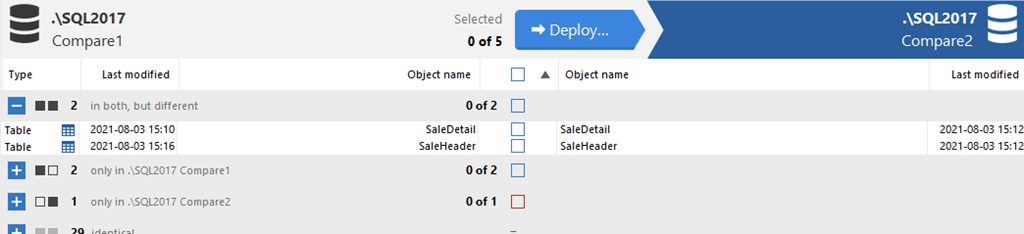
2021-08-03 15_19_51-SQL Compare - E__Documents_SQL Compare_SharedProjects_(local)_SQL2017.SimpleTalk

I see both tables here as different, even though I only added a column to the SaleHeader table. You might think there is a FK or something else, but there isn’t. I only ran this code:

ALTER TABLE dbo.SaleHeader ADD SalesPersonID INT

Why do I see both tables? Let’s click on SaleHeader. I now see the details of the changes. In addition to my column, there is a difference with the constraint. That’s the Primary Key for this table.

2021-08-03 15_21_24-SQL Compare - E__Documents_SQL Compare_SharedProjects_(local)_SQL2017.SimpleTalk

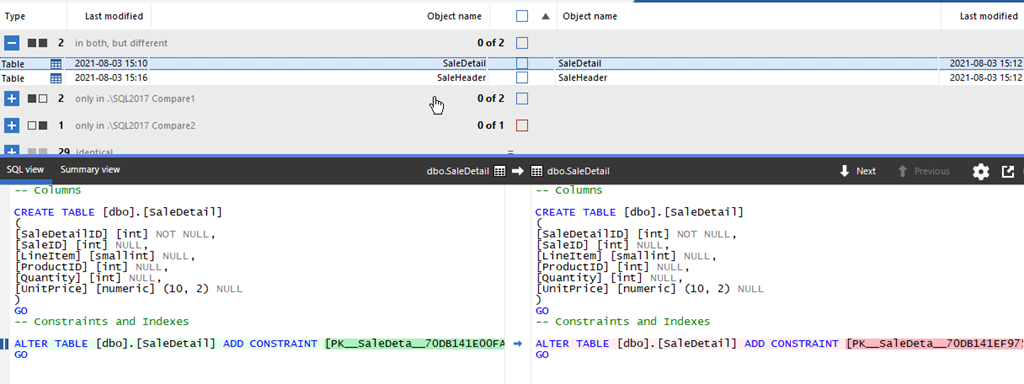
If I look at the SaleDetail table, I see the only difference is the constraint.

2021-08-03 15_21_32-SQL Compare - E__Documents_SQL Compare_SharedProjects_(local)_SQL2017.SimpleTalk

What has happened is Microsoft generated a system-generated name for the Primary Key because I didn’t specify one. I can specify one, and should, but if I don’t, Microsoft handles this.

Since these are different objects, with different names, SQL Compare flags this. If I try to deploy my new column, this is the script generated. Note, I’ve only showed the change part, not all the setup.

PRINT N'Dropping constraints from [dbo].[SaleHeader]'
GO
ALTER TABLE [dbo].[SaleHeader] DROP CONSTRAINT [PK__SaleHead__1EE3C41F8D88FA16]
GO
IF @@ERROR <> 0 SET NOEXEC ON
GO
PRINT N'Altering [dbo].[SaleHeader]'
GO
IF @@ERROR <> 0 SET NOEXEC ON
GO
ALTER TABLE [dbo].[SaleHeader] ADD
[SalesPersonID] [int] NULL
GO
IF @@ERROR <> 0 SET NOEXEC ON
GO
PRINT N'Creating primary key [PK__SaleHead__1EE3C41FDBE16A10] on [dbo].[SaleHeader]'
GO
ALTER TABLE [dbo].[SaleHeader] ADD CONSTRAINT [PK__SaleHead__1EE3C41FDBE16A10] PRIMARY KEY CLUSTERED  ([SaleID])
GO

This code shows that
the constraint is dropped, the column added, and then the constraint rebuilt. Again, with the same system-generated name. That means every script I generate will do this when this table is changed.

The customer was editing this script and removing the ALTER TABLE DROP CONSTRAINT and the ALTER TABLE ADD CONSTRAINT lines (and comments). A pain, and a place where a human can make a mistake.

Let’s fix this.

Change the Options

If I click “Edit Project”, I have a way to flip a switch and prevent this from happening.

2021-08-03 15_34_16-SQL Compare - E__Documents_SQL Compare_SharedProjects_(local)_SQL2017.SimpleTalk

After clicking the button, I see the Data Sources tab, where I picked my databases, but in the upper right, I can click the Options item.

2021-08-03 15_34_24-(local)_SQL2017.SimpleTalk_1_Dev v localhost.SimpleTalk_1_Dev.scp

This gives me a lot of checkboxes. If I scroll down, I’ll find an “Ignore” section. In here there is an Ignore constraint and index names. I need to check this.

2021-08-03 15_35_01-(local)_SQL2017.SimpleTalk_1_Dev v localhost.SimpleTalk_1_Dev.scp

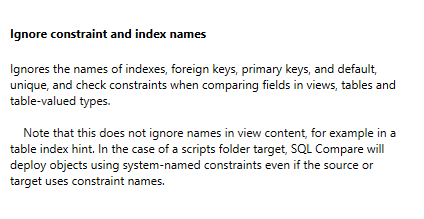
The help on the right side tells me that I can ignore the system generated names. This doesn’t quite work smoothly for scripts folders, as you can read.

2021-08-03 15_35_08-(local)_SQL2017.SimpleTalk_1_Dev v localhost.SimpleTalk_1_Dev.scp_

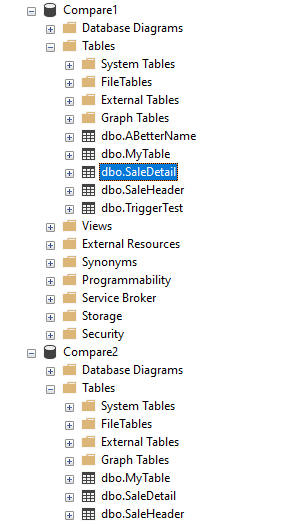
Once I click the checkbox and re-compare the databases, the view is similar, though the SaleDetail table doesn’t appear in the list of different objects.

2021-08-03 15_35_23-SQL Compare - E__Documents_SQL Compare_SharedProjects_(local)_SQL2017.SimpleTalk

If I generate the script, however, it looks cleaner. No constraint changes.

2021-08-03 15_35_32-Deployment

This is what the client wants.

Summary

Ultimately, you don’t want to have system generated named constraints. Too easy to make mistakes, or someone even manually checking items might think there is a problem. One thing that I recommend is that you slowly rename these constraints to a standard that fits your environment.

SQL Compare has lots of options, and this is just one to make this fit your environment. If you have items that you need customized between certain databases, look through the list of options for something that helps you. Or keep following these tips on the blog.

For this option, if you need to add this in the command line, then use the /icn option.

SQL Compare is amazing and if you need to check what might be changing and happening between your databases, give it a try today.

Posted in Blog | Tagged , , | Comments Off on Ignoring System Generated Key Names in SQL Compare