Daily Coping 16 Jul 2021

I started to add a daily coping tip to the SQLServerCentral newsletter and to the Community Circle, which is helping me deal with the issues in the world. I’m adding my responses for each day here. All my coping tips are under this tag. 

Today’s tip is to find fun ways to distract yourself from unhelpful thoughts.

We likely all have negative and unhelpful thoughts. I know I do on a regular basis. While I can be upbeat and positive, I can also feel stressed, sad, or angry about different things. Working to actively change your thoughts is helpful at times to coping.

One thing that I’ve done is spend a few minutes doing something that requires some focus. For me, that usually falls into one of a couple areas:

  • Guitar
  • A quick game
  • Duolingo

These are not in any order, but I have found that I can take a couple minutes to strum a song, open Duolingo and go through a lesson, or pick a game that makes me concentrate. I tend to use things like Sudoku or recently, Water Sort Puzzle, as a fairly quick way of timeboxing. A round here takes 2-3 minutes, which is about what a song or a lesson take.

I’m slightly running away, but I’m distracting myself. Time is a great healer, and often a short break gives me a slightly different perspective. I can start to cope with my fears, anger, sadness, or whatever in a better way, or at least a more calm way.

It might take a few rounds of thought, distraction, thought, distraction, etc., but it’s helpful for me.

A HUGE CAVEAT:  I am not susceptible to depression, at least not as I see it in other friends/family. My coping is much different than I might do with someone who might be more susceptible or have a mental illness that makes it hard to cope. If you have challenges in this area, please seek out others, especially professionals. Illness is illness, and needs treatment at times to ensure you cope and thrive in life.

Posted in Blog | Tagged , , | Comments Off on Daily Coping 16 Jul 2021

Daily Coping 15 Jul 2021

I started to add a daily coping tip to the SQLServerCentral newsletter and to the Community Circle, which is helping me deal with the issues in the world. I’m adding my responses for each day here. All my coping tips are under this tag. 

Today’s tip is to challenge yourself when you feel negative. Look at something from a new perspective.

It’s been a hard time, with very hot weather, lots of little tasks, and the need to make some decisions. None of them big, but the sheer volume is a little overwhelming to me.

I’ve been feeling a little negative about getting through the week lately, and wanting to vent and complain a bit. A few people close to me have been good at listening, which is helpful. However, I need to stop and review how I see things.

One place I’ve felt negative is the lack of progress in a few spring maintenance operations. My wife reminded me I have kids here willing to help and I should review how I look at some chores. Ask for help, remember that it’s not all on me.

That’s a struggle as I really try to be independent. However, I made an effort to look at it from the new perspective, that others are willing to help, and asked them to take a few things off my plate. It was a good lesson for me.

Posted in Blog | Tagged , , | Comments Off on Daily Coping 15 Jul 2021

Getting Row Numbers with Window Functions–#SQLNewBlogger

Another post for me that is simple and hopefully serves as an example for people trying to get blogging as #SQLNewBloggers.

In a recent post, I started looking at some basics for window functions. This post continues with a look at one of the most commonly used ones: row_number().

Rows in a table aren’t in any particular order. They can be physically stored in order by the clustered index, but in a SELECT, there is no guarantee of any particular order unless you have an ORDER BY clause. However, even when you get a set or rows, there isn’t any number for the rows that is given.

Many of us would like to have some number that allows us to know this is row 1, row 2, etc.

We can do that with ROW_NUMBER(), which is a window function that assigns sequential numbers to rows. In the previous post, I used some baseball data, so I’ll continue with that today, but I’ll use another amazing batter, Ken Griffey Jr.

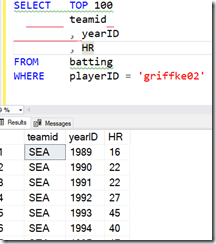
If I just get the list of batting records for Ken, I see this results (abbreviated) below. Note that there is no ordering I can count on here. The row number to the right is added by SSMS, but isn’t in the result set:
2021-07-13 11_34_04-SQLQuery1.sql - ARISTOTLE.BaseballData (ARISTOTLE_Steve (75))_ - Microsoft SQL S

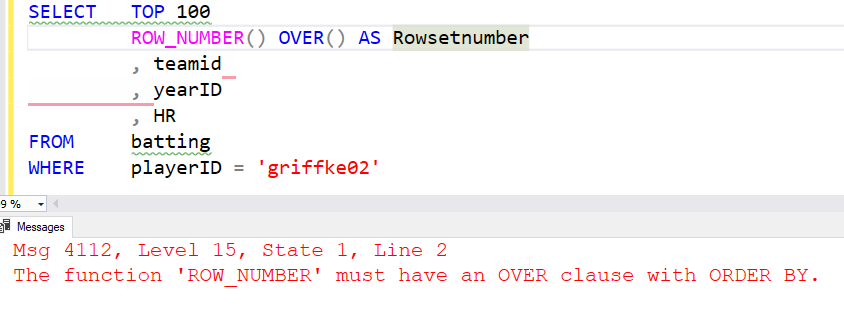
If I want to ensure every client has a row number, I can use that function with an OVER() clause. Note that I need to include something in the OVER() clause.
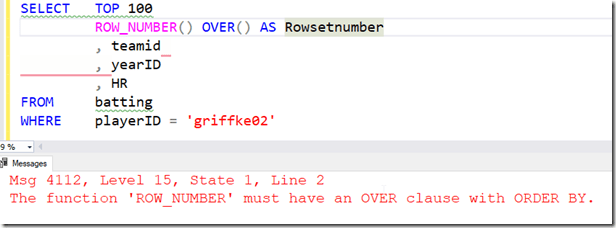
2021-07-13 11_35_33-SQLQuery1.sql - ARISTOTLE.BaseballData (ARISTOTLE_Steve (75))_ - Microsoft SQL S

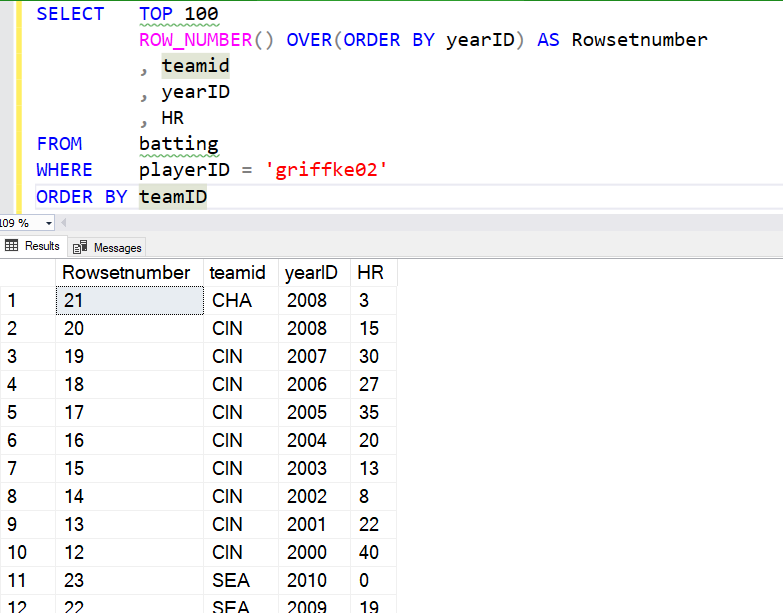
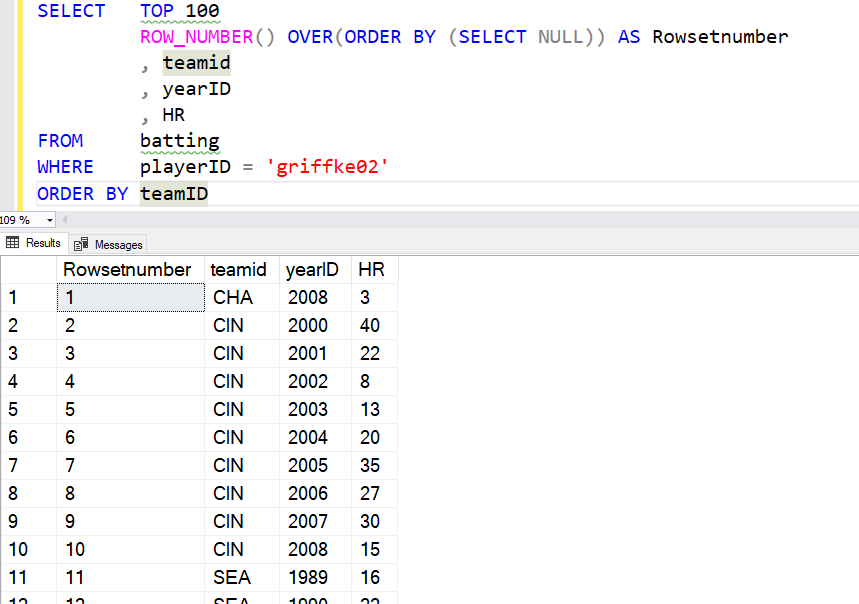
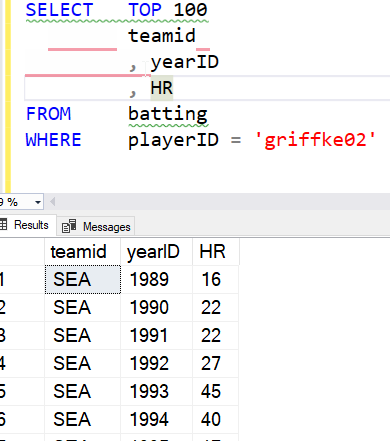
Let’s fix that. I’ll order by year and then ensure I show the SSMS number added by the GUI. I see the numbers seem to correspond to the years. What if I order the entire query by team?
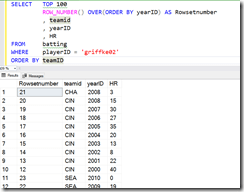
2021-07-13 11_38_32-SQLQuery1.sql - ARISTOTLE.BaseballData (ARISTOTLE_Steve (75))_ - Microsoft SQL S

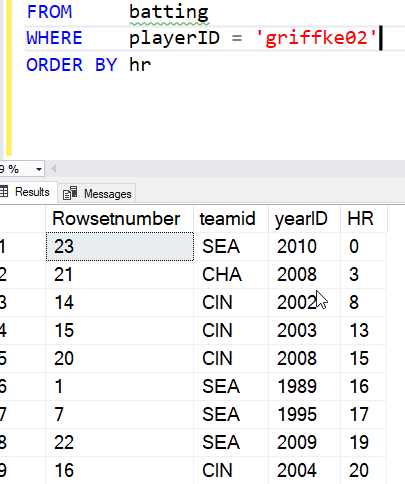
This appear to have reversed the numbers. However, note that rows 11 and 12 are the 22 and 23. The window function applied the numbers based on the ordering of years for the entire set, then the rows were re-ordered for the query based on the ORDER BY. We see this more clearly with an ORDER BY using the HR column.
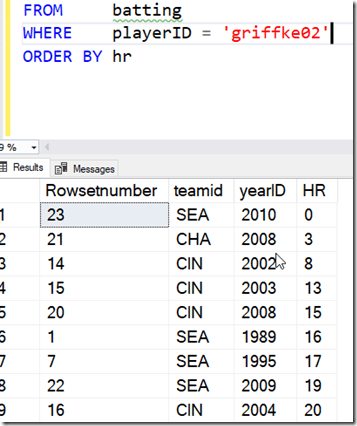
2021-07-13 11_41_59-SQLQuery1.sql - ARISTOTLE.BaseballData (ARISTOTLE_Steve (75))_ - Microsoft SQL S

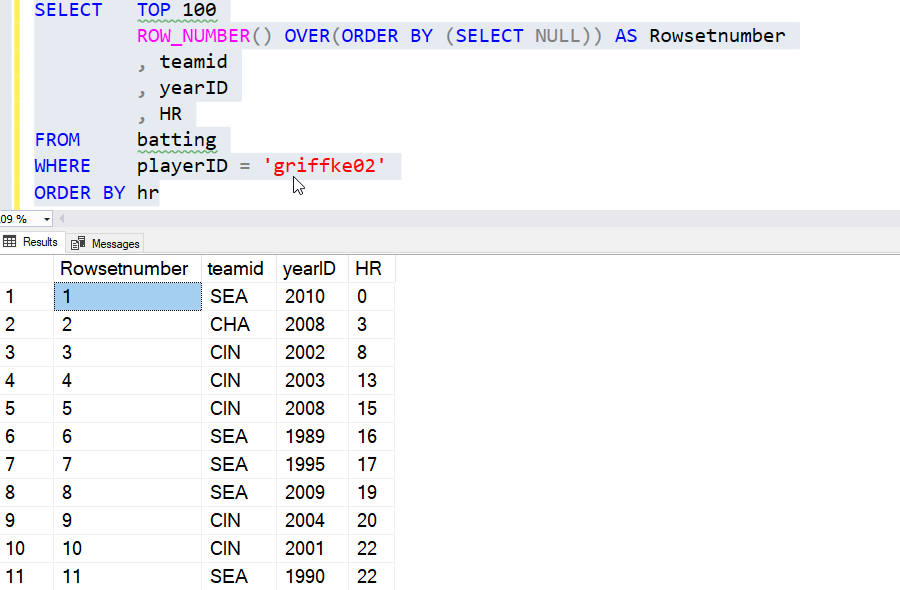
What about just an ordering for the results? I do need an ORDER BY I can use this trick.

SELECT   TOP 100
          ROW_NUMBER() OVER(ORDER BY (SELECT NULL)) AS Rowsetnumber
          , teamid
          , yearID
          , HR
FROM     batting
WHERE    playerID = 'griffke02'
ORDER BY hr

This allows me to just apply the ROW_NUMBER to whatever the query is doing. Here’s the result, ordered by HR.
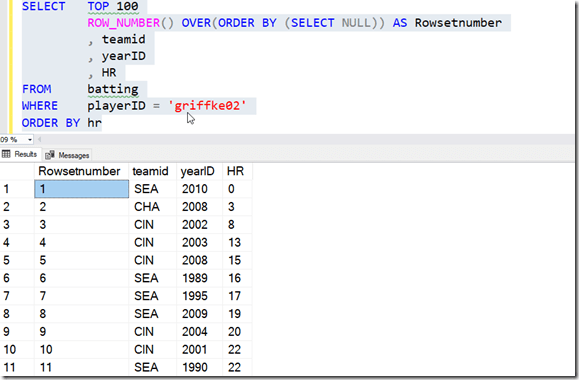
2021-07-13 11_45_14-SQLQuery1.sql - ARISTOTLE.BaseballData (ARISTOTLE_Steve (75))_ - Microsoft SQL S

If I go back to my ordering by team, I see this:
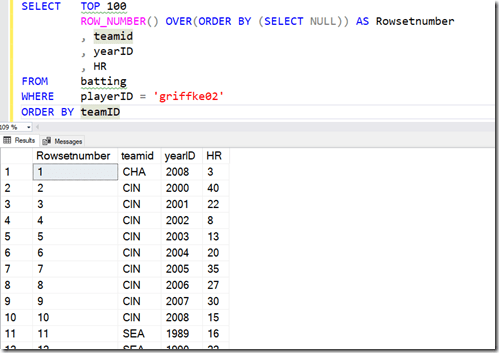
2021-07-13 11_46_48-SQLQuery1.sql - ARISTOTLE.BaseballData (ARISTOTLE_Steve (75))_ - Microsoft SQL S

I can also add a PARTITION BY, and get numbering inside the partition or group. Here I’ll partition by team. I’ll go back to ordering by year, since that makes sense. I’ll use this query.

SELECT   TOP 100
          ROW_NUMBER() OVER(PARTITION BY teamID ORDER BY (SELECT NULL)) AS Rowsetnumber
          , teamid
          , yearID
          , HR
FROM     batting
WHERE    playerID = 'griffke02'
ORDER BY yearID

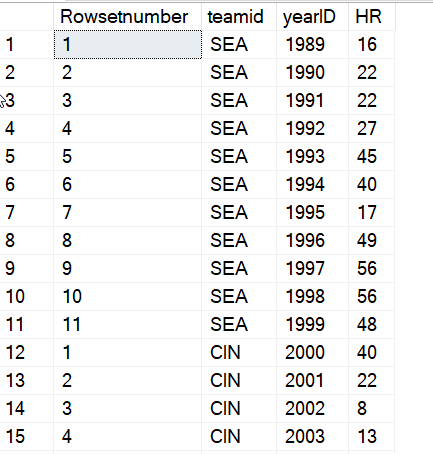
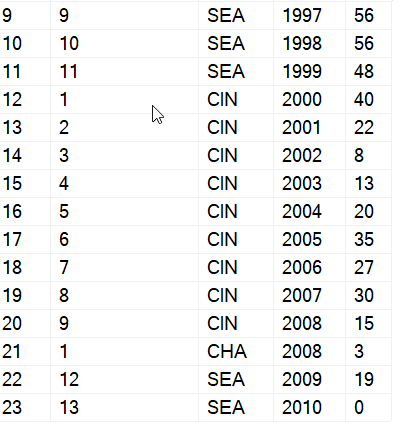
The results are then shown with the numbering restarting with each team.
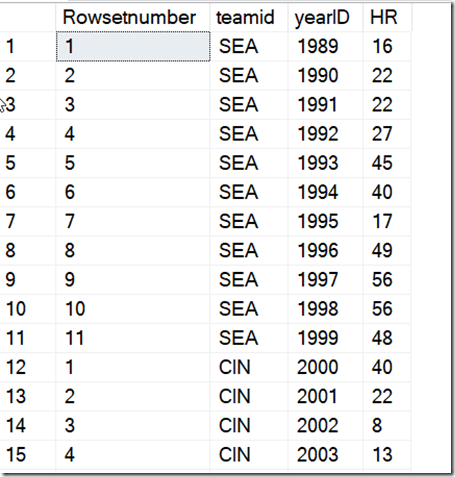
2021-07-13 11_49_01-SQLQuery1.sql - ARISTOTLE.BaseballData (ARISTOTLE_Steve (75))_ - Microsoft SQL S

The one strange thing to note here is that since Ken went back to Seattle late in his career, the numbering for his final two years show a continuation of the numbers from earlier with SEA.
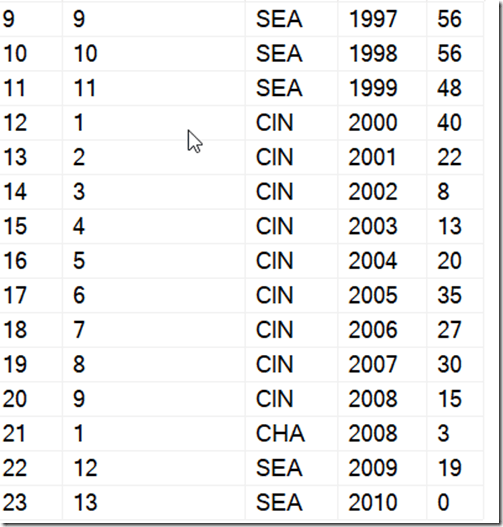
2021-07-13 11_49_12-SQLQuery1.sql - ARISTOTLE.BaseballData (ARISTOTLE_Steve (75))_ - Microsoft SQL S

The ROW_NUMBER() function is very powerful and useful when you need some ranking and ordering to show to the client for the rows. As with all data, you need to ensure you understand the data set and be aware of how your partition (grouping) and ordering in the OVER() clause apply to the data, but the final results are dependent on the query’s ORDER BY. This can cause some confusion, so be sure you understand the difference and inform your clients.

SQLNewBlogger

This was a quick 10 minute post. I’ve done a lot of work with Window functions and presented on them, so this was a portion of a presentation I’d given, where I took part if a demo and wrote it up.

However, you can experiment in 15-20 minutes and then spend 10-15 minutes structuring a post on this topic. How have you used ROW_NUMBER(), or if you’ve just learned it, what does it mean to you. Come up with some examples, ensure you understand them, and then explain them back. Might be an easy interview question to answer at some point if they find it on your blog.

Posted in Blog | Tagged , , | 2 Comments

Improving DevOps Automation

We use a lot of automation at Redgate. As a company that builds software, we want to ensure that all the changes from our teams get integrated and tested in a timely manner. We have multiple teams on some products, and while we do have regular meetings between them, it can be easy for a developer to miss some update on a change others are making and break something with their own work. Worse, they could cause a regression or security issue, which we work hard to avoid.

Recently I saw a post from one of our lead software engineers about the build process. While we have lots of pipelines, the general process hasn’t changed in many years. In some sense that’s good, because we focus on building better software, not the process. We don’t change just for the sake of change, or because a new team or division lead likes one tool over another. I’ve seen customers where they move from Jenkins to Azure DevOps because someone in charge “likes one better.” Not a good use of time.

However, you do need to evaluate whether your process is meeting your needs. In our case, we surveyed lots of developers to get their thoughts on pain points and issues. The build and release process was consistently listed as a pain point, with releases often requiring a dev to manage it from their workstation, preventing them from spending time building software for customers.

That might be the big lesson I saw in the write-up. We realized that a non-negligible amount of time was being spent by developers on the process of moving bits rather than building the software. This led us to re-examine how things are done. In particular, we looked at the agent OS (Linux v Windows) and containers. Both of these are more viable technologies now than in years past, and they can reduce costs while smoothing the process. As a result, we are developing a general contract that helps us decide how to change our process. This is similar to an API, that doesn’t specify the tool to use, but rather the inputs, outputs, and what the effect should be. From this, we’ll start to help teams move forward is changing their process as we have time.

The big takeaway right now is that this is pushing us to use containers, which simplify the steps and allow us to easily move from Azure to AWS to on-premises, or really any environment. We can switch builds across different platforms and more easily scale up or down as needed. It will take some time, and some of our software will be more challenging in containers. However, we are also seeing benefits from customers, and at some point, I expect we’ll provide containers for certain functions that make it easier for the end-users of our software to also deploy and upgrade their tools.

DevOps is an ongoing process. Not a set of tools that you change just because, or a way of building software that matches what another organization does. Instead, it’s learning, experimenting, and evaluating how you can be more effective. Then adopting what you’ve learned and repeating the process. Keep improving, and you’ll find that you can produce software quicker and at a higher level of quality while improving the skills of your engineers.

Steve Jones

Listen to the podcast at Libsyn, Stitcher, Spotify, or iTunes.

Posted in Editorial | Tagged | Comments Off on Improving DevOps Automation