The Technical Debt Anchor

I ran across an article on the 7 types of tech debt that can cripple your business, which is a great title. It certainly is one that might scare a lot of CTOs/CIOs/tech management. I am sure that much of the IT management gets concerned on a regular basis with how quickly their staff can evolve their software to meet new business needs.

The first two items have to do with data, which is understandable. Data is the core of how many organizations operate and move forward, and if you don’t have the ability to easily work with data in a flexible way, you can struggle. Many of us technical people know this, but I find many non-data-professional staffers don’t get this and are often unwilling to work at improving the situation. They things to just be magically better without changing how they do their jobs.

Many of us data professionals know that data quality is crucial. Many others assume we have quality data. Both of us need to understand that some of our data is suspect, but most of us is pretty good. Don’t get drawn into a black/white argument that our data is amazing or horrible. No matter what we do, there will be errors, so account for that. At the same time, do some testing, some evaluation, and double-check yourself.

We also need to ensure some level of performance from our data stores (databases, data lakes, etc.). Too often we see queries start to slow down and blame the DBAs. We ask them for better performance without being willing to press on developers (or vendors) to improve the performance of their code. Don’t just expect to build bigger machines, make sure you train staff to write better queries and help DBAs learn how to better index systems. We’re a team, so let’s work as a team on our performance issues.

There are a few AI-related items and a couple of DevOps items as well. All tech debt is a problem; it just depends on how much you have as to how big a problem it is for your systems. However, the seventh item is cultural debt. AI is part of this, as staff can have job-threatening views of AI, but that’s really a lack of trust. Management has to build trust with staff and ensure they are cared for if management expects staff to be accountable for code. Workers have to drive themselves forward, as a part of the technology revolution is that change is a given. Don’t expect to do the same job you’ve done for years. Learn to use new tools and learn to use them effectively in your position.

At the same time, management has to value employees and be clear about what’s expected or workers. Be fair with employees and value their efforts. Working together is what will drive your organization forward.

Steve Jones

Listen to the podcast at Libsyn, Spotify, or iTunes.

Note, podcasts are only available for a limited time online.

Posted in Editorial | Tagged | 6 Comments

Upgrading SQL Server in a Container

I decided to update software on my laptop recently during a trip. I’m loathe to do this on most trips, as I don’t want any instability before a presentation. Usually once I hit the airport, I don’t change anything.

This time I’m visiting a few customers and don’t need to use my computer. I’ll be taking notes on paper, and while working in the hotel, I decided to upgrade Rancher Desktop after a notification, as well as SSMS, VS, and a few other pieces of software. I decided to patch my SQL Servers as well, which was easy. This post shows how.

Update: the original screenshot below was the wrong one. That has been updated.

Upgrading SQL

I don’t have SQL Server installed on my laptop. Instead, I have a few container instances running under Rancher Desktop. Each of these has a docker compose file and a batch file to start and stop the containers. I’ve written about this before, but I didn’t cover upgrades.

Here is the upgrade process. First, I find the docker compose file, which is in c:\data\xxx where xxx is the instance. Here is the file for my SQL 2019 instance.

2025-06_line0015

I open this in VS Code, and it looks like this.

2025-06_line0016

I next check the build list for 2019 on SQL Server Central. It shows me that CU32 is the latest, which means I haven’t patched this in some time. I also haven’t used this instance much. I need to change this.

Here’s the change: in the file, I update line 5 to say 32 instead of 27.

2025-06_line0017

I save this and then double click the batch file to start my 2019 instance. When I do that, I see the new image being pulled down.

2025-06_line0018

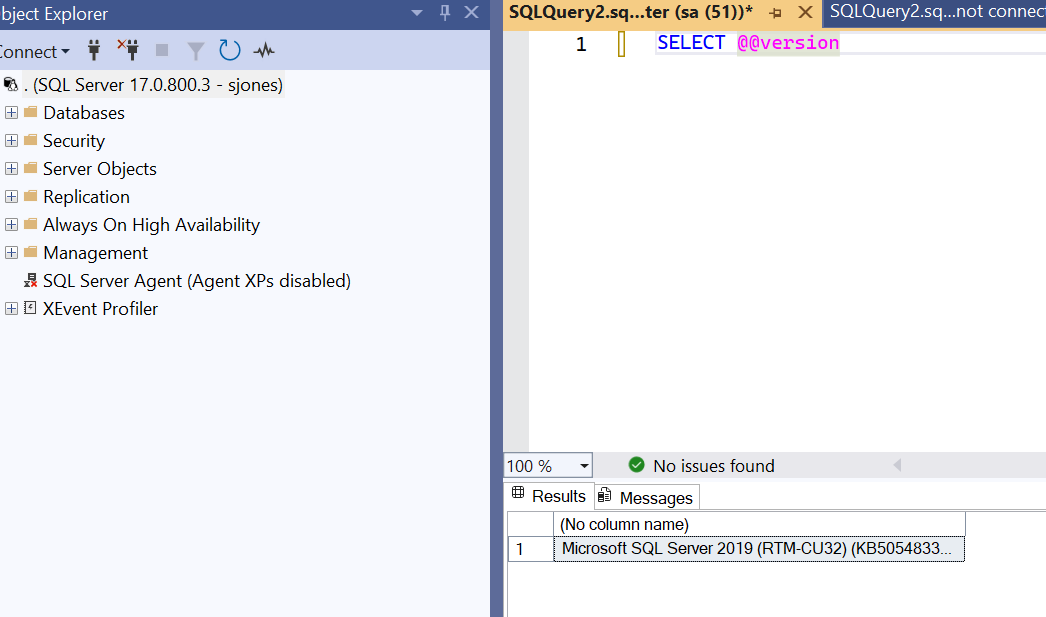
Once this completes, the container starts and I can connect. When I do that, I see this:

Upgrade complete.

Now to edit the other docker files.

Posted in Blog | Tagged , | Comments Off on Upgrading SQL Server in a Container

The Data Warehousing Choice

Each time I compile and curate the Database Weekly newsletter, I find lots of Fabric content from the various sources I watch to compose the newsletter. Since I primarily deal with the Microsoft Data Platform stack, this makes sense. Most of the things I am interested in are related to Microsoft, and as a result, I tend to use sources that also use SQL Server, Power BI, Fabric, and related technologies. I do look for other related data items, but I am heavily MSSQL focused.

Recently, I stumbled on a piece that contains Fabric Alternatives in AWS, GCP, and OCI. It covers some of the options on these cloud platforms at a very high level. A product name and short description, but it shows there are other choices. I found it interesting that Databricks is mentioned, but not Snowflake. I’m not sure why that is, as Databricks is on Azure (and other platforms) as is Snowflake, but perhaps the author doesn’t consider Snowflake a peer? That seems strange.

I don’t have a lot of customers using Fabric, but when I work with SQL Server heavy clients, they always ask my opinion on Fabric. Microsoft has devoted a lot of resources (engineering and marketing) to Fabric, and that has many customers considering Fabric for a data warehouse. However, my view is still that Fabric is an incomplete system and unfinished (from an engineering view) platform. I would still be hesitant to adopt it, especially after some high-profile outages.

AWS has several warehousing options, and I find a number of customers using Databricks or Snowflake as their main warehousing options if they have left on-premises platforms. Both of these seem fairly mature, well understood with lots of documentation, examples in online articles, and plenty of staff that can work on these systems. If I were thinking about a data warehousing system separate from my OLTP SQL Server (on-prem, Azure SQL, MI) database, I’d look at one of these.

Those of you reading this are likely in the Microsoft space, so do you feel the same way? Or have you bought into the Fabric marketing? Microsoft is spending a lot of money there, and even adding a SQL Database to the platform. Microsoft clearly thinks they can compete with these other options (Databricks and Snowflake).

Do you?

Steve Jones

Listen to the podcast at Libsyn, Spotify, or iTunes.

Note, podcasts are only available for a limited time online.

Posted in Editorial | Tagged | Comments Off on The Data Warehousing Choice

Monday Monitor Tips: Searching Permission Changes

During a demo of Redgate Monitor Enterprise to a customer, they asked about how to search for permission changes. This post examines how you can do that in Redgate Monitor.

This is part of a series of posts on Redgate Monitor. Click to see the other posts.

Permission Changes

Redgate Monitor Enterprise adds a few security features to the tool that track things that organizations can struggle to track as their estates grow. There is a security menu item at the top of your Redgate Monitor web page. You can see this expanded on our demo system at monitor.red-gate.com.

2025-06_0095

Click the permission entry and you will see this starts on a page that is titled Permissions. There are a few tabs below the title (Permission changes, Servers, Databases, Users). We start on Permission changes, which helps us to see the various changes that have occurred.

2025-06_0096

Below this, we see a date box that is set for the last week, along with a few other items. By default we show you the last week’s worth of changes and all the data. However, you can easily alter this.

2025-06_0097

This can be a lot of data, especially in an enterprise, so perhaps I only want to see certain things. I can click “Columns and choose which data I care about. Here, I’ll uncheck a few boxes.

2025-06_0098

Notice this has rolled up some changes, so I don’t see quite as much as data as I do in the default view. This is useful when I want to see the “who had a change” and not every detail.

2025-06_0099

I can, of course, change the date range. We give you some quick defaults, or you can use the calendar picker to choose a range.

2025-06_0100

When I do this, I only see some changes, those that apply to that date range.

2025-06_0101

If I want to further filter things, I can choose that item. You can see the various items below I can choose from.

2025-06_0102

Let’s set  this to “Changed by” the sa account. When I do that, notice the “Filters” icon is annotated saying I have 1 filter condition. I also only see the one row changed by SA.

2025-06_0104

I will expand my date range and remove the filter while adding all the columns, and I see this data:

2025-06_0107

That’s a lot, but I can change the density. Here are the choices.

2025-06_0106

Here is compact. Now all 10 rows fit on the page:

2025-06_0108

Comfortable only shows 7 rows (9 in standard).

2025-06_0109

Lastly, I can set the number of rows on the page in the lower right.

2025-06_0110

Summary

Security is becoming something more people need to report on, especially public companies or those regulated. This feature of Redgate Monitor helps you satisfy auditor requests with the information they need to verify you are watching your systems.

Or, at least that you know Redgate Monitor is doing so.

Redgate Monitor is a world class monitoring solution for your database estate. Download a trial today and see how it can help you manage your estate more efficiently.

Posted in Blog | Tagged , , | Comments Off on Monday Monitor Tips: Searching Permission Changes