Tag: administration

  • T-SQL Tuesday #40– File and Filegroups

    tsqltuesdayIt’s the second Tuesday of the month and time for T-SQL Tuesday again. This is a monthly blog party, where the participants write on a particular theme. This month Jen McCown, of Midnight DBA fame, invites us to talk about files and filegroups in SQL Server.

    If you’re like to participate, write a post and drop a comment (or pingback) on Jen’s blog. Watch the #tsql2sday hashtag on twitter for next month’s invitation.

    Filestream and Filegroups

    I have a couple talks that deal with Filestream related topics, so I decided on a quick introductory lesson on how this works.

    Filestream was built into the AdventureWorks 2008 sample database. Requiring administrators to turn on Filestream caused some confusion and complaints, despite the fact that it’s easy to do.

    What does Filestream have to do with filegroups? In a database that is enabled for Filestream data, you need to add a filegroup specifically for the Filestream data. This is actually a folder on your file system, which you can access through T-SQL, or through the Win32 API. If you are using SQL Server 2012 or later, you can also access this data with a Filetable, which is built on Filestream.

    Let’s create a database, and add a filegroup for Filestream. We start with the “New Database” dialog in SSMS.

    fs_a

    With the normal defaults, we see a data file (FS_Test) and a log file (FS_test_log). For Filestream data, we need a new place to store it. Let’s add a file:


    fs_b

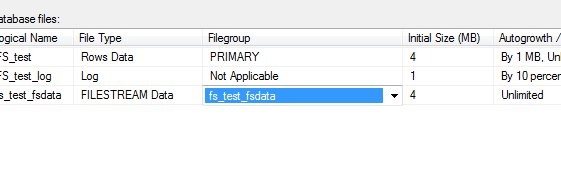
    Once I add the file, I mark it as storing Filestream data. The other options are rows (data files) or log files. However this presents a problem. When I scroll right, I see that there is no filegroup for Filestream data. I can’t put this in an existing filegroup.

    fs_c

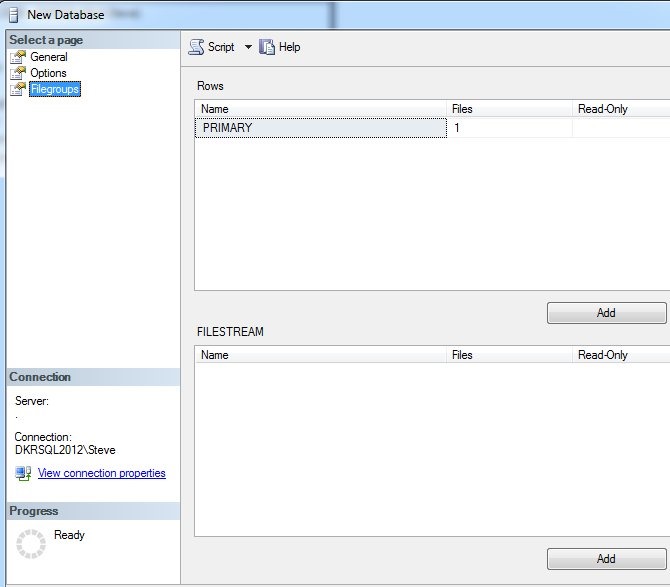
    Let’s add one of those. Here’s the default filegroup dialog.

    fs_d

    I can click add, and put in a filestream filegroup. The name doesn’t matter, it’s just for administrative purposes. Once I do that, I can go back to the files dialog, and if I select the dropdown, my new filegroup appears.

    fs_e

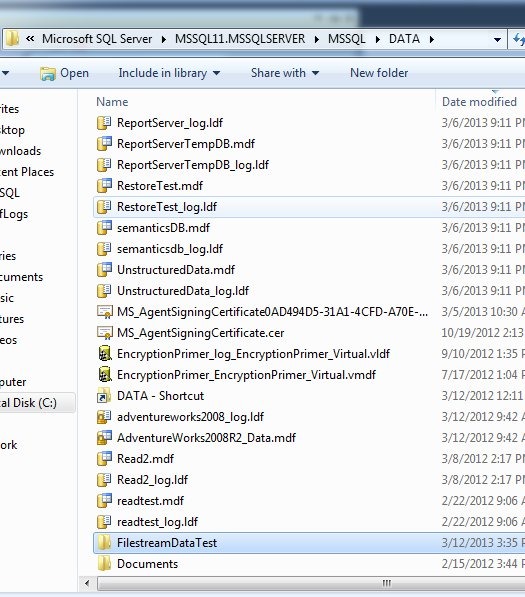
    Now I need a location. Outside of SQL Server, I created a folder in my data directory. This can be anywhere, but I did it in the default location. It’s called FilestreamDataTest.

    fs_g

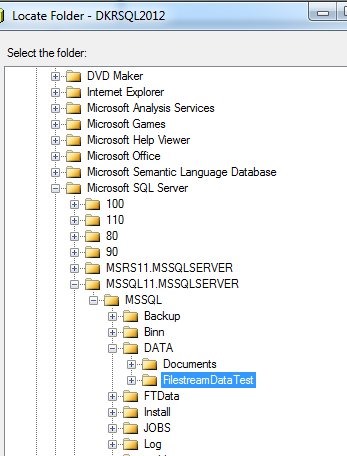
    I then select this in the files dialog, using the ellipsis to the right of the Path column.

    fs_f

    I see my folder in the file picker and choose it.

    fs_h

    Once I’ve selected it, I don’t click OK. I click “Script” and get the script below:

    CREATE DATABASE [FS_test]
     CONTAINMENT = NONE
     ON  PRIMARY 
    ( NAME = N'FS_test', FILENAME = N'C:\Program Files\Microsoft SQL Server\MSSQL11.MSSQLSERVER\MSSQL\DATA\FS_test.mdf' , SIZE = 4096KB , MAXSIZE = UNLIMITED, FILEGROWTH = 1024KB ), 
     FILEGROUP [fs_test_fsdata] CONTAINS FILESTREAM  DEFAULT 
    ( NAME = N'fs_test_fsdata', FILENAME = N'C:\Program Files\Microsoft SQL Server\MSSQL11.MSSQLSERVER\MSSQL\DATA\FilestreamDataTest\fs_test_fsdata' , MAXSIZE = UNLIMITED)
     LOG ON 
    ( NAME = N'FS_test_log', FILENAME = N'C:\Program Files\Microsoft SQL Server\MSSQL11.MSSQLSERVER\MSSQL\DATA\FS_test_log.ldf' , SIZE = 1024KB , MAXSIZE = 2048GB , FILEGROWTH = 10%)
    GO

    I can run this, and once I do, if I go into the folder that contains my Filestream file, I see this:

    fs_i

    As I create tables that hold Filestream data, including FileTable data, I’ll see entries in here for each column (or Filetable) that holds this data. There is a folder that holds logging information for this data, which I do not manage.

    Hopefully this is a quick, short piece that helps you understand Filegroups and Filestream.

  • Dropping Indexes

    While working on some demos recently, I needed to drop an index for a test. I executed this generic statement for an index I’d just created.

       1: DROP INDEX ix_IndexName

    Needless to say I was surprised when I got this error:

    Msg 159, Level 15, State 1, Line 1

    Must specify the table name and index name for the DROP INDEX statement.


    I haven’t done much index maintenance in the last few years, but since I had specified the name, and I expected names to be unique, I was surprised. That’s not the case, however, since indexes aren’t seen as objects.

    I created the index in AdventureWorks with this code:

       1: -- paste in create index statement

       2: CREATE NONCLUSTERED INDEX ix_IndexName

       3: ON Sales.SalesOrderHeader ( [TerritoryID],[ShipMethodID], [SubTotal], [Freight] )

       4: INCLUDE ([SalesOrderNumber], [CustomerID]);

    As a test, I then added this index:

       1: CREATE NONCLUSTERED INDEX ix_IndexName

       2: ON Production.Product ( [Name],[ListPrice]);

    Same name, different table.

    A quick check in sys.objects surprised me.

       1: select *

       2:  from sys.objects

       3:  where name = 'ix_Indexname'

    This returned no results. Hmmm, let’s investigate further. I next decided to check sys.indexes.

       1: select *

       2:  from sys.indexes where name = 'ix_Indexname'

    This returned two results:

    indexes

    Two entries, with two object_ids. I wondered what those objects were, so I ran more code:

       1: select *

       2:   from sys.objects

       3:   where object_id in (1010102639, 1717581157)

    I received the two tables back as the objects.

    indexes2

    This surprised me, though I’m sure I’ve read the details in a book at some point, or even seen the documentation in sys.indexes. The entry for name says it is unique only within the space of the object, which would be the parent table.

    I had assumed that indexes were objects, but they aren’t. They are an attribute of an object, and as such, I needed this code to remove my index:

       1: -- cleanup

       2: DROP INDEX ix_IndexName

       3:  ON Sales.SalesOrderHeader

       4: ;

       5: GO

    Update: As noted in a few comments, you can also drop the index as:

       2: DROP INDEX Sales.SalesOrderHeader.ix_IndexName

    And, of course, I needed to drop my test object.

       1: Drop INDEX ix_IndexName

       2: ON Production.Product

       3: ;

  • Attaching an MDF with no Log (AdventureWorks)

    Attaching an MDF file without an LDF file can be a little tricky. I had to go through this recently when I downloaded the AdventureWorks2008R2 database, which was just an MDF file. I know I’ve done this before, but I had to stop and look things up, which means that I should blog about it (hint, hint).

    How do I attach a new database?

    If I go into SSMS, I can pick the “Attach” dialog by right clicking the “databases” folder.

    attach1

    Once I pick my MDF, I see the dialog populated.

    attach2

    However if I click “OK”, I get an error.

    <mini-rant>

    Don’t click OK for precisely this reason. If there’s an error, it can be hard to figure out what happened, and the error handling in SSMS isn’t the greatest. I’ve even seen people click “Cancel” without realizing there was an error”.

    If you use the GUI, please click the “script” button instead and cancel out of the dialog.

    </mini-rant>

    attach3'

    The error occurred because the log file didn’t exist. If you select the log file in the lower dialog, and click Remove, you can use the GUI here.

    However removing the log file and pressing the click button gives me this code:

    USE [master]
    GO
    CREATE DATABASE [AdventureWorks2008R2] ON 
    ( FILENAME = N'D:\SQLServer\MSSQL11.MSSQLSERVER\MSSQL\DATA\AdventureWorks2008R2_Data.mdf' )
     FOR ATTACH
    GO

    .csharpcode, .csharpcode pre
    {
    font-size: small;
    color: black;
    font-family: consolas, “Courier New”, courier, monospace;
    background-color: #ffffff;
    /*white-space: pre;*/
    }
    .csharpcode pre { margin: 0em; }
    .csharpcode .rem { color: #008000; }
    .csharpcode .kwrd { color: #0000ff; }
    .csharpcode .str { color: #006080; }
    .csharpcode .op { color: #0000c0; }
    .csharpcode .preproc { color: #cc6633; }
    .csharpcode .asp { background-color: #ffff00; }
    .csharpcode .html { color: #800000; }
    .csharpcode .attr { color: #ff0000; }
    .csharpcode .alt
    {
    background-color: #f4f4f4;
    width: 100%;
    margin: 0em;
    }
    .csharpcode .lnum { color: #606060; }No mention of a log file. If I run this I’ll get an error in the messages pane, but the database will attach:

    File activation failure. The physical file name "C:\Program Files\Microsoft SQL Server\MSSQL11.DENALIRCO\MSSQL\DATA\AdventureWorks2008R2_log.ldf" may be incorrect.

    New log file ‘D:\SQLServer\MSSQL11.MSSQLSERVER\MSSQL\DATA\AdventureWorks2008R2_2_log.ldf’ was created.

    Converting database ‘AdventureWorks2008R2_2’ from version 705 to the current version 706.

    Database ‘AdventureWorks2008R2_2’ running the upgrade step from version 705 to version 706.

    That works well, but what about the rebuild log option?

    If you look in the CREATE DATABASE topic, you’ll find the option ATTACH_REBUILD_LOG. What if I use this?

    create database AdventureWorks2008R2_2
     on ( filename = 'D:\SQLServer\MSSQL11.MSSQLSERVER\MSSQL\DATA\AdventureWorks2008R2_Data2.mdf')
      for attach_rebuild_log

    .csharpcode, .csharpcode pre
    {
    font-size: small;
    color: black;
    font-family: consolas, “Courier New”, courier, monospace;
    background-color: #ffffff;
    /*white-space: pre;*/
    }
    .csharpcode pre { margin: 0em; }
    .csharpcode .rem { color: #008000; }
    .csharpcode .kwrd { color: #0000ff; }
    .csharpcode .str { color: #006080; }
    .csharpcode .op { color: #0000c0; }
    .csharpcode .preproc { color: #cc6633; }
    .csharpcode .asp { background-color: #ffff00; }
    .csharpcode .html { color: #800000; }
    .csharpcode .attr { color: #ff0000; }
    .csharpcode .alt
    {
    background-color: #f4f4f4;
    width: 100%;
    margin: 0em;
    }
    .csharpcode .lnum { color: #606060; }If I run this, I get essentially the same messages:

    File activation failure. The physical file name "C:\Program Files\Microsoft SQL Server\MSSQL11.DENALIRCO\MSSQL\DATA\AdventureWorks2008R2_log.ldf" may be incorrect.

    New log file ‘D:\SQLServer\MSSQL11.MSSQLSERVER\MSSQL\DATA\AdventureWorks2008R2_2_log.ldf’ was created.

    Converting database ‘AdventureWorks2008R2_2’ from version 705 to the current version 706.

    Database ‘AdventureWorks2008R2_2’ running the upgrade step from version 705 to version 706.

    I’m not sure why this option exists, or if it’s been deprecated in 2012 since the functionality appears to exist in FOR ATTACH. The documentation mentions that if the log file is not there, it will rebuild. I guess this is included in case you wish to force a rebuild, which is a good thing.

    In any case, if you run into issues attaching a database with the GUI, this should help you.

  • The Dark Side

    I went to the Dark Side recently and enjoyed it.
    I went to the Dark Side recently and enjoyed it.

    Recently I was invited to speak at the Rocky Mountain Oracle Training Days. It was part of some cross platform talks that have happened in Denver, with some Oracle professionals coming to our last SQL Saturday in Denver. I was happy to oblige, and ended up spending part of two days at the small conference. I was a little nervous beforehand, unsure of how SQL Server talks might be received at an Oracle event. There’s a fair amount of animosity between the companies and that seems to bleed over to the professionals working on these platforms. I’ve made my share of Oracle jokes in the past, though all in fun.

    It was interesting to sit and talk with some of the Oracle DBAs attending. For the most part, they have the same problems as SQL Server DBAs, and seem to approach things in a similar manner in terms of indexing, tuning SQL and more. They have the same types of problems, with similar solutions, though the details are different. And, of course, the Oracle solutions tend to be more expensive. I did hear about one thing that I wish was a part of SQL Server: mirroring of log files. I haven’t had many issues with log files, but as databases get more critical, this seems like an enhancement to SQL Server that would make sense.

    One of the interesting things I did hear about was from a cross platform DBA who didn’t have a unified directory services structure and struggled with the SQL Server authentication when clients came from non-Windows systems. This person loved the integration of the Microsoft stack, but moving outside of their technology resulted in lots of challenges. This is one of the areas where I think Microsoft has fallen down in the past, in not supporting a variety of clients well. Even today there are issues when you leave the IE browser in some applications.

    It was a good conference, with so many people facing the same types of concerns over limited resources, technology changes, and job security. Most of the attendees just want to learn more, get better at their jobs, and stay employed. I’m glad I had the chance to attend, and hope I get to go back next year.

    Steve Jones


    The Voice of the DBA Podcasts

    We publish three versions of the podcast each day for you to enjoy.