
I saw this question come across Twitter under the #sqlhelp tag one day and was wondering myself. Someone suggested the default trace, I was thinking msdb.dbo.restorehistory and decided to check.
First I hit Books Online. It notes that the restore_date column means: Date and time of the restore operation. Can be NULL.
Very helpful (hopefully you read the sarcasm). This looks like a CS 101 comment, not very helpful and not detailed. Here’s a Connect item for more detail, and here’s one I submitted for clarification.
OK, time for testing. I first grabbed a copy of AdventureWorks since I assumed it would take at least a minute to restore. I restored a new database as “ADW_3”. It was around a minute and so I checked restorehistory:
USE msdb
GO
SELECT TOP 10 * FROM restorehistory
And I got this:
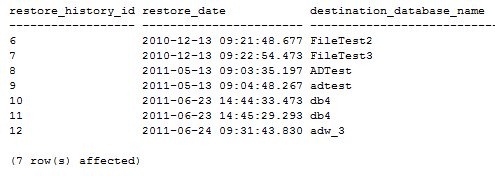
This was not terribly helpful. At the time I ran this, it was 9:32, so this appears to be the start date/time of the restore.
Then I checked the default trace: ‘
SELECT * FROM ::fn_trace_getinfo(0)

SELECT *
FROM ::fn_trace_gettable('C:\Program Files\Microsoft SQL Server\MSSQL10.MSSQLSERVER\MSSQL\Log\log_54.trc',0)
     INNER JOIN sys.trace_events e
          ON eventclass = trace_event_id
     INNER JOIN sys.trace_categories AS cat
          ON e.category_id = cat.category_id
WHERE databasename = 'ADW_3'
The first query gets the name of the file, which is put into the second query as the file source and that returned a number of results, of which the interesting ones were:

That isn’t terribly helpful either. I was hoping there would be a second event in the default trace, but there isn’t, even 10 minutes later when I checked. (I’m ever optimistic)
Then I thought “wouldn’t recovery run in a restored database? Isn’t that in the error log?”, so I decided to check there and found this:

The “starting up datbaase ‘adw_3’ is likely just after the log file is built and corresponds to a tenth of a second after the restore starts. I suspect the files are created first as part of the restore, but not marked in the error log. Then the database is started, and is marked a “restoring” immediately after.
There is a checkdb informational message, which is the last time that the command was run not on this database, but on the source database that created the backup file (bad, Steve, bad, 8 months old!).
Last we see that just about 6sec later there is the completed restore message.
No duration, but you can calculate that based on the “starting up” message.




 Voice of the DBA