

I saw this question come across Twitter under the #sqlhelp tag one day and was wondering myself. Someone suggested the default trace, I was thinking msdb.dbo.restorehistory and decided to check.
First I hit Books Online. It notes that the restore_date column means: Date and time of the restore operation. Can be NULL.
Very helpful (hopefully you read the sarcasm). This looks like a CS 101 comment, not very helpful and not detailed. Here’s a Connect item for more detail, and here’s one I submitted for clarification.
OK, time for testing. I first grabbed a copy of AdventureWorks since I assumed it would take at least a minute to restore. I restored a new database as “ADW_3”. It was around a minute and so I checked restorehistory:
USE msdb
GO
SELECT TOP 10 * FROM restorehistory
And I got this:
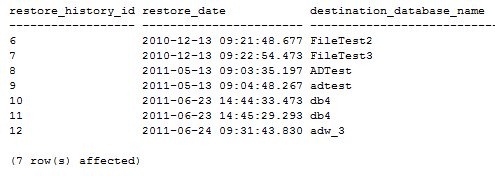
This was not terribly helpful. At the time I ran this, it was 9:32, so this appears to be the start date/time of the restore.
Then I checked the default trace: ‘
SELECT * FROM ::fn_trace_getinfo(0)

SELECT *
FROM ::fn_trace_gettable('C:\Program Files\Microsoft SQL Server\MSSQL10.MSSQLSERVER\MSSQL\Log\log_54.trc',0)
     INNER JOIN sys.trace_events e
          ON eventclass = trace_event_id
     INNER JOIN sys.trace_categories AS cat
          ON e.category_id = cat.category_id
WHERE databasename = 'ADW_3'
The first query gets the name of the file, which is put into the second query as the file source and that returned a number of results, of which the interesting ones were:

That isn’t terribly helpful either. I was hoping there would be a second event in the default trace, but there isn’t, even 10 minutes later when I checked. (I’m ever optimistic)
Then I thought “wouldn’t recovery run in a restored database? Isn’t that in the error log?”, so I decided to check there and found this:

The “starting up datbaase ‘adw_3’ is likely just after the log file is built and corresponds to a tenth of a second after the restore starts. I suspect the files are created first as part of the restore, but not marked in the error log. Then the database is started, and is marked a “restoring” immediately after.
There is a checkdb informational message, which is the last time that the command was run not on this database, but on the source database that created the backup file (bad, Steve, bad, 8 months old!).
Last we see that just about 6sec later there is the completed restore message.
No duration, but you can calculate that based on the “starting up” message.


