Author: way0utwest

  • The Rise of Vector Databases

    I had never heard of a vector database. I assumed this was a specialist type of database used for a particular problem domain, like a streaming database or graph database. There is a need for specialized platforms in certain situations, but I wasn’t sure what a vector was. The description I saw for a vector database was that they “… are specifically designed to work with the unique characteristics of vector embeddings. They index data in a way that makes it easy to search and retrieve objects according to their numerical values.”

    That sounds like any database. However, I saw a few more articles on the hype and then some details about the ways in which this type of database is helpful. Essentially, this is a database designed to store the outputs from various Artificial Intelligence (AI) and Machine Learning (ML) models that examine unstructured data. Things like images, video, audio, and even text are turned into numerical values, or vectors. The vector database is designed to help index and then search these vectors.

    What is interesting about the possibilities here is that the entire image, video, or whatever isn’t turned into a single numerical hash of some sort. Instead, the AI/ML process might identify that Steve Jones is in this video. That he is wearing a hat, or that he’s wearing a kilt. If I wanted to search for other videos of Steve Jones, or if this is the type of hat he’s wearing, a vector database can help. It’s much more powerful than simple tags that might be placed on a video because the details of the content are rendered into vectors which can be compared to other vectors. Not for exact matches, but likely ones.

    One interesting example in the second link above is that content could be “vectorized” to determine if an apple in the content refers to a fruit or the company that Steve Jobs and Steve Wozniak made famous. Not easy to do with a tag, but more possible with a vector database.

    And lots of data. Lots of vectors specifically, whose inventory is growing all the time. As more software is built to analyze unstructured data, and as organizations collect more unstructured data, the need to apply database techniques to this data becomes important.

    For those of us working with databases, I’d expect a lot of the mechanics of dealing with a database would still apply. Things like security, backups, and indexing will be needed with vector databases. We’ll get calls about slow performance, missing data, or strange results, and we’ll troubleshoot the system. How we do that specifically might vary, but those are just details we’ll work out.

    I like the idea of new databases, which provide more tools, challenges, and opportunities for us as data professionals. I haven’t met anyone using a vector database yet, but I’m looking forward to the day when that happens.

    Steve Jones

    Listen to the podcast at Libsyn, Stitcher, Spotify, or iTunes.
  • Daily Coping 1 Feb 2023

    Today’s coping tip is to decide to lift people up rather than put them down.

    This is something I am trying to practice more as a coach, pointing out positive things rather than negative ones. Not that I won’t criticize, but the goal is to find places for improvement rather than point out issues as negatives.

    People are hard enough on themselves with mistakes. I should note the action provides a way to move forward.

    I started to add a daily coping tip to the SQL Server Central newsletter and to the Community Circle, which is helping me deal with the issues in the world. I’m adding my responses for each day here. All my coping tips are under this tag.

  • Daily Coping 31 Jan 2023

    Today’s coping tip is to take a small step towards and important goal.

    One of my goals this year was to work on a way to score myself with customer interactions. I spent time at the end of last week setting up my scorecard in a spreadsheet to track things. A good thing as I have a customer call this morning where I’ll need to rate myself again.

    I started to add a daily coping tip to the SQL Server Central newsletter and to the Community Circle, which is helping me deal with the issues in the world. I’m adding my responses for each day here. All my coping tips are under this tag.

  • Flyway Desktop Projects for My PoC

    In a previous post, I set up the basic databases for the PoC project I’m working on. In this next post, we’ll get the Flyway Desktop projects set up for the PoC.

    This is part of a series of working through Flyway and Flyway desktop to demo database changes. Disclosure: I work for Redgate Software.

    Flyway Desktop

    Flyway Desktop (FWD) is the GUI that Redgate built on top of Flyway for managing your database project. This replaces the SQL Source Control and SQL Change Automation products that we used to try and integrate into IDEs.

    I like Flyway Desktop, which is standalone app for capturing code and committing it to Git. It is a project based app, so you set up a project in a folder for a particular database (and possibly schema). In my case, I’m going to set up two projects to start for my PoC.

    Version Control

    We work with Git, which has become the de facto VCS for most people.

    On GitHub, I set up a public project where I’m putting this repository. It is located at: https://github.com/way0utwest/FWPoC

    This is on my local machine as a copy at e:\Documents\Git\FWPoC

    MSSQL

    The first project I’m setting up is my SQL Server project, in a folder called MSSQL under the root of the git repo. This is a project folder just for Flyway Desktop. Once I create the folder, I’m going to create a new project in FWD.

    2022-12-28 17_05_51-Flyway Desktop

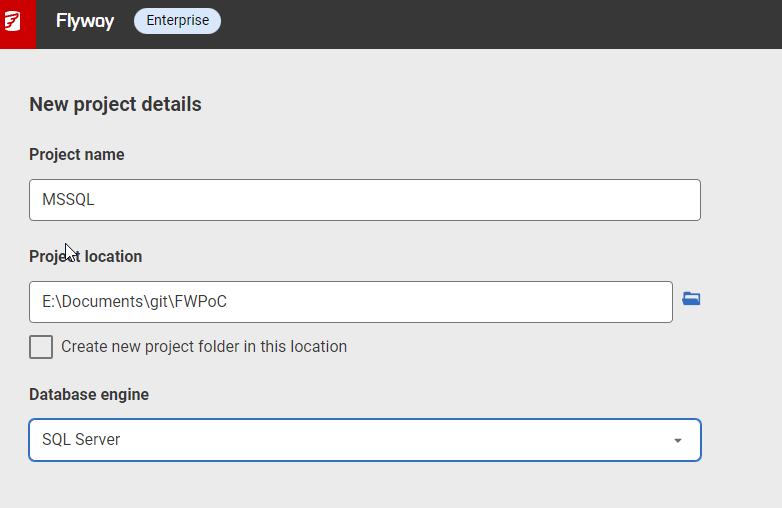
    I get a form after clicking New project. I’ll set the name as MSSQL, choose the root folder, and since I created the folder, I uncheck the checkbox. While I appreciate it’s good to put things in a subfolder, at times I’ve had FWD make a subfolder under the folder I choose, so I’m wary of this box. Mostly because I make mistakes.

    2022-12-28 17_05_33-Flyway Desktop

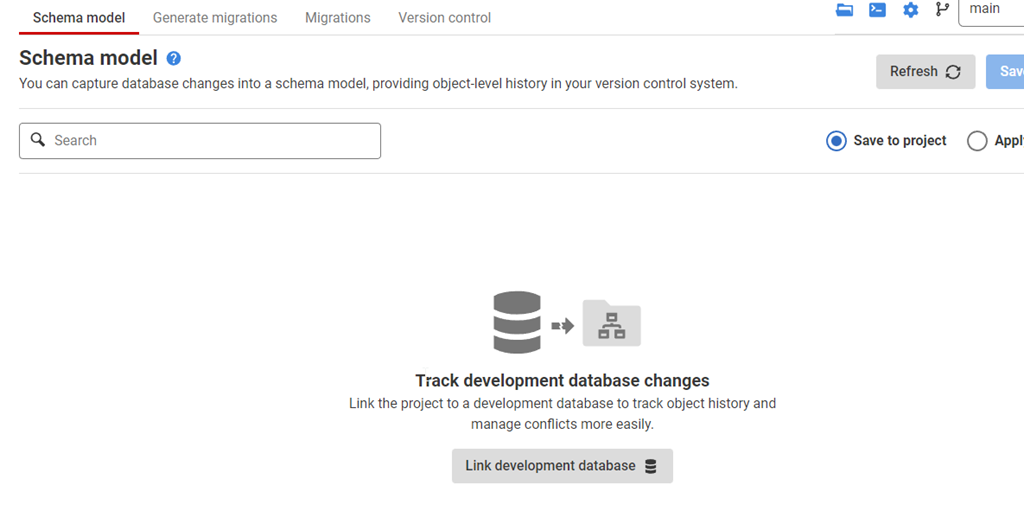
    Once this is created, I start in the Schema Model tab. I hate this nomenclature, as it’s weird. This is the list of objects whose code I’m capturing. There’s nothing here, because I need to link this to my development database.

    2022-12-28 17_07_44-Flyway Desktop

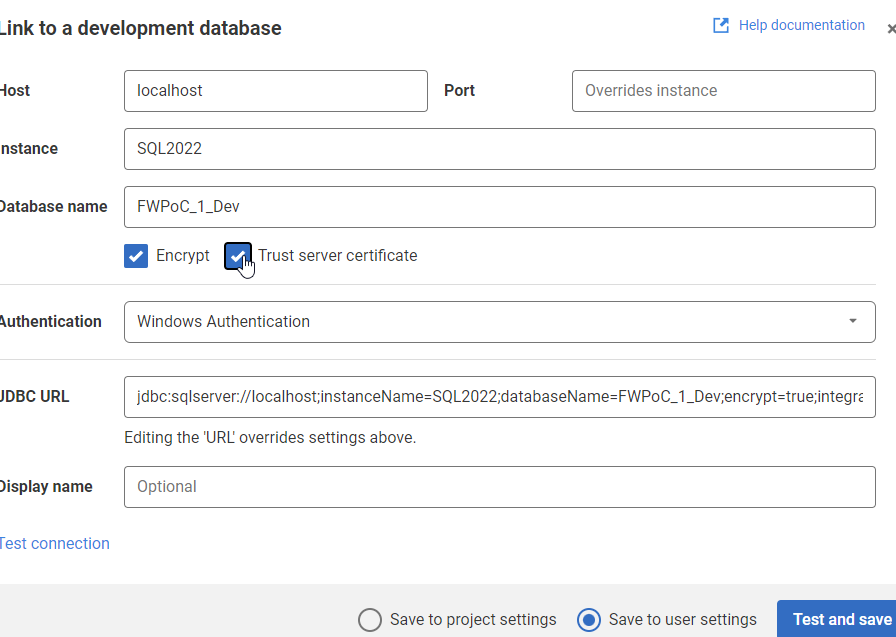
    If I click the “Link” button at the bottom, I get a dialog for the JDBC connection string. Don’t worry, you don’t need to know Java. Just fill in the boxes.

    2022-12-28 17_09_47-Flyway Desktop

    Two things in the dialog above.

    One: Click Trust Server Certificate. Most new installations of SQL and driver upgrades require this. I don’t know why we don’t have this checked by default.

    Two: Click “test connection” in the lower left, so if you have issues, this gets found quickly.

    Once this is done, I go back to the Schema model and I see this:

    2022-12-28 17_11_44-Flyway Desktop

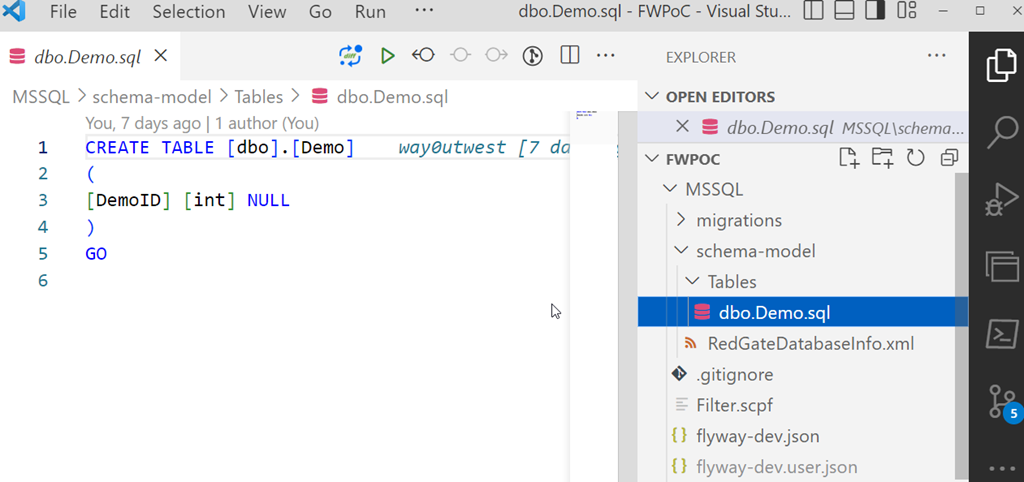
    I’ll select this object and save this to the project. This puts the file in the file system for this object, but doesn’t commit this to version control. We can see this in Visual Studio Code below. This is just a git repo, so if I open it in VSCode, I can see the file, the contents, and a note there are changes to be committed in the left icon.

    2023-01-03 12_31_22-dbo.Demo.sql - FWPoC - Visual Studio Code

    One project complete.

    PostgreSQL

    My second project is for PostgreSQL. Same git repo, similar process. I’ll create a new project, but say this is a PostgreSQL project.

    2023-01-03 12_33_16-Flyway Desktop

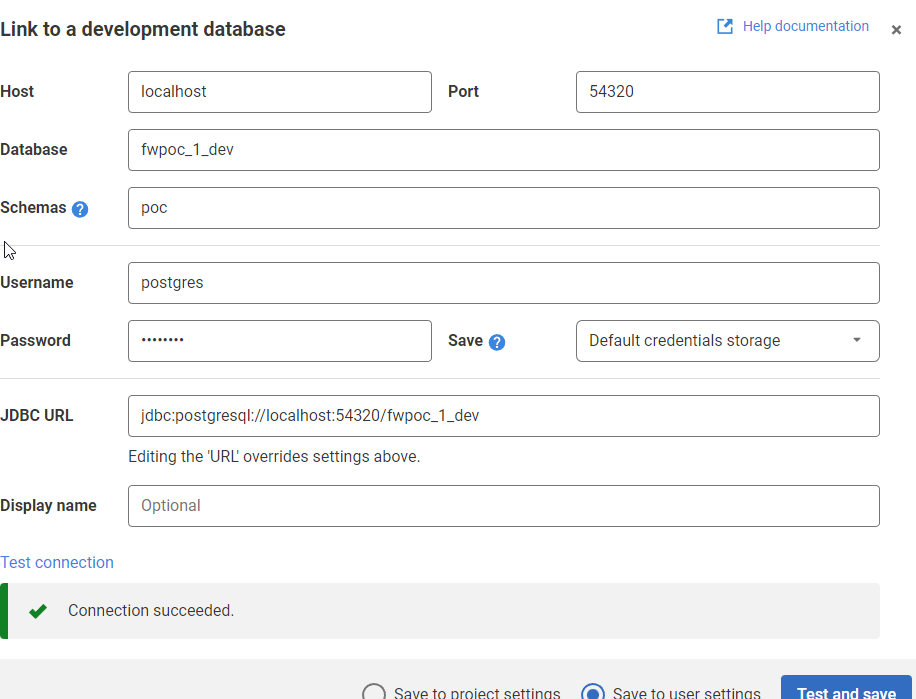
    The process is the same. I’ll link this to a dev database. I need to specify the port and database I’m using. I also specify the schema here, as it’s not the default.

    2022-12-27 17_36_50-Flyway Desktop

    Once I get the project connected, I see the same as I did above for SQL Server. I save it, and I get a slightly different structure in the project. I see a schema below the schema-model folder. In here, I see my table, but it’s not the code, but a description.

    2023-01-03 12_37_14-demo.rgm - FWPoC - Visual Studio Code

    From here, I just commit and push this stuff up to the repo. Note that commits and pushes, can push everything from both projects as they are in one repo. I did this on purpose to keep everything organized for me. However, if this were a team, I’d likely separate SQL Server and PostgreSQL into separate repos so individual developers don’t get confused.

    The next step here is to get a second database to where I can deploy changes for each project. I’ve got these set up, and in the next post, we’ll work on an initial deployment.