Fixing DBCC CloneDatabase Dup Key error in sys.sysschobjs

This was an interesting error, and I was able to duplicate it, so I decided to write a post on how to find the problem and fix it. The error after running DBCC CLONEDATABASE is:

NO_STATISTICS and NO_QUERYSTORE options turned ON as part of VERIFY_CLONE.
Database cloning for 'atest' has started with target as 'aSmallTest'.
Msg 2601, Level 14, State 1, Line 11
Cannot insert duplicate key row in object 'sys.sysschobjs' with unique index 'clst'. The duplicate key value is (885578193).

The final key value (885578193) for you might be different, but the error is the same.

Note: In SQL Server 2022 RTM + GDR, this error occurs with system objects collisions. Upgrading to CU12 fixed this. Possibly earlier CUs fix it, but that’s all I’ve tested.

The Scenario

I connected to a SQL Server instance and ran this:

DBCC CLONEDATABASE(aTest, aSmallTest) WITH VERIFY_CLONEDB;

I was just trying to copy a database to do some testing against a copy. The command too quite a few seconds (11 for me) to run before returning the error above. You can see the screenshot below.

2024-07-02 10_50_07-SQLQuery3.sql - ARISTOTLE.atest (ARISTOTLE_Steve (79))_ - Microsoft SQL Server M

Strange. Why would a copy of a database cause an error here? I’ve run DBCC CLONEDATABASE on this instance before and it worked.

I’m not sure of the exact problem, and my searches note that

The Fix

I found a post that describes a similar issue, but certainly isn’t the case here. Another post from Pinal shows how to query sys.sysschoobhs, which isn’t reachable with a DAC connection. I finally found in the docs that SQL Server doesn’t support cloning with objects in the model database.

So, I need to delete objects in the model database. In my case, I took this query (from the first link above) and ran it from the source database. That’s important. Running from anywhere else doesn’t work.

SELECT m.id, m.name, c.name, c.id, m.type
FROM model.sys.sysobjects m
FULL OUTER JOIN sys.sysobjects c
ON m.id = c.id
JOIN sys.objects o
ON c.id = o.object_id
WHERE --o.is_ms_shipped <> 1
m.name <> c.name
AND m.id IS NOT NULL;

As you can see below, this returns two objects.

2024-07-02 11_00_31-SQLQuery3.sql - ARISTOTLE.atest (ARISTOTLE_Steve (79))_ - Microsoft SQL Server M

If I look in model, I see these, one if you just look at tables, but the PK is attached.
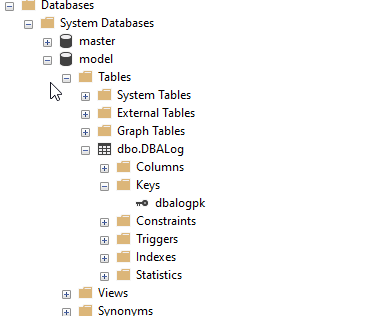
2024-07-02 11_01_56-SQLQuery3.sql - ARISTOTLE.atest (ARISTOTLE_Steve (79))_ - Microsoft SQL Server M

If I delete these two objects, then DBCC CLONEDATABASE works.

Summary

This is a strange error, and I’m not sure why it appears, but the documentation notes that running dbcc clonedatabase with objects in model is not supported. I suspect this is a change across one of the CUs, as I know this used to work.

In any case, the fix is remove the objects in model. If you really need these, then I’d create a script to remove and add those objects back, with a call to dbcc clonedatabase in the middle.

Posted in Blog | Tagged | 3 Comments

Least Privilege

I assume that most of you know about the principle of least privilege. If not, please read this short blog from Brian Kelley and make sure you understand how you should approach security. In the modern world, we also ought to adapt our systems for the zero trust model, which includes the least privilege principle.

However, I wonder how many of your organizations really follow these security guidelines internally. Are you strict about adding limited access and removing it when people change jobs/roles? If you use Windows Auth (or Entra), are your admins doing that or just adding in new roles? Do you scope down database access roles in granular ways or just stick with 1-2 roles for the most common things people do?

Maybe more importantly, do you use roles or are these systems that still have explicit grants for users?

Microsoft had a major hack recently from a test account that had administrative privileges. While there certainly might be a need for a test account to have privileged access, I’d hope that any test account created had a limited lifetime. I’ve created privileged database access accounts for vendors, but usually set a reminder to myself to disable the account after xx days. When I got smarter, I wrote a one-time job to do that and scheduled it. These days, I’d also file a ticket for my team noting that this needs disabling as well.

Humans get lazy and often don’t think about the future. If you’ve never had an issue with a test account, why think something might happen? Why spend the time writing a note or a job when surely you’ll remember or deal with it later? Maybe more common, why disable a login when the user might need access longer? We don’t want to deal with another phone call and enabling the account. That’s an interruption to our work week.

What has been humorous to me is that I’ve seen quite a few people who are very security conscious get annoyed when some automated system or process disables their account and forces them to make a call.

It is annoying. However, these little things, the details, the adherence to good practices are what help ensure we have better security. When we take shortcuts (like not enabling MFA), when we skip steps, when we do small favors for others, we’re increasing risk. Most of the time that’s fine.

Once in awhile it really comes back to cause problems. I’m not sure the savings are worth it.

Steve Jones

Listen to the podcast at Libsyn, Spotify, or iTunes.

Note, podcasts are only available for a limited time online.

Posted in Editorial | Tagged | Comments Off on Least Privilege

Taking My Wife on a Date Out of Town

This isn’t data related, but I had some fun, so I decided to make a quick post. I’m on holiday today, actually yesterday and today, in San Francisco/ Oakland.

The reason: a date.

My wife is a fan of Dwele and she’s often said that since he lives in Washington D.C. and is sometimes in clubs there, we should plan a trip sometime. I’ve periodically searched for concert dates and never seen any. While I was traveling this spring, I happened to see a couple dates at Yoshis, a jazz club in Oakland. I bought tickets and surprised her. I then booked a short holiday this week for us to fly out and see the concert.

Tonight is the show and we’re excited for the adventure.

Life is short. Work hard, but remember to enjoy yourself when you can. Especially with those you love. Look for opportunities to bring them joy and take them when you can.

Posted in Blog | Tagged , | Comments Off on Taking My Wife on a Date Out of Town

A New Word: Fitching

fitching – v. intr. compulsively turning away from works of art you find frustratingly, nauseatingly good – wanting to shut off the film and leave the theater, or devour a book only in maddeningly little chunks – because it resonates are precisely the right frequency to rattle you to your core, which makes it mildly uncomfortable to be yourself.

Good is relative, I guess. Maybe things are so well done that you can’t handle the imagery?

I’ve found myself fitching while trying to watch Crash many years ago at home. My wife was captivated, but I had to get up and leave the room. It was far too real, and too possible for me, and I couldn’t handle it.

That has stuck with me, and I’ve avoided certain films or books since then.

From the Dictionary of Obscure Sorrows

Posted in Blog | Tagged , | Comments Off on A New Word: Fitching