T-SQL Tuesday #174 – My Favorite Interview Question

This month is a great topic to me. I think growing and improving your career is a skill that most of  us could improve, especially in our younger years. The invitation from Kevin Feasel is a good one from which you can learn a lot.

I am looking forward to the responses from others.

If you want to host an invite one month, ping me and request a date. Most of 2024 is full, but I have a few months, and I certainly am happy to schedule you into 2025. This is a great way to participate in the community, meet others, and challenge yourself. You just need a blog.

In this post I’m going to give two questions, one as an interviewer and one as interviewee.

My Favorite Interview Question for Candidates

When I interview someone, I usually have a list of things to ask them to better help me compare candidates, but these are associated with digging into knowledge, however this question really helps me.

What have you learned recently?

I don’t expect candidates to know everything. I expect to have to teach them quite a bit about my environment. However, what I want from them is an effort to learn. My view is that some people are constantly learning things and others are content to rest on their previous knowledge/experience.

If someone hasn’t learned anything recently, I don’t necessarily write them off, but I might probe about what they have been doing, as well as how they prepared for a new job or the interview. Perhaps they’ve been busy with something (crisis, illness, etc.) and haven’t been improving in the short term, but if someone hasn’t learned anything in the last year they’re proud of, or they can’t remember when they last invested in themselves, I have a hard time investing in them as an employee.

Note, I will dig into ensure you learned something and aren’t just giving me an answer.

My Favorite Question as an Interviewee

In a lot of my jobs as a technologist, or a data professional, the job is the job. It’s very similar in many places. These days I do more architecture and advocacy, but if I were approaching a new job, I’d ask this:

What are the expectations around working hours?

I’d add context to this, but what I’m looking for are information for these items:

  • core working hours
  • on-call/non-core hours
  • punctuality

I don’t mind working hard, but I don’t expect to work a lot of non-core hours every week, or even too regularly. I don’t mind 40 or even 50, but beyond that I’m not going to be happy.

I’m also not someone that punches a clock. If you expect me to be online (or in an office) every day at 8am, you’re going to be disappointed. I might be there at 7:45 or 8:15. I don’t avoid work, and I do my best to be early for meetings, but if nothing is scheduled, I will vary my start time. I usually warn a potential boss about this.

I used to ask about travel, but I’m over that. I don’t mind or worry about travel too much.

Posted in Blog | Tagged , | 7 Comments

Reading JSON Data with Python

Recently I’ve been looking at archiving some data at SQL Saturday. As a start, I needed to read some of the archive data I have in Python. This post looks at the basics of reading in JSON data in Python, one of the more versatile languages for working with data.

Another post for me that is simple and hopefully serves as an example for people trying to get blogging as #SQLNewBloggers.

Reading JSON Files in Python

I have some data in the SQL Saturday repo in JSON format. This is schedule information, which is exported from Sessionize. I also have XML data, but I decided not to mess with that for now.

Getting this data into a dataset is actually easy in Python. Here are the basics. First, we need to import a few modules. In Python, lots of functionality is from various modules, which aren’t available until added to your workspace. However, they are easy to import.

We need a few modules:

  • json – used to work with json data
  • os – used to work with files and call OS functions.
  • pandas – used for creating dataframes
  • chardet – functions to detect encoding

I’ll import these, though from os I’ll only get a few things.

# Basic import of a JSON file

import json
import chardet
import pandas as pd
import os

Once I’ve done this, I can use these modules in my code.

Now for the code. The first thing is to find my files. I’ve stored json files in a “raw” folder, which I assume is below the place where I’m running the code. In this case, I have two files.

2024-05-06 14_11_40

Here’s a little setup code that sets the path (which could be an argument to the file), but creates a path to the files and starts a loop:

mypath = '.\\raw'
onlyfiles = [f for f in os.listdir(mypath) if os.path.isfile(os.path.join(mypath, f)) and f.endswith('.json') ]
# loop through the files
for f in onlyfiles:

In Python, once I want to create a set of code in a loop, I need to indent it, so the next few lines are indented below the for statement above. I’ll repeat that for clarity.

In the loop, I want to do a few things. First, I get a path to the file with the os.path.join  command, which builds me a path that works in various functions. Next, I want to use the chardet module to detect the encoding of the file. They should all be the same, but I had some issues when expecting the default encoding (this post helped). This ensures I get the correct encoding for the file.

Lastly, I’ll open the file.

# loop through the files
for f in onlyfiles:

    currentfile = os.path.join(mypath,f)

    enc=chardet.detect(open(currentfile,'rb').read())['encoding']

with open(currentfile,'r', encoding=enc) as json_data:

Again, I have a with statement and want to run other code, so I’ll indent the next line. The next line reads in the file using the json module, which has a load() function. This function knows how to parse a json file so that we can work with it.

Lastly, outside of the with command, I’ll return to the for loop be de-indenting one level and calling a pandas function to take a portion of the JSON file and load it into a dataframe. Think of a dataframe like a resultset in SQL or a datatable in C#. In this case, I’ll take the “sessions” structure. I print the first five rows with the head() function.

The entire code structure looks like this:

# Basic import of a JSON file
import json
import chardet
import pandas as pd
import os

mypath = '.\\raw'
onlyfiles = [f for f in os.listdir(mypath) if os.path.isfile(os.path.join(mypath, f)) and f.endswith('.json') ]

# loop through the files
for f in onlyfiles:
    currentfile = os.path.join(mypath,f)
    enc=chardet.detect(open(currentfile,'rb').read())['encoding']
    with open(currentfile,'r', encoding=enc) as json_data:
        data = json.load(json_data)
    # get session data from json
    df = pd.DataFrame(data['sessions'])

    # print the head
    print(df.head())

The results look like the image below. I’m not covering how to run Python or anything else, but you can see the first five rows with the session title and a couple other elements.

2024-05-06 14_20_09

The raw JSON looks like this for the first file with the sessions element.

2024-05-06 14_21_21

Now I can work with the data and query, transform, rewrite, store in a database, whatever. I’ll cover how to move this data in another post.

SQL New Blogger

This post took me about 15 minutes to write, mostly because of looking up some links. The code itself was for something I was already doing, so after getting the code working, I wrote this post using it.

This is a good example of something you could write to show that you are building some data warehouse skills, which are valuable for many employers.

Posted in Blog | Tagged , , | 1 Comment

Multiple Display Productivity

It seems that when I travel to offices these days, it’s standard for most desk setups to have two monitors. I think all the desks at Redgate have a docking station and two monitors for people to use. They also convert to standing desks, which is handy. I have a standing desk that I use regularly, and it’s nice to have that option when I visit an office. At a number of customer sites, I’ve seen similar setups, sometimes with laptop/monitor lifts instead of desks that rise.

Recently I saw a docking station announced that can support four monitors. I wonder how many of you want, need, or use more than two monitors. While there is often a standard in offices, since many of us work part or full-time at home, perhaps you have a different setup. Maybe you have one or two large monitors instead of 3 or 4 smaller ones. I’d certainly be interested to know if any of you have more than 4 monitors.

I run three 24″ monitors on my desk. When I go to an office and use a docking station, I can use my laptop as a third, though the resolution gets a little funny. If I were there for any length of time, I might try to reconfigure the laptop to work with the lid closed. Maybe that’s a chore for the next trip. At home, however, I usually have SQL Server Central and writing tools on one monitor, Chrome with lots of tabs as my main workspace for research and general work, and Outlook/Spotify on a third monitor. That lets me focus on one monitor most of the time glancing at another one for reference or copy/paste work.

I tried four monitors in a 2×2 configuration at one point, but I didn’t like looking up and down. Even now, I often really use two monitors, with side glances at a third one at times. I have been tempted to get 2 larger monitors (27-30″ range), but I’m not sure I would be more productive and not sure it’s worth spending the money for no real benefit I can perceive.

I’ve seen some neat setups in people’s offices. I see some developers using vertical monitors, though I haven’t found that to be ergonomic for me. I seem to have too many long lines of code or text. I see some people using a laptop with one monitor, and I’ve seen some friends who are creative with videos/live streaming that use more than four monitors.

I don’t know I have met anyone that has a gaming chair/monitor setup, but I’m sure someone out there has bought or built something like that. If you have, or you think you’ve got a cool setup, let me know.

Steve Jones

Listen to the podcast at Libsyn, Spotify, or iTunes.

Posted in Editorial | Tagged | 2 Comments

A New Word: ioia

ioia – n.the wish that you could see statistics overlaid on every person you encounter – checking the signal strength of their compatibility, a measure of their trustworthiness.

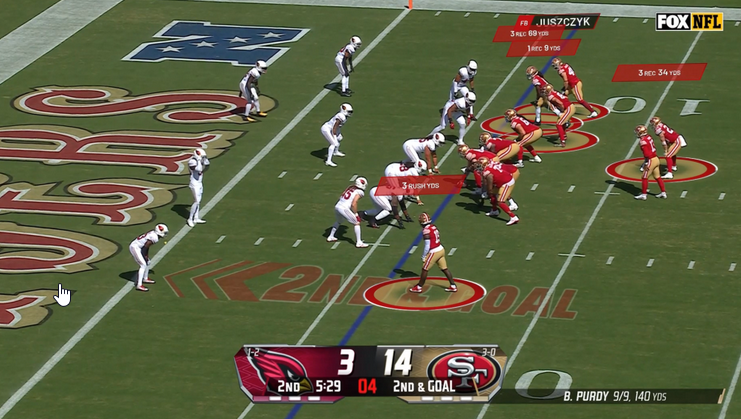
I subscribe to the NFL Plus mobile package every year and watch various games on my phone/tablet as I have time. Often I watch some while working on the ranch, cutting grass, shopping in the grocery, etc. I bring this up as there are a few viewing options in the package. I can watch the normal game broadcast, but I can also see one with stats. This looks similar to the image below:

2024-04-10 11_51_58-NFL  adding alternate game broadcasts — Mozilla Firefox

I thought I would enjoy this, but I don’t. I don’t mind some stats at times, but I don’t like when there is an overlay while the players are in action.

The idea of ioia being always overlaid on what I see, ala the Apple Vision or Google Glass views, would be annoying, and distracting. Already people checking mobiles is annoying.

If I could control the display, and dismiss it, then maybe ioia is something I’d embrace. Of course, there’s still the concern with data quality as a lot of ratings for people are very subjective.

From the Dictionary of Obscure Sorrows

Posted in Blog | Tagged , | Comments Off on A New Word: ioia