TDM was based on some existing technology, and incorporated a product that we were already selling, but it was an evolution based on our knowledge and experience that helps organizations build better software. We’ve had these products for a number of years:
data masking – Data Masker for SQL Server and Oracle
data generation – SQL Data Generator for SQL Server
classification – SQL Data Catalog for SQL Server
However, we didn’t want to just rebrand these, but rather attack the problem space in a new way. We especially wanted to be sure that our products would work across different database platforms.
The result is Test Data Manager, which includes these capabilities:
classification
subsetting
masking
data generation
database virtualization/cloning
Of these areas, only the last one (virtualization/cloning) uses an existing product, Redgate Clone. The rest of these are CLI driven brand new products designed to be put together to meet your needs. I’m particularly excited by subsetting (I wrote about this recently), as I think this is a boon to agility.
If you want to shift-left, empower your developers, and build better quality database software faster, check out Test Data Manager and get a demo scheduled.
Posted inBlog|TaggedRedgate, syndicated, TDM|Comments Off on What Does Redgate Test Data Manager Do?
Legislation was introduced in Australia to allow employees to protect themselves from unreasonable calls and emails from work during off-hours. You can read more about it, but a bill was passed to allow employees to ignore calls and messages without repercussion It is expected to pass, though I don’t expect this to do a lot for bad bosses. They’ll find ways to hint or imply that you need to respond, and might even remove your chances of advancement/promotion/raises. While you can sue, that rarely works out well for anyone.
From the various reports I’ve seen, I’m not sure if this includes salaried workers or just hourly workers. I certainly think hourly workers ought to be paid if they’re called after hours. I’ve even been paid as a salaried worker if the calls outside of core hours exceeded a certain amount per week. That seemed fair to me, and in our team, there was always someone willing to work more for extra money, so I could trade on-call work if I didn’t want to do it.
As a side note, my second time on call (for a week), I got paged over 40 times. It was a nice paycheck, but not worth it. I had toddlers in the house, and I slept with a vibrating pager on my chest to not wake my wife. It was not a good week and I traded away my on-call weeks to others, sometimes even sweetening the deal by buying them lunch.
There are a lot of people working in technology who don’t like the job and don’t recommend a career in this business precisely because they are overworked. The US has a very poor work-life balance in general, and many people feel pressured to work lots of extra hours. My colleagues and friends overseas do lots of work, and seem just as productive, but don’t arrive early, leave late, or work weekends very often. Sometimes they do, but not often. In the US, many people work more than 40 hours regularly, with a commute, and think this is normal.
There are times when extra work might be needed. However, with plenty of us working from home after the pandemic, it’s important to strike a balance of some sort and learn to get away from work. I’ve worked hard to reduce my hours from a regular 60 while owning and running SQL Server Central to something more reasonable now. I certainly have weeks I work more than 40, but I have weeks I work less.
Balancing the workload in a day is something else I watch. I try hard to not set meetings or work too early or late, but the nature of my job means I work with people in the US, the EU, and Australia. As I write this, I started work at 8 am this morning with a meeting and I have an 8-9 pm webinar for the Australian region. However, I went to the gym at lunch and coached kids for a few hours in the late afternoon. I found a balance and while I might have worked 9 hours today, I don’t often do that. I will take 6 am calls, but not regularly.
There is something satisfying about working hard to earn your paycheck each day. It gives one purpose and satisfaction for a job well done. At the same time, it’s important to get away from work, enjoy your family, friends, hobbies, faith, and more. In technology, where regular hours aren’t always part of the job, you must manage your life well. I don’t know that legislation would help in the US, but I am interested to see how this proceeds in Australia.
While this industry is full of self-taught individuals who have spent time learning new technologies and tools, it’s somewhat amazing that training continues to be an issue. Many organizations limit their training budgets and time allocated to employees while continuing to expand the number of technologies and platforms they use. This is one reason why I think changing database platforms to avoid licensing costs is unlikely to save you money anytime soon. Retraining staff and developing competence takes time. Perhaps this is also one reason why many companies look to the cloud, thinking that they can reduce the amount of upskilling needed by their staff if the cloud vendor manages the systems.
That might be true, but there is a lot of knowledge is still needed about how the underlying technologies work, especially if employees are to efficiently write code or make configuration changes in the system. The cloud can be more cost-effective, but it can easily be less cost-effective. Knowledgeable employees can make a difference.
I do see plenty of organizations subscribe to online learning, but often I find these courses good for basics, but not necessarily helpful for specific situations and just-in-time knowledge requirements for projects. There more custom training, or at least, group support, is needed to ensure that your staff is learning efficiently. Far too many people can’t handle open-ended training from an online platform and complete more than one course.
Training isn’t enough, as there also needs to be some practical application of new skills in your environment. Practicing katas as a group, coaching each other, and applying skills to actual projects while measuring results is important. It takes some commitment from both employees and organizations to get better. Far too often, I also see staff unmotivated to learn and grow, for a variety of reasons, but that’s a different problem that we have to work to solve together.
The world of technology in business is growing increasingly complex. We find more and more organizations adding technologies, especially new database platforms, and we lack skilled people to work with them. That’s a constant challenge, but one that creates opportunities for you if you find ways to improve yourself.
I had a customer question whether Flyway Desktop (FWD) would cause problems if developers were adding columns into the middle of tables. It’s a valid concern, and this post shows that FWD doesn’t cause you issues, even if your developers do silly things.
Unless they want to do silly things.
I’ve been working with Flyway Desktop for work more and more as we transition from older SSMS plugins to the standalone tool. This series looks at some tips I’ve gotten along the way.
The Scenario
Imagine that you have a table with a few columns, like this one.
CREATE TABLE Product
( ProductID INT NOT NULL CONSTRAINT ProductPK PRIMARY KEY
, ProductName VARCHAR(50)
, ProductDesc VARCHAR(1000)
, ProductSize CHAR(1)
, ProductWeight INT
, ProductColor VARCHAR(20)
, StatusID int
)
GO
This table has the same structure in dev and prod, and I need to add a new column. We need a quantity per package as we have new products where there are multiple items in a box, so there is a need to add ProductQtyPerUnit to the table.
I decide that this needs to be before StatusID since it’s related to the other product description items, and I want them to be together. This is a good concept when designing entities, but it’s not worth doing when we have millions of rows in this table in production.
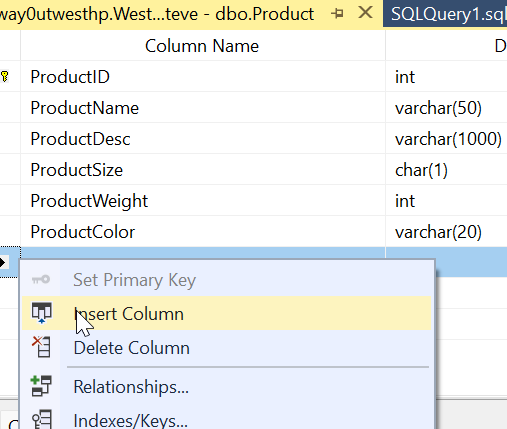
In the SSMS designer, I do this. I right click my table, click Design, the right click before StatusID and select Insert Column:
I then design my new column. Things look good.
Most developers would just save this change. However, if I were to click the Generate Change Script button, I’d see this (I leave out the SET stuff at the top).
BEGIN TRANSACTION
GO
CREATE TABLE dbo.Tmp_Product
     (
     ProductID int NOT NULL,
     ProductName varchar(50) NULL,
     ProductDesc varchar(1000) NULL,
     ProductSize char(1) NULL,
     ProductWeight int NULL,
     ProductColor varchar(20) NULL,
     ProductQtyPerUnit smallint NULL,
     StatusID int NULL
     )  ON [PRIMARY]
GO
ALTER TABLE dbo.Tmp_Product SET (LOCK_ESCALATION = TABLE)
GO
IF EXISTS(SELECT * FROM dbo.Product)
      EXEC('INSERT INTO dbo.Tmp_Product (ProductID, ProductName, ProductDesc, ProductSize, ProductWeight, ProductColor, StatusID)
         SELECT ProductID, ProductName, ProductDesc, ProductSize, ProductWeight, ProductColor, StatusID FROM dbo.Product WITH (HOLDLOCK TABLOCKX)')
GO
DROP TABLE dbo.Product
GO
EXECUTE sp_rename N'dbo.Tmp_Product', N'Product', 'OBJECT'
GO
ALTER TABLE dbo.Product ADD CONSTRAINT
     ProductPK PRIMARY KEY CLUSTERED
     (
     ProductID
     ) WITH( STATISTICS_NORECOMPUTE = OFF, IGNORE_DUP_KEY = OFF, ALLOW_ROW_LOCKS = ON, ALLOW_PAGE_LOCKS = ON) ON [PRIMARY]
GO
COMMIT
This script essentially creates a new table, copies over data, then drops the old table before a rename. On a large table, this could acquire a number of locks and potentially cause errors or disruptions for clients. If I want deployments at any time, without causing downtime, this isn’t the script I want to run.
Flyway and Column Changes
If I do this in dev, assuming I don’t have millions of rows of data, I might not notice this. What about detecting this change in Flyway? Let’s see.
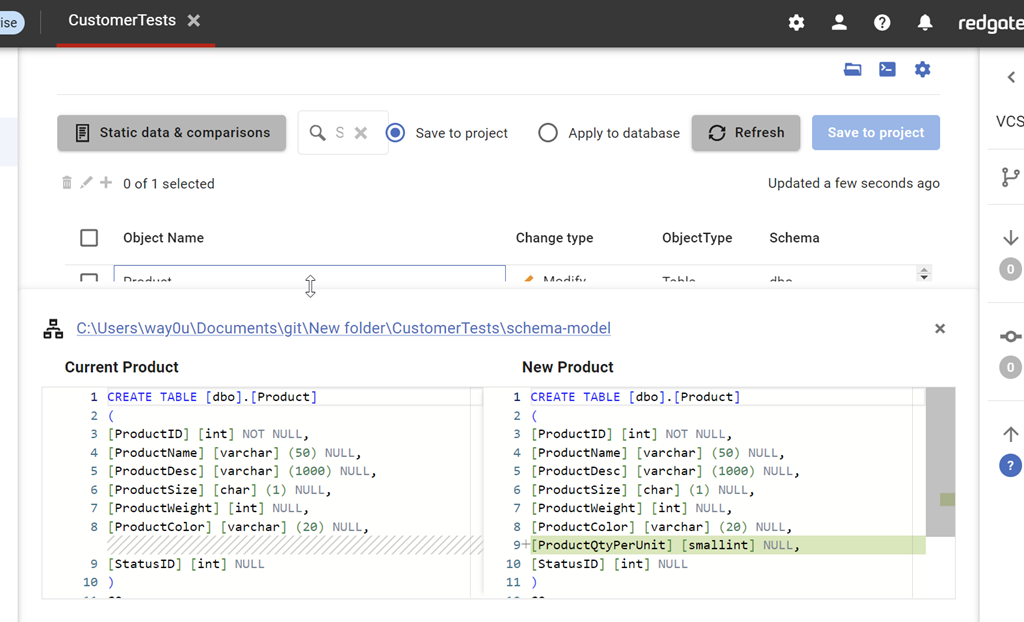
I have a Flyway project open in Flyway desktop and I’ll refresh the changes. As you can see, we detect this new column. As you can see, we detect the change, showing the insertion of the column into the middle of the table.
I can save this and then generate a migration script for this change. When I do this, I see this script. Notice that this script is unlike the SSMS script and just adds a column to the table.
This is the same behavior in SQL Compare. By default, we don’t want to rebuild tables and move data. We want to just add the new change to the system.
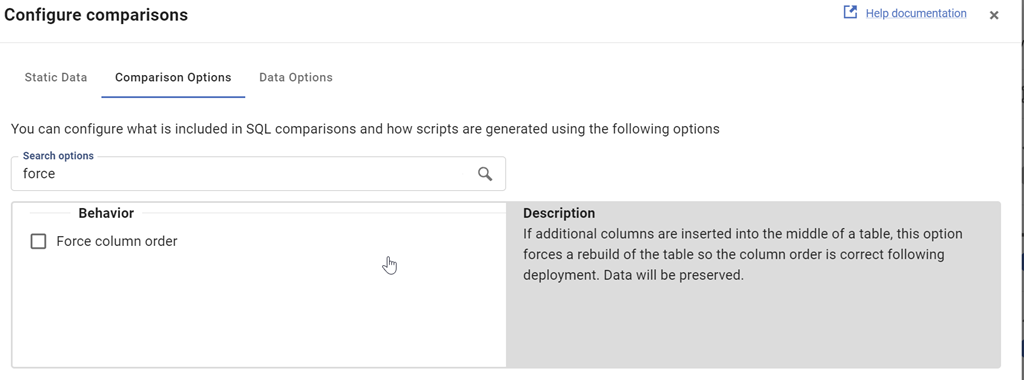
This is controlled by the Force Column Order option, which is off by default. We can see this when I look at the comparison options for the project.
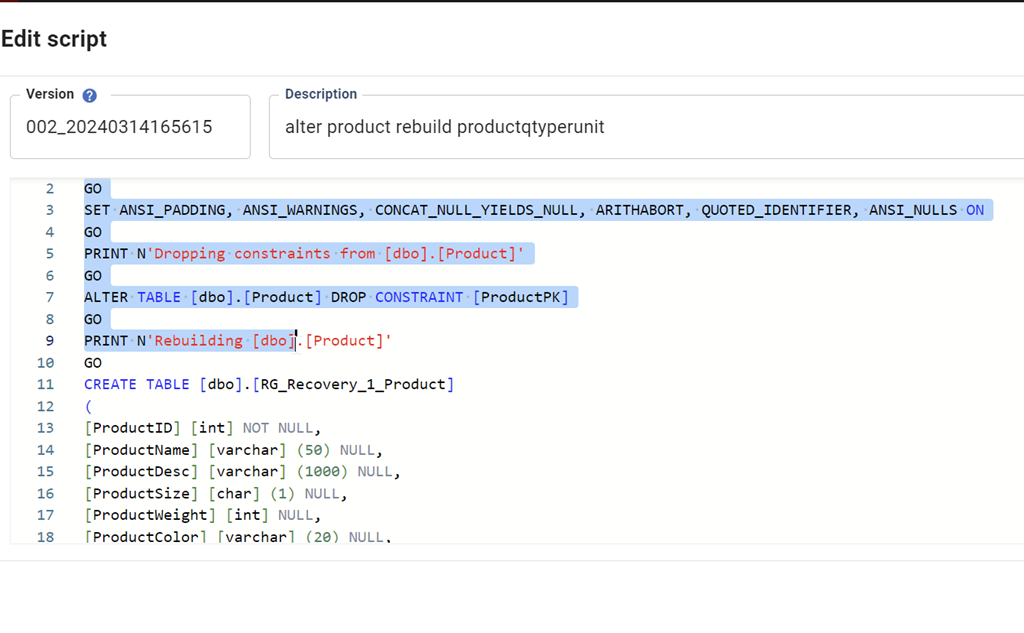
I can check this and then re-generate the migration script. When I do that, we see this script. This one
The entire script is here:
PRINT N'Dropping constraints from [dbo].[Product]'
GO

ALTER TABLE [dbo].[Product] DROP CONSTRAINT [ProductPK]

GO

PRINT N'Rebuilding [dbo].[Product]'

GO

CREATE TABLE [dbo].[RG_Recovery_1_Product]

(

[ProductID] [int] NOT NULL,

[ProductName] [varchar] (50) NULL,

[ProductDesc] [varchar] (1000) NULL,

[ProductSize] [char] (1) NULL,

[ProductWeight] [int] NULL,

[ProductColor] [varchar] (20) NULL,

[ProductQtyPerUnit] [smallint] NULL,

[StatusID] [int] NULL

)

GO

INSERT INTO [dbo].[RG_Recovery_1_Product]([ProductID], [ProductName], [ProductDesc], [ProductSize], [ProductWeight], [ProductColor], [StatusID]) SELECT [ProductID], [ProductName], [ProductDesc], [ProductSize], [ProductWeight], [ProductColor], [StatusID] FROM [dbo].[Product]

GO

DROP TABLE [dbo].[Product]

GO

EXEC sp_rename N'[dbo].[RG_Recovery_1_Product]', N'Product', N'OBJECT'

GO

PRINT N'Creating primary key [ProductPK] on [dbo].[Product]'

GO

ALTER TABLE [dbo].[Product] ADD CONSTRAINT [ProductPK] PRIMARY KEY CLUSTERED ([ProductID])

GO
By default, Flyway isn’t going to try and rebuild your tables if developers add columns into the middle of a table. This is the recommended and preferred way of dealing with these changes. If your developers complain, then discuss the fact that we don’t need to worry about the physical order of columns in a table. If you want columns returned in a different order, do that in a query (and don’t use SELECT *).
If you really need tables rebuilt, you can check the option, but you shouldn’t do that.
Try Flyway Enterprise out today. If you haven’t worked with Flyway Desktop, download it today. There is a free version that organizes migrations and paid versions with many more features.
If you use Flyway Community, download Flyway Desktop and get a GUI for your migration scripts.






 Voice of the DBA