A New Word: Aesthosis

aesthosis– n. the state of feeling trapped inside your own subjective tastes – not knowing why you find certain things beautiful or ugly, only that you do – wishing you could remove the sociopsychological lenses from your eyes so you could see the beauty in anything and be moved to tears by the smell of burning garbage, the aria of a screaming toddler, or a neon Elvis painted on black velvet.

Earlier in my life, I had stronger tastes, opinions, and judgments. Often just inside my own head, but I still had them. I might even point out to someone that I didn’t like something, regardless of whether they liked it. Often without prompting, which is a bit of a way of being a jerk for no reason.

As I’ve gotten older, I find myself less strongly moved by things. I can instead appreciate them for what they are, express curiosity why others might find them desirable or horrific, or just let the impression I have wash over me.

I got on a plane recently and there was an infant or toddler crying. For most of the flight. A few people complained around me quietly, but I could appreciate the challenge the parents were facing (and the shame or embarrassment), empathize with the little one’s fear, and really just accept this as part of the day. I wasn’t judging, just experiencing.

I had a similar experience when there was some visual thing the kids sent everyone. My wife liked it ( I assume it was a joke), but I remember not really finding it funny, but being more curious about why one kid did. I think the five of us were split on how we felt, but it was just interesting to me.

I don’t feel so trapped anymore, just interested in the world.

From the Dictionary of Obscure Sorrows

Posted in Blog | Tagged , | Comments Off on A New Word: Aesthosis

A First Look at Redgate’s Subsetter

I have been a proponent of subsetting databases in dev/test for a long time. It took awhile, but as part of the Test Data Manager that Redgate launched at the PASS Data Community Summit, there is a subsetting component. I was very excited to try this out, and this shows my first experience.

This is part of a series of posts on TDM. Check out the tag for other posts.

Getting Started

The subsetting tool is a part of Test Data Manager, so you need to get that installed. Once it’s set up, there are a few CLIs that work from within the GUI or separately to perform certain functions. One of these is subsetter.exe, which is a Windows executable.

I copied that to a folder in my path (c:\utilities) and I was ready to experiment. There is a doc page, but really it’s copying a file. You can see this below, and it’s a handy spot on my machines where I put in various CLIs or batch files I need to run from anywhere.

2024-02-16 14_58_01-Utilities

That’s the easy part, not the harder part.

Setting up Databases

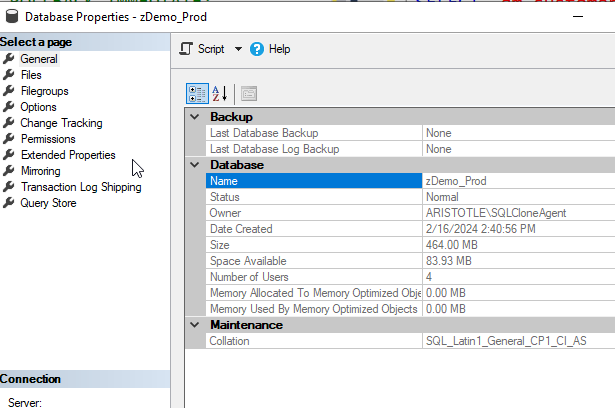
I set up a quick zDemo_Prod database to hold some data. I then grew this to a few hundred MB because many of my test databases are small. Since this was a quick test, I wasn’t searching for something large.

2024-02-16 14_59_02-Database Properties - zDemo_Prod

Next I needed a blank copy of this. The worked examples page shows an easy way to do this, but essentially you need a copy of the schema in another database. I ran this to get the db.

DBCC CLONEDATABASE(zDemo_Prod, zDemo_Dev) WITH VERIFY_CLONEDB;
go
ALTER DATABASE [zDemo_Dev] SET READ_WRITE WITH ROLLBACK IMMEDIATE;
GO

Once that was done, I was ready to subset.

I used a batch file because this is a CLI and there are a number of parameters. I like editing those in a file and then just calling one thing from the CLI. Here’s my file:

2024-02-16 15_02_01-createsubset.cmd - Visual Studio Code

The required parameters are the engine, the source, and the target. Everything else is optional. As I was experimenting, I decided to add a target size.

Once this was saved, I just ran the batch file. As you can see, there is a lot of output.

2024-02-16 15_03_37-cmd (Admin)

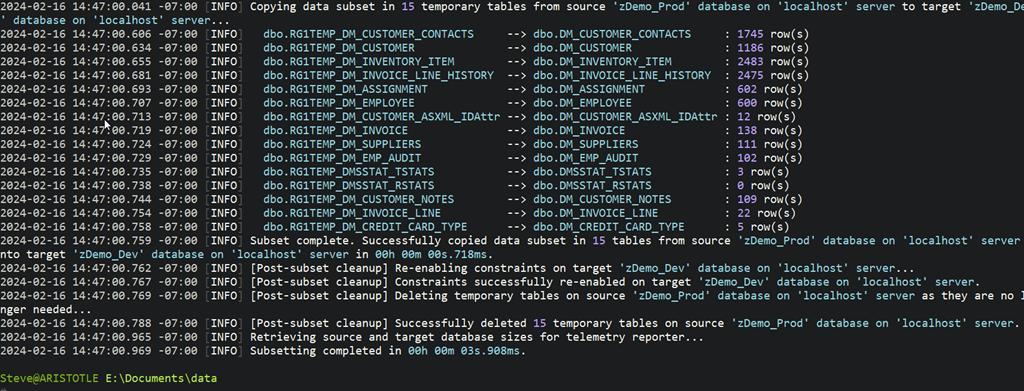
Essentially this analyzed my database, talked the PK/FK structures, and then decided to grab a limited set of data. This isn’t all the output, but the bottom portion is shown below and it lists the tables that were “shrunk” by this process.

2024-02-16 15_03_51-cmd (Admin)

I also set up a few queries to check the row counts before and after. You can see how much was moved above, but below you see the two queries from different databases. zDemo_Dev is on the left and zDemo_Prod is on the right. Same queries on both sides.

2024-02-16 15_06_03-SQLQuery2.sql - ARISTOTLE.master (ARISTOTLE_Steve (65))_ - Microsoft SQL Server

My DM_Customer table started with 15005 rows, but only 1745 were moved over The DM_Customer_Notes had 1025, but only 109 moved. I’m sure this is because the rows in here have a FK to DM_Customer.

Overall pretty cool, and on a 300MB database, 10% of that took me a few seconds to get moved to a second database.

Summary

This worked pretty well. It took me very little time to get this set up, as it’s a CLI, but getting it configured took a little learning. However, I’m pleased so far with how it works.

I’ll be experimenting more and passing back feedback to our devs. If you have thoughts or ideas, let me know.

If you want to try Test Data Manager out for yourself, contact your Account Executive at Redgate, or ping sales@red-gate.com for a demo and a Proof of Concept eval.

Posted in Blog | Tagged , , , | 2 Comments

The Art of the Code Review

The inspiration for this was a piece about the art of the good code review. Throughout my career, I’ve seen code reviews grow and change. From formal meetings to automated notifications and asynchronous discussions to complete lip service to the process. I’d like to think that most organizations are beyond the latter and there is some sort of review beyond the developer, but I still see a lack of other eyes looking at code before it’s deployed, especially database code.

The article above opens with the idea of why we review code. The main reason is to create ownership, or more specifically, shared ownership. I had never thought of it in these terms, even though I think the ideas of standards and patterns are certainly shared items. Having everyone take ownership not only keeps quality high but could help you share knowledge and also ensure everyone feels a responsibility to safeguard all the code. This also helps everyone keep an eye on the larger picture of the entire codebase.

I know lots of modern application developers are very familiar with pull requests, though I think these are still somewhat rare in the database world. This is a notification that someone would like their code to be put together with everyone else’s code. A good code review does start with a good pull request, as the idea is to have enough information to let the reviewer decide if they should approve things. PRs should also be focused, so if you are making a major change in one object and refactoring another, make those two different PRs. That way I can reject one without the other.

Overall I like the suggestions in the post, but I worry about one of them. The author notes that if there are minor changes requested in a comment, you should pre-approve the PR and trust the author to address the issues. In today’s very busy world, and with the challenge of changing code once it’s deployed to a database, I don’t know if I’d follow this for SQL code. Maybe for C#, but if I have to live with your code for a decade, I don’t want mistakes deployed that could be prevented.

Steve Jones

Listen to the podcast at Libsyn, Spotify, or iTunes.

Posted in Editorial | Tagged | 1 Comment

Foreign Keys in SQL Data Generator

A customer recently asked about using FKs in SQL Data Generator, and I decided to write a short post showing how these work.

The Scenario

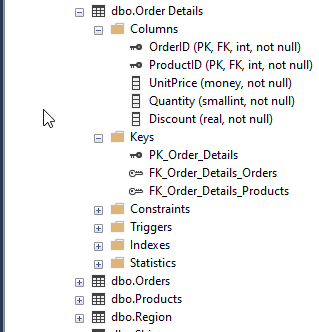
I’ve got a copy of the Northwind sample database on my system, named Westwind so I can experiment. As you can see below, the Order Details table has a few FKs in it, one to Orders and one to Products.

2024-02-09 16_00_24-SQLQuery5.sql - ARISTOTLE.Westwind_1_Dev (ARISTOTLE_Steve (59))_ - Microsoft SQL

This is a very standard setup in many databases, where there are links between tables. I’m also going to add another table with no FKs, but I want data in here from another table.

CREATE TABLE OrderHistory
(OrderID INT
, OrderDate DATETIME
, Complete BIT
)
GO

This should have an FK declared to dbo.Orders.OrderID, but as I often see, this wasn’t set up.

Using SQL Data Generator

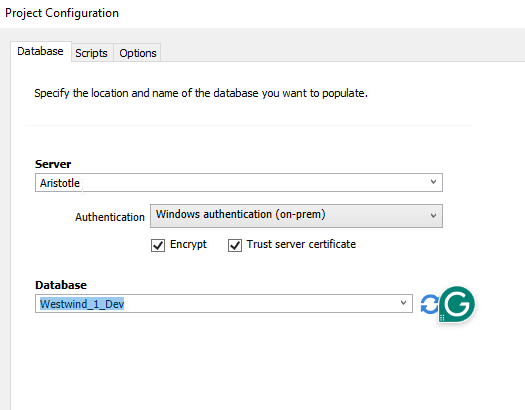
I’ll create a new project in SQL Data Generator that points to this database. When this configures itself, I’ll deselect all tables except for Orders, Order Details, and OrderHistory.

2024-02-09 16_02_14-Project Configuration

When I do this, if I look at Order Details, I can see that in the preview, both OrderID and ProductID are listed as generated data using the keys. In this case, this means I’d get data from both the Orders and Products tables.

2024-02-09 16_03_17-SQL Data Generator - New project _

If I check OrderHistory below, you can see that the OrderID is set as an integer to be generated. However, that’s not what I want.

2024-02-09 16_04_44-SQL Data Generator - New project _

Fortunately, I can set a manual key here. If I select the Generator drop down at the top, I see  there is a SQL Type generator, and one of the subtypes is a FK. We’ll pick that.

2024-02-09 16_05_19-

This changes the configuration and I need to pick a table and column. I’ll choose orders.

2024-02-09 16_05_31-SQL Data Generator - New project _

Now I can generate data. Before I do this, I check Orders and there are 840 orders in there. I’ll just generate 10 more. I’ll also generate 10 OrderHistory rows and not delete existing data. Once I generate the data, let’s look at some results.

Below, we’ve added 10 orders, which makes sense. My OrderHistory table has 10 rows, but when I join with Orders on the OrderID, I get all 10 rows back. Data generator has respected a manual, non-DRI, FK.

2024-02-09 16_10_36-SQLQuery5.sql - ARISTOTLE.Westwind_1_Dev (ARISTOTLE_Steve (59))_ - Microsoft SQL

SQL Data Generator should detect your declared FKs, but even if you don’t have them or it doesn’t, you can add them into your generated dataset.

SQL Data Generator is part of the SQL Toolbelt, and fantastic set of productivity tools for SQL Server developers. If you’ve never used these, download an eval and give them a try today.

Video Walkthrough

I also have a video walkthrough of this post, if you’d rather see this in action.

Posted in Blog | Tagged , , | Comments Off on Foreign Keys in SQL Data Generator