The PASS Data Community Summit 2025 Recap

It’s Monday. I’ve been home since Fri night, but with a busy weekend, I’m still recovering from the PASS Data Community Summit. There’s a nice wrap from the crew, which you can watch. You might spot yourself in there if you attended.

This is a short post of some memories and photos from the event. As usual, I wish I had more. One sad thing was Chris Yates not coming due to other commitments, but I loved seeing him on a sign in the convention center. I sent him this shot.

2025-11_0123

Every year I find myself either over-committed or under-committed. The latter is great, because I can see more people. The former is overwhelming and tiring. This year was the “over” year, where I had enough things scheduled that I didn’t have enough time to get to sessions or hang out and see people.

That being said, it was great to see Ryan Booz at the event. We’ve had a few years of traveling around together while working a Redgate. He left this year to find a job that better fit his life, and I miss seeing him regularly. It was good to take a little time and catchup with him.

2025-11_0121

My wife came up for Mon/Tue/Wed to get a break from work and see a friend in Seattle. Monday was keynote rehearsal for me, and spending some time with my wife that afternoon and evening. I also managed my one workout for the week on the hotel Pelaton. I had aimed for 3-4, but got too busy, and was too tired. I did run into a few friends wandering around the convention center.

2025-11_0128

Tuesday was breakfast with my wife and then heading over for a long keynote rehearsal. We had a few last minute changes last month and I was asked to help with the keynote. I’ve been busy prepping and working with our marketing and artist teams to get things ready. We had a lot of fun, but it’s been a lot of work and we had last minute updates to review on Tuesday.

2025-11_0129

Redgate brought in a number of sales engineers and support staffers for training and to meet customers at the conference. We’ve re-dedicated ourselves to working closely with customers, getting feedback, listening to their concerns, challenges, and critiques of our products. David runs our support org in the US and I rarely see him. We used to travel to all sorts of events, so it was great to see him last week.

2025-11_0135

My wife came briefly, but it was a late night leaving. This was my view leaving, with almost the same view coming back the next morning.

2025-11_0138

Wednesday was an early start. At the convention center just before 7 for the Redgate Keynote. Well, for makeup, mics, and waiting. The event has used the same crews for makeup and sound for a number of years. I’ve gotten to know the staff and enjoy catching up with them. I got to watch Grant and Laura get made up before my turn.

2025-11_0136

This was a weird experience for me the first time, but I’m used to it now. Fortunately, I cover my balding head with a hat, so I’m only in the chair for a few minutes. The one thing I have to remember is to finish my coffee first, so I don’t smear my lipstick (gloss).

2025-11_0137

It’s a lot of waiting for the event to begin, but once the keynote started, it seems to go fast. I was glad that there were 3 of us, and I didn’t have a huge part. I am used to being on stage, so standing to the side while Kellyn and Laura presented their parts was east. I did take a moment to snap a short of the Redgate Product and Engineering leaders on the front row.

2025-11_0125

Wednesday was a little time at the booth, where I saw more friends, but I had a session in the afternoon and I had a rehearsal scheduled with the Microsoft presenters for their keynote.

2025-11_0124

It’s not all work, as I got to chat with Bob Ward and Conor Cunningham. I’ve known those gentlemen a number of years and relish the opportunity to catch up with them. Again, a lot of waiting and standing before I did my part and left them to rehearse.

2025-11_0139

There are some beautiful views from the Summit building and I grabbed one here on the way to the talk. Last year ago I was very busy and lay down here on Friday afternoon for a break before the closing. Someone snapped a picture, and I was hoping that I wouldn’t end up here again. (I didn’t).

2025-11_0110

After my presentation, I ran into Thomas LeBlanc, a longtime friend from Baton Rouge. I’m not a big college football fan, but I usually check to see how Thomas’ LSU Tigers do every week and sometimes send a note.

2025-11_0126

Wednesday night was the expo reception, which was nice. I had lots of chats with different people, got a few pictures with them, and enjoyed the event. Afterwards, I finally got back to see my wife and got to spend a bit of time with her and a friend. It was a later night than I wanted, but it’s hard to cut things too short when I’m having a good time.

Thursday was the Microsoft keynote, and again, an early call. 7am for more makeup, mics, and misc time with Microsoft staff. I opened the day with a short summary and reminders, and also a memory of Andrew Clarke. I added this slide to my deck, and I choked up a bit when I got to it.

2025-11_0140

I knew Andrew for many years, and lunch (with a beer) was a part of many of my trips to the Redgate office in Cambridge. I miss his wit, thoughts, and company. I referenced a great article from our founder in the keynote, which I recommend reading.

2025-11_0127

I chatted backstage a bit, which always seems weird to me. I am often in public, and having a green room backstage is always a little odd. Still, it’s nice they have coffee, and not nice there as pasties. Fortunately, I avoided the latter.

2025-11_0141

Once again, I was on the move for a livestream that Redgate wanted to do for our Test Data Manager product. We had a spare room where we setup and got ready to record. A lot of waiting, though at least I got to sit down a bit.

I also had to fit in a recording for the Simple Talks podcast. I have been trying to schedule these when I see people, so I’m working around their schedules.

This was fun, though packing up and getting the equipment secured was a lot. I had planned on getting back to the hotel for a workout before our Thursday night party, but got hung up chatting with a few Redgate co-workers and only had time to sit down in my room (alone Sad smile ) for about 20 minutes before heading out to the Redgate party.

2025-11_0115

It was great to catch up with various Redgate people and customers at this event. I was busy and didn’t take many pix, but I enjoyed this.

Friday morning I lightly slept in. I didn’t get to the convention center until 830a.  I missed the morning keynote, though I will watch later. I had more recordings scheduled, so I setup my room and got ready to knock out 4 more sessions.

2025-11_0112

I ate lunch with Tim Mitchell and had a fun chat with a few attendees that sat with us. That’s one of the things I missed this year, being a little busy and skipping lunch or just grabbing something on my way to something else.

I did take a few minutes to check on Ike Ellis, who is a friend and had to cancel his trip and session at the Summit. Ike has had a few health issues, and had a minor accident this week. He called me, so I could help coordinate and inform whoever needed to know. If you know Ike, send him some well wishes.

2025-11_0142

After lunch, the expo hall closed and I had time to hit one session. I went to see Atte, one of the New Stars of Data speakers. I love that the Summit reserves some spaces for new speakers, and with 50% first timers, this is a even better. We have speakers and attendees coming for a new experience they’ll remember forever.

I had a 7pm flight and we have a 330p wrap for the event with staff and Redgaters. It was a quiet, but fun time seeing a number of people I work with and don’t see often. There are also some others that I do see throughout the year. I had a drink, a few conversations, and then grabbed a ride to the airport with a few coworkers for my (late) flight home.

An amazing time, though never enough time. Even when waking up at 615a to get to volleyball practice, I still was thinking about all the people I’d seen during the week and remembering how much I enjoy spending time with the community.

Looking forward to next year, and hopefully, a few less commitments so I can spend more time talking with the community.

Posted in Blog | Tagged , , | 1 Comment

Is Data Modeling Common?

Recently, I had a few questions on database modeling. One was posted in the SQL Server Central forums, and a customer asked about ERD tooling on the same day. This came shortly after Redgate acquired Vertabelo (now Redgate Data Modeler). This stood out to me as very rarely in the last few years have I found people consulting and updating a diagram while performing database development.

When I started as a developer and needed to update a database, I had to first update a diagram that was stored in ErWin. We had a dedicated computer (back when we went to an office every day) where the software was run and any developer could us this to update the diagram with proposed changes. Back then, we had to get another peer to sign off on changes before making them, and the peer was supposed to go check the diagram for the change before approving it. That’s only if they thought your change made sense and conformed to our standards (naming, design, etc.).

Over the last decade or so, it seems there haven’t been a lot of common tools for building diagrams in the Microsoft space. The SSMS Database Diagrams haven’t been the easiest to use and I rarely see people consult it. I loved ER/Studio, but it and ErWin were very expensive and outside the budget for most groups. There have been a lot of smaller online tools, but I don’t see a lot of consensus for which ones people like. There are DbSchema and SqlDBM, among others. I see various blogs, like this one, that recommend different tools, but the uptake seems to be low in many organizations. I hope Redgate can make data modeling more common with Redgate Data Modeler (coming soon to the Toolbelt).

My question for you is do you still maintain and use database diagrams for development? Or is this a somewhat lost art? Is it not necessary or useful for you? Do you wish your development teams did this to ensure a more cohesive and consistent model?

I used to like having a diagram because it a) forced me to slow down and rethink things a bit as I made updates and b) let me see where there were dependencies. One of the reasons SQL Dependency Tracker exists is that I asked Redgate to extract the dependency tree from SQL Compare to allow me to see it separately. This would allow me to know what other objects might need to be changed if I refactored ObjectA. I found that to be a great “picklist” of things to check during database development.

I don’t know how many people these days perform data modeling, but I do know a lot who don’t spend much time thinking about the changes they make. I fear data modeling has become a bit of a lost art, which saddens me.

Steve Jones

Listen to the podcast at Libsyn, Spotify, or iTunes.

Note, podcasts are only available for a limited time online.

Posted in Editorial | Tagged | 8 Comments

A Quick Look at Redgate Data Modeler

Redgate acquired a data modeling tool from Vertabelo recently and I wanted to explore how it works. This is a short look at this tool and how it might be useful in working with databases.

This is part of a series on Redgate Data Modeler.

A Simple Layout

The tool is a cloud tool, designed to work in a browser. This negates the need to install anything, but this also means you need to be connected to the Internet to use it. Once you get past the licensing (I won’t show this), you have a basic screen that looks like this:

2025-11_0169

There isn’t much to see and this doesn’t feel that intuitive to me, but that’s because I’m not familiar with it. Most tools have some sort of modeling surface to start, but here we have a list of models, of which I have none. That is because this is designed to be used by multiple people across multiple platforms with shared designs. Ideally that’s what many of us want, not a set of project files we have to share, version, copy, etc.

The icons at the top have two “new” ones at the left, some greyed out ones since I don’t have models, and then some layout ones on the right that control the left, top, and right panes/blades.

If I right click in the middle, I see two options, which correspond to the two icons on the left: new folder or new document.

2025-11_0170

A folder makes sense, as these are for organization. The documents make less sense, as I expected just a modeling diagram. Instead, if I pick this I get three choices: logical model, physical model, and sql script. I’ll choose logical model and go from there.

2025-11_0206

Logical Models

A logical database model is a kind of an outline of your entities and the domain of data you want to capture. When I click this button, I first get asked for a name, which makes sense.

2025-11_0207

Then I get a blank canvas that looks like the one below. I have my entities on the left, properties on the write and a canvas with some icons. There’s also a toolbar.

2025-11_0208

The icons above the canvas are where you can add entities. You can’t import anything here, which I don’t like, but that was never built. I get that most of us might go from Logical to Physical to SQL, but if I want to get a handle on existing databases, I have to add everything myself.

Let me start with a new entity. I’ll click this icon.

2025-11_0209

Once I do this, I get nothing. The icon is selected, and I need to click on the canvas, and I’ll see an entity. Note that the left shows this as an item with errors, which are reflected on the right in Entity Issues.

2025-11_0211

The error is I need an attribute. I can also see the name above on the right, where I can set the name, a comment, and add attributes. I’ll start with a few items that matter for SQL Server Central.

When I add a title,  want to pick a type. In the attribute table, I can select a gear icon (cog). This is next to the datatype field.

2025-11_line0002

This brings up a list of types I can choose. When I choose varchar, I get a box at the top for the length.

2025-11_line0001

Once I have filled out what I need, I can see my canvas image is updated with the attributes. Notice that I’ve marked the three attritibutes as required (the M column) and the ArticleID as the PK (the PI column).

2025-11_line0004

I’ll add a second entity, that I want to relate. Once I’ve added it, I see the icon at the top for a 1 to many relationship.

2025-11_0085

If I click this, I can then click on article and drag to ArticleSchedule. That gives me a visual linkage between the two items.

2025-11_0086

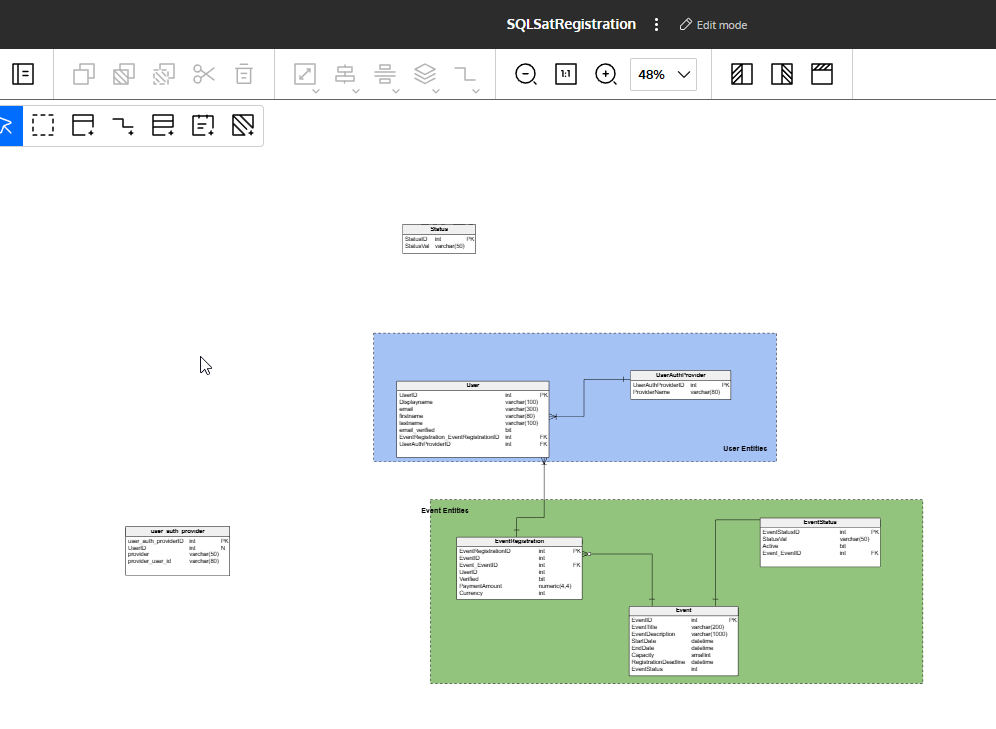
If I continue and add a few more entities, I can start to see a nice relationship for my model. I’ve added some many-many relationships, which you can see are different than the one-many.

2025-11_0087

Saving the Image

Once I want, I can save this as an image. There is also the option to share with others in my org, or export a PDF.

2025-11_0089

Once I click this, I choose the type and if I’m doing part of the model or the whole thing.

2025-11_0090

I click Generate and get a link to download my image.

2025-11_0091

When I download it and open it, I see this. An image of just my entities.

2025-11_0092

I can also generate documentation. When I click this icon, I get a choice of formats.

2025-11_0093

When I generate that, then I open it and see a document. It’s here if you want to look at it, but here’s an image of one page.

2025-11_0094

If I click on the Data Modeler icon in the upper left, I go back to the main screen with my model listed in the middle. I can see this is a logical model based on the icon.

Not a bad little tool to start modeling, though likely for most of the things I do, I’d live in a Physical model with the ability to import from a SQL Script. I’ll look at those features in another post, but this has shown you a quick look at getting started and creating a logical model.

Give Redgate Data Modeler a try and see if it helps you and your team get a handle on your database.

Posted in Blog | Tagged , , | 3 Comments

An Unexciting Exciting Release

SQL Server 2025 was released this week. The announcement came at Ignite and the PASS Data Community Summit with keynotes on Wednesday and Thursday, respectively. While there are some things to look forward to in the release (What’s New) and some highlights from T-SQL Tuesday this week, it seems that this release wasn’t a very exciting one.

On one hand, I blame all the Microsoft Fabric focus, which seems to distract from the core product that powers the databases at many organizations.  The SQL Server blog from Microsoft has had relatively few posts this year, highlighting a few things. The Fabric blog gets more posts, which is something I’ve seen at Database Weekly as well. As I curate the content during my week, I find a lot more Fabric-focused content than SQL Server-specific posts. That contributes to a lack of excitement for a new version of SQL Server.

On the other hand, SQL Server is a very mature product and most of us use it daily, depend on it, and feel comfortable with the way it works. While some of us want changes, bugs fixed or features enhanced, for the most part, I find many clients expect it to just work and don’t have time to refactor code to use new features. A few also are nervous about using features until they’ve been in a few versions, as we sometimes see features released with limited functionality and few enhancements (*cough* these tables *cough* or these ones).

At the same time, the What’s New page has a lot of stuff listed. If not more than SQL Server 2022 and 2019, it’s in more categories. Maybe it’s just that the documentation writers are more verbose? Perhaps, but I see lots of things I hadn’t noticed before in announcements. RegEx and the AI capabilities have dominated a lot of the news/blogs/etc., but the Change event streaming, native support for parquet/Delta, AG control flow, backup on secondaries, ADR for tempdb, and more are there. Plus, quite a few security enhancements to let us work with managed identities.

When I really look at the product, there are things to be excited about, probably at least a couple for most people. At the same time, it has seemed like many people, including me, aren’t necessarily overly excited about upgrading systems to a new version when much of our code won’t change.

Maybe because no one lets us, or gives us time to, change code to use new features.

Steve Jones

Listen to the podcast at Libsyn, Spotify, or iTunes.

Note, podcasts are only available for a limited time online.

Posted in Editorial | Tagged | 2 Comments