Am I Good At My Job?

I was talking with a friend recently about some of their co-workers. In this case, they were complaining that another person couldn’t do some tasks that my friend considered relatively easy things. Deal with an unusual restore situation, write some PowerShell to reconfigure servers, build somewhat complex (to them) queries, etc. Things that my friend thinks most database people should be able to do after a year of experience.

However, my friend questioned whether they were evaluating co-workers appropriately. How can one tell? I might be able to tell if a coworker is better or worse at a task, but what’s my frame of reference and my experience. I might think them not capable at things I do well. At the same time, I can be wowed by someone with more experience with a technology I don’t know well, such as Azure Data Factory, but not really be able to judge if they’re average or an expert.

I suspect most people think they’re good at their jobs, or at least competent. They think they are earning their salary, and they likely are. However, that doesn’t mean they are better than the average SQL developer (or DBA or C# dev, etc.). That’s a different standard, and while most people in surveys think they are better than average, that’s not how averages work. Half of us are below the average.

It can be hard to determine where you might relate to others in a skill level. I think this is one reason why we struggle to interview and hire well. It’s just hard to determine what a senior person should do, and in a short Q&A period, we can’t often determine if a candidate can do all the things we might ask them to do later. I think many people get good at a small number of things their organization asks them to do, but often aren’t well rounded outside of those boundaries.

The people I’ve known in any business who excel are those who are always learning and improving themselves. Whether they’re technologists, doctors, or chefs, they are looking to get better at their existing skills and regularly add new ones. That’s a good outlook for life in general, and I would hope many of you adopt that attitude.

Steve Jones

Listen to the podcast at Libsyn, Spotify, or iTunes.
Posted in Editorial | Tagged | Comments Off on Am I Good At My Job?

A New Word:Maugry

maugry – adj. afraid that you’ve been mentally deranged all your life and everybody around you knows, but none of them mention it to you directly because they feel it’s not their place.

I don’t know that I quite feel maugry, though I certainly sometimes wonder if I view the world much differently (and strangely) than others. I certainly think in polite society that others often won’t point out something that others do or say that is very strange.

I also like to think that often I have lots of empathy and understanding of how others view the world, though maybe that means I am actually deranged from others’ point of view and I should feel maugry.

From the Dictionary of Obscure Sorrows

Posted in Blog | Tagged , | Comments Off on A New Word:Maugry

Friday Flyway Tips–Capture the Filegroup for Tables

A customer asked recently why Flyway doesn’t detect the filegroup for some changes. I showed them it does and decided to write a post on this.

I’ve been working with Flyway Desktop for work more and more as we transition from older SSMS plugins to the standalone tool. This series looks at some tips I’ve gotten along the way.

Setting Up Filegroups

I don’t see a lot of SQL Server databases using filegroups. They can be helpful, and they can create complexity, but they aren’t good or bad. Some people use them, and for various reasons. If you use them, you’ve probably run some code like this:

ALTER DATABASE [EngineRoomDemo_1_Dev] ADD FILEGROUP [indexes]
GO
ALTER DATABASE [EngineRoomDemo_1_Dev] ADD FILE ( NAME = N'index1', FILENAME = N'C:\Program Files\Microsoft SQL Server\MSSQL15.MSSQLSERVER\MSSQL\DATA\shadow_index1.ndf' , SIZE = 8192KB , FILEGROWTH = 65536KB ) TO FILEGROUP [indexes]
GO

Here I’ve added a new filegroup, called indexes, and a file in this group. This isn’t set as the default.

Since I’m working with Flyway Enterprise and generating scripts, I do need to also alter my shadow database, so that I can both detect changes and also verify my scripts. I’ll use this code:

ALTER DATABASE [EngineRoomDemo_1_Dev_Shadow] ADD FILEGROUP [indexes]
GO
ALTER DATABASE [EngineRoomDemo_1_Dev_Shadow] ADD FILE ( NAME = N'index1', FILENAME = N'C:\Program Files\Microsoft SQL Server\MSSQL15.MSSQLSERVER\MSSQL\DATA\shadow_index1.ndf' , SIZE = 8192KB , FILEGROWTH = 65536KB ) TO FILEGROUP [indexes]
GO

Now we can detect changes.

Detecting Table Changes

First, let’s actually create a new table on this filegroup. To do that, I create a table, but I add an ON clause, as shown here. After the table creation, I use ON with the name of the filegroup. This ensures this table exists on the file(s) for this filegroup.

CREATE TABLE [dbo].[newtable](
     [myid] [int] NULL,
     [mychar] [varchar](20) NULL
) ON [indexes]
GO

Once this is done, I can go to Flyway Desktop and detect the change. When my schema model refreshes, I see the change, but no filegroup.

2024-02-09 14_50_41-Flyway Desktop

Hmmm, what’s wrong?

By default SQL Compare ignores filegroup information. If I click the Comparison options button, I get a dialog.

2024-02-09 14_51_29-Flyway Desktop

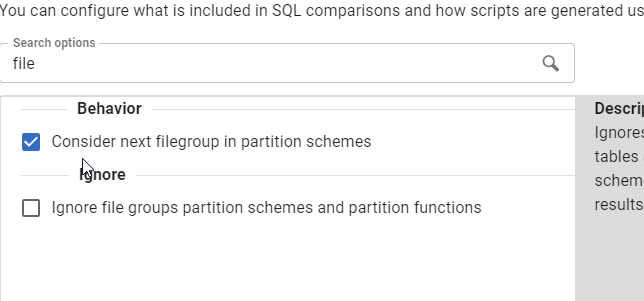
In here, go to the Comparison options dialog and type “file”. Hopefully the lower option below will be fixed to say “filegroups” and also add commas soon (sorry, I’m an editor).

2024-02-09 14_51_42-Flyway Desktop

We ignore these by default, so I’ll uncheck the lower box.

2024-02-09 14_53_10-Flyway Desktop

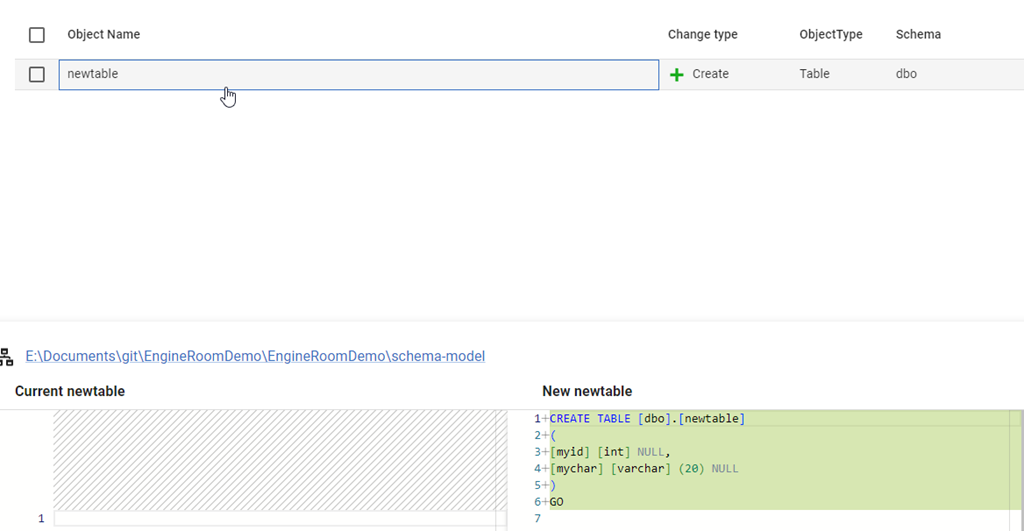
I’ll save this and refresh my schema model. Now I see the proper script with the ON clause.

2024-02-09 14_53_27-Flyway Desktop

Problem solved. If I care about where objects are created, I now have the filegroup location captured as part of my code.

Try Flyway Enterprise out today. If you haven’t worked with Flyway Desktop, download it today. There is a free version that organizes migrations and paid versions with many more features.

Video Walkthrough

I made a quick video showing this as well. You can watch it below, or check out all the Flyway videos I’ve added:

Posted in Blog | Tagged , , , | Comments Off on Friday Flyway Tips–Capture the Filegroup for Tables

Knowing String Defaults in T-SQL–#SQLNewBlogger

For years I’ve assumed I knew the string defaults, but I realized that’s not right. This post looks at what I learned.

Another post for me that is simple and hopefully serves as an example for people trying to get blogging as #SQLNewBloggers.

Declaring VARCHAR variables

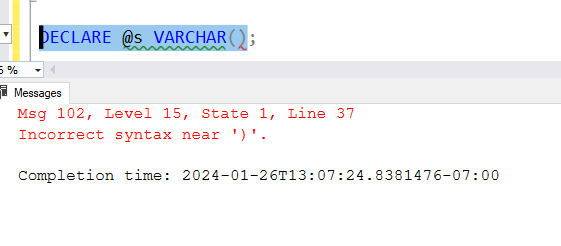
I learned a couple things. First, this is invalid code:

2024-01-26 13_07_31-SQLQuery8.sql - ARISTOTLE_SQL2022.sandbox (ARISTOTLE_Steve (52))_ - Microsoft SQ

The parenthesis aren’t needed, and cause an error. But if I declare just the word, I can add a string. The string in this code is more than 30 characters, which I’ve always assumed is the default length.

DECLARE @s VARCHAR;
SELECT @s = 'this is a test of a fairly long string'
SELECT @s

When I run this, however, I only get one character back.

2024-01-26 13_09_00-SQLQuery8.sql - ARISTOTLE_SQL2022.sandbox (ARISTOTLE_Steve (52))_ - Microsoft SQ

Why is that? Well, the default length is on, according to the docs.

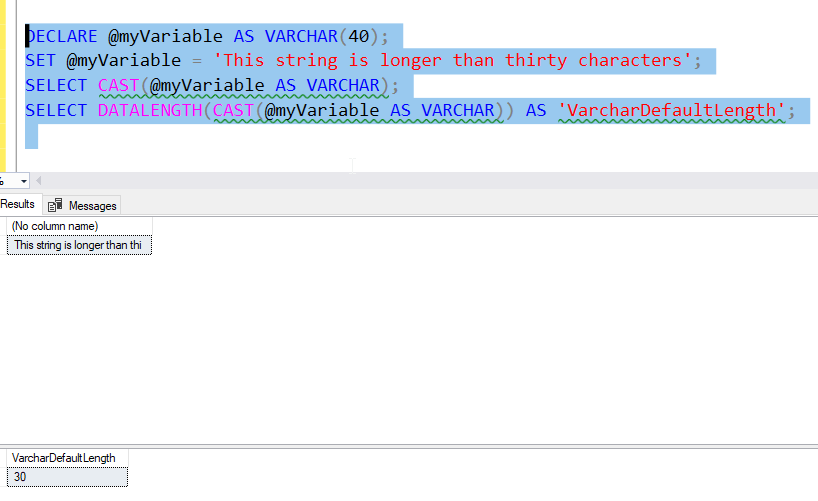
When is it 20? When we use CAST/CONVERT. In that case, it’s 30. Code from the docs shows this:

2024-01-26 13_10_55-SQLQuery8.sql - ARISTOTLE_SQL2022.sandbox (ARISTOTLE_Steve (52))_ - Microsoft SQ

I’ve known this happens with CAST, but I didn’t realize the default length was 1. That’s interesting, and hopefully something no one lets slip into production when it would cause a problem.

A good lesson is to always declare your length, and don’t make that MAX if you don’t need it.

SQL New Blogger

This post took me about 10 minutes to write, once I realized the issue. I spent a few minutes grabbing links, as I’d had some of the code written once I was testing what I’d read.

You could do the same thing. Show some learning, show some code, show how you change things.

Posted in Blog | Tagged , , | Comments Off on Knowing String Defaults in T-SQL–#SQLNewBlogger