Portable Data Storage

I saw a review on a rugged SSD, and it got me thinking about local storage. Over the holidays I needed to scan something from a device at the ranch, but to get the image to my computer, I needed a flash drive. It took me 10 minutes of searching around to find one because I rarely use them anymore. In fact, I couldn’t remember the last time I’d used one for a transfer between computers. I just send stuff through OneDrive/DropBox/GDrive or some other mechanism.

Today I’m wondering if the rest of you have abandoned using portable storage or if is it something you find useful. How often do you use portable storage in your life? Apart from laptops or mobile phones, I’m wondering about portable disk drives or any device where you transfer data using a wire rather than wirelessly. Note, I’m not talking about going from one computer to another on a wired network. I mean moving the storage from one place to another with your hands.

The only place I know I’m regularly using a portable drive is in the Tesla. There I have a rugged portable SSD that captures the dashcam and security footage. I had to transfer it from the drive to my computer last year when I saw an accident. I think that might have been the last time that I actually used portable storage (before the scan).

I have lots of old portable drives, and even old CD/DVDs I’ve recorded that have SQL Server ISO, pictures, backups of databases, and more. However, I don’t use them anymore. I don’t know how many of those devices still work, and I ought to check them, load the backups into cloud storage, and then recycle (after erasing) the devices. Or trashing them. I’m guessing many of them are just old tech at this point no one wants.

I think the era of using portable storage most of the time is likely gone. Even my friends who like to keep their own backups locally tend to use a NAS of some sort and wireless transfers, as opposed to plugging in. However, maybe I’m wrong. Are some of you still Luddites with storage technology, if that word can even apply to digital storage technology?

Steve Jones

Listen to the podcast at Libsyn, Spotify, or iTunes.

Posted in Editorial | Tagged | 1 Comment

Updating Teslamate to the Latest Version

I noticed Teslamate wasn’t updated. In fact, I hadn’t had any data captured in nearly a month and I’ve been too busy to notice. I was concerned something had happened, but I wasn’t sure what.

This is part of a series that covers my experience with a Tesla Model Y.

Troubleshooting

I saw a few notes online that said to restart things, which I did. When I went to the home page of my installation, everything looked fine, but not data for the last 20 something days. On the settings page, I saw a message that I needed to include an encryption key as an environment variable, nothing else.

One post said that I should delete the entry in the tokens table in the database to force a new login. So, I did that. I connected to the container with:

docker compose exec database psql teslamate teslamate

Then I ran a delete statement.

2023-12-19 15_39_30-cmd

When I went back to the home page, I did see a login page. Fortunately, I had the Tesla Tokens app on my phone and it generated new API keys for me. If you don’t have this, you need it.

I still had the encryption key message and I didn’t have any data, so I decided to upgrade.

Adding an Encryption Key

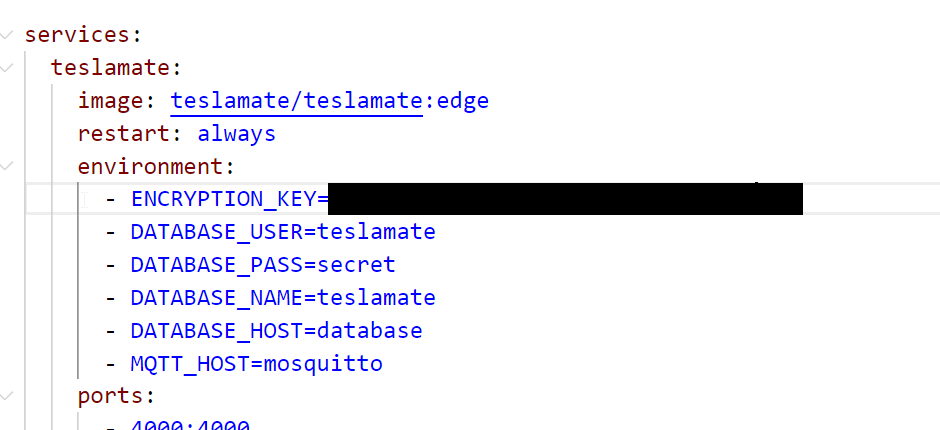
In my Docker Compose file, I decided to add the encryption key. In the old file, I didn’t have the encryption key, so I copied the environment variable from the docs and added this in my file.

ENCRYPTION_KEY=somekeyvalueImadeup

No, that isn’t my password, but you can see the file below.

2023-12-19 15_41_44-docker-compose.yml - PublicDocuments - Visual Studio Code

Once this was done, I checked the update page and it said to be sure you were on docker compose v2. I wasn’t sure where I was, but I know I hadn’t updated Docker Desktop in awhile, so I went to that app, downloaded the update and applied it.

Now I was ready.

Upgrading Teslamate

This is really easy. This is on the docs page. First, stop your containers with this:

docker-compose down

Next, run this

docker compose pull

As you can see, it started the update and had to pull down new images.

2023-12-19 15_45_41-cmd

Once this was done, I ran docker compose up and things were running. I got to the teslamate page, where it wanted me to log in again. Fortunately, I’d saved my API tokens. I entered them and I was in:

2023-12-19 15_46_43-Overview - TeslaMate - Dashboards - Grafana — Mozilla Firefox

Before this, the “Tina” in the upper left dropdown was nul and none of the temp values were populated.

Hopefully I’ll have this working for some time, but I’ll set a reminder to upgrade things a couple times a year.

Posted in Blog | Tagged , | Comments Off on Updating Teslamate to the Latest Version

Friday Flyway Tips–The Version Control Blade

The Flyway Desktop Version Control tab is gone and a new blade has appeared in its place. This post looks at the changes and what that means for a developer.

I’ve been working with Flyway Desktop for work more and more as we transition from older SSMS plugins to the standalone tool. This series looks at some tips I’ve gotten along the way.

The Version Control Tab

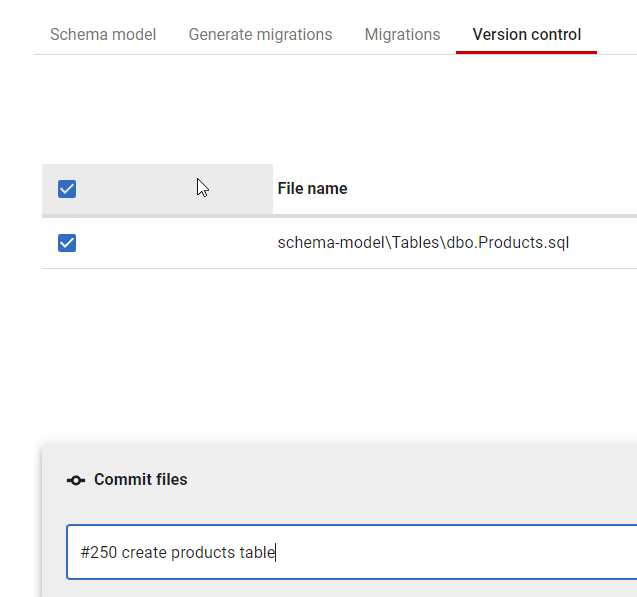
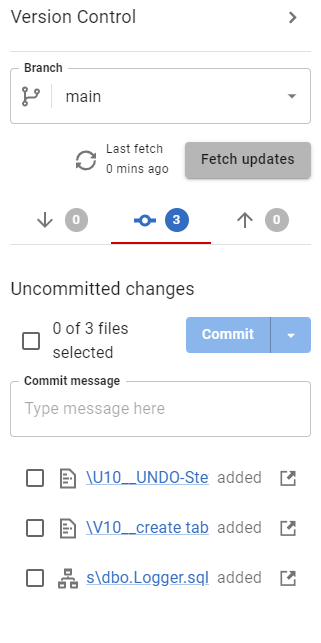
It’s gone. Here’s an old screenshot of what this looked like. It was one of four tabs across the top of a project. Note that this just had the title, with no information.

2023-12-13 18_01_48-Flyway Desktop

That’s unlike most other tools that provide VCS features, in that there usually is some status. On the tab, you can see the files to be committed, and push/pull/etc., but you have to select the tab.

2023-12-13 18_02_45-Flyway Desktop

We wanted to do better.

A Version Control Blade and Status Bar

We realized that version control isn’t really part of the workflow of Flyway Desktop; it’s a separate function. We also had lots of requests to help developers know there are changes in the repo to commit, push, etc.

We’ve been testing this for some time as a feature flag, which was annoying because I’d see the tab and the blade, but it released recently. I’m not sure which version got this, but it is in 7.0.3.

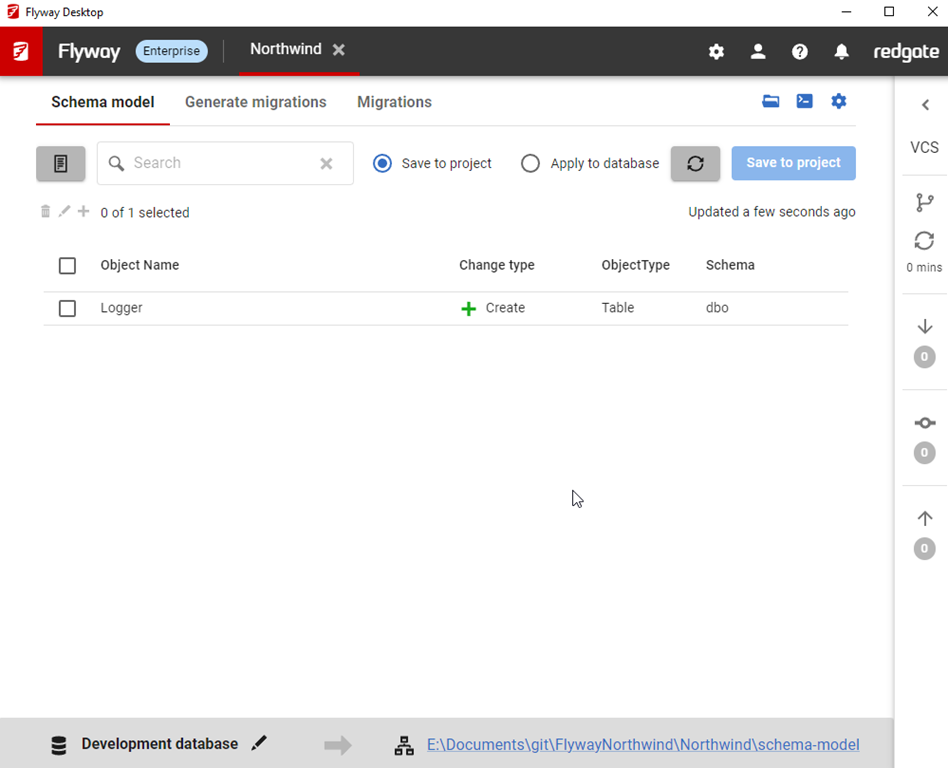
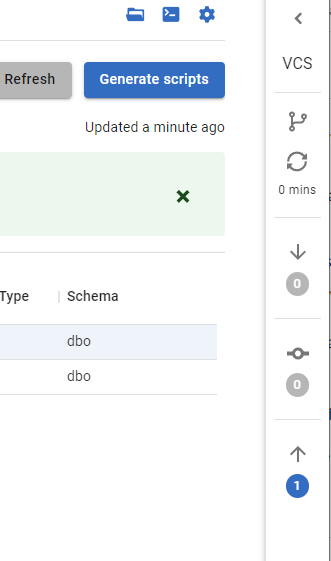
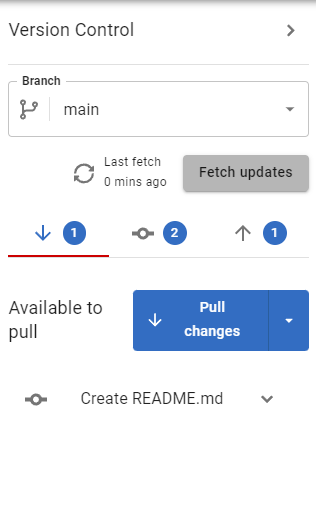
You can see it below, on the right side. Note that we have an arrow at the top to expand this. We also have a branch icon, a refresh, which tells you the last time something push/pull/fetch’d, and then there are down arrow (remote commits not pulled), a circle with a line (uncommitted changes), and an up arrow (commits to push).

2024-01-05 16_39_26-Flyway Desktop

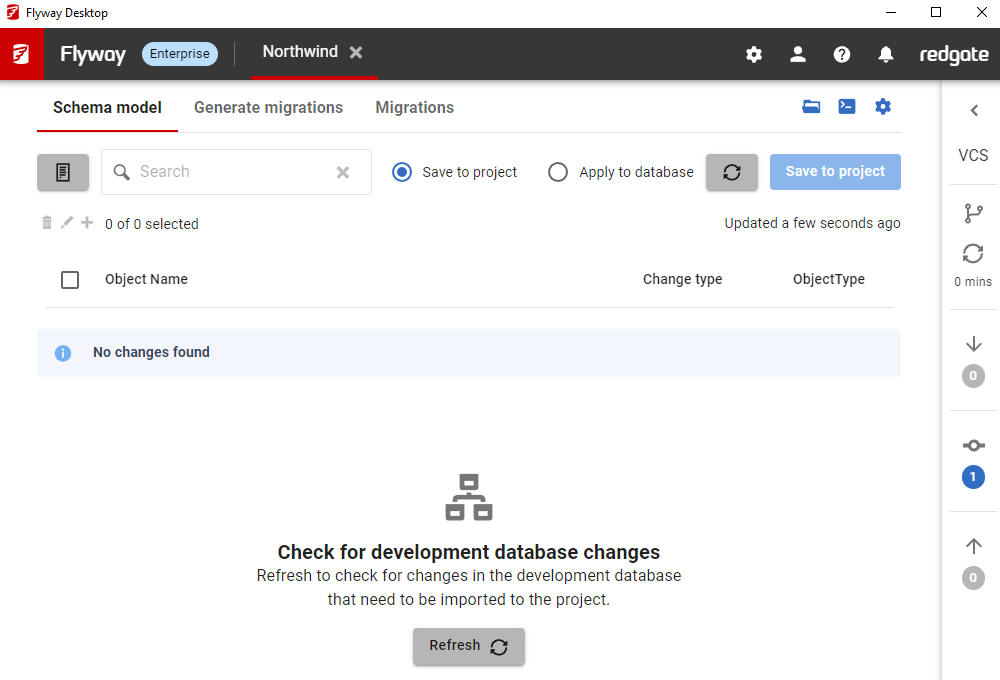
If I select the object listed, and click Save, I’ll see this after the operation completes I have an uncommitted change. Notice the “1” in the middle of the blade.

2024-01-05 16_41_53-Flyway Desktop

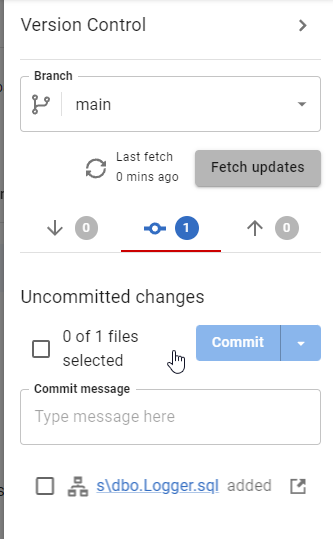
I can expand the blade, but I can just click the one (or icon) and I see the blade expand. From here, I can add a commit message and commit this change (if I select it).

2024-01-05 16_42_01-Flyway Desktop

I’ll make another change, generating a migration script. Now my expansion shows 3 changes, the schema file, the migration script and the undo script.

2024-01-05 16_44_44-Flyway Desktop

I’ll commit these three as one item. My blade closes after this and I see a committed change to push.

2024-01-05 16_45_40-advocates - Redgate - Slack

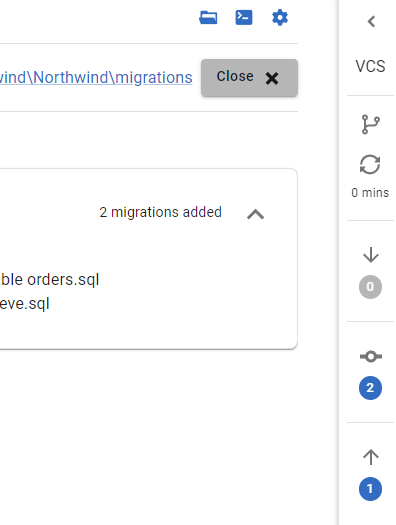
I’ll generate another migration script. In this case, I now see multiple changes. I see my two new migration scripts added, and I still have a commit to push.

2024-01-05 16_48_43-Flyway Desktop

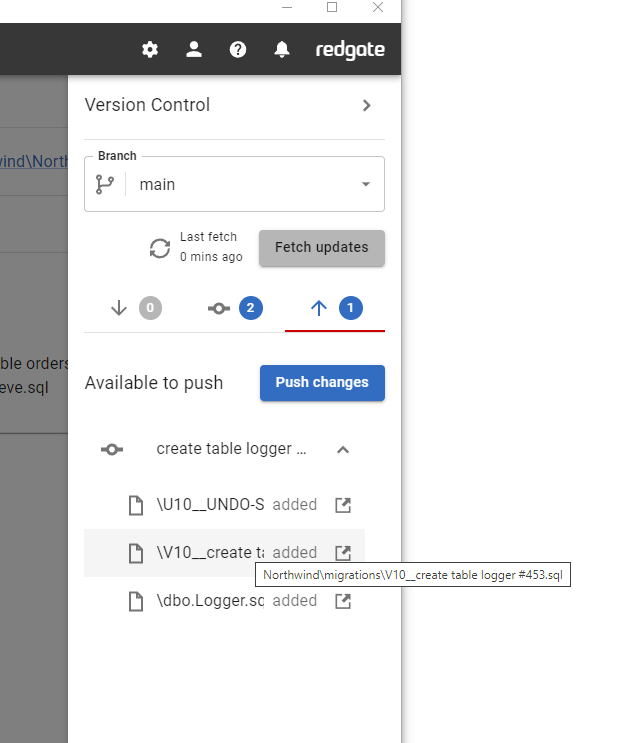
If I expand the blade, I can see the details. For example, on the push tab, I can see the commit and files included. For a small screen, or small window, I get a tooltip if I hover and can see the full file name and path.

Screenshot 2024-01-05 165157

If I make a change in the remote, likewise, I’ll also see a commit to pull.

2024-01-05 16_53_57-Flyway Desktop

I’ll push and pull (and commit) and then I’ll see a clean list nothing in my VCS blade.

Summary

This isn’t a big change, and I’d argue this makes FWD much easier to use and more comfortable for many people. Developers are less likely to have their local repo out of synch with a remote.

Try Flyway Desktop out today. If you haven’t worked with Flyway Desktop, download it today. There is a free version that organizes migrations and paid versions with many more features.

Video Walkthrough

I made a quick video showing this as well. You can watch it below, or check out all the Flyway videos I’ve added:

Posted in Blog | Tagged , , , | 2 Comments

Continuity Across Restarts

There are a lot of database platforms, and each tries to convince you theirs is better. As Brent points out in that link, sometimes they just skip comparing themselves to other platforms because it makes them look better. They only look at the platforms they compete well against.

For most of us, we often just need basic CRUD operations. I know that most RDBMS platforms would work for us, and sometimes NoSQL ones work as well, though I think that NoSQL isn’t necessarily better for many applications (maybe most). You may feel differently, but that’s my view. While I use SQL Server, I think the majority of systems I’ve managed or built could easily run on MySQL, PostgreSQL, or many other platforms.

In any case, we want to store some data, get it back, maybe change it, and sometimes delete it. I think that last operation is fairly rare as most of us use soft deletes and because of this, our databases continue to grow like crazy. There was an interesting post from Brent on MySQL in AWS Aurora, where the buffer pool cache can survive a restart of the database engine. This is for the cloud version from AWS, not MySQL in general, but that’s fairly cool to me.

And scary.

If you read more, there are some limitations, and the value of this, to me, is limited. However, it’s a neat idea, since I could see some sort of restart of the database from a patch for the engine or even a configuration change. For MySQL, clients can’t connect while the buffer pool is initialized, which isn’t something that we deal with in SQL Server, but I can see this being useful. Or perhaps this helps if an Aurora node goes down and the next one picks up the database engine with a full buffer pool? Not sure if that actually happens from the docs, but if they kept the buffer pool separate enough or up to date on a second node, that would be great.

In the real world, I wonder to what extent we find an empty buffer pool at startup to be a problem. Sure the first few queries are slow, but most of the workload isn’t the first few queries. It’s all the clients that come in the next 5, 10, 20 minutes.

As Brent notes, this might not be something we want in SQL Server, but it is good to see cloud-enabled platforms trying something new. Some of those will turn out to not work very well, but for those that do, I bet we see other platforms start to adopt some of the ideas from new technology.

Steve Jones

Listen to the podcast at Libsyn, Spotify, or iTunes.
Posted in Editorial | Tagged , | Comments Off on Continuity Across Restarts