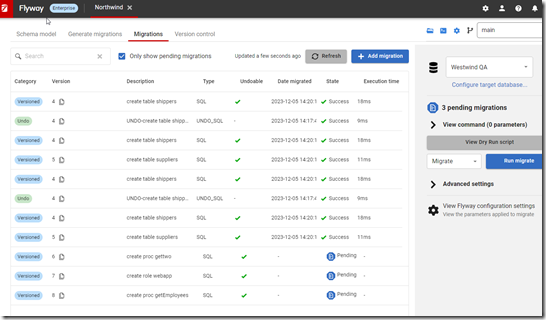
Friday Flyway Tips–Linking Commits to an Azure DevOps Work Item

Recently I was doing a demo and a customer asked how I had linked my commit in Azure DevOps to the work item that existed. It’s easy, and tldr; it’s with the commit comment. This post shows how that works.

I’ve been working with Flyway Desktop for work more and more as we transition from older SSMS plugins to the standalone tool. This series looks at some tips I’ve gotten along the way.

Creating a Work Item

In Azure DevOps, there is a board menu. Under here, one of the subitems is Work Items. You can see these below:
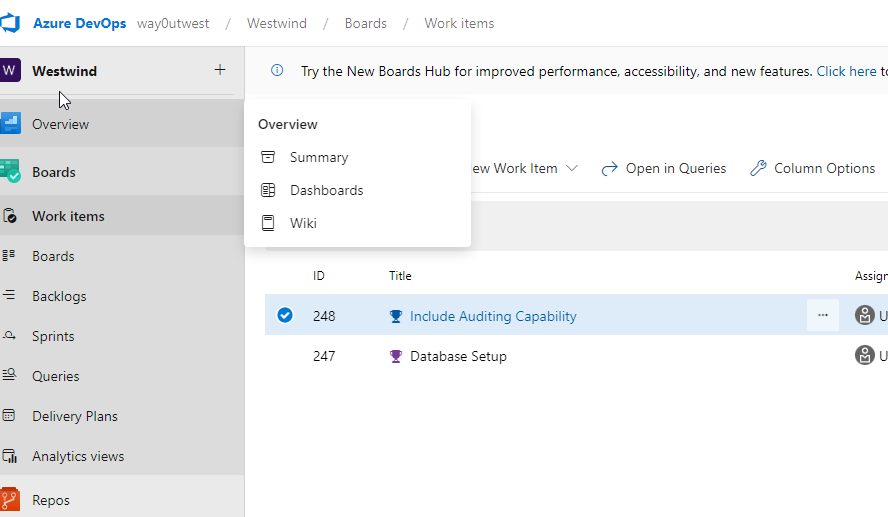
2023-12-13 17_52_28-Work items - Boards

I tend to work from the “Boards” item, which looks like this:
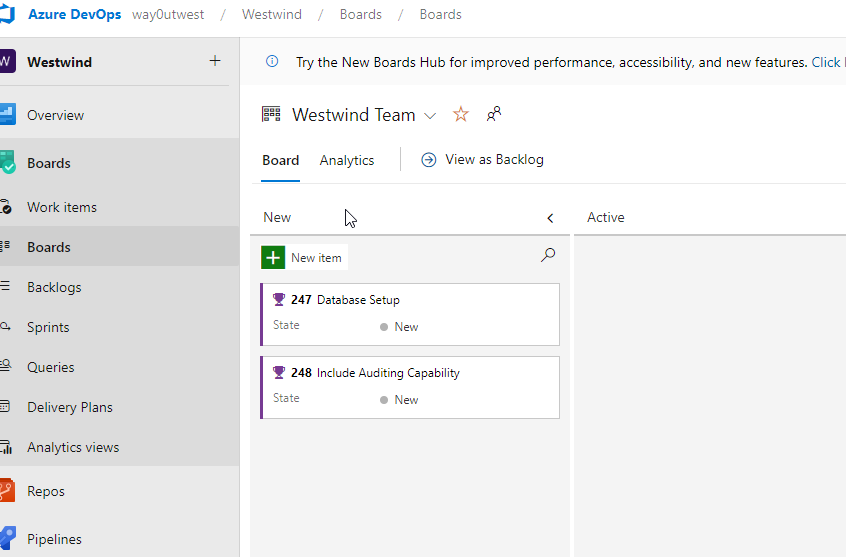
2023-12-13 17_52_22-Westwind Team Features Board - Boards

Let’s assume we have a new item, so I’ll click the “New Item” at the top of the left column. This gives me an edit box, which I’ll type in a name.
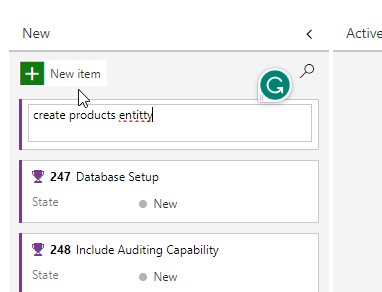
2023-12-13 17_54_25-Westwind Team Features Board - Boards

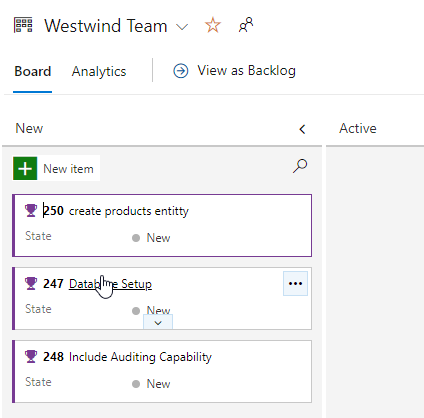
When I hit enter, this gives me a new work item, which you see below, as 250 create products entitty.
2023-12-13 17_55_19-Westwind Team Features Board - Boards

Since I don’t want to leave a spelling error, I’ll edit the title to look better.  Now I have a work item.

Linking A Commit in FWD

In SSMS, I’ll create the products table. Once I do this, I’ll go to Flyway Desktop and refresh the schema model. When I do this, I see my change. I’ll select this and save to the file system.
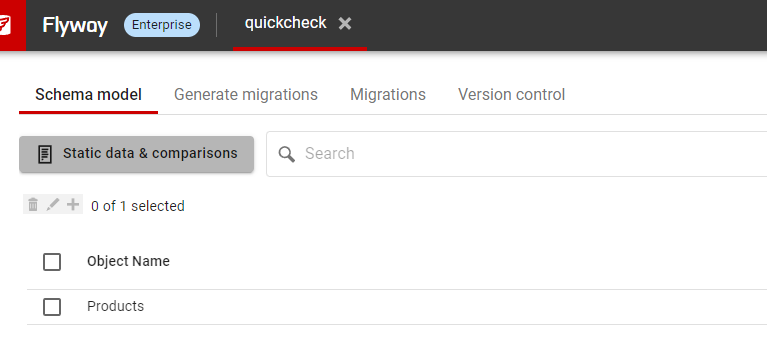
2023-12-13 18_01_48-Flyway Desktop

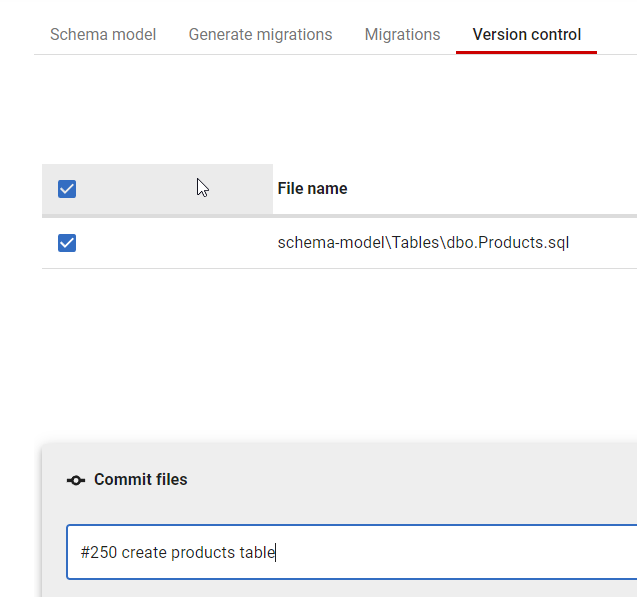
Once this is done, I’ll go to the Version Control tab, and I again see my file changed. Here my file is selected, and I’ll enter a commit message, but I’ll include the work item number after a #. This creates a link.
2023-12-13 18_02_45-Flyway Desktop

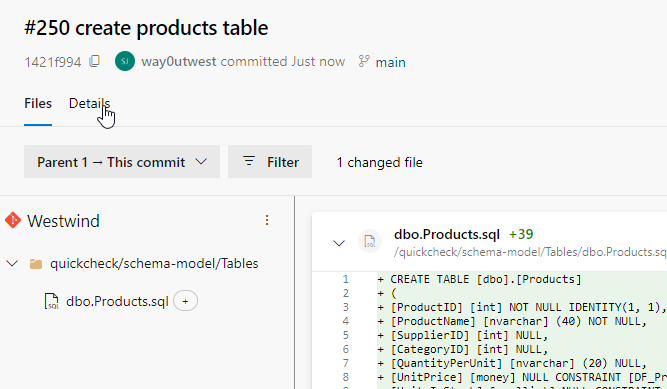
I now click commit and push. In Azure DevOps, in the Repos –> Commit item, I see my commit.
2023-12-13 18_04_15-Commit 1421f994_ #250 create products table - Repos
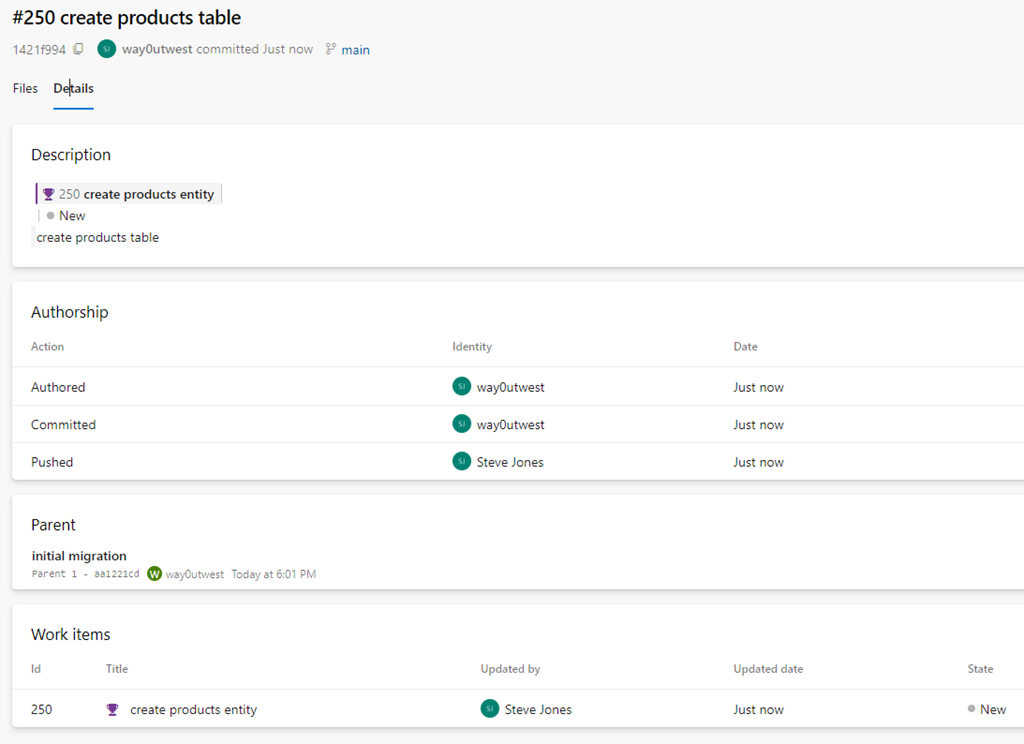
Note the details item under my cursor. If I click that, I see commit details and near the bottom, a link to the work item.
2023-12-13 18_04_21-Commit 1421f994_ #250 create products table - Repos

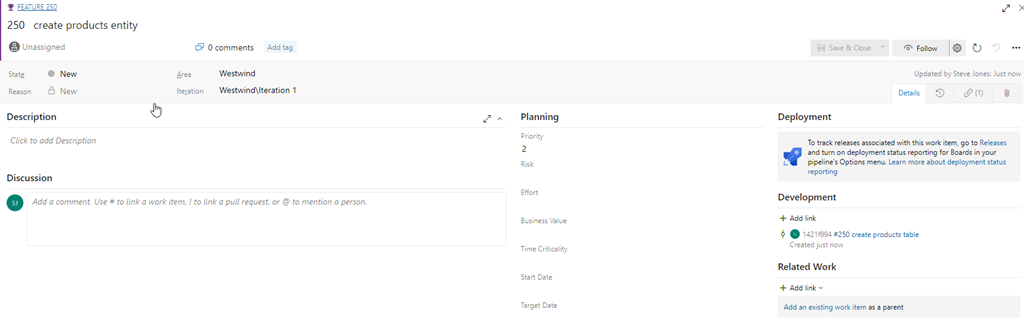
If I click through to the work item, or I access the work item from Boards, I will see my commit linked on the far right of the work item.
2023-12-13 18_04_32-Westwind Team Features Board - Boards

This is very handy to have your actual code linked to the work that it relates to. If I have PRs or multiple commits, as long as you use the #nnn, where nnn is the work item, you’ll have everything linked together.

This is less a Flyway Desktop feature than an Azure DevOps one, but you can access this from Flyway Desktop by writing good commit messages with work item numbers.

Try Flyway Desktop out today. If you haven’t worked with Flyway Desktop, download it today. There is a free version that organizes migrations and paid versions with many more features.

Video Walkthrough

I made a quick video showing this as well. You can watch it below, or check out all the Flyway videos I’ve added:

 

Posted in Blog | Tagged , , , , , | 1 Comment

The 2024 Plan

Today is the last working day of 2023. Next week we start with the New Year’s holiday on Monday and then many of us go back to work, starting a new year. This is the time of year where many people make New Year’s Resolutions, most of which will be abandoned by March. Some of you might keep to your goals, but it is hard to make substantial changes in your life all at once, especially based on a calendar date.

Instead of making a resolution this weekend, I would suggest that you think about your career and sketch the outline of a plan. Having a plan is a good way to approach the new year, one that I think might be better than setting goals without a plan. It’s easy to set goals, but without a concrete approach to attacking those goals, I think it becomes difficult to meet them, and more importantly, difficult to drive your career in the direction that makes it better for you.

I heard some good advice from Brent Ozar at SQL Saturday Boston 2023. He said a good way to build a plan is to think where you would like to be in a year. What would you like to know? Or what skill would improve your career? What do you think would impress your boss? I’m sure most of you working in technology would like to make more money or find a better employer but those are the results after becoming a better data professional, not the plan.

In a year, I think you can easily spend 50 hours working on your career, in an hour a week. Two hours a week is doable, but it can be hard to do more with a busy life, especially if you have family. However, you can make a couple of scheduled times a week to spend 15, 30, or 60 minutes on something in your career. Consider it a hobby and discuss how and when you’ll find time with your partner and family. Put the times on your calendar and take the time to sit at a computer.

As for what you work on, look at my questions above, and pick a technology/language/framework/tool/platform/etc. and start typing. Write code, build a server, read what others have written, and practice answering questions that others have asked on your topic, even if you don’t post the answer in a forum.

In the beginning, it will be hard. You’ll feel like you aren’t accomplishing anything. You might feel like you’re just wasting time, but you’ll learn things and slowly you will be able to actually get something done. Whether you want to train AI models, write better T-SQL, or learn to manage Availability Groups like an expert.

My last piece of advice is to write. Journal, blog, make notes, but write about what you’ve learned. Whether these are notes for yourself to review before an interview or published blogs that build your brand. Document your journey and I am sure you will be very proud of yourself on this date next year.

Steve Jones

Listen to the podcast at Libsyn, Spotify, or iTunes.

Posted in Editorial | Tagged | Comments Off on The 2024 Plan

A New Word: Koiniphobia

koinophobia – n. the fear that you’ve lived an ordinary life.

The last one of the year. I’ve enjoyed reading through this dictionary, learning new (made up) words, and thinking about life. Hope you have as well.

What’s an ordinary life? I think that’s what life is for many of us, though we have lots of little ups and downs, joys and sorrows, important events to us.

When I was younger, like many, I think I wanted to be a professional athlete or a rock star or a movie star or someone famous. Later, as I went through school and the tech booms, I wanted to be a rich tech person.

None of those happened, but I’ve had an amazing life. I think in many ways, it’s very pedestrian, and I walk through my days doing ordinary and simple things. I work at a desk, I shop for groceries, I go to the gym, I fix things around the house, I feed horses on the ranch.

I am also blessed to travel for work and stand on stage in front of many people. However, lots of my friends do the same thing.

I know I’m famous in a very narrow, weird way, but I also very much enjoy my anonymity in most of my life. I appreciate the time I have with others in my family, friend group, and community, as someone just participating in life with them.

I have no koiniphobia, not because of my life, but because everyone I know has their own interesting, unique, exciting things in their life. We don’t need to be on stage or in the media to live a very unordinary life. That’s what life is.

From the Dictionary of Obscure Sorrows

Posted in Blog | Tagged , | Comments Off on A New Word: Koiniphobia

Some Relief But Still Some Concern

Years ago Andy Warren and I were talking about the Database Weekly newsletter and what we wanted to include in each edition. We knew there wasn’t enough news on a weekly basis, so we decided that we’d add blogs from various individuals as well as press releases, patches, and other items related to databases and SQL Server. At some point, we realized we were getting older and one of the unfortunate things that happen is people pass away. We thought about including obituaries as well since we knew a lot of people and we wanted to remember them. We did and this evolved into sqlmemorial.org, which I maintain out of a repo online.

I got a notice to renew the domain recently and I realized that I hadn’t updated this site in quite some time. That’s a relief and I was glad that I haven’t gotten any notes about anyone in the data community dying.

At the same time, I worry that I’ve missed someone who participates in the #sqlfamily online, at events, or just has developed a brand and presence in our community. I see a lot of news, but I get busy like most of us and am not always in touch with all communities around the world. Since the decay of Twitter and the scattering of places where people congregate online, it seems there is less interaction and less of a place to see news posted and re-posted by others. I used to hear about a lot of people passing on from Twitter, but these days that doesn’t happen.

Hopefully, because people aren’t leaving our community that often.

I remember when Jim Gray was lost and my surprise at his death. I didn’t know him, but I had seen him speak. To me, Robert Davis, Euan Garden, and Brian Moran were shocking. Those were people I’d had many conversations with, shaken their hands and hugged them, and shared meals with them. Tom Roush probably touched me the most, though I knew him through his cancer treatment and I wasn’t shocked when he passed. I know quite a few of the people on the list at SQLMemorial, but not as well as knew those gentlemen.

I’m at the age where I see more funerals than weddings. I’ve had friends pass, some far too young, and I try to remember that as I go through life, appreciating the good things I experience.

If you know of someone who has passed, please send me a note, a link to an obituary, or write your own statement of their life and include it in an email. Fork the SQL Memorial repo and submit a pull request so we can remember their life.

Steve Jones

Listen to the podcast at Libsyn, Spotify, or iTunes.

Posted in Editorial | Tagged | 2 Comments