Using DATETRUNC–#SQLNewBlogger

I saw someone using DATETRUNC recently in some code and realized I hadn’t really looked at this function before. It’s one that was added in SQL Server 2022, though it’s been in other platforms for years.

This post looks at the basics of this function.

Another post for me that is simple and hopefully serves as an example for people trying to get blogging as #SQLNewBloggers.

DATETRUNC

One of the challenges for years in SQL Server is dealing with dates. For years we had datetime, and we used this for everything. However, this includes dates and times. The DATE datatype was eventually added, but we have lots of legacy data that includes dates and times mixed together.

Since we don’t always want dates and times, or we want some cutoff, the DATETRUNC function was added to help us. This function takes two parameters, a datepart and a date.

The datepart is any sort of potion of a datetime value. This can be quarters, months, hours, minutes, milliseconds, etc. Of course, all as singular, not plural.

The date is any valid date type: smalldatetime, datetime, date, time, datetime2, datetimeoffset.

We use it like this:

SELECT GETDATE(), DATETRUNC(DAY, GETDATE())

That returns on my system:

----------------------- -----------------------
2023-12-13 18:23:00.337 2023-12-13 00:00:00.000

If you look, this has truncated the date at the day, replacing everything after this with zeros. In this case, the datetime output of getdate() is turned into a date value.

Another example, what if I want to get rid of seconds? I can do that easily like this:

SELECT GETDATE(), DATETRUNC(SECOND, GETDATE())

———————– ———————–
2023-12-13 18:24:19.557 2023-12-13 18:24:19.000


You can see that I have the same date and time for hours, minutes, and seconds, but I’ve gotten rid of the partial seconds.

Using This Function

This is a function, and using it in the WHERE clause (or ON) can impact performance. This often (maybe always) messes up your index usage. However, we often want to display something cleaner, and perhaps in the SELECT clause we want to just order things and show hours.

I might to show shipments during an hour and this code helps:

SELECT TOP 50
        o.OrderID
      , o.Customer
      , o.OrderDate
      , DATETRUNC (HOUR, o.OrderDate) AS OrdersByHour
FROM dbo.[Order] AS o
ORDER BY o.OrderDate desc;

770         0SW2LZ               2023-12-12 23:14:35.220 2023-12-12 23:00:00.000
830         X6SYVULIQQGMZLPN0LL  2023-12-12 23:08:22.450 2023-12-12 23:00:00.000
731         NB3                  2023-12-12 23:03:45.120 2023-12-12 23:00:00.000
883         UDPUS144L1SL1Z1KPD   2023-12-12 22:56:25.100 2023-12-12 22:00:00.000
171         M28F5EYLB            2023-12-12 22:56:07.950 2023-12-12 22:00:00.000
775         P9LET1EBNFN          2023-12-12 22:53:48.580 2023-12-12 22:00:00.000
209         S1I4Q04SUOP          2023-12-12 22:19:49.470 2023-12-12 22:00:00.000
654         5O4GBEWZZVDII        2023-12-12 22:14:53.420 2023-12-12 22:00:00.000
967         NWA9                 2023-12-12 22:06:04.400 2023-12-12 22:00:00.000
458         JYD4TZU0S35XPW3WD7   2023-12-12 22:01:14.350 2023-12-12 22:00:00.000
584         ZDQ2J348SRI6D3HW     2023-12-12 21:59:34.910 2023-12-12 21:00:00.000
718                              2023-12-12 21:54:32.740 2023-12-12 21:00:00.000
359         I4YDWI               2023-12-12 21:54:20.970 2023-12-12 21:00:00.000


If I look at these results, it’s cleaner to see the hours, and this certainly is easier than parsing our and combining years, months, days, and hours.

There are likely lots of uses for cleaning up output, or limiting input parameters to certain groups of date values. Definitely a function I can see myself using to simplify and group date data in new ways.

SQL New Blogger

This post took me about 15 minutes to write, including the mockup of some code and generating some data with SQL Data Generator. I did a basic exploration of this function, and wrote about it.

This is something you can easily do, and include your own thoughts on where you’d use this. Search your old code for DATEPART stuff and see if you can replace some complex expressions with DATETRUNC.
Posted in Blog | Tagged , , | Comments Off on Using DATETRUNC–#SQLNewBlogger

Friday Flyway Tips–Deploying Migrations with a Target

Recently I was working with Flyway Desktop (FWD) and helping a customer work on deploying part of their work. They weren’t sure how easy this could be, but this post follows what I showed them.

Using the ability to run Flyway commands in FWD, we can deploy some migrations and not others. This post shows how to configure this.

I’ve been working with Flyway Desktop for work more and more as we transition from older SSMS plugins to the standalone tool. This series looks at some tips I’ve gotten along the way.

Picking Migrations

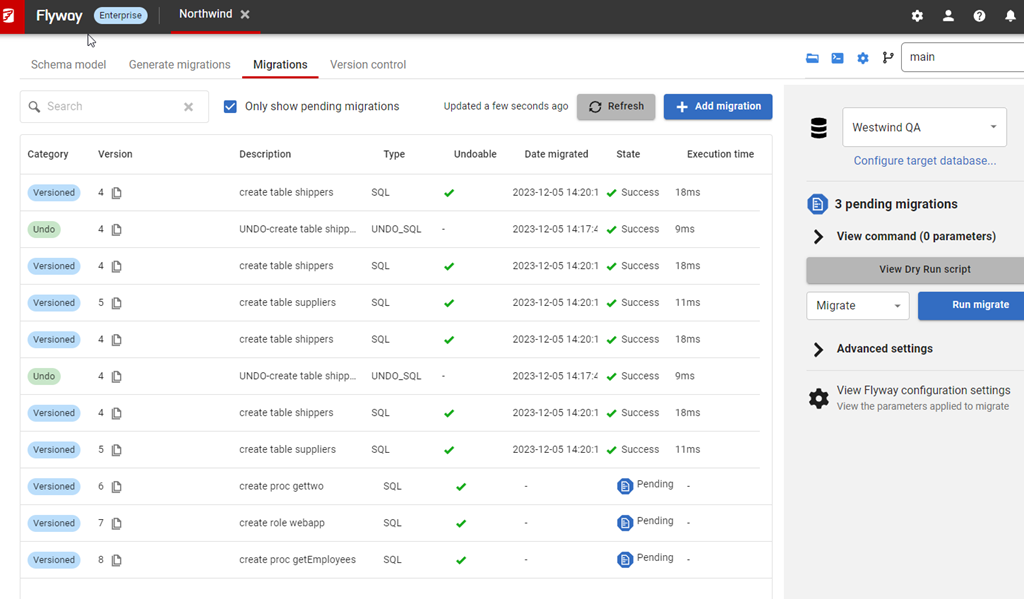
I’ve got a FWD project here, and you can see the migrations below. In this case, I’ve selected a target of my QA machine and we can see that I have migrations applied up to 5 and there are pending migrations from 6-8 (ignore the undo).

2023-12-05 15_07_27-Flyway Desktop

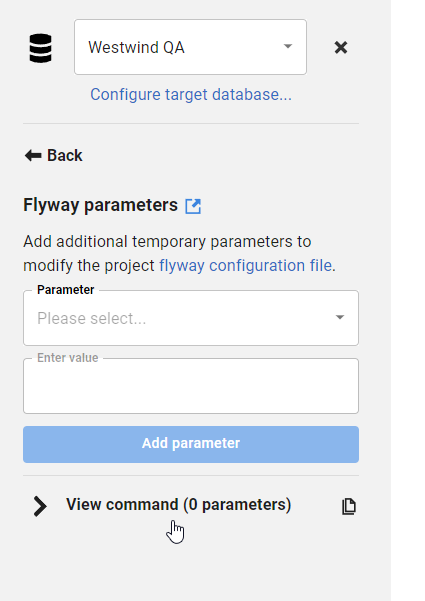
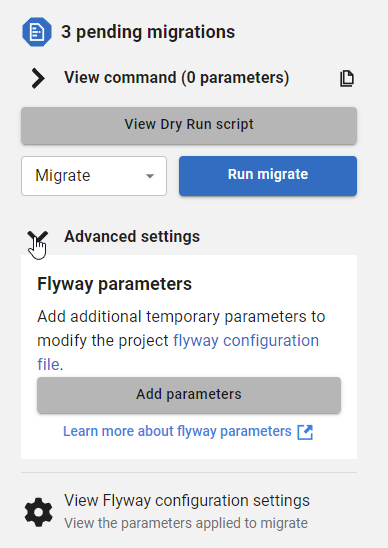
If I want to apply migration 6, but not 8, I can do that. First, I’ll click the Advanced settings on the right side. When I do that, I see text with a “add parameters” button.

2023-12-05 15_08_15-Flyway Desktop

If I click the Add parameters button, I get a drop down that is searchable.

2023-12-05 15_08_58-Flyway Desktop

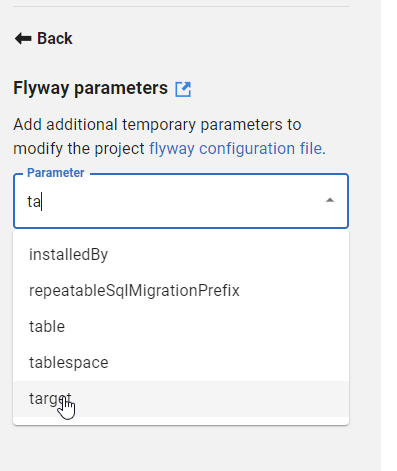
I can start typing “ta” in here and you see matching items. “Target” is the last one and this is the parameter that you want.

2023-12-05 15_09_06-Flyway Desktop

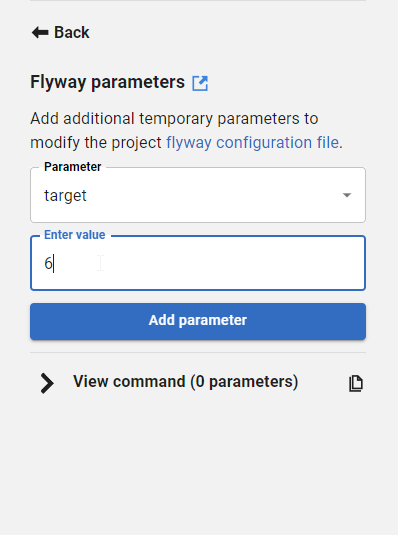
The value of the target is the last migration you want to run. In this case, I can pick 6 and it will run only migration 6. If I pick 7, it will run 6 and 7.

2023-12-05 15_09_15-Flyway Desktop

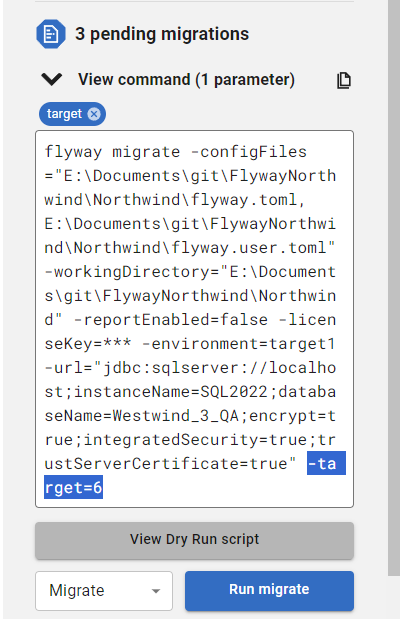
Once I do this, I can click back (or add more parameters) and on the main screen I see that target is in blue, as a parameter added. In the command text box, I’ve highlighted this command as added to the CLI.

Note: This text is what you could run in a CI system or at a cmd/shell .prompt

2023-12-05 15_09_38-Flyway Desktop

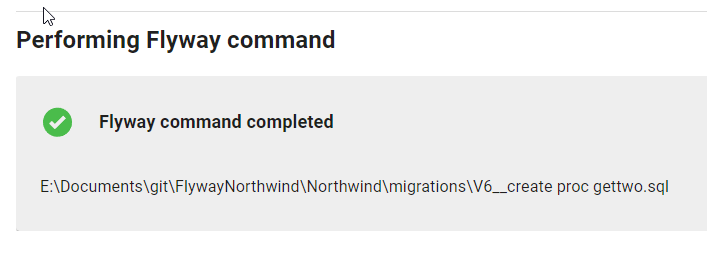
When I click migrate, the command is run and I get output about which migrations ran.

2023-12-05 15_12_16-Flyway Desktop

If I close this, then I see 6 is successfully applied (after unchecking only show pending) and 7 and 8 are above target. In another post, I’ll explain those.

Try Flyway Desktop out today. If you haven’t worked with Flyway Desktop, download it today. There is a free version that organizes migrations and paid versions with many more features.

Video Walkthrough

I made a quick video showing this as well. You can watch it below, or check out all the Flyway videos I’ve added:

Posted in Blog | Tagged , , , | Comments Off on Friday Flyway Tips–Deploying Migrations with a Target

Try, Try Again, Until It’s Right

One of the challenges with making changes in a database environment is that undoing those changes can be hard. What’s often preferred is rolling forward with a new change to correct the issue, but that’s often done with limited analysis and thought. Instead, we hope our staff makes a quick patch and a better decision under pressure than they did with more time to examine the problem. That works if it’s a simple mistake that was made in implementation but not if we haven’t designed our solution well at the start.

I ran across an article on DoorDash that I thought was interesting. During the pandemic, their business exploded and they outgrew the Aurora PostgreSQL database. They migrated to Cockroach, a cloud version of PostgreSQL that’s distributed and can (theoretically) scale much higher.

The thing I found interesting is that the engineers at DoorDash were trying to break apart their monolith and get better scalability, primarily from certain tables, by extracting their tables to get single writers in a cluster, which should help them handle a larger workload. They wanted to use their main identity table as a test, which I assume is the table that tracks each user in the system. They tried to migrate this and cutover to a new cluster 4 times before a fifth attempt worked.

I think any large migration is fraught with issues, but I appreciated the design here that allowed them to rollback their change and revert to the previous version of the database. That’s something I don’t see many teams think about or build into their database change process. I think having a clear, known, tested way to undo changes is important, at least for some of your tables.

There are two pieces of advice they give that I often give to customers as well. First, learn to spread out changes across batches. When I work with Flyway customers, I always let them know they need to think of a migration script as a unit of deployment and break those apart as best you can. Those often also become units of rollback, so keep them small. Not necessarily every change in its own script, but don’t bundle too many things together.

Second, keep things simple. Too often I find engineers build clever solutions that make sense to them, but no one else. You never know the quality of your next hire, so don’t overcomplicate things without a really good reason.

Did their process work? They’ve grown to about 1.9PB of data. That’s a lot of food orders. They’ve also had other metrics of success, and seem to be saving time for their tech team, which is often one of the main reasons to build a better process and use it consistently.

Steve Jones

Listen to the podcast at Libsyn, Spotify, or iTunes.

Posted in Editorial | Tagged , , | 4 Comments

A New Word: Nementia

nementia – n. the post-distraction effort to recall the reason you’re feeling particularly anxious or angry or excited, trying to retrace your sequence of thoughts like a kid gathering the string of a downed kite.

I’m pretty level headed, but sometimes I over-react to something and may get angry, upset, etc. Sometimes I have to go through the process, but often my wife might interrupt the thoughts, asking me to go through some nementia and figure out why I reacted this way.

Like the rest of us, I’m human, I do silly things, and I sometimes can’t figure out why I reacted that way.

From the Dictionary of Obscure Sorrows

Posted in Blog | Tagged , | Comments Off on A New Word: Nementia