Don’t (Always) Be a Hero

I saw a comic from Kendra Little recently, which reminded me of my first SQL Server crisis. I got hired as a contractor to support a large Novell network. In my first chance to work with SQL Server, a new database server running SQL Server 4.2 on OS/2 1.2 was installed on our network to support a new data entry application. This was mandated by a government legal change on Jan 1.

As the junior person, I was supporting the installation by corporate developers on Dec 31 at 5 p.m. We finished getting things set up, ate dinner, and then I watched the developers do some smoke testing and prepping the application and database servers for go-live at midnight. It was exciting to me as a young professional to be part of this deployment.

At around 12:30 a.m., as I was getting ready to leave, the system locked up. We found the database server unresponsive, so we rebooted it. This continued to happen, with my eventually paging my boss and having him come in the early morning. We worked through the night and into the next day. I didn’t leave until early morning on Jan 2nd, with the need to return that night. We had an overloaded, unstable system that required us to work long hours babysitting the server. It was worse for our clients, who had to manually record data and then try to perform data entry during slow times to catch up the system. I was a hero that January, as were my co-workers, with all of us logging around 100 hours each week that month.

It was a rough time, though I learned a lot about SQL Server, OS/2, and eventually, Windows NT. I also learned about poor software testing, especially load evaluation. I learned how easy it was to overwork yourself, and how heroics are needed but can’t be business as usual. Being a regular hero isn’t something that is conducive to being effective or efficient with your staff or your business. I saw this later when I came to Denver and a poorly designed system that needed patches or reboots every week overloaded me and my staff.

Much of what we do as developers or operational staff is to support others. We provide them with systems to get their work done, whatever that work might be. We work hard, and we find solutions to challenges, but we ought to not only provide stability to customers, we need to do that over time. That means that we need to have a staff that we can count on over time. If we overload them or struggle to retain them because of burnout, we can’t easily do that. We also can’t get new, perhaps more important work done if we are constantly dealing with the same issues.

I’ve seen management do this, and they end up with staff that isn’t efficient, can’t tackle new work, or turn over constantly. Some of you might know of a company like this in your area where they are always hiring because they aren’t a place anyone wants to work. Someone will work there because they need a job, but that company is never very efficient. Eventually, they’ll struggle with their competition and lose business. Or maybe not, maybe they’ll linger on with lots of missed opportunities.

I’ve also seen IT professionals live like this and thrive on emergency situations. If you’ve read The Phoenix Project, you’re familiar with Brent, who is the go-to person for anything. I’ve been that person, and I’ve seen that person in different organizations. While I always appreciate them, I’m often frustrated because they become too busy to handle my requests and there is a constant stream of requests because things aren’t being fixed or solved. It’s never a good situation.

We need to be heroes at times, but those ought to be emergencies, and they ought to be rare. Most IT professionals (and others) I know will work longer or harder when needed, but the need can’t be constant or even regular. It should be an unusual situation. If it’s not, then something has to change, at least for me. Either the technology or the staff. As I gained experience and savvy, this has usually meant I go find another job because the situation has become “emergencies are status quo.”

Life’s too short to live like that.

Steve Jones

Listen to the podcast at Libsyn, Spotify, or iTunes.
Posted in Editorial | Tagged | Comments Off on Don’t (Always) Be a Hero

Friday Flyway Tips–Seeing Pending Migrations

I find that quite a few people using Flyway will end up with a lot of migration scripts over time. While you can certainly re-baseline and split scripts into separate folders, visualizing these over time can be hard.

The Flyway Desktop team added a nice little option that makes it easier to see new work as opposed to old work.We’ll look at that in this post.

I’ve been working with Flyway Desktop for work more and more as we transition from older SSMS plugins to the standalone tool. This series looks at some tips I’ve gotten along the way.

Lots of Migration Scripts

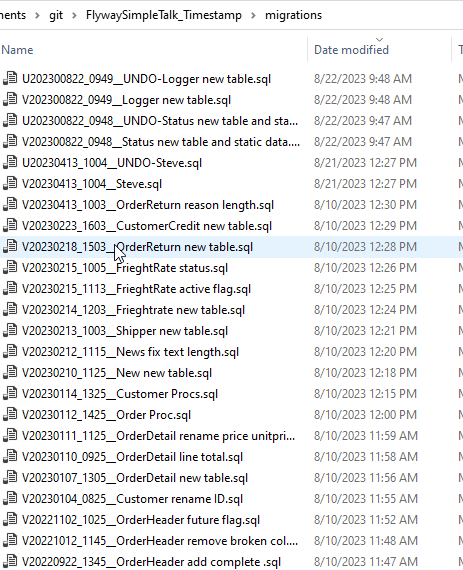
We might see a lot of migration scripts over time in a folder. Certainly I can see this in the file system for one of my projects.

2023-10-19 15_06_07-migrations

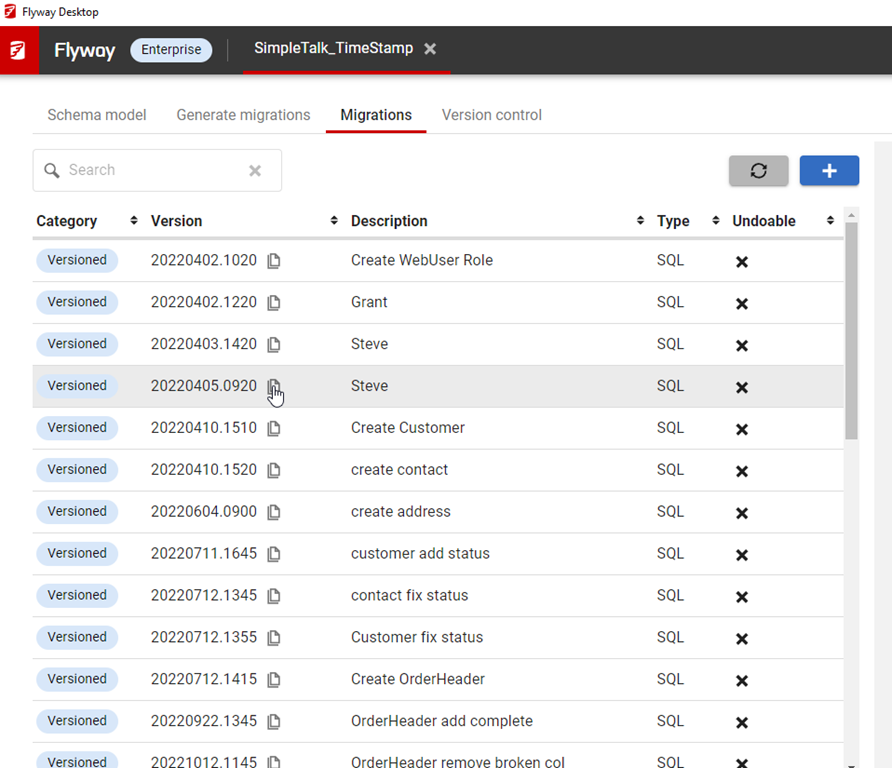
In Flyway Desktop,  here is my view.

2023-10-19 15_40_08-Flyway Desktop

That is a lot of scripts. Since these are ordered as they would apply, it can be a lot of scrolling to find the ones that haven’t been applied.

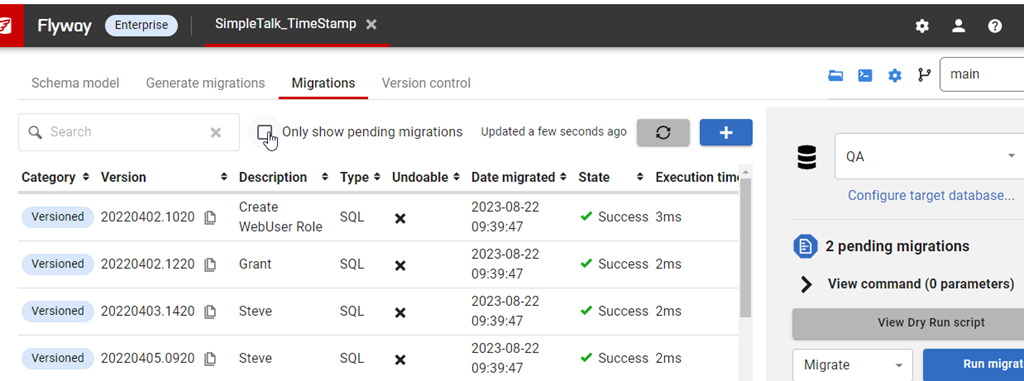
However, if I click an environment on the right, I get a different view. Now I see a checkbox above the migrations that says “Only show pending migrations”.

2023-10-19 15_40_29-Flyway Desktop

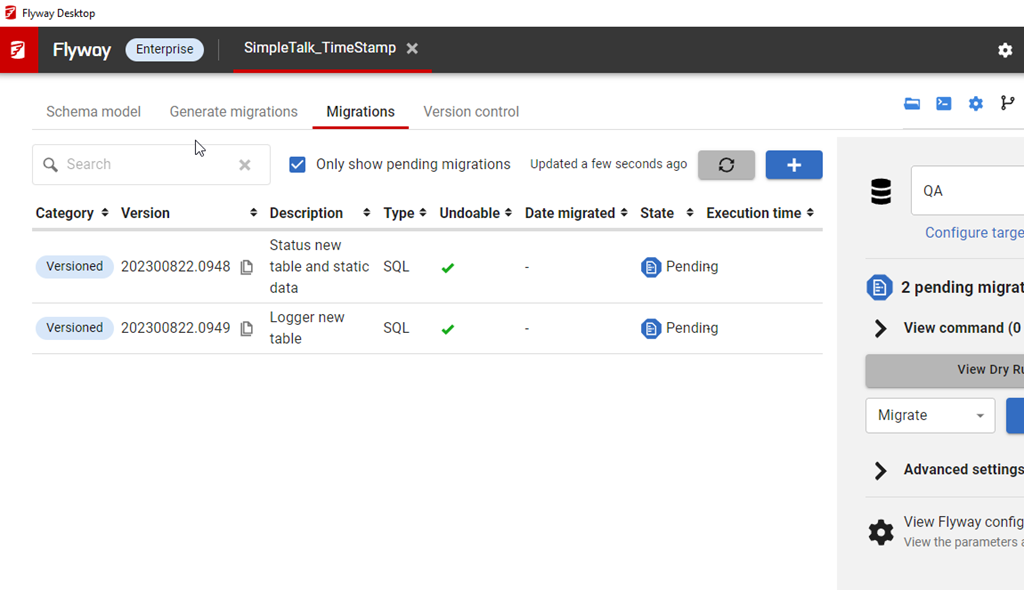
If I click that, I see a view of the few that haven’t been applied to this environment.

2023-10-19 15_42_13-Flyway Desktop

A quick way to see what work has been added to the project, but not applied to other environments.

Try it out today. If you haven’t worked with Flyway Desktop, download it today. There is a free version that organizes migrations and paid versions with many more features.

Video Walkthrough

I made a quick video showing this as well. You can watch it below, or check out all the Flyway videos I’ve added:

Posted in Blog | Tagged , , , | Comments Off on Friday Flyway Tips–Seeing Pending Migrations

When Work Isn’t Done

Software development can be a challenge for each of us with lots of demands and the need to ensure your code solves a problem correctly, efficiently, and completely. Juggling the workload by yourself is one thing, but add in a team of developers, and the complexity quickly grows.

The real world is chaotic and despite the best efforts of project managers and scrum masters, our software development life cycle doesn’t always proceed smoothly. I wonder how many of you run into this situation and how you deal with it.

Developer 1 gets a piece of work, let’s call this A. They complete this and send it to the QA team. Somewhere during this process, Developer 2 get’s a different piece of work (B) and writes code. They send this to QA before A is completely tested.

Now, Developer 1 finds a mistake. Something doesn’t work or they realize their solution is incomplete. QA is A + B, but A doesn’t work and needs revision. B passes testing and needs to be deployed. If your codebase and QA have both A and B in them, how do you strip out A or B and ensure B is deployed to production but A isn’t?

If this is C# or Java, you might have one solution, even if both changes are in the same class. If this is database code, you might have a different set of issues to deal with.

Really, the question is can you reorder work in your deployment process? I find many customers don’t consider this when they are evaluating their software pipeline. They somehow assume if code gets to QA that it’s good, which is nicely optimistic but not realistic. At some point, we’ll deploy code to QA that doesn’t work. The more developers we have, the more likely this is, and the more demands on our time, the more likely we need to reorder work and release one thing but not another.

As a DB developer and DBA in a company 20 years ago, I built a process and forced us to reset the QA environment and redeploy B only (using a branch of code that stripped out A) for re-testing. This ensured that we tested what was going to be deployed. However, I find a lot of organizations can’t do this or don’t want to. They want to hope that a human and either extract all of B or strip out all of A and release partially tested code without issues.

I find that to be a poor idea. In this era of regular staff changes, staff of varying quality, and the high complexity of software, this is asking for mistakes. With cheap hardware, virtualization, and the ability to provision copies of environments, we ought to do better.

How do you handle this today? Depend on humans to not make mistakes? Hope for the best? Or follow a repeatable, reliable process that accounts for inexperience and human error?

Steve Jones

Listen to the podcast at Libsyn, Spotify, or iTunes.
Posted in Editorial | Tagged , | 2 Comments

A New Word: Zielschmerz

zielschmerz – n.  the dread of pursuing a lifelong dream, which requires you to put your true abilities out there to be tested on the open savannah, no longer protected inside the terrerium of hopes and delusions that you started up in kindergarten and kept selaed as long as you could.

I don’t know I have any lifelong dreams, much less zielschmerz. I used to want to play professional sports, but that lifelong dream died a long time ago when I realized pursuing it wasn’t realistic.

I have enjoyed life and worked to grow my career, skills, and enjoyment in different ways. However, I am more a take things are they come and constantly re-evaluate what I want and need more than having a dream.

However, you can pursue a lifelong dream, which might not include being tested on the savannahs, but it might be tested in the real world. My wife changed careers to work with horses, taking a leap that she could actually earn enough to have that be a viable career. It’s been nearly 12 years now and she’s made it a success, though I know she had a lot of trepidation and anxiety in making the leap and growing her business.

Hopefully there is no more zielschmerz these days for her.

From the Dictionary of Obscure Sorrows

Posted in Blog | Tagged , | Comments Off on A New Word: Zielschmerz