Practicing (Annoying) Better Security

At Redgate Software, we’ve been looking to “level up” our internal security game. While we have had very good security during the 16 years I’ve been there, there have been a few security issues with our products. The speed at which we address things, as well as the communications with customers, has impressed me.

We’ve had almost no problems with our internal systems, unlike a few other places I’ve worked. We haven’t had the phishing/virus/breach/ransomware issues that I’ve seen at other employers or heard about from friends. I do think our IT staff is diligent and careful, as well as forward-thinking. It also helps that we’ve had a relatively small employee staff that worked in physical offices for most of our existence.

Recently, we’ve been on a security push to tighten up the way we deal with systems. As we grow our staff, and as we add more offices, there is a recognition that our attack surface area is growing. We also find more and more people using non-Redgate-owned devices. This year we’ve had a series of policies rolled out that we are supposed to adhere to in order to ensure strong security, as well as compliance with data privacy rules such as the GDPR.

One of these is a bring-your-own-device (BYOD) policy. For years I’ve used my personal mobile phone for Redgate, with a few settings enabled to allow a remote wipe if I lose it. However, I’ve also had a personal desktop that I use for daily work in my home office. I’ve never enabled a lock on this as my wife occasionally uses it to get a picture or other document. Or send me something I forgot to sync in the cloud.

Part of our new policy is that I need to enable a lock on my desktop, as there is privileged Redgate information on there. Not much Redgate data, but the machine does connect to our business OneDrive and SharePoint systems. This lock should be a 2-minute timeout, which means that I come back to my desktop after coffee, laundry, or something else to find it locked. After years of always locking my desktop in corporate offices, I somehow find this more annoying. Especially as I’ve gotten used to rarely typing my 15-character password. I mess this up regularly and have to (more slowly) re-type my password a few times.

I know this is better security, and I am always conscious of locking my laptop in our various offices when I go in. However, I find it annoying at home. Especially when I pop in away from work to look up something on the Internet. I keep telling myself this is good security, and good for both Redgate and our customers. I’m still annoyed by the change, but I know it’s for the best. Like many who work in organizations, I’ve been lazy about some security aspects for years, and the change is a disruption. I’m sure some of you feel the same way about the rules and protocols that your employers have implemented.

You’re not alone in desiring a more convenient workplace, but security is a series of overlapping measures that work together to protect data. Practicing and adhering to good security is a lot like a daily backup. Most of the time it’s something never need, but when there’s an issue you’ll be glad you followed the process that day.

Steve Jones

Listen to the podcast at Libsyn, Spotify, or iTunes.

Posted in Editorial | Tagged | 7 Comments

Creating a SQL Clone Image from a SQL Clone Database

A customer asked if a new image could be created from a database that was itself a SQL Clone. It can, and I’ll show that in this post.

This is part of a series of posts on SQL Clone, which is a virtualization product from Redgate Software.

Creating a New Image

To start with, I’ll look at the clones that I have deployed on a test server. As you can see below, I have a database, called “SimpleTalk”, on a local instance.

2023-09-29 15_52_52-Zoomit Zoom Window

I’m going to use this to create an image. First, I’ll click “Create Image” on the left. I’ll choose SQL Server, since I will use the existing cloned database as the source.

2023-09-29 15_53_00-SQL Clone

I pick the instance and database. As you can see, I’ve chosen the database that was listed above as a clone.

2023-09-29 15_53_10-SQL Clone

Next we skip the classification screen. This is a test db, so no data in there to worry about.

2023-09-29 15_53_14-SQL Clone

I’m not going to modify this, as this is a test.

2023-09-29 15_53_17-SQL Clone

Now I pick the destination, which is a local share.

2023-09-29 15_53_21-SQL Clone

I give this a name which differentiates from the original db and other images. I normally want to name all images as _new or _current for rotation purposes, but here I’m adding a test name since I’ll delete this right away.

2023-09-29 15_53_32-SQL Clone

You can see this start working.

2023-09-29 15_53_36-SQL Clone

And it completes in about the time for a restore. If I had added masking, this would run a little slower.

2023-09-29 15_53_59-SQL Clone

I have the image created, so it’s time to test this with a new database.

Validating the Image with a Clone

Click “Create clone” on the left menu and you get a dialog that asks for an image. I’ll pick the one I created above.

2023-09-29 15_54_06-SQL Clone

Once we chose the image, we can modify it. We won’t here.

2023-09-29 15_54_11-SQL Clone

Now we add an instance and a name. I’ve entered those below.

2023-09-29 15_54_24-SQL Clone

Once this completes, I can see this database, and my other clone in the SSMS Object Explorer.

2023-09-29 15_54_37-SQLQuery14.sql - ARISTOTLE.sandbox (ARISTOTLE_Steve (75))_ - Microsoft SQL Serve

If I query both databases, I get the same data, since I haven’t changed either one during this process. Note below that each one of these queries is from a cloned database.

2023-09-29 15_55_23-SQLQuery1.sql - ARISTOTLE.SimpleTalk Cloned Clone (ARISTOTLE_Steve (54))_ - MicrThe SQL Clone cloned database is just a database. SQL Server sees it as any other database, as SQL Clone presents the mdf/ldf/ndf as any other database. You can back it up like any other one.

If you are looking to save storage space for multiple copies of databases, or give each user a consistent copy in seconds, check out SQL Clone.

Posted in Blog | Tagged , , | Comments Off on Creating a SQL Clone Image from a SQL Clone Database

The Code Review Checklist

Early in my career as a developer, I was required to follow a formal process to get the code I’d written deployed to production environments. Each time I’d written code, I had to document what I’d tested and then print out the relevant sections of the codebase. I needed to find two other developers to spend 10-15 minutes with me in a meeting, going over my code, each of us with our own paper copy. Almost like a dissertation, I had to answer questions and defend my work, with problems being marked on paper for me to go fix.

Over time, I learned that different developers reviewed code in different ways. Some spent more time on standards and formatting. Naming and the visual structure were more important to them, so if I wasn’t confident in my work, I’d pick them and spend time ensuring the formatting was correct. Or sometimes, I’d mis-format it, so they would tell me to go fix that and not look at what the code actually did. Others were better at examining algorithms, and I often used them to help me learn, with them digging into my logic and helping me understand whether I’d included enough error handling, considered edge cases, or written code that performed well.

Often the mood I was in, and the pressure to meet a deadline might have me leaning one way or the other. Of course, there were plenty of times I just had to go with whichever two developers had time to review the code.

There was an inconsistency in code reviews, and I breathed a sigh of relief in future jobs where we didn’t formally review code. In fact, in quite a few positions where I wrote C++, VB, or FoxPro/Clipper, my code was never reviewed, nor was there formal testing. Other developers and I often had to rework sections of code regularly, which led me to implement better testing of my own code. I didn’t adopt formal frameworks for some time, but I did save off test scripts for code in our Visual SourceSafe repository to ensure I could test code.

These days pull requests and code reviews are commonplace, at least among many software developers. Not so much in the database world, but I do find customers that believe in testing and I regularly preach this to others. I’m also glad that Redgate has built-in static code analysis and linting into its products, though I wish we had better (and easier) unit testing support for database code.

For those of you out there writing code, do you go through any sort of code review process? Is it consistent? Is there a checklist of sorts? I have found that different people have their own internal checklists, but I rarely see anyone with a more formal checklist, or even a set of lists for what to check in different types of code. Even in unit testing, I don’t often see people approaching their tests in a methodical manner.

Checklists have been shown to be beneficial in the healthcare field where staffers are overworked and handoffs are frequent. Using a set of checklists can improve patient outcomes. I suspect that a good set of checks for code might do the same thing. However, I find that a lot of database developers are reluctant to adopt any formal testing practices.

A view that reminds me of .NET and Java developers in the early 2000s.

Do you have a checklist (actual or mental) that you go through for your own code? For anyone else’s code? Or do you think formal testing of SQL code is even worth the effort. Let me know today.

Steve Jones

Listen to the podcast at Libsyn, Spotify, or iTunes.

Posted in Editorial | Tagged , | 8 Comments

SQL Saturday Boston 2023 Slide Decks

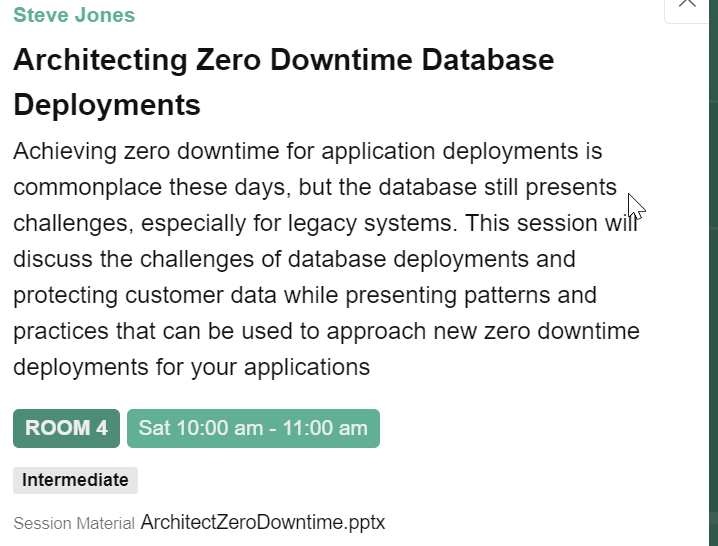
Thanks to everyone who came to my sessions at SQL Saturday Boston 2023. I’ve added the decks to the schedule, so you can click my session and will see the download there. You can see this below, and all speakers can edit their sessions and upload the deck. See the download below:

2023-10-14 13_43_08-SQL Saturday Boston 2023 (#1046)

I’ve also copied the links here for slides:

For the first session, Architecting Zero Downtime Database Deployments, there is also a GitHub repo here. Clone the repo down (or fork) and you can follow the sessions along. The repo is at: https://github.com/way0utwest/ZeroDowntime

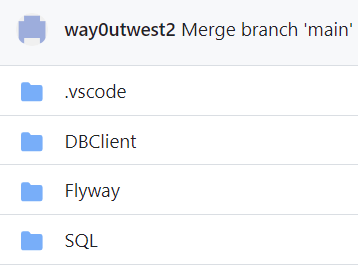
In here, there are a few folders, as shown here:

2023-10-14 13_45_44-way0utwest_ZeroDowntime_ Code for my zero downtime presentation

The two items from the session are the DBClient, which is a Visual Studio 2019 project, and the SQL folder, which has all the setup (and teardown code). Each script is numbered, and you can run them in order. There are also some comments in each for when to flip feature flags.

If you find issues, please submit an issue in the repo.

Posted in Blog | Tagged , , , , , | Comments Off on SQL Saturday Boston 2023 Slide Decks