Using Clear Language to Avoid Confusion

A long time ago a software engineer advised me to try and ensure that I made my interfaces clear to users, especially those that are busy focusing on some other task the software enables. The phrase he used was to make a “Fisher-Price” interface, referring to the toy company that makes big and brightly colored buttons for their toys. The idea being that we didn’t want to cram too many things on the screen or possibly confuse a user.

As a kid, I watched Mr. Roger’s Neighborhood on television and enjoyed the show. Lots of kids had a similar view, but they might not have known that the main actor took care in choosing his words to convey concepts and ideas to children. In fact, the former producer said that the writers joked that his manner of speaking was its own language, called “Freddish.”

I saw an article that talks about the care Fred Rogers took in explaining things, with examples of how he made choices in how to communicate with his audience. The piece got me thinking about not only Fisher-Price interfaces, but also the language that we use to communicate with developers when we ask them to build something.

Often I find in software development that we use a model or a shortcut to represent what we want. We partially describe something, or we assume that the words we choose mean the same thing to us and the other party. This goes both ways, with developers needing to be clear with their clients (and each other) and clients needing to be clear with developers.

I don’t think I’d advocate for adopting Freddish, but I do think that we ought to pay attention to the words we choose, especially when we find the end result isn’t quite what is expected. Examining where the design went wrong and if we could communicate differently, or more often, earlier in the process to avoid problems.

Communication is a difficult skill. I find constant examples at work, in my hobbies, even within my family where someone says one thing, but means another.

To me. To themselves, they feel perfectly clear. Context, innuendo, implication, we depend on these a lot in communications, but those can cause issues when we aren’t very familiar with others. As we move to remote work, as we find less bonds with our co-workers because we don’t see the same body language, as we don’t eat meals together, as we don’t often share a context of work, we need to be more careful about the words we use and find ways to ensure we all are saying the same thing that the other person hears.

Steve Jones

Listen to the podcast at Libsyn, Stitcher, Spotify, or iTunes.
Posted in Editorial | Tagged , | Comments Off on Using Clear Language to Avoid Confusion

Friday Flyway Tips: Searching Migrations

When a Flyway Desktop (FWD) project (or Flyway project) has been around for a long time, there can be a lot of migration scripts. That can be a pain for users, but there is a way to find your changes or limit what you see. This post looks at how to do this starting with Flyway Desktop 6.5.4.

I’ve been working with Flyway Desktop for work more and more as we transition from older SSMS plugins to the standalone tool. This series looks at some tips I’ve gotten along the way.

A Busy Screen

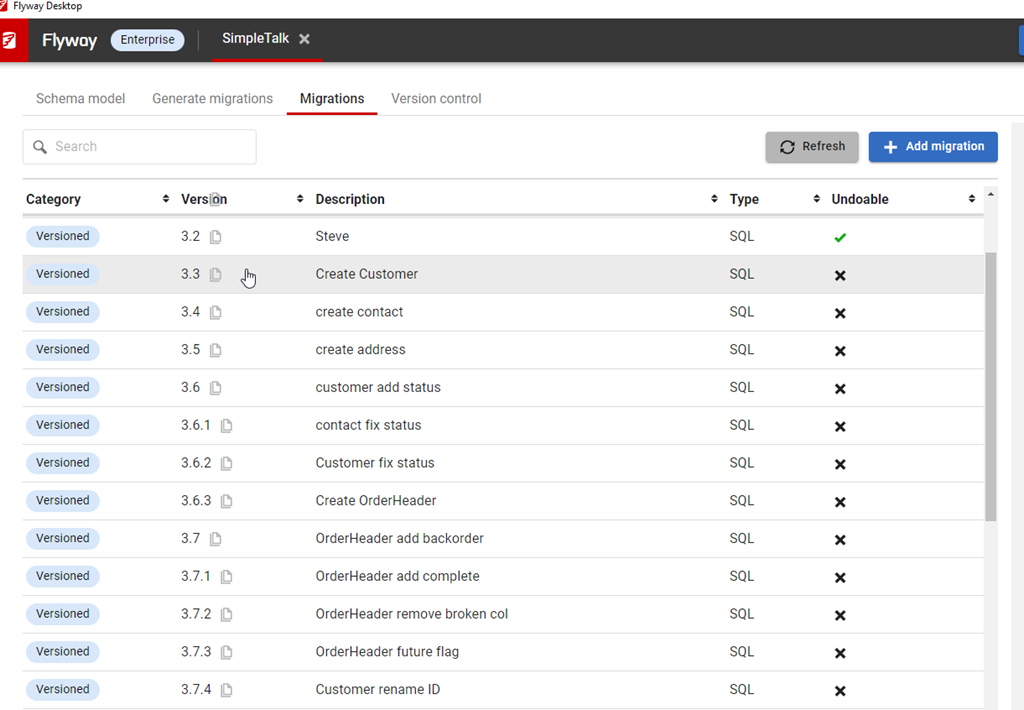
I’ve got a lot of migrations in this project. You can see below in the image, noting the scroll bar goes up and down here.

2023-08-10 12_30_54-Flyway Desktop

Many customers have many more migrations, which could run into the 100s. I’ve worked with large Oracle migrations in the past where there were 100s for an upgrade from v4 to v5. The project would have been 1000s in its lifetime.

Use Search

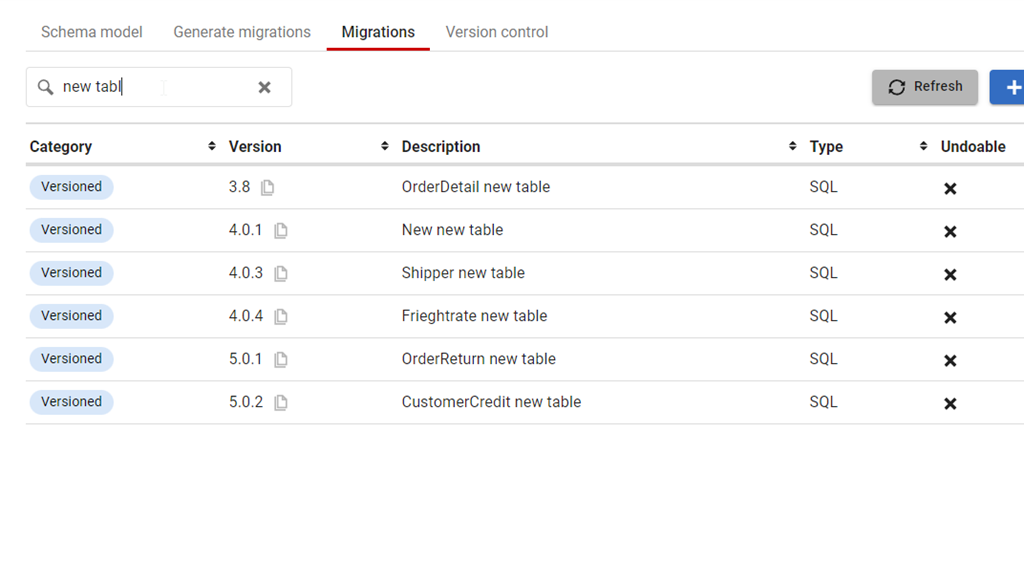
At the top of the Migrations tab, there is a new search box. This was added somewhere in Flyway Desktop 6, and I just noticed it. However, it’s very, very handy. If I start typing in there, like “New Table”, then I see just those migrations.

2023-08-10 12_33_47-Flyway Desktop

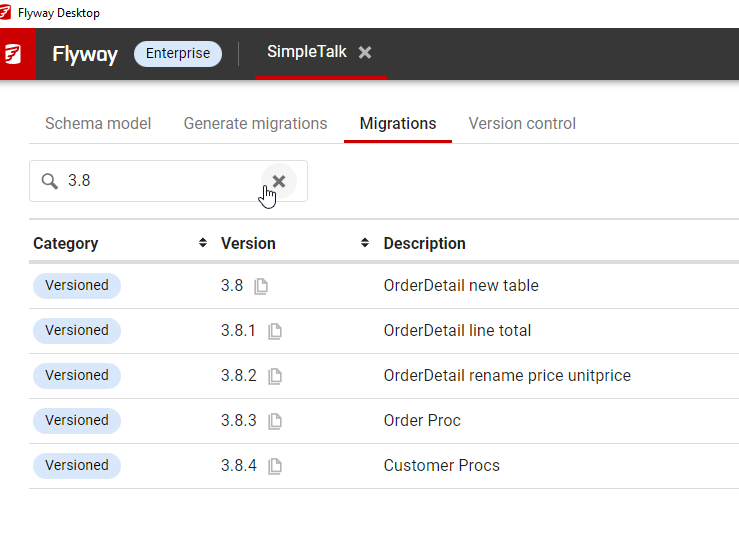
I can even search versions, like the specific migrations in the 3.8 release that I am wondering about.

2023-08-10 12_35_55-Flyway Desktop

This works by checking the version and description fields. The rest aren’t as useful, but it does mean if you come up with some standards for the description in your team, you can easily use this to find changes in your project.

Try it today. If you haven’t worked with Flyway Desktop, download it today. There is a free version that organizes migrations and paid versions with many more features.

Video Walkthrough

I made a quick video showing this as well. You can watch it below, or check out all the Flyway videos I’ve added:

Posted in Blog | Tagged , , , | Comments Off on Friday Flyway Tips: Searching Migrations

What Have You Done Lately Outside of Work?

I was chatting with someone recently that’s younger than me. They’ve got a good job and had some success learning, but they felt like their career wasn’t progressing fast enough. This person still wanted to grow their career and their income. That’s the place many people find themselves.

This individual was asking my advice since they thought I’d had some success and were looking for me to share some of the things that worked for me. I asked them this question: What have you done lately outside of work for your career?

They hadn’t done really anything, which is fine. This person has a partner, hobbies, and has found some balance in life. They were enjoying themselves, which is great. I love people having balance in life.

However.

If you want to move faster in your career than others, you have to do more. I don’t mean work 90 hours a week or spend every night on a project. However, I grew my career with work outside of work. Brent Ozar did the same thing. Many of the speakers you see at conferences and Microsoft MVPs did the same thing. They put in extra hours to grow their skills and knowledge.

I know lots of you work a lot, and you have family/friend/spiritual commitments. I get that. However, I’m sure most of you aren’t working the coal miner’s schedule. If you have hobbies or fun time, that’s great, but can you carve out some time from those to invest in your career? Brent has time management skills advice, and I’ve written about this as well. Doctors, lawyers, even auto mechanics work on their skills when they aren’t getting paid by someone. They do this as an investment in the future.

As I move towards the end of my career, I do less (especially this year), but I still read some books that help grow my skills in areas Redgate cares about. I do some training for coaching to improve there. I do less for my career than I used to, but I still do something outside of work.

Answer my question today. What have you done lately outside of work for your career?

Steve Jones

Listen to the podcast at Libsyn, Stitcher, Spotify, or iTunes.
Posted in Editorial | Tagged | 1 Comment

A New Word: Aubadoir

aubadoir – n. the outworldly atmosphere just before 5 am, when the bleary melodrama of an extremely late night becomes awkwardly conflated with the industrious flourescence of a very early morning.

I haven’t seem 5am from the previous day side in a long time. I just don’t go out much, and almost never past midnight. However, I did have a late night recently after vacation. I flew home on a Sunday night, with a delayed flight. This has become all too common, but in this case it was tough.

I landed around 1230am. I got bags and drove home, getting into bed between 130a and 200a. I had a 9am flight, so I was up at 6am to pull out some laundry from my bag, throw in a few new clothes, and then head back to the airport.

Getting home and remembering that I had to be up in a few hours certainly had me feeling some audadoir.

From the Dictionary of Obscure Sorrows

Posted in Blog | Tagged , | Comments Off on A New Word: Aubadoir