AI Thoughts on the Build Keynote

If you haven’t seen the Build 2023 keynote, it’s, well, interesting. At a surface level, it’s focused on AI and delivers some demos that many of us might find to be useful and intriguing. I didn’t attend the event (or watch it live), but I did see it a bit later and I made some notes, pausing the 30-minute talk a few times to think about what I’d seen.

The opening lightly glosses over some of the AI enhancements to development tools and the environments that can be created quickly in GitHub or Azure. Some of us will like those, and maybe they’ll grow on me, but I tend to prefer a development environment on my own hardware, where I have unlimited compute power at a fixed cost. The first big announcement is then showing Copilot technology, essentially some ChatGPT-like abilities, embedded into Windows 11. The demo shows asking Windows where settings are, with the response including buttons to take actions, like setting dark mode. Minorly useful, though I think Windows search works fine. I can type “env” and get the “edit environment variables” in the results. I still have to click through to change things, but this doesn’t seem like a better use of AI, especially if I need to type “set dark mode” instead of “dark”.

To be fair, the demo has the user asking for ways to adjust the system to get more work done. The suggestions are for dark mode and a focus timer. I knew about the former, but not the latter. Perhaps being able to ask for general assistance with tasks is useful as there are likely lots of features I know nothing about and wouldn’t even think to look for. There is also the option to drop a document, like a PDF, in the chat and Windows asks if the user wants the system to “explain”, “rewrite”, or “summarize” the document. The user clicks summarize and gets a summary of the document.

There is also a demo with plugins that developers can write for Bing, such as one that uses a legal package to make a change to a document. While lawyers might be worried about their practices (or paralegals about job prospects), I’m more worried about a fundamental problem that many of us data professionals have seen in the past: garbage in, garbage out.

In this case, if the AI model isn’t well-trained, can I really trust it to summarize a PDF or change a legal document? How can I tell if it’s wrong, or slightly off? In some sense, this reminds me of a high school report. It might summarize some text at an A level, or a D level. It’s up to me to judge that, and I can’t assume the results are good or bad.

The important thing to keep in mind, however, is that we aren’t in that place with AI. We can’t just trust the AI. We are in a time when AI is an assistant, where it can help us complete a task or get something done a little quicker. We are still responsible. We still have to verify and do some work, but if the Copilot can automatically launch Jira and navigate to a ticket, or attach a document and create a short message to our team, that saves us time. It saves us tedium. It can make our jobs easier. We are still needed, but we don’t do all the heavy lifting.

I do worry about some of the opportunities for plugins that developers will write strictly to monetize their efforts. If I want a shopping list, I don’t want it to go to Instacart. I want a list I can use. I realize that doesn’t necessarily make Microsoft or a developer any money, but not all the tasks and advances are about profit. Or at least, I hope they all aren’t. I hope some are here to just make the world better. For a quick view of what that could be, watch the keynote closing video.

Steve Jones

Listen to the podcast at Libsyn, Stitcher, Spotify, or iTunes.

Posted in Editorial | Tagged , , | Comments Off on AI Thoughts on the Build Keynote

Denver Dev Days

I’m going to attend the Denver Dev Days 2023 in June. I submitted a few sessions and got two picked. I’ll be doing these talks:

  • Blogging for the Tech Professional
  • Architecting Zero Downtime Database Deployments

These are both sessions I enjoy.

If you’re in the Denver area, this is a fun developer learning event at the Microsoft office in the Tech Center. You can get more information here: Denver Dev Days 2023. Hope to see you there.

Posted in Blog | Tagged , , | Comments Off on Denver Dev Days

Branding Yourself for a Dream Job – Houston SQL Server User Group

I delivered a presentation for the Houston SQL Server User Group tonight, virtually from Colorado. I’d love to go down, but couldn’t do it today.

The slides for the talk are here: BrandingDreamJob.pptx

I had fun and thanks to the Houston group and Paresh for having me.

A few interesting questions:

Should you use your real name on Slack (or Twitter/etc.)

There is no right or wrong answer here. For me, I want to tie together my efforts, so if I help people on Twitter, I want to link my resume/profile to my Twitter account. It’s why I keep way0utwest and try to get that on new platforms. My profile says “Steve Jones”.

You can do what you want.

What about using ChatGPT to write blogs?

A great comment here from Paresh. I think this is a good way to get started and maybe sketch out a post. I would recommend this, though I think this needs to grow and improve.

However.

You don’t know if ChatGPT synthesized sentences and paragraphs from other information, which is what we all do. You also don’t know if it copied paragraphs verbatim from somewhere.

My advice if you use this is plan on editing the result and making it your own.

How do we network virtually?

I’ve networked and built friendships online for years. In the SQL Server Central forums and similar places. Sometimes real time chat, sometimes asynchronous posts. However it works.

If you can get to know people with messaging or posts on a platform, that’s great. If you come to a virtual group meeting, or even a company meeting, early, you can spend a few minutes in chat or live chatting with them. Ask a question, share something, solicit an opinion, or comment on something.

In busy chats, or even aloud, you might @ someone or address them. In chat, @Steve, that was an interesting comment. Aloud, “Steve, have you ever used automatic seeing in an AG?”


Posted in Blog | Tagged , | 3 Comments

Setting up a Local http Server with Node

Setting up a local web server was something that I haven’t done in a long time and this was really easy. This post shows how to do this with a command line node web server.

A Need

Most software that needs a web server sets one up for you. This is pretty easy, and if I have a web app in Visual Studio, it will start up its own server when you run the app. If you had to set your own up, IIS was in many versions of Windows, but it wasn’t a simple thing to configure and manage.

I like simple.

I needed to just serve a file over http to test something. I could have done this by uploading a file to this blog or somewhere else, but I was hoping to keep this small and portable.

Looking Around

As always, I started with Google. I found a bunch of articles on Apache, python (should have tried this) and others. Then I saw this short article on a test web server on Windows. I looked, and this seemed to be something simple. I had node installed, so really I ran this:

npm install -g http-server

This installed somewhere. I had created a new folder in d:\http, but the web server was installed elsewhere. When I typed “http-server” in the command line, it seemed to be running. I saw this:

2023-05-04 09_19_04-http-server

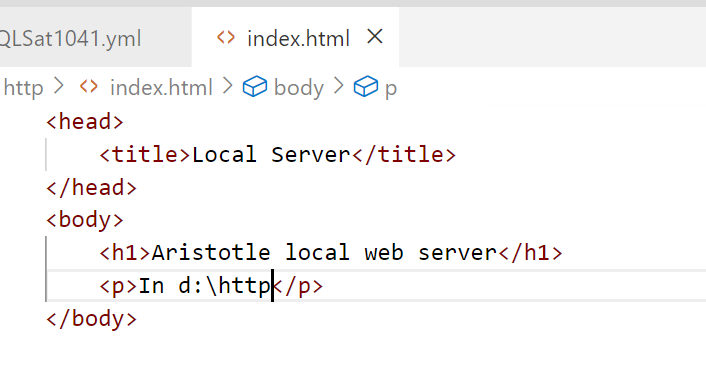
I created a quick html file, index.html, with this content:

2023-05-04 09_19_40-index.html - sqlsatwebsite - Visual Studio Code

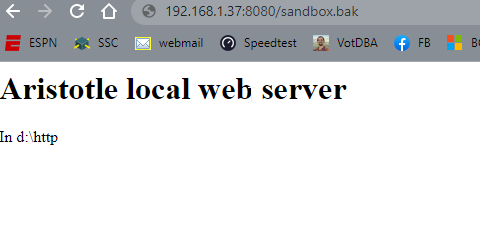
and voila, I had a web server.

2023-05-04 09_19_47-Local Server

It’s basic, but any file I drop into d:\http can be served over http by entering the file name in the path. You can see in the image above, I was testing moving SQL Server backups. That URL actually downloaded that file from my browser.

Summary

This showed how you can set up a server with node. It’s quick and easy, and flexible. I can set this up as needed for tests without any big config. If you need this, here’s one way to test your own web stuff.

Posted in Blog | Tagged , , | Comments Off on Setting up a Local http Server with Node