Leveling Up for Sales and Marketing

I’m heading to Austin today for Redgate’s internal Level Up conference. This is designed to help employees improve their skills in some way. The original ones focused on technology skills, but they have grown to include other business skills. A nice writeup from 2019 is here.

This has traditionally been in Cambridge, UK, but last year we had an event in Austin. I couldn’t attend because of other commitments, and have actually never been to Level Up. Fortunately for me, there are actually a few events this year:

  • Level Up Sales and Marketing, US – May 2023, Austin
  • Level Up Sales and Marketing, UK – June 2023, Cambridge
  • Level Up Technical, UK – July, Cambridge

This year, I’ll get to attend the first two, though not likely the third. I’d like to hit the technical talks, but I also have a lot of other trips and travel, so I have to pick and choose.

I’m not speaking here. I speak a lot, and this is a chance for others to share their knowledge. I have offered to mentor and support others, and I ran a presentations tips and tricks session recently. Actually, I may do that in a few other places and record it.

Having an internal conference isn’t cheap or easy, but it is a neat way to build bonds in the company and tailor training to what you need. I’ve been asked to speak at a few other companies’ conferences, and I’ve always enjoyed it.

Posted in Blog | Tagged , , , | Comments Off on Leveling Up for Sales and Marketing

A New Word: Vemödalen

vemoödalen – the fear that originality is no longer possible

I used to worry about this, and often I thought that I’d run out of original things to do. However, after 20 years of writing, I know that’s not true. Seeing TikTok or Youtube things my kids enjoy show me the tremendous creativity and originality that the world has to offer.

You might disagree, but I don’t find this to be a sorry for me and I embrace the amazing diverse, creative world we live in.

From the Dictionary of Obscure Sorrows

Posted in Blog | Tagged , | Comments Off on A New Word: Vemödalen

A Second Job, a Trip, and a Change of Pace

Some of you know that I work a second job as a volleyball coach for competitive clubs in the US. I started doing this as my youngest kid grew up, and I was looking for a hobby. I ended up coaching at the club where she competed and kept going when she left for university. Eight years later I still coach kids from Nov-May with my wife.

This weekend I’m traveling with my team of 17-year-oldsto compete in Las Vegas on Fri-Sun. A couple days off from work, to do more work, but it’s fun. I love kids and working with them, seeing them grow and change, succeed and fail.

I also like getting away from technology and watching the competitive nature of sports.

I’ll be back late Sunday, with a morning flight Monday for work. Hopefully I won’t be too tired from the weekend.

Posted in Blog | Tagged , , | Comments Off on A Second Job, a Trip, and a Change of Pace

What Backups Are In This File?–#SQLNewBlogger

I had a question on multiple backups in a file and had to check my syntax. This post shows how to see which backups are in a file.

Note: Don’t do this. Put backups in separate files.

Another post for me that is simple and hopefully serves as an example for people trying to get blogging as #SQLNewBloggers.

Setup

I have a sandbox database. I made a backup of this.

BACKUP DATABASE [sandbox] TO  DISK = N'D:\SQLBackup\sandbox.bak' 
   WITH NOFORMAT, INIT,  
   NAME = N'sandbox-Full Database Backup', 
   SKIP, NOREWIND, NOUNLOAD,  STATS = 10
GO

Note I used INIT, which will ensure this is the only backup in this file.

I then changed something, in this case, I made a new table (I was testing things for Rich).

CREATE TABLE testforrich (myid INT)
GO
INSERT dbo.testforrich (myid) 
SELECT ROW_NUMBER() OVER (ORDER BY (SELECT NULL))
  FROM sys.columns AS c
GO

I then ran another backup. However, this time I wanted to append to the existing file.

BACKUP DATABASE [sandbox] TO  DISK = N'D:\SQLBackup\sandbox.bak'
  WITH NOFORMAT, NOINIT,  
  NAME = N'sandbox-Full Database Backup', 
  SKIP, NOREWIND, NOUNLOAD,  STATS = 10
GO

The NOINIT keyword is in here, which appends the backup to the same file. In essence, sandbox.bak will then contain two different backups in one file. For this test, I then made another change and another backup.

TRUNCATE TABLE testforrich
GO
BACKUP DATABASE [sandbox] TO  DISK = N'D:\SQLBackup\sandbox.bak'
  WITH NOFORMAT, NOINIT,  
  NAME = N'sandbox-Full Database Backup', 
  SKIP, NOREWIND, NOUNLOAD,  STATS = 10
GO

Now I have three backups in the file.

Checking Contents

If I were to click the restore item in SSMS and pick the file, I see this:

2023-05-03 10_15_53-Restore Database - sandbox

Note that the position is listed as “3”, which means this is restoring the newest (most recent) backup by default. I don’t seem to be able to edit this, though if I click timeline and change the time, I can get a different backup. I see different backups in there:

2023-05-03 10_30_16-Backup Timeline_ sandbox

However, when are those backups? This timeline isn’t great.

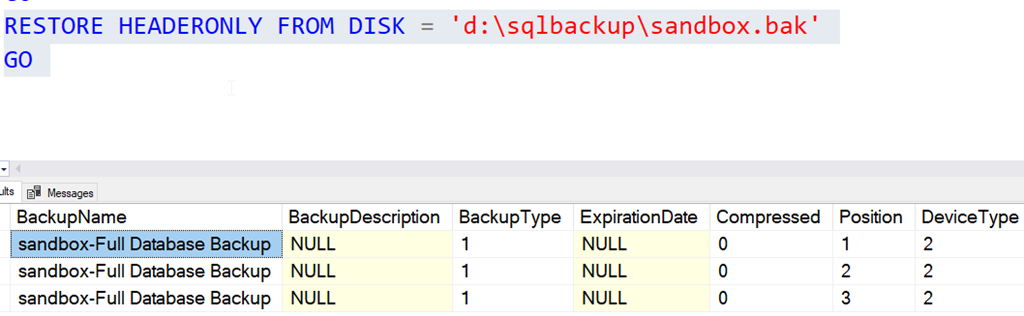
I can use RESTORE HEADERONLY. The command I ran is:

RESTORE HEADERONLY FROM DISK = 'd:\sqlbackup\sandbox.bak'
GO

This gives me all three backups, which are shown as different positions in the file.

2023-05-03 10_31_38-SQLQuery7.sql - ARISTOTLE.sandbox (ARISTOTLE_Steve (72))_ - Microsoft SQL Server

From here, I could perform a restore with a different backup if I needed to.

SQL New Blogger

This was a quick post that I wrote after I spent 5 minutes creating a test for something. I grabbed my code, took a few screen shots, and it took about 10 minutes to assemble this.

Easy for you, and this shows a potential interviewer or manager that you can dig into a small issue, learn, and solve it. Try it for yourself and write a blog post.

Posted in Blog | Tagged , , | 3 Comments