Daily Coping 13 Jan 2023

Today’s coping tip is to take five minutes to sit still and breathe.

Sounds simple. I find this to be very challenging. If I’m just sitting here, why am I now getting something done? I could be productive during this five minutes.

I struggle to do this, but I’m taking this time to do this. It’s a few days earlier in the week, and I’m at a customer site for a bit of work. During the time someone else was working with the customer, I took five minutes to sit in the lobby of as building. I set a timer and put my phone in lap. I then sat, looked at the fountain for a bit, closed my eyes a bit, and tried to just sit.

It took a few minutes to relax. I kept thinking about things I needed to do, reflect on the customer visit, and more. After a bit, I could quiet my mind and just relax.

It was nice, though I still felt like I could have been productive during that five minutes. Clearly I need to practice this more.

I started to add a daily coping tip to the SQL Server Central newsletter and to the Community Circle, which is helping me deal with the issues in the world. I’m adding my responses for each day here. All my coping tips are under this tag.

Posted in Blog | Tagged , , | Comments Off on Daily Coping 13 Jan 2023

Daily Coping 12 Jan 2023

Today’s coping tip is to write a list of things you feel grateful for and why.

  1. My wife – our relationship continues to grow, and I cherish this after more than 27 years.
  2. Health – no major issues for me
  3. Finances – secure enough to not worry, with relatively minor stresses over expenses.
  4. Children – healthy and doing well in life. I’m proud of them
  5. Coaching – I love working with kids and am grateful for the chance to do so.
  6. Animals – The dogs, cats, and horses enrich my life. I’m grateful, even when I’m annoyed by something.

There is plenty more, but this is a short list.

I started to add a daily coping tip to the SQL Server Central newsletter and to the Community Circle, which is helping me deal with the issues in the world. I’m adding my responses for each day here. All my coping tips are under this tag.

Posted in Blog | Tagged , , | Comments Off on Daily Coping 12 Jan 2023

Getting Started Connecting to a Database with Flyway

In a previous post, I got Flyway installed as a CLI utility (command line interface). This post will look at the first connection to a database.

If you need to install Flyway on Windows, see my previous post.

Concepts

Flyway is a command line executable that takes various parameters to control what it does. Essentially, these are command verbs and decide what action is running. The previous post looked at the version command.

There are also parameters that can be included before the command. There are lots of parameters.

However, much of the way Flyway works is controlled by the flyway.conf file, which is inside a conf folder where you installed Flyway. If this file is found in the current folder, then Flyway will use configuration parameters from this file.

Note, the inline parameters should override those in the conf file.

Configuration

I find it much easier to use the configuration files. While you can specify this with the configFiles parameter, I often ensure that I run Flyway from within a particular folder that has a flyway.conf file. This has worked well.

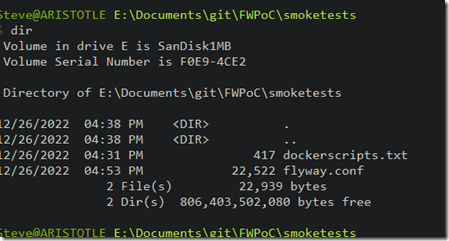
Copy your flyway.conf from your install folder (under conf) to a new folder where you will experiment. For me, I set up a new folder called “smoketests” where I’m doing a little experimenting. As you can see, I only have two files in here:
2022-12-27 11_06_23-cmd

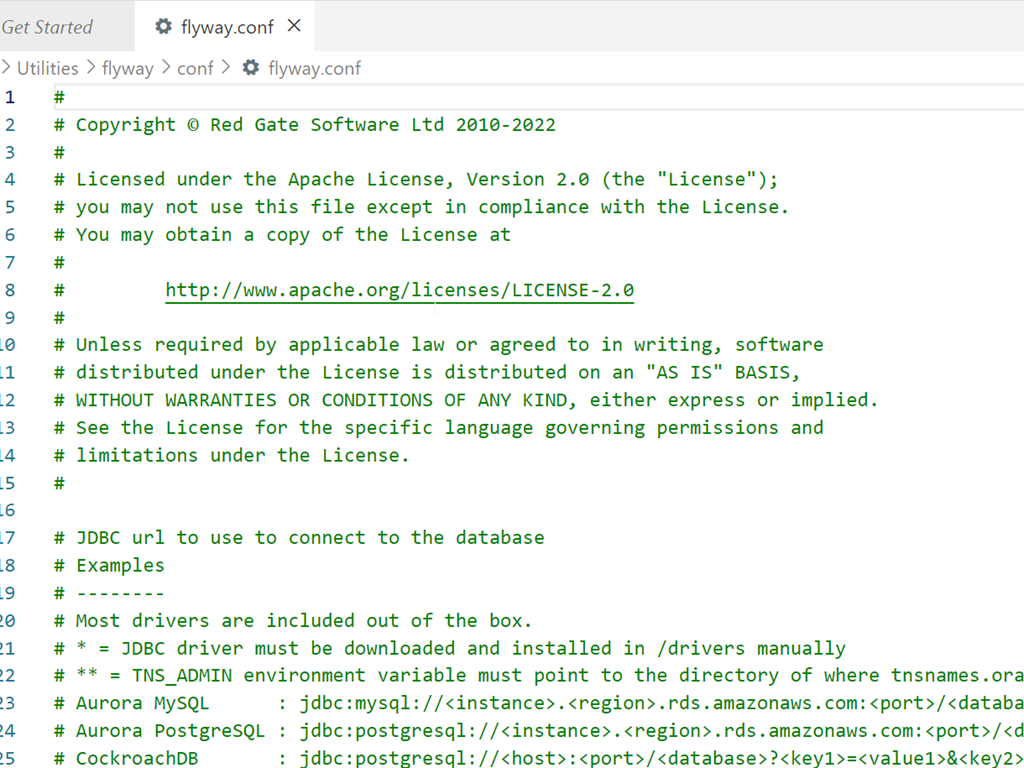
The default conf file can get a little confusing. It’s full of many options, which are somewhat documented. My default looks like this when I open it:

2022-12-27 11_07_28-flyway.conf - flywaysimpletalk - Visual Studio Code

Most everything is commented out, which makes it harder to figure out what to do.

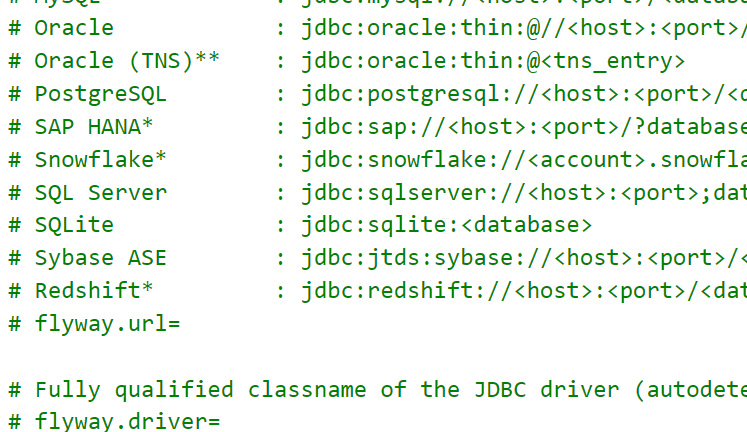
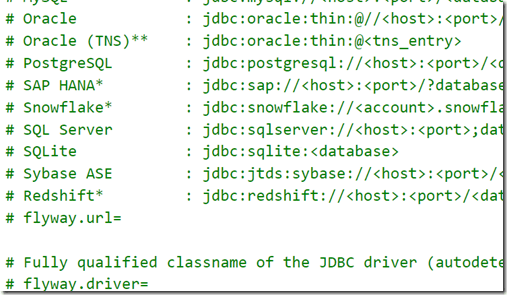
The thing to remember is that you uncomment those settings that you want to set. For example, the drivers section is extensive. Some of theses are included, some you need to download. Since this are all Java based JDBC drivers, it can look strange to a SQL Server person.
2022-12-27 11_15_29-flyway.conf - flywaysimpletalk - Visual Studio Code

The thing that gets lost in here for me is that I don’t comment out the line that starts with SQL Server. Instead, I need to copy and paste the jdbc part to the flyway.url= line. My valid connection would look like this:

2022-12-27 11_17_26-● flyway.conf - flywaysimpletalk - Visual Studio Code

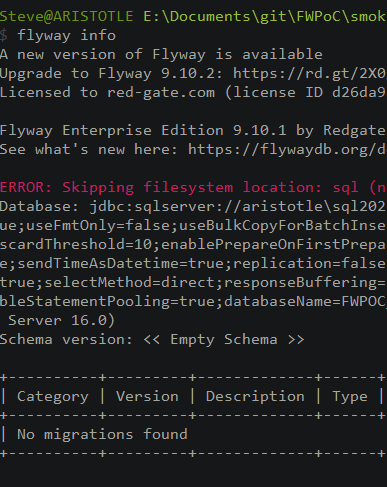
Let’s try connecting with the info command. When I run Flyway info, I get asked for a user and password. Annoying, but not that bad. However, I then get an error:

2022-12-27 11_19_53-cmd

This is a secure connection error. I do have TCP/IP enabled, which I know Java needs. This is more about a change the SQL Server team made, which requires secure connections.

Let’s add this to our connection string: ;trustServerCertificate=true

This gives me this string:

flyway.url=jdbc:sqlserver://aristotle\SQL2022;databaseName=FWPOC_1_Dev;trustServerCertificate=true

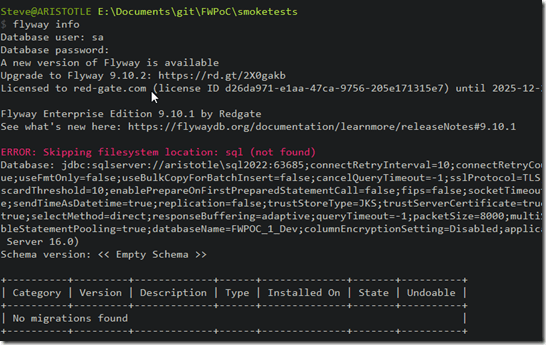
Now when I connect, things work. I still have to enter a name and password, but I can connect and I get back something.
2022-12-27 11_22_56-cmd

I see some info on flyway versions. There’s a new version available. I’m also licensed for Flyway Enterprise.

Then I see the filesystem folder, sql, is missing. This is where the migrations are stored, so if I want to add migration scripts, I need to add a folder.

Next, I get the complete connection string. Lots of options here, of which most are defaults.

Then I see the schema is empty. Flyway works off schemas, which is what many platforms require. We get lazy in SQL Server and often just use dbo, but most other platforms want schemas set up.

Finally I see that there are no migrations run in this database, and I see an empty status table.

That’s a lot, and I connected to the database. Nothing changed in the database, and no flyway_schema_history table was added. This essentially let me know Flyway was working.

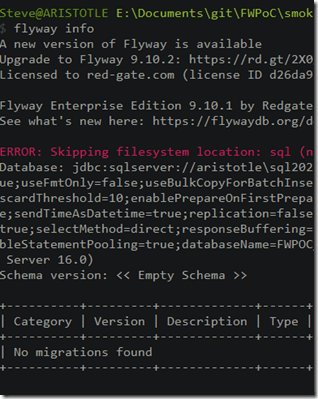
The last thing I’ll do is add this to my connection string: integratedSecurity=true

This lets get away from the name and password on Windows, but using Windows Auth for SQL Server.
2022-12-27 11_30_50-cmd

That’s it. I’ll keep working on different commands in Flyway and getting to know the CLI.

Posted in Blog | Tagged , , | Comments Off on Getting Started Connecting to a Database with Flyway

Do Hybrid Conferences Work?

The pandemic forced many events online, which has worked fairly well inside many companies and certainly spurred some technological advances in how we meet and share information. With the pandemic ending or at least entering an endemic phase, there are many live events now, as well as some attempting to embrace a hybrid philosophy.

I went to two conferences in 2022 that embraced the hybrid concept: SQL Bits and the PASS Data Community Summit. I was just a speaker at the former, and mostly a speaker at the latter, though I saw quite a bit of the behind-the-scenes action from the organizers’ perspective at the Data Community Summit.

During SQL Bits, I watched a hybrid session with a remote speaker. I also presented two sessions with a moderator that was engaged with the virtual attendees. The experience watching a remote presenter wasn’t great, and the audio at times was hard to hear. I also spoke with a few virtual presenters who also noted they struggled to hear people in the room. All in all, it felt somewhat live, but I felt disengaged from the speaker, and missed a feeling of interaction from the picture-in-picture of the individual speaker inside the larger screen. It was just too hard to see them and understand body language.

At both events, the sessions I presented with a moderator went well, and I felt the moderator could be a good proxy for people online. I also know that I have little visibility into what people online see and hear. I’ve gone out of camera range at times, and I rarely know if the virtual audience can see my entire screen, me, or some combination of both, much less hear what I’m saying.

After the Summit, I read a post about hybrid events from Andy Galbraith, which made a lot of sense to me. I enjoyed seeing and speaking with Andy in Seattle, though I know that our interactions would have been fewer, less satisfying, and less connected if we were virtual using Spatial.IO or some other technology. Spatial has been the best online platform I’ve seen for groups, but it’s still not great.

Like Andy, I don’t want to pick a fight, but I have a few perspectives on why I don’t think hybrid works for the most part. First, it’s resource expensive. The equipment, people, and time spent putting the show together make it less attractive for most events, even paid. The people managing AV find it more than twice as hard to manage the technology and don’t like the added stress.

Second, the interaction is still very limited, and when we do try to interact, it’s full of pauses and stutters in conversation that make this much worse than in person. Even a proxy adds delays and a very un-natural feeling to the engagement.

Lastly, we don’t really create the same engagement as the view from a virtual event is very limited, and one can’t really engage with other attendees in the same way we can in person. Not only in sessions but before/after and in other spaces. Meetings with more than ten people are often hard to engage with more than a few people, so I don’t expect we can make things better when there are 50, 100, or more people in a virtual meeting.

I appreciate the accessibility aspect of virtual attendance. I think we ought to have more virtual events. I was glad we had a few virtual SQL Saturdays in 2022 and I’d like to see more in 2023. If you want to put one on, especially with a niche technology, please reach out. I’d love to see more of these events.

I just don’t think hybrid works. Not at large conferences, not at SQL Saturday, and not at user groups. My view is you should choose one or the other. Make it in-person or virtual.

That being said, I do like the broadcast efforts from large conferences. I thought PASSTV was great. I have enjoyed the shows between sessions at Ignite and Build, and I hope we can do some of that for the 2023 PASS Data Community Summit. One thing I think has worked well across decades is broadcasting. The effort is lower and the experience for the remote audience can be better. They aren’t included, but they can see a “show” that is better than a clumsy attempt at bringing thousands of people into a “room” of some sort.

I don’t think hybrid conferences work, but I know I’m biased in that I help run and organize live events. I want to see more live events in the future, and I want to see more virtual events.

Just not together.

Steve Jones

Listen to the podcast at Libsyn, Stitcher, Spotify, or iTunes.

Posted in Editorial | Tagged | Comments Off on Do Hybrid Conferences Work?