Creating a PostgreSQL Docker Container with a Volume on Windows

This post looks at how to set up a PostgreSQL container on Windows using Docker for Windows. I’ve seen a few posts, but I had to cobble together some instructions from places, so I decided to make my own post to help me remember and keep things simple.

tl;dr: do this:

  • Create a folder c:\docker\pgdev
  • get the Docker image: docker pull postgresql:latest
  • Run the container, command below:
docker run --name pgdev -e POSTGRES_PASSWORD=Str0ngP@ssword -d -p 5432:5432 -v C:\Docker\pgdev:/var/lib/postgresql/data  postgres

That’s it. Then you have a PostgreSQL instance running on port 5432 (default) with a user, postgresql, and a password, Str0ngP@ssword.

More detailed instructions below

Create a place for data

Containers are ephemeral, which isn’t what we want for a database. We want to keep data around, so let’s make a place for this. This will be a volume for our container, which we will map to a particular location inside the container. Then if the container dies, we can map this to another PostgreSQL container and have our data appear.

Create a c:\Docker folder on your machine. This is a good spot for any Docker related volumes.

Now create a pgdev folder under c:\docker. This is the place we’ll keep data for this PostgreSQL container. It should be empty.
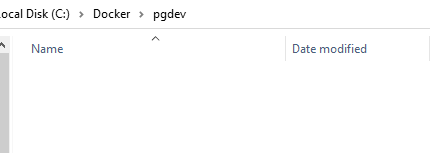
2022-12-27 10_04_37-pgdev

Get the Image

Container images are available from Docker. I won’t cover installing Docker or setting up Linux containers, but you do need to do this. I used Windows 10, and I have WSL v2, as you can see:

2022-12-27 10_06_23-cmd

Docker Desktop is running Linux containers. You can see that since it say “Switch to Windows containers”.

2022-12-27 10_07_40-

Next, use Docker Pull. I assume you are working with the default Docker registry, so this command should work:

Docker image pull postgres:latest

This will start downloading the image.

2022-12-26 13_16_43-cmd - docker  image pull postgres_latest

When this completes, move on.

Starting the container

Once we have the image, we can start the container. You could do this without the folder above, but your data would be in the container and if the container were ever deleted, then the data is lost.

The basic command for starting the container requires a few parameters. Here is a list of what I provided in the command at the beginning:

  • –name – This is a name you can use in docker commands to refer to the container. You can put anything. I chose “pgdev”.
  • The password in the database system for the postgres user. This is a default user and you send this in as an environment variable with -e. The password I used here is: Str0ngP@ssword
  • -d runs this detached, rather than interactively. This means your command shell can return command to you. Otherwise, all output from the container appears in the shell and you can’t type anything.
  • -p is the port mapping. This is host:container. In this case, we map 5432 on the host (where we use some postgreSQL driver to connect) to 5432 inside the container. You can choose any unused port for the first number, but 5432 is needed for the second number as the postgresql service is listening on 5432.
  • -v is the volume mapping. Here we map our host folder to a container folder (host:container). We enter the folder we created above and then map this to the place where postgresql stores data. That’s in /var/lib/postrgresql/data
  • postgres is the image name.

Here is the command again:

docker run --name pgdev -e POSTGRES_PASSWORD=Str0ngP@ssword -d -p 5432:5432 -v C:\Docker\pgdev:/var/lib/postgresql/data  postgres

Once this executes, we should see a long hex code returned, which is the container identifier.

2022-12-27 10_22_58-cmd

We also see our folder is now filled with postgresql specific data files and folders:
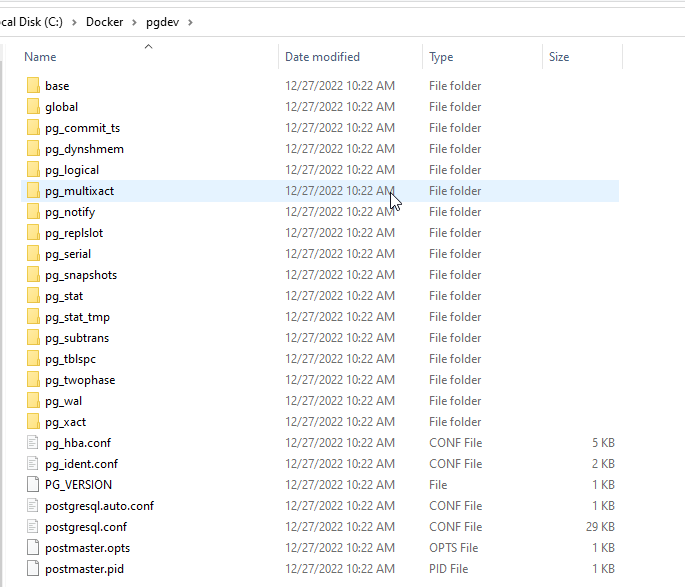
2022-12-27 10_23_05-pgdev

That’s it, our container is running.

Posted in Blog | Tagged , , | 3 Comments

Daily Coping 9 Jan 2023

Today’s coping tip is to look back at a previous coping tip that required planning and evaluate how it helped.

One of my tips in December was to listen to new music. I downloaded the four sets of music for my trip and listened to them. I was surprised how I felt.

  • This is Santana – A good mix, which I enjoyed. #2 on this list. I listened a few times to this playlist.
  • Blessings and Miracles – newer music, but not as enjoyable as I thought. I listened once and then part of a second time and gave up. #4
  • The Pinkprint – New, and I’ve enjoyed some Nikki Minaj on other playlists. However, I didn’t enjoy this one apart from a couple songs. I did listen a couple times, but found myself drawn to the other album. #3.
  • Beam Me Up Scotty – I found myself listening to this a number of times, maybe 5-6 between my airline trips to London and Lisbon. #1 on this list.

I started to add a daily coping tip to the SQL Server Central newsletter and to the Community Circle, which is helping me deal with the issues in the world. I’m adding my responses for each day here. All my coping tips are under this tag.

Posted in Blog | Tagged , , | Comments Off on Daily Coping 9 Jan 2023

The Cost of Employee Turnover

Sometime during the first 3-4 months of the pandemic, after offices all over the world closed, I thought that a lot of businesses would try to hold on to existing employees and minimize turnover. I also thought many employees would be nervous about changing jobs amid all the uncertainty.

That wasn’t the case everywhere, and I was surprised at how much employee turnover occurred in many companies during 2020 and 2021. We had the Great Resignation, where talented employees (and some not-so-talented) found new employment with lots of remove flexibility. We typically have low turnover at Redgate, but more surprising to me was the number of people we’ve hired in the last two years.

Our gains come from losses elsewhere. It seems a lot of companies have had a bit of turnover, more than they liked.  The costs of replacing a staffer has climbed to an average of USD$57k, according to a recent poll of hiring managers. I’m sure this is a combination of the time and money spent on recruiters and interviews as well the lost productivity of having less people around.

For many of us working in technology, we realize that losing good people is a problem. Often we lose undocumented knowledge about our systems,  those shortcuts, checks, small tasks, not-so-obvious fixes, and more that make life easier. We can feel more stressed about additional work, or even the anticipated unknown challenges we might face. Moral, productivity, and motivation decrease, which creates a snowball effect. Everyone gets less done, which costs the organization more. Either lower revenue, more costs, or perhaps fewer services for those government or non-profit concerns.

With large tech companies letting lots of talented people go, I wonder if we’ll see more competition in the employment market. For quite a few years there have been fewer workers than there are jobs. Perhaps that changes a bit in the future, though I still think there are not nearly enough talented workers for the positions open. Good for talented workers as they may have more choices, but also good for less talented workers when companies feel pressure to hire anyone.

Except, what I’ve seen in a lot of companies is that they don’t want to hire anyone. Having a degree or cert isn’t enough. Companies aren’t going to hire you because you are Azure/AWS/etc. certified. They want tech skills and at least a few soft ones. That creates an even higher cost to fill positions, so maybe that USD$57k isn’t a bad number.

To me, what this really means is that organizations ought to look at poor management, both middle and upper, and replace those people. That’s the problem in many places, one that isn’t easily fixed. Poor culture, micromanagement, lack of support, little-to-no psychological safety, and more contribute to poor retention.

Culture is important and building it is hard. While not everyone will have a great culture, many organizations can avoid a poor one by treating people fairly and ensuring management understands how to do that. If for no other reason than to avoid the high costs of replacing staff.

Steve Jones

Posted in Editorial | Tagged , , | 5 Comments

Goals for 2023

This is the goal setting post for 2023. The previous ones were:

As with previous years, I’ll break these into three categories: career, personal, and community. There’s some blend with all of these, but these are goals that I want to use to engage and grow my life in interesting ways. To aim for mastery, autonomy, and purpose, as Daniel Pink wrote in Drive.

The idea here is to set goals for Q1 2023 and review in March. I’ll also do monthly reviews of these. The rest of this post should be repeated in all future posts.

Reading

I’m separating this out, as I’ll put a few things in here that span other areas.

For Q1, I’m aiming for 2 books outside of the fiction I enjoy. These are going to be in these areas:

  • marketing – title TBD. Something to help me better understand how to approach this part of my job. There have been recommendations in our Slack channels, so I’ll pick one.
  • Coaching – Again, a few recommendations in groups I frequent.This is important as I influence young people.

Both of these are items I’ll target for these reasons:

  • S – This is targeted, reading a book
  • M – I’ll finish or not
    • A- both
    • B – 1 done, 1 partial
    • C – 1 done
    • D – partial
    • F – not started
  • A – I read around 100 books a year, so 2 in a quarter isn’t too much.
  • R – Marketing is a part of my job and career at this point, so this is good. Coaching is something I do personally with kids and with customers for DevOps.
  • T – I have 3 months, until 31 Mar.

Career

My career has taken a strange turn in that I continue to do some technical work and consulting with clients and customers, but more of my effort is spent understanding marketing and sales. I pivoted slightly last year by reading The Trusted Sales Advisor,

I also need to do more work with other platforms, at least to become more comfortable with them. I thought I might do more in 2022, but ended up getting buried with community stuff.

For Q1, I’m doing to aim to do a couple things:

  • Set up a tracking system based on the book for my efforts with customers
  • Track and calculate my scores to help me better approach how I work with customers.
  • Review this with my boss and with someone in sales

This is not a lot, but it’s a good start. I can review this goal as:

  • S – This will include a way to track things, likely Excel, and then some formulas or reporting to help me see how I’m doing. I also need to fill this out after each call with a customer. I’ll send it to a couple people in sales for review in March from two people. setting a reminder now.
  • M – I will have a sheet to look at, and a record of calls. I also have a review reminder set.
    • A – All calls tracked, review complete, data used to change my work.
    • B – most calls tracked, review complete,
    • C – half calls tracked, only 1/2 reviews,
    • D – less than half calls tracked, no review,
    • F – no sheet set up
  • A – Building a simple tracking sheet ought to be easy. The formulas are given. We used to track calls, now I’m adding in 5 minutes to think about how things went. Getting people to meet with me should be achievable if I make the time.
  • R – Important for my job
  • T – I have a 31 Mar deadline.

Community

A portion of my job is community. It’s also a passion. I spend time here outside of work, I volunteer and go to UGs/events when I don’t have to, and I certainly do work with SQL Saturday outside of my job. In fact, I was fixing PRs and updating the site while on vacation in Portugal, mildly anoying my wife.

In terms of a goal here, I’m going to focus most on SQL Saturday and less on speaking for now. I likely will go to a few events, but I want to limit my efforts in Q1.

The goals here will be the following:

  • 2 speaking engagements for community (SQL Sat Austin and SQL Bits are on my schedule)
  • Reach out to 10 SQL Sat groups that did not run an event in 2022 and motivate them for 2023. This should be at least 2 emails to each person/group.
  • Reach out to all 2022 organizers and ask about plans for 2023
  • Start coding a tool for converting schedules to HTML.
  • Hold office hours once in Q1
  • Send 3 monthly SQL Saturday updates to the community

In terms of the review, I see them this way.

  • S – These are fairly specific. I can track emails. I can’t quite track motivation, but that’s something I need to do to help grow SQL Saturday back to where it was. I also can start putting code in a repo, which is a big step.
  • M – For the review, I’ll say this:
    • A – 2 presentations complete, 10 emails to new organizers, 36 to older ones, at least 3 commits and a MVP of a tool, office hours, 3 updates
    • B – 2 presentations complete, 8 emails to new organizers, 30 to old, 2 commits, office hours, 2 updates
    • C – 2 presentations complete, 5-8 emails to new, 20 to old, 1 commit, office hours, 2 updates
    • D – 1 presentation,  3 emails to new, 10 to old, no commits, no office hours, 1 update
    • F – lower than D
  • A – This can be tough. Finding time for SQL Saturday comes a1nd goes, as does motivation. I should easily do the talks, and I can easily reach the emails by making time. Office Hours can be tough, and the monthly newsletter is something I’ve struggled with.
  • R – These are community efforts that should help others. They don’t directly help me, other than building some skills as a leader, but they will help others if I can get more events moving.
  • T – All bound by the 31 Mar deadline.

Personal

My personal goals are going to be a little shortchanged here. When I look at what’s above, that’s more than I probably should tackle, though some of them should be quick to get through with a short bit of time every week.

Coaching also ramps up, so I’m going to limit this to a couple things for Q1.

  • Use my Power BI report for stats
  • Update the Power BI report based on feedback from athletes
  • Build 6 wooden coasters – I haven’t made enough time for my hobby here, so I’m going to start small. We need more coasters (as noticed over the holidays), so I want to build 6. Same style, different.

These can be rated as follows:

  • S – Use means I gather stats. Updates are from feedback. Coasters are specific.
  • M – Have I entered stats on the sheet, did I respond to feedback, coasters.
    • A – All stats entered in sheet/report. Take all feedback and do something, 6 coasters
    • B – all stats entered, some feedback, 4 coasters
    • C – All stats entered, feedback not influencing report, 2 coasters
    • D – some stats entered, no feedback used, no coasters
    • F – failing at stats
  • A – These should be achievable. The coasters should be 2 short periods
  • R – The first two are relevant to my efforts coaching. The last is just for satisfaction and to remind me of hobbies.
  • T – 31 Mar.
Posted in Blog | Tagged , , | 3 Comments
