
I read Robert Cain’s post on his use of technology to improve health, and wrote an editorial with a few thoughts. I’ve been doing some similar things for years, so I decided to add some notes on how I use technology and devices for looking at my health.
I’m not fanatical about this, and I’m not trying to capture everything in detail, and this might not be good enough for many of you, but this gives me some information with a minimal impact to my life.
Water Bottles for Hydration
I’m going to start here because it’s the easiest thing that helped me. A few years ago I found myself feeling dehydrated on some days. This was especially true after traveling away from Denver. Many place aren’t as dry as home, and I find myself not drinking enough water when I return.
I found a simple way to help me remember was to just fill multiple water bottles and set them on my desk in the morning. Throughout the day I could see if I had 4, 3, 2, or 1 full bottle of water. This helped me to increase my intake at home. When my doctor told me to go from 64oz to 100oz, I changed 2 24oz bottles to 32oz ones.
On the road, I’ve started to carry a bottle and do what I can. I could use an app, and I might try Robert’s app for my next trip, but I don’t want to get annoyed. The habit at home has helped me to be more cognizant away from my desk.
If I go to the gym, I just grab one of the four and take it with me. This is a good low-tech approach for me.
Garmin Forerunner for Exercise
Redgate gave me a 10 year anniversary gift of a Garmin Forerunner 645 smart watch. I’d been considering a few, and this was a good one for me. The main advantage I found with this watch is the battery can last 4-5 days if I don’t use the GPS. Since most of my exercise doesn’t use this, not needing to charge this daily is something I appreciate.
Many of the Garmin watches (and others), allow you to track exercise. I have loaded a number of exercise tracking profiles loaded. For me, I can click a few buttons and select from yoga, weight lifting, biking, swimming, etc. I start tracking when I start and end when I end. For a few items, I can click a button that marks a set, lap, etc.
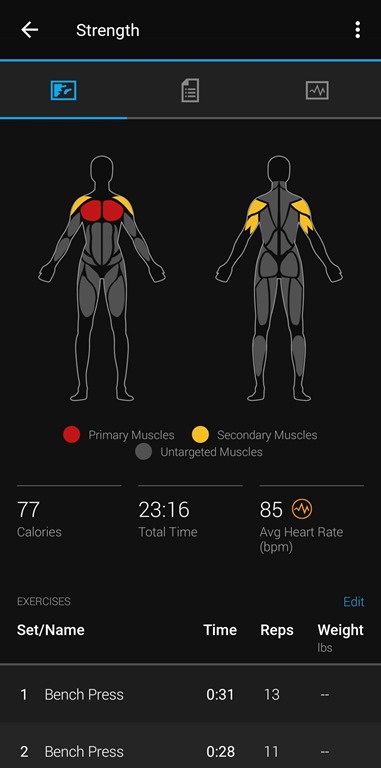
For weight lifting, this tracks sets, but also tracks rest time. I try to take no more than a minute between sets, so this is handy. It also helps me remember if I’ve done 5 or 6 sets. That is nice since I might be looking at email, reading, etc. while I work out.
After exercise I glance at my results to see my average heart rate, my level of effort, etc. As a couple examples, here is what I see for swimming:
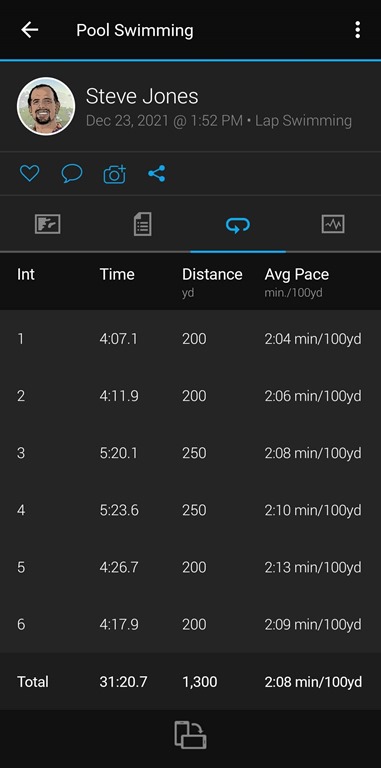
I tend to find 2:00-2:05 is pretty pace for me to stress myself. If I get above 2:06, either I’m slacking, or my body is worn out and I don’t realize it. A minute or two here, against what I thought my effort level was helps me evaluate my stress and sleep.
For weight lifting, the app guesses pretty well for some exercises, but not all of them. I could edit these, but I don’t bother. I’m more concerned with time and heart work here.
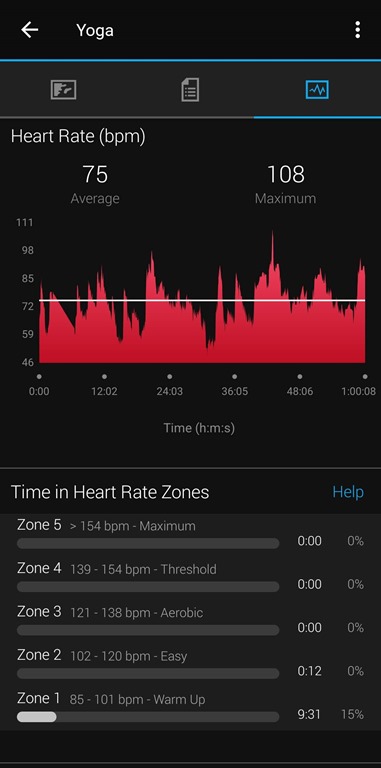
I usually only look at my effort level for yoga afterwards. Here you can see I wasn’t working hard enough on this day, but I can decide then how I view that. Sometimes I need a break, and that’s fine. Sometimes I see this and it reminds me to work harder tomorrow.
Heart Rate
I don’t have a history of heard issues in my family, but I do think that heart rate can be an early predictor of other issues or increasing stress. When I got my watch, I started tracking my heart rate. It was interesting to see what my resting heart rate was, which was around 54bpm 4 years ago.
I usually look at the 30 day views, but I can see a longer term, which you see here. My 1 year average is 51bpm. I’m at 48bpm for the last month, which is an improvement. I think that’s been dietary changes.
Other Metrics
The watch tracks sleep, which I sometimes glance at across a week, mostly just to see if I’m resting enough. I don’t need to this be amazingly accurate, but more it helps me think about myself if I’m feeling rundown.
I started adding my weight in here every day or two. I step on the scale, get a number, and then click “add” and “weight”. The app remembers my last weight, and if it is unchanged, I can just click OK.
The watch tracks steps, floors, stress, and probably more. I don’t bother. I sometimes look at steps if I haven’t done any exercise that day. I can then decide if I need to make time to exercise, or live with the amount of movement I’ve gotten that day.
Lose It
I didn’t use Lose It, but my wife liked it. She tried Noom, and liked it, but felt it was a little too intrusive in her daily work. A friend recommended this, and she liked it. She could type into search the food, or scan a bar code.
This helped her track calories and make decisions on what to eat. I, however, find this to be too much data entry, and then too much work to then try to plan future meals for the day.
Health Records
I am in the UC Health system in Colorado. My insurance covers this group of physicians, and there is a nice integrated system that captures appointments and notes, but also includes test results. They do graph and track things across time, but I’ve started to download and save results.
As I get older, knowing how your body is changing might be useful for future doctors. I want to have a better view of my health, so I’m managing this. I don’t have a great solution. I am lightly testing a few apps, but recommendations appreciated.
MapMyRun
There are lots of places to track long term exercise. While Garmin does track this, I always worry about a data breach, failure, or some issue when I don’t control the data. I used to manually enter things into Mapmyrun, and that was where I tracked my running streak.
There is a link from Garmin to MapMyRun, and my watch now updates both places. I have over a decade of exercise in MapMyRun and I periodically download my data to have it.
Community
I haven’t really participated in the community aspects of either Garmin Connect or MapMyRun. Neither appealed to me, but I do know some people use these to motivate each other, or they attack challenges that are available.
You might find these things useful.
Summary
Health is important to me, and I hope to you. I don’t think that you need to obsess or make this the most important thing in your life, but I do think this is something to pay attention to, especially once you get to 40 or 50 years of age.
We don’t necessarily need to track everything, but we ought to be aware of some metrics and how they might change over time.



 Voice of the DBA