Daily Coping 25 Feb 2022

I started to add a daily coping tip to the SQLServerCentral newsletter and to the Community Circle, which is helping me deal with the issues in the world. I’m adding my responses for each day here. All my coping tips are under this tag.

Today’s tip is to look back at the pandemic, and find some pictures that are happy memories.

A few of many:

20210607_21453520210623_19384820210705_12485320210716_11521820210813_20144620210824_18315020210907_12260920211004_19191220211009_15204120211030_081814

Posted in Blog | Tagged , , | Comments Off on Daily Coping 25 Feb 2022

T-SQL Tuesday #147 Wrap-Up

I was the host this month for T-SQL Tuesday #147 and here is a look at the people who blogged (that I know about). If I’ve missed anyone, let me know.

Rob Farley wrote about updates, not only with version upgrades, but also CUs and the need for automated testing.

Deepthi Goguri talks about her first job and the requirement to move off SQL Server 2000. This was after her schooling was on SQL Server 2012. I like the emphasis on fear as a reason not to change, and the use of tools to find potential problems that could occur during the upgrade.

Kevin Chant writes that he uses upgrade events as chances to improve the way a system works. He also uses the Data Migration Assistant to move, but do so carefully. Don’t jump across too many versions.

Damien Jones asks us if we can avoid upgrades in the cloud. That’s an interesting perspective, and one I don’t see often. It is legitimate, as every time something changes, we need to test, and if there are issues, what do we do? Avoiding change is something that I find important in the short term but highly detrimental in the long term.

Greg Moore writes about the challenges of convincing a client to upgrade.

Glenn Berry gives us a way to make a case for upgrades, working against those that don’t want to change, and some thoughts on related tech changes that might help you decide to upgrade.

Marcin Gminski talks about https://sqlwatch.io/blog/t-sql-tuesday-147-sql-server-upgrade-strategies/

Alex Stuart notes that if it isn’t broken, why fix it? Don’t upgrade for no reason, but there are some reasons to upgrade and Alex lists them.

Reitse Eskens gives us a basic process to follow when upgrading. These aren’t detailed steps, but these are the things I look at when upgrading.

Gethyn Ellis talks about why we wait to upgrade and why we might rethink that.

The first upgrade, from Todd Kleinhans, looks at the problems he had an how we got past an Access to SQL Server upgrade. I’ve been in this exact situation, back in the early 90s. It was a mess and very stressful, but I learned a few things. Including to avoid Access for years.

Lastly, but not least, Martin Catherall provides some general thoughts on how he would approach an upgrade, with some tool suggestions to help.

Posted in Blog | Tagged , | 2 Comments

Daily Coping 24 Feb 2022

I started to add a daily coping tip to the SQLServerCentral newsletter and to the Community Circle, which is helping me deal with the issues in the world. I’m adding my responses for each day here. All my coping tips are under this tag.

Today’s tip is in looking back at the pandemic, what has been a good thing for you?

I think the best thing for me across the pandemic is that I actually used a lot of vacation with my family, mostly my wife. Unlike many years, where I plan on trips and usually have work get so busy that I have vacation time left at the end of the year, in 2022 I burned all my vacation.

Things I did:

  • Multiple ski overnight ski trips
  • Volleyball trips to Philadelphia, Omaha, and Orlando
  • A vacation in Key West
  • Two horse competitions in Santa Fe
  • Camping in Custer, SD
  • A wedding in DC
  • Las Vegas with the family
  • A horse shopping trip in Boise

It was a good year away from work with the pandemic.

Posted in Blog | Tagged , , | Comments Off on Daily Coping 24 Feb 2022

Azure Redundancy for Storage

This is part of a series on my preparation for the DP-900 exam. This is the Microsoft Azure Data Fundamentals, part of a number of certification paths. You can read various posts I’ve created as part of this learning experience.

In a previous post, I discussed the makeup of Azure regions and Availability Zones. These are important concepts to understand how storage protection works. This post looks at the various redundancy types: LRS, ZRS, GRS, and GZRS and RA-GZRS.

Note: This isn’t directly on DP-900, but these concepts did help me understand better how the Azure options fit together.

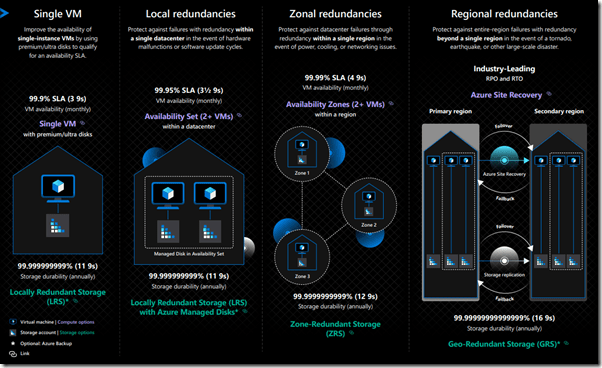
As I discuss these, this infographic might help. Also, MS Docs has an article.
2022-02-04 09_43_49-Azure Resiliency Infographic_PostFinal

Local Redundant Storage – LRS

As it might imply, this means that your storage bits are copied synchronously to redundant storage in the local area. In this case, this means the data center where your  storage is located. Your files (or VHD or whatever) is copied three times into separate locations. This means that your files can survive a single node (computer or disk) failure.

This also means you should forego software RAID for VMs or data files as there are already three copies that will acknowledge the write.

You do not get to pick which data center, just the region where the data center lives. This means your resource could be in any of the data centers in a region, but there are three copies.

Impressively, this gives you 11 9s of durability. However, a fire or major failure of a single data center might cause all your data to disappear.

You can use managed disks with LRS.

Zone Redundant Storage – ZRS

The next level of protection is ZRS, where you get three copies, but this time the copies exist in three parts of an Availability Zone. This is why the AZ must be inside a 2ms latency boundary. This way your files can be copied from data center to data center inside of the AZ.

In this way you achieve 12 9s of durability for your files. More importantly, if a single data center were to go offline, you would still have access to your files (or VHDs).

You can use managed disks with ZRS.

Geo-Redundant Storage – GRS

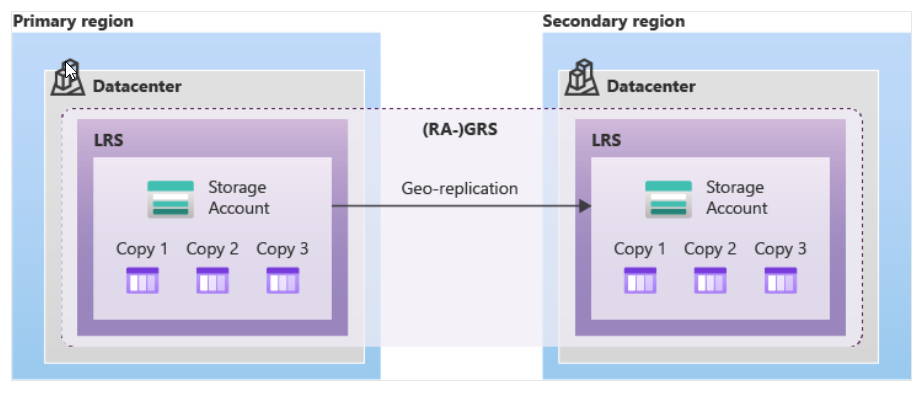
This is a type of redundancy that is between LRS and GZRS. In GRS, the primary data center implements LRS, with 3 copies of files in the single data center. This gives you protection against node failures.

A second copy, asynchronously, is made in a second region, where LRS is also implemented. This means 6 copies of your data, spread across 2 data centers, one in each of two regions. The image below shows this:

2022-02-04 10_18_30-Data redundancy - Azure Storage _ Microsoft Docs

Note, the files in the secondary region are not accessible unless there is a failover. However, if you add RA-GRS, the read access equivalent, you can access files in either zone.

Geo-Zone Redundant Storage – GZRS

GZRS expands the ZRS storage to include a second region. You still get three copies in your primary region spread out across an AZ, but you also get three copies in a secondary region. These are replicated asynchronously as the latency between regions isn’t bounded closely enough for synchronous changes.

The secondary zone uses LRS for the copies. The difference between GRS and GZRS is the replication in the primary region.

GZRS is supposed to give you 16 9s of durability.

Read Access Geo-Zone Redundant Storage – RA-GZRS

With GZRS, there is more protection for your files, but you cannot access the files in the secondary region unless you fail over from the primary region. The customer or Microsoft can initiate this.

In some cases, you might wish that you could spread the read workload between the primary and secondary regions. With RA-GZRS, you can do this. Your clients can access files in the secondary or primary region.

Availability of Azure Storage Options

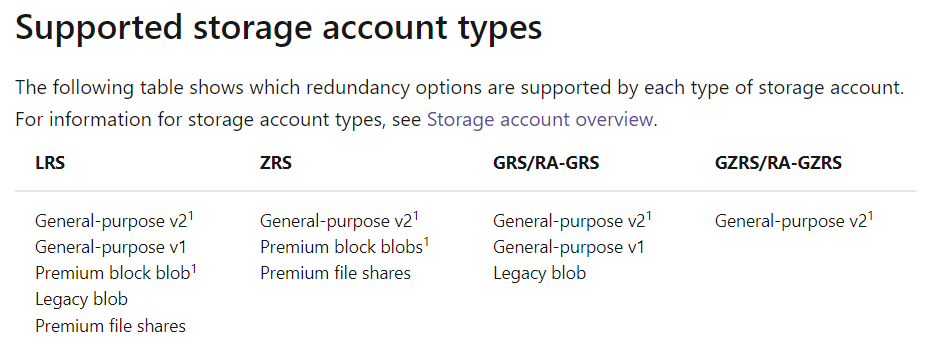
Not all Azure Storage options are available with the different redundancy options. In the redundancy article, there are two charts, I’ve reproduced below. This first one looks at the different redundancy options and which types of storage fit:

2022-02-04 10_24_53-Data redundancy - Azure Storage _ Microsoft Docs

This next one shows that the different account types fitting in the options.
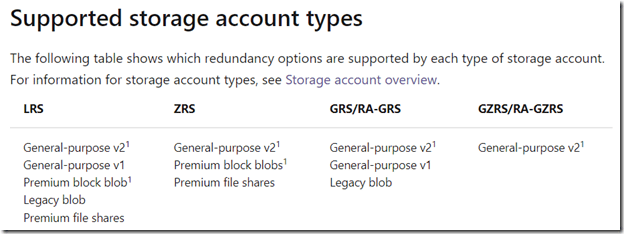
2022-02-04 10_25_14-Data redundancy - Azure Storage _ Microsoft Docs

Posted in Blog | Tagged , , , | Comments Off on Azure Redundancy for Storage