Daily Coping 15 Sep 2021

I started to add a daily coping tip to the SQLServerCentral newsletter and to the Community Circle, which is helping me deal with the issues in the world. I’m adding my responses for each day here. All my coping tips are under this tag.

Today’s tip is to aim to be good enough, rather than perfect.

I used to aim for perfection. In the 80s, a lot of writing in business looked at the success of the Japanese manufacturers and their focus on being perfect in many ways. Not that they get there, but they aimed for perfection. This drove me in my career in many ways, helping me to adopt testing, documentation, and re-checking work.

Over time I realized that this didn’t work well for me in many ways. I could get caught up in making something better than it needed to be and spend more time than necessary. There were also problems and situations where I couldn’t even find perfection, which also drove me crazy.

I found in my career, that perfection can also vary. What I think as perfect as a developer or sysadmin isn’t what a client might think. I learned to be effective and solve problems. Not just a patch for the moment, but an imperfect patch that could las for some time. A decision that I might have to revisit if things changed, but that was good enough for now.

I learned to get things done. Today, I continue to do that, especially in speaking. I’m not aiming for the perfect take in presentations. A movie scene may take 10, 20, or more takes to get right. I’ve certainly approached some video recordings like this.

Now I accept some small mistakes, mis-speaks, stutters, or other imperfections. In the grand scheme of what I’m trying to do, it’s good enough, though certainly not perfect.

When I coach, I aim to keep improving the athletes. Helping them to grow and become better, but not obsessing over things not being perfect. Instead, we want to be good, and more importantly, be able to adapt and still be successful.

This isn’t to aim at being half-assed, but more that we find some 侘寂 (wabi sabi).

Posted in Blog | Tagged , , | 3 Comments

T-SQL Tuesday #142–What is Bicep?

It’s time for the monthly blog party, and this month the host is Frank Geisler. I was reaching out to various people last year to find hosts, and also (silly-ly) looking for first names to fill out the alphabet on the host page.

Frank is a fellow MVP and a BI expert. He was gracious enough to agree to host and I thought he picked an interesting topic. This month’s invitation is about scripting to deploy resources. I don’t do a lot of deployments over and over, but I have been interested in one area. It’s actually been a tab in my browser open for a few weeks, so I took this opportunity to dig in.

Bicep

I’ve been seeing this term used in various blogs, and in the MVP email list we have. I wasn’t sure what it was, and I kept thinking of this:

flexing-flex

That’s not it at all, and I was glad I went through this resource.

Bicep is a transpiler, meaning it takes one language and translates it into another. In this case, the Bicep language will move code into the ARM JSON templates. JSON is really for machines, not humans, so the idea is to give sysadmins and developers an easy way to describe resources they need to deploy into Azure.

The language is new, and it’s on Github. This is a DSL (domain specific language), which means it was designed for a specific purpose. With the 0.3 release, the language is built into the Azure CLI and Azure PoSh utilities, so this will do the transpilation for you. There’s also a decompiler to go from an ARM template back to Bicep. It’s also supported by Microsoft, which is always a plus if you need to call for some issue.

I don’t know a lot about Terraform, but this appears to be another language designed to do the same thing. The FAQ in GH notes this is a revision of ARM, which I guess makes sense. I’m guessing at some point they’ll try to get people to not use ARM (or stop supporting this) and only work with Bicep. Azure supports Terraform, so I’m guessing this is more an attempt to deprecate ARM and the challenges of customers working with JSON.

A couple things I did like about this. First, there are modules, so you can reuse some code. There is also intellisense, validating and getting you actual resources from Azure that are available. I do worry about deprecation that makes it difficult to deploy a copy of an existing resource when Azure is trying to push you to use some new resource. However, I do think the intellisense and validation in the VS Code extension improve productivity for developers and sysadmins.

Reuse also helps infrastructure teams assist developers by providing them modules that adhere to good or best practices.

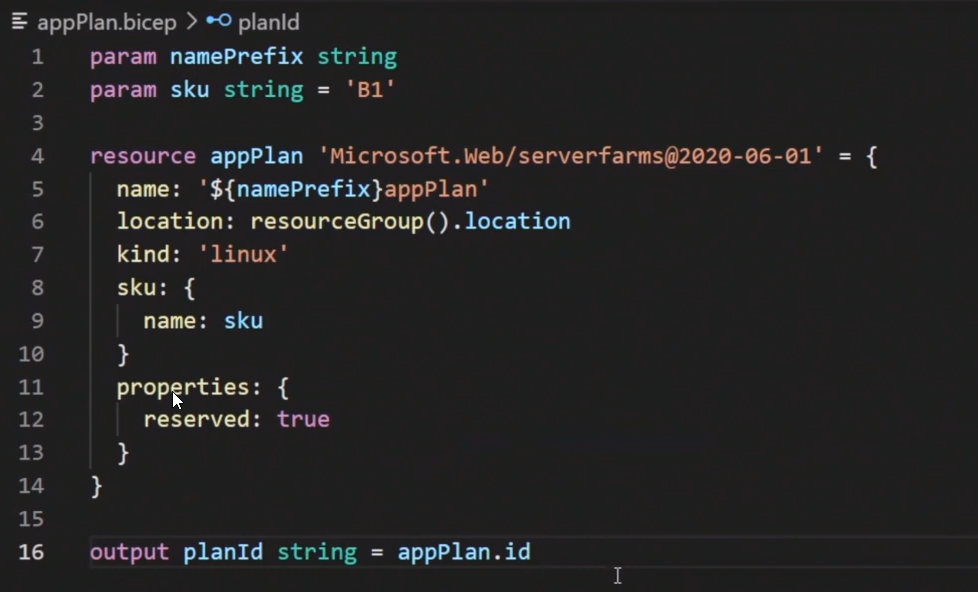
The language looks like a mix of Python and YAML. Not too hard to understand, and with help, this should be easy to use to create a resource.

2021-09-14 10_23_36-Bicep language for deploying Azure resources - Azure Resource Manager _ Microsof

I’m pressed for time today, so I’m not going to experiment or set up an environment, but I need to add this to a list of things to do.

Why call it Bicep?  No idea. I can’t find an answer, but I did someone say these are “ARMless deployments”. Not sure that fits with Bicep, but I like the logo.

2021-09-14 10_22_05-Bicep meet Azure Pipelines _ I CAN MAKE THIS WORK

Posted in Blog | Tagged , , | 1 Comment

Daily Coping 14 Sep 2021

I started to add a daily coping tip to the SQLServerCentral newsletter and to the Community Circle, which is helping me deal with the issues in the world. I’m adding my responses for each day here. All my coping tips are under this tag.

Today’s tip is to give yourself permission to say no.

This is one of the skills I’ve developed in my career. In fact, at my 10 year anniversary with Redgate, our CEO pointed this out. I tend to say “no” unless I’m 100% sure I can deliver. In general, this is how I work.

I forgot this recently, and agreed to something I wasn’t sure I could fit in. I had to back out, which I hate doing. A good lesson, and this tip was a good reminder for me.

This doesn’t mean I just always say no to things. Instead, I try to gauge how confident I am, realistically thinking about my schedule and workload and home life. Then if there’s no reason I can think of that will cause issues, I’ll agree. If I have doubt, I say no, but offer to revisit or see if I can move things around.

I do try to work with and accommodate others, but I’m happy to say no if I can’t, rather than having to back out, or worse, fail to deliver later.

Posted in Blog | Tagged , , | Comments Off on Daily Coping 14 Sep 2021

Changing the Connection for Data Masker

Data Masker for SQL Server is a great tool ensuring the data you use in non-production environments is compliant with any regulations by obfuscating and changing sensitive data. This is part of a series of posts on Data Masker from Redgate Software.

I needed to check something for a customer recently in Data Masker. However, I didn’t want to mask my existing database. Instead, I wanted to make a copy of the db and then use my masking set. However, the existing masking set includes a setting for the connection string.

When I first started using Data Masker, this was something I hadn’t thought about. The new masking set dialog asks for an instance/database name, and then this gets hidden. The first time I needed to change the connection, I hunted through all the menus, looking for a project option.

The Controller

I was lucky enough to work with the developer of the Data Masker product, who contracted with Redgate for a bit after the acquisition. I emailed him in frustration and he spent a little time explaining the architecture decision. Since Data Masker can connect to multiple databases for different situations, the connection is actually in the controller. This allows one masking set to handle multiple databases.

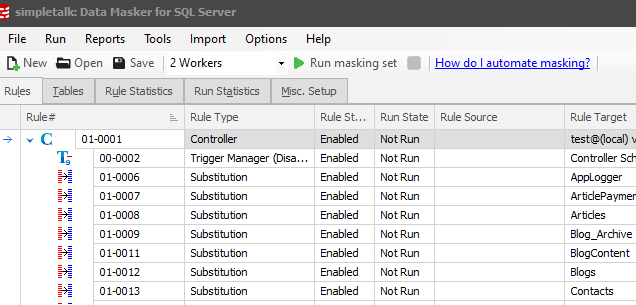
As you can see below, all of my rules are indented below the controller. This means they all use the connection setting in the controller.

2021-09-10 10_10_42-simpletalk_ Data Masker for SQL Server

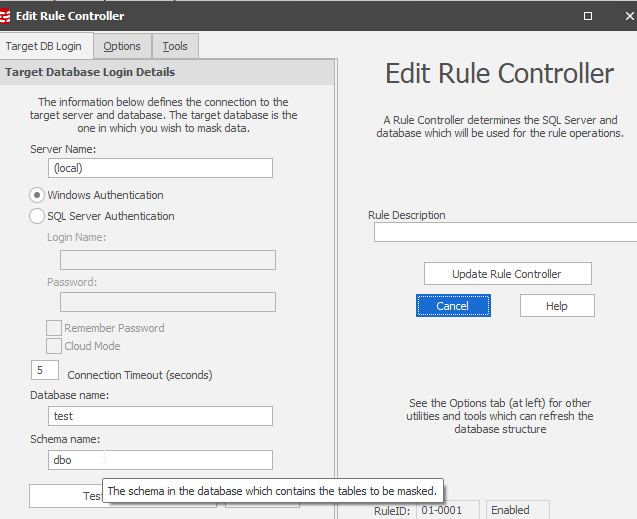
To change to connection string, I click “Edit Rule” with the controller highlighted. This lets me see all the settings right away.

2021-09-10 10_12_41-Edit Rule Controller

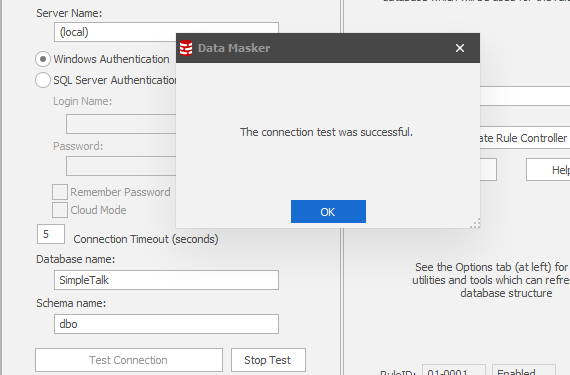
I can change the database name (or other settings) and then I always click “Test Connection” as I have been known to mis-type things, and this isn’t a drop down.

2021-09-10 10_13_45-Edit Rule Controller

Don’t forget to click “Update Rule Controller”. There is no save here. That’s what does it.

Data Masker is an incredibly powerful tool for protecting sensitive data. I see more and more customers using it all the time to comply with GDPR and other government regulations. If you’ve never tried it, download an eval today and check out our library of articles.

Posted in Blog | Tagged , , | Comments Off on Changing the Connection for Data Masker