Getting Started Remotely

My middle kid is about to graduate from college and is starting to look for a job. I suspect he won’t have too much trouble, as an aeronautical engineer near the top of his class, but I do think that it’s going to be more challenging to find employment than it was two years ago. Though likely better than last year.

While my employer has continued to hire people throughout the last year, we definitely know it’s been a challenge for some of them to get up to speed, build relationships, and get productive. It’s likely easier for technical people, especially for those with experience, but not necessarily easy for those just getting their careers going.

If you were starting your career now, I’m sure many of you would be better prepared than when you did begin. I’m wondering if there were things you might recommend to those getting started if they were doing your job. Tips, tricks, or habits to build?

I was listening to a few people recently talking about this topic, and they gave advice that I followed early on. Keep working on your skills, growing your knowledge and ability to be better in your field. If you’re a programmer, practice and learn more about how to better build systems. If you are on the admin side, be sure you are learning to script and manage with code, rather than GUI clicks. If you are in some other area, like marketing, learn to better analyze what you do and how to manipulate data.

No matter what, the one thing I always recommend to others is to learn to present an idea clearly to others. Communication, both written and spoken, is a prized skill, and one I find lacking in many people. Being able to present something in a coherent and cogent manner is important.

Along with that, I emphasize the other half of communication. Learn to listen well and process what others say. This is as important as being able to present your ideas, especially in today’s world where much of our communication occurs with fewer body language cues and less context.

Steve Jones

Listen to the podcast at Libsyn, Stitcher, Spotify, or iTunes.
Posted in Editorial | Tagged | Comments Off on Getting Started Remotely

Daily Coping 7 May 2021

I started to add a daily coping tip to the SQLServerCentral newsletter and to the Community Circle, which is helping me deal with the issues in the world. I’m adding my responses for each day here. All my coping tips are under this tag.

Today’s tip is to talk to someone else and get some advice from them on how to cope with life.

I have a couple people I talk to regularly in my life. They are close friend or family, and people I trust. Lately I’ve had a couple rough patches in life. Nothing major, but just down, unmotivated, and a little frustrated with the state of the world.

It’s easy to get caught up in your own head and lose perspective on the world. I’ve been able to unload some thoughts on friends and have them remind me of good things, or where I may be overreacting, or just give me support by listening. It’s helped me to work through a tough few days and improve me outlook and attitude.

This last year has been hard, and while my life overall has been great and easy, I still get stressed or sad or frustrated with the world. I bounce back and forth a bit, and helping able to talk with others has helped me cope.

Reminder: Today is the WIT Data Platform Mental Health and Wellness Day. I’m speaking, and if you want a few minutes to hear how others cope or deal with life, register and join us.

Posted in Blog | Tagged , , | 1 Comment

Daily Coping 6 May 2021

I started to add a daily coping tip to the SQLServerCentral newsletter and to the Community Circle, which is helping me deal with the issues in the world. I’m adding my responses for each day here. All my coping tips are under this tag.

Today’s tip is to take a 5-10 minutes break today and do something fun.

I take some breaks often during work, but usually they’re to go cook or do laundry or exercise. I have sometimes done something distracting, like watch my wife work, but not often do I do something fun.

There was a time I played guitar for a few minutes, or tried to learn some new song, but I have gotten away from that.

Yesterday I decided to get back to that, and stopped work mid-morning after a few meetings. I didn’t have anything pressing, so I went and got my guitar, put on a couple songs and just played along. I don’t do that often enough, having fun, ignoring my mistakes, and just enjoying the time away from work.

Reminder: tomorrow is the WIT Data Platform Mental Health and Wellness Day. I’m speaking, and if you want a few minutes to hear how others cope or deal with life, register and join us.

Posted in Blog | Tagged , , | Comments Off on Daily Coping 6 May 2021

Powershell Practice with a War Game

I attended part of the recent PowerShell + DevOps summit, and one of the sessions was from Fernando Tomlinson (@wired_pulse and @underthewire_ps) on incident response. He talked about a number of things, but one was his work at UnderTheWire.tech, where there are PowerShell training items.

One section here is on War Games. These are challenges, where you need to use PowerShell to progress through the levels of the game. It’s a chance to practice some knowledge, or maybe look things up and learn. I decided to try one of these.

Century

The first war game is Century. Here you join a Slack server to get credentials, and it’s also where you can ask for help. Once you join, you have an initial set of credentials to connect to a host through SSH. If you’ve never done this, it’s a chance to learn.

For me, I knew Win10 had added this, and I hadn’t actually installed PuTTy on this machine, so I tried this:

ssh century1@century.underthewire.tech

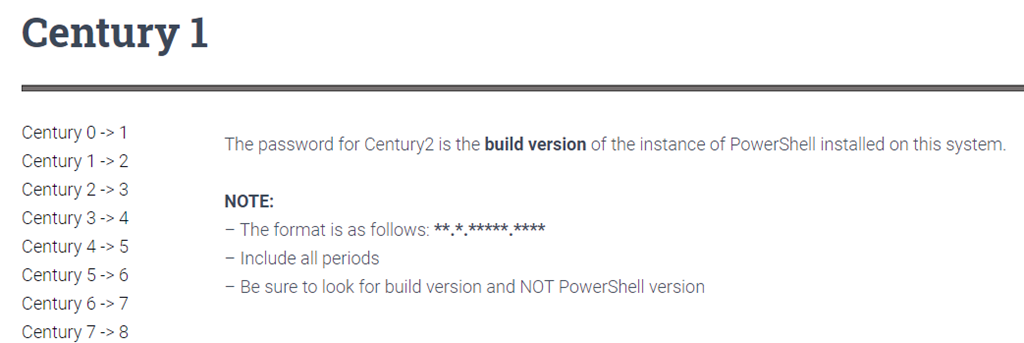
This prompted me for a password, which I had from Slack. From here, I needed to go through the next step in the wargame. In this case, the 1st level looked like this:

2021-04-27 16_06_17-Century 1 – UTW

Easy enough, I need information on PowerShell that is installed. If you know how to do this (I did), it’s easy. I copied the build number, and then used “exit” to disconnect. I opened a new SSH connection, with the century2 user and the build number as the password.

It worked, and I continued through the challenge.

Thoughts

This was an interesting test of how to use PowerShell. I don’t do a lot of desktop admin type stuff, so I had to look up some items. I had to type carefully (or copy/paste carefully) and read. For example, one item said to look in a folder for a file, but I was looking at the list of items in the root, not as folders. Slightly embarrassed myself in asking for help on this one.

Overall, these weren’t too hard, but I enjoyed the process of working through the game and learning something new. Not a bad way to play with some PoSh.

Posted in Blog | Tagged , | Comments Off on Powershell Practice with a War Game
