A Six Week Break

Today is my last day of work for six weeks. I start my sabbatical Monday, or maybe this afternoon, and will be gone. I may or may not blog, but I’m planning on being a bit unwired, so don’t expect anything. Certainly no technical posts.

I am mostly planning on taking a break from all my normal life, with no big plans. My wife and I are planning to get away for a few weeks, but beyond that I’m likely enjoying summer on the ranch without a schedule to follow.

Enjoy your summer and see you in August.

Posted in Blog | Tagged , | 2 Comments

Using a GenAI to Help Brent

Brent had a query exercise recently about train stations moving in some order and having overrides to this order in emergencies. I suppose he’s been traveling a lot lately and ran into an issue.

In any case, I decided to see if Claude could solve his challenge.

This is part of a series of experiments with AI systems.

The Prompt

I put this into Claude, mostly copy/paste from Brent’s challenge.

I have a sql table of stations in a physical order. Here is the table and data for stations DROP TABLE IF EXISTS dbo.Stations; CREATE TABLE dbo.Stations     (StationId INT IDENTITY(1,1) PRIMARY KEY CLUSTERED,      StationName VARCHAR(50),      StationPhysicalOrder INT); INSERT INTO dbo.Stations (StationName, StationPhysicalOrder)     SELECT CHAR(64 + n), n     FROM (VALUES         (1),(2),(3),(4),(5),(6),(7),(8),(9),(10),(11),         (12),(13),(14),(15),(16),(17),(18),(19)     ) AS Numbers(n);

I also have an override table, which contains its own data for emergencies. Here is this code: Transact-SQL 1 2 3 4 5 6 7 8 DROP TABLE IF EXISTS dbo.StationRoutingOverride; CREATE TABLE dbo.StationRoutingOverride     (StationRoutingOverrideId INT IDENTITY(1,1) PRIMARY KEY CLUSTERED,      StationFromName VARCHAR(50),      StationToName VARCHAR(50)); INSERT INTO dbo.StationRoutingOverride (StationFromName, StationToName)     VALUES (‘E’, ‘S’), (‘B’, ‘I’), (‘I’, ‘D’);

write a query to return a result set that: * Starts with the station with the lowest StationPhysicalOrder * For each row, if there’s a row in StationRoutingOverride to dictate the next step, jump to that station * Otherwise, go to the station with the next StationPhysicalOrder

The Answer

Here’s the code:

WITH StationRouting AS (
     -- Base case: Start with the station having the lowest StationPhysicalOrder
     SELECT 
         s.StationId,
         s.StationName,
         s.StationPhysicalOrder,
         1 as StepNumber
     FROM dbo.Stations s
     WHERE s.StationPhysicalOrder = (SELECT MIN(StationPhysicalOrder) FROM dbo.Stations)
     
     UNION ALL
     
     -- Recursive case: Find the next station
     SELECT 
         next_station.StationId,
         next_station.StationName,
         next_station.StationPhysicalOrder,
         sr.StepNumber + 1
     FROM StationRouting sr
     CROSS APPLY (
         SELECT TOP 1
             s.StationId,
             s.StationName,
             s.StationPhysicalOrder
         FROM dbo.Stations s
         WHERE s.StationName = COALESCE(
             -- First priority: Check if there's an override for current station
             (SELECT sro.StationToName 
              FROM dbo.StationRoutingOverride sro 
              WHERE sro.StationFromName = sr.StationName),
             -- Second priority: Next station by physical order
             (SELECT TOP 1 s2.StationName 
              FROM dbo.Stations s2 
              WHERE s2.StationPhysicalOrder > sr.StationPhysicalOrder 
              ORDER BY s2.StationPhysicalOrder)
         )
     ) next_station
     WHERE next_station.StationName IS NOT NULL
)
SELECT 
     StepNumber,
     StationId,
     StationName,
     StationPhysicalOrder
FROM StationRouting
ORDER BY StepNumber;

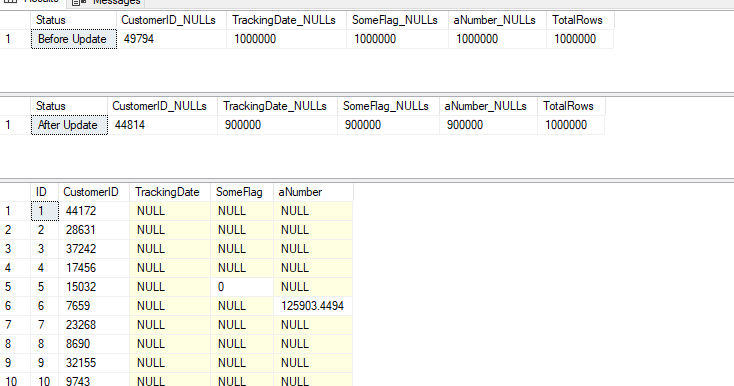
That doesn’t work, so I added to the prompt:

2025-06_line0046

I got a similar error again with the group by in the CTE and pasted that in. The query got rewritten (Again) and this time it ran with this result, which matches Brent’s answer.

2025-06_line0047

GenAIs make mistakes, but they can also fix things. I wondered how well this would work, but it worked well. I merely told the model it had made an error and it tried again.

Imagine if the AI could connect to a db, run its code, and adjust from the error messages itself? The higher end coding tools are supposed to do this.

Posted in Blog | Tagged , , | Comments Off on Using a GenAI to Help Brent

The Technical Debt Anchor

I ran across an article on the 7 types of tech debt that can cripple your business, which is a great title. It certainly is one that might scare a lot of CTOs/CIOs/tech management. I am sure that much of the IT management gets concerned on a regular basis with how quickly their staff can evolve their software to meet new business needs.

The first two items have to do with data, which is understandable. Data is the core of how many organizations operate and move forward, and if you don’t have the ability to easily work with data in a flexible way, you can struggle. Many of us technical people know this, but I find many non-data-professional staffers don’t get this and are often unwilling to work at improving the situation. They things to just be magically better without changing how they do their jobs.

Many of us data professionals know that data quality is crucial. Many others assume we have quality data. Both of us need to understand that some of our data is suspect, but most of us is pretty good. Don’t get drawn into a black/white argument that our data is amazing or horrible. No matter what we do, there will be errors, so account for that. At the same time, do some testing, some evaluation, and double-check yourself.

We also need to ensure some level of performance from our data stores (databases, data lakes, etc.). Too often we see queries start to slow down and blame the DBAs. We ask them for better performance without being willing to press on developers (or vendors) to improve the performance of their code. Don’t just expect to build bigger machines, make sure you train staff to write better queries and help DBAs learn how to better index systems. We’re a team, so let’s work as a team on our performance issues.

There are a few AI-related items and a couple of DevOps items as well. All tech debt is a problem; it just depends on how much you have as to how big a problem it is for your systems. However, the seventh item is cultural debt. AI is part of this, as staff can have job-threatening views of AI, but that’s really a lack of trust. Management has to build trust with staff and ensure they are cared for if management expects staff to be accountable for code. Workers have to drive themselves forward, as a part of the technology revolution is that change is a given. Don’t expect to do the same job you’ve done for years. Learn to use new tools and learn to use them effectively in your position.

At the same time, management has to value employees and be clear about what’s expected or workers. Be fair with employees and value their efforts. Working together is what will drive your organization forward.

Steve Jones

Listen to the podcast at Libsyn, Spotify, or iTunes.

Note, podcasts are only available for a limited time online.

Posted in Editorial | Tagged | 6 Comments

Upgrading SQL Server in a Container

I decided to update software on my laptop recently during a trip. I’m loathe to do this on most trips, as I don’t want any instability before a presentation. Usually once I hit the airport, I don’t change anything.

This time I’m visiting a few customers and don’t need to use my computer. I’ll be taking notes on paper, and while working in the hotel, I decided to upgrade Rancher Desktop after a notification, as well as SSMS, VS, and a few other pieces of software. I decided to patch my SQL Servers as well, which was easy. This post shows how.

Update: the original screenshot below was the wrong one. That has been updated.

Upgrading SQL

I don’t have SQL Server installed on my laptop. Instead, I have a few container instances running under Rancher Desktop. Each of these has a docker compose file and a batch file to start and stop the containers. I’ve written about this before, but I didn’t cover upgrades.

Here is the upgrade process. First, I find the docker compose file, which is in c:\data\xxx where xxx is the instance. Here is the file for my SQL 2019 instance.

2025-06_line0015

I open this in VS Code, and it looks like this.

2025-06_line0016

I next check the build list for 2019 on SQL Server Central. It shows me that CU32 is the latest, which means I haven’t patched this in some time. I also haven’t used this instance much. I need to change this.

Here’s the change: in the file, I update line 5 to say 32 instead of 27.

2025-06_line0017

I save this and then double click the batch file to start my 2019 instance. When I do that, I see the new image being pulled down.

2025-06_line0018

Once this completes, the container starts and I can connect. When I do that, I see this:

Upgrade complete.

Now to edit the other docker files.

Posted in Blog | Tagged , | Comments Off on Upgrading SQL Server in a Container