Exchanging Schemas with SQL Compare Snapshots

Recently I was working with a customer and they asked if they could somehow package up their schema without the data and send this to a colleague. Absolutely, and that’s one reason we have SQL Compare snapshots.

Here’s a quick example of this working, where I’ll move a database from my desktop to a laptop. Separate SQL Compare machines and licenses.

First, I start with a database on my local instance. This is a copy of the ContosoRetailDW that I got from Microsoft. It’s set up, and I want to get the schema to another machine without doing a backup.

2020-07-28 11_29_28-SQLQuery2.sql - ARISTOTLE_SQL2017.master (ARISTOTLE_Steve (59)) - Microsoft SQL

I could script this into one big file with SSMS/SMO, but I’d lose some of the flexibility I have with SQL Compare, where I could filter things, set options, etc.

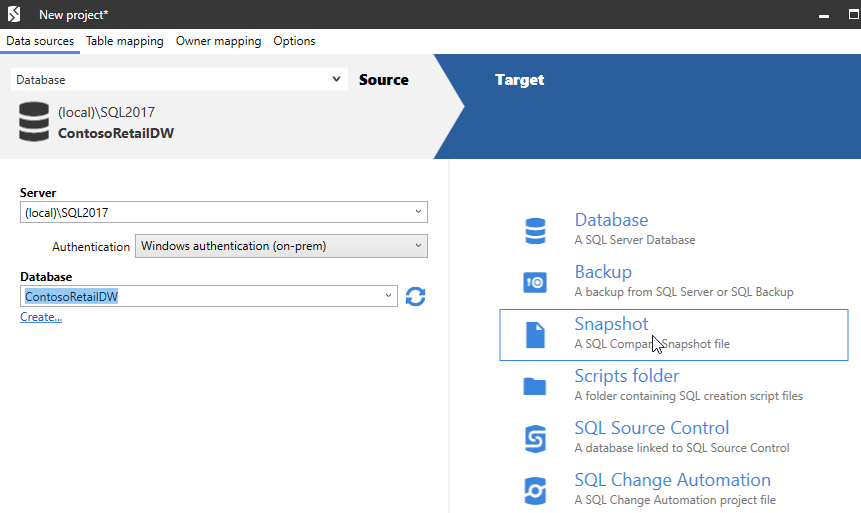
Let’s start SQL Compare. When this opens, I have the basic dialog asking for source and target. I’ll set the source to my database. For the target, I have many options, the third of which is Snapshot (in SQL Compare 14).
2020-07-28 11_56_04-New project_

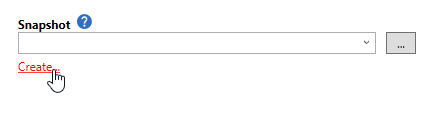
When I click this, I see a simple dialog. This is because SQL Compare is looking for me to pick a snapshot to compare my database to. I don’t want to make a comparison. What I want to do is create a snapshot, so I’ll click Create.
2020-07-28 11_56_20-New project_

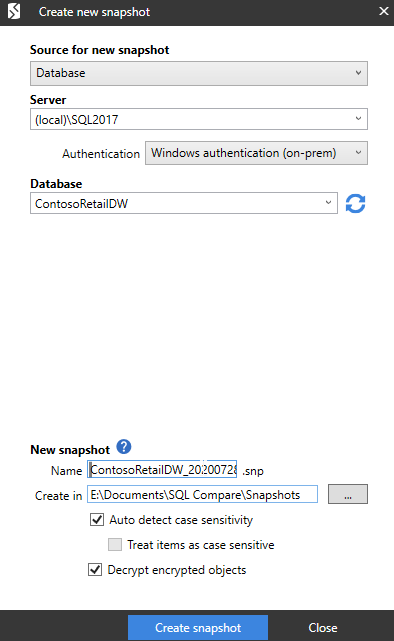
This gives me a different dialog. Here I connect to a server and database and Compare will create a snapshot. I pick a few options for where to store this and whether to decrypt things and use case sensitivity.
2020-07-28 11_56_42-Create new snapshot

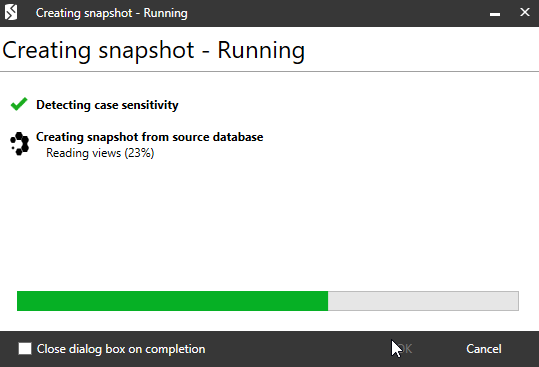
This runs and Compare lets me know what’s happening at each stage.
2020-07-28 11_56_49-Creating snapshot - Running

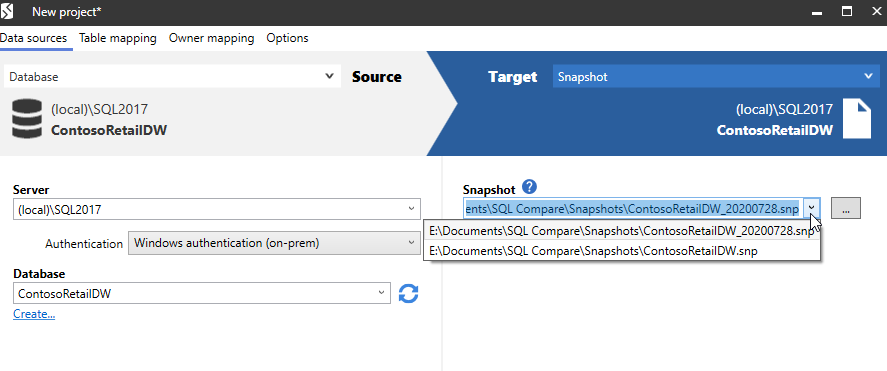
When this is done, I’m back to the project dialog. Here I can select my snapshot from those in my local folder. Since I’m not going to do anything here, I’ll cancel out of this and close SQL Compare. Then I’ll transfer the file to a laptop.
2020-07-28 12_04_17-New project_

Restoring the Snapshot

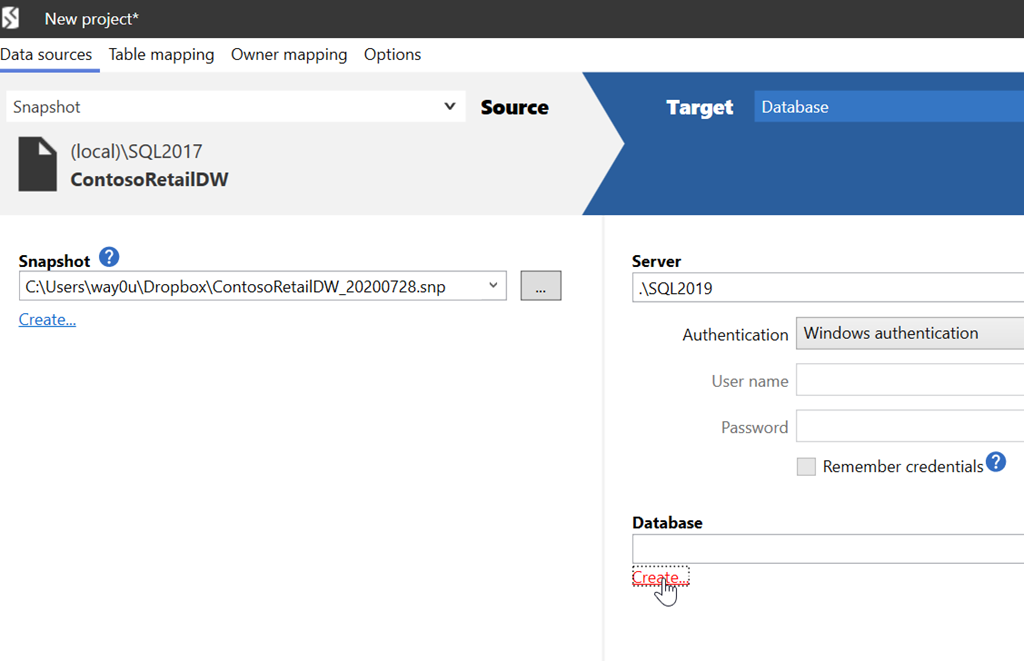
I can email myself this file and save it on another machine. I’ll do that in the same SQL Compare\Snapshots folder. Now I can open SQL Compare on this machine. When I do, I’ll select the snapshot as my source.
2020-08-20 08_22_41-New project_

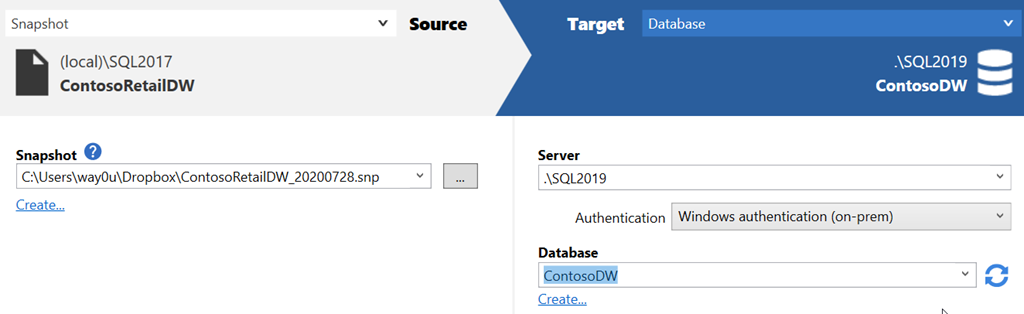
The target is a database, but in this case, it’s a new one. I’ll create one from the SQL Compare dialog.

2020-08-20 08_22_55-Create new database

Once this is created, I can run the comparison.
2020-08-20 10_01_20-New project_

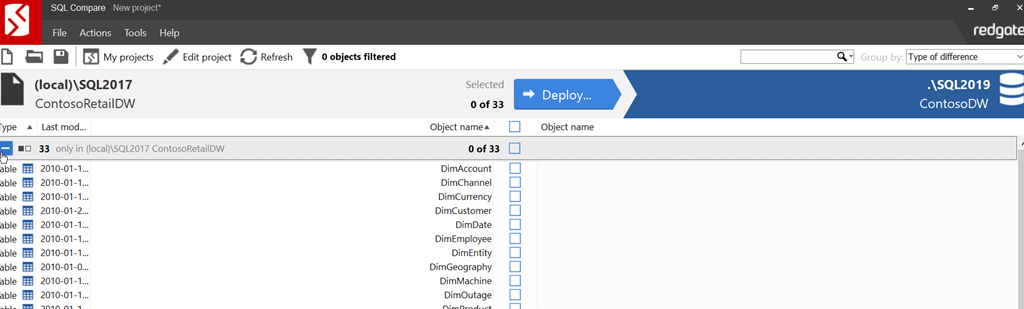
When this completes, I have the system objects as identical, but I can see there are a number of use objects that don’t exist.
2020-08-20 10_01_55-SQL Compare - New project_

I can click Deploy and walk through that process. There are a number of confirmations to approve, but I am not showing those. At the end, a new comparison shows things are matching.
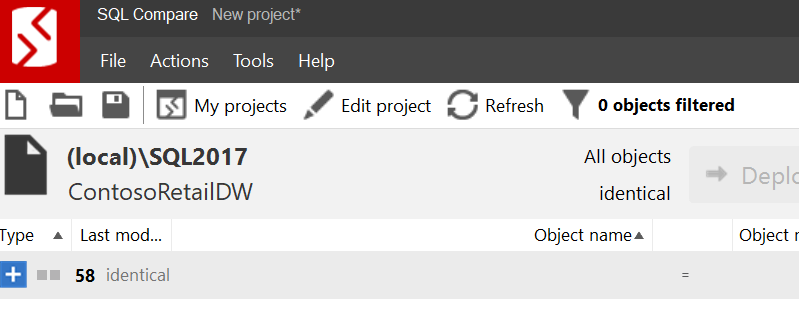
2020-08-20 10_03_07-SQL Compare - New project_

Note this doesn’t move data, just schema objects. This is primarily for development purposes, though if I needed data, I’d just use SQL Server backup and restore. Or SQL Data Compare if I needed limited data from tables.

SQL Compare is one of the most popular products from Redgate. If you’ve never used it, give it a try today with an eval. If you have the SQL Toolbelt, make sure you are using Compare to check and move schema changes around in an ad hoc manner.

Posted in Blog | Tagged , , | Comments Off on Exchanging Schemas with SQL Compare Snapshots

Better Government Security Through DevOps

Most teams building software seem to go a little too fast to ensure their code is both secure and of high quality. I don’t think it really  matters whether you are working in a waterfall process, agile, lean, or any other methodology. Whether fast or slow, humans will make mistakes, new code can introduce a vulnerability. Even if you follow great practices, it seems that hackers and criminals find new attack vectors all the time. I’m not sure we really can go slow enough and stay in business.

Those of us working as data professionals know that protecting the data in our databases is important. We are reluctant to allow too much change too quickly, especially when there might be changes that affect security. However, is limiting change the best idea?

I’d argue no. DevOps preaches the ability to update on demand, and often, as soon as code is complete. This doesn’t mean we don’t test or pen test or run security scans or anything else. It does try to limit the work in progress, which means that we aim to allow updates to our lives systems regularly.

An article for CIOs notes this that DevOps helps us improve security, precisely because we can fix things quickly. This might be especially important in high security environments, like government systems. The ability to patch, correct faulty code immediately, and respond to threats is important. There could be breakage from fast moving code, but another part of DevOps is improving your knowledge and skills, working to improve not only the quality of existing code, but also the quality of all future, first written code.

I would rather manage database systems that backed applications being updated on demand in a DevOps flow. I’d rather be able to patch and update libraries, platforms, and frameworks quickly. We’ve seen the problems in systems that aren’t updated with the Equifax breach. We should learn from this incident and ensure we can patch and update systems on demand, whenever we need to do so.

Steve Jones

Listen to the podcast at Libsyn, Stitcher or iTunes.

Posted in Editorial | Tagged , | Comments Off on Better Government Security Through DevOps

Daily Coping 26 Aug 2020

I started to add a daily coping tip to the SQLServerCentral newsletter and to the Community Circle, which is helping me deal with the issues in the world. I’m adding my responses for each day here.

Today’s tip is to take time to forgive someone who hurt you in the past.

This is a personal item. I think many of us feel wronged or hurt by others, sometimes by accident, sometimes on purpose. In either case, the event can be very upsetting and impactful to us.

I don’t want to publicly note who I’m forgiving, but I am making it a point to do so, and let someone know that I forgive their past transgression.

This is certainly something I need to work on. There are people that I feel have treated me poorly, and I haven’t forgiven them. I should let some things go, but I am struggling, especially when some people don’t seem to acknowledge their actions.

Posted in Blog | Tagged , , | Comments Off on Daily Coping 26 Aug 2020

Daily Coping 25 Aug 2020

I started to add a daily coping tip to the SQLServerCentral newsletter and to the Community Circle, which is helping me deal with the issues in the world. I’m adding my responses for each day here.

Today’s tip is to tell someone about a book or article you found helpful.

I go through a random collection of books and articles all the time. I read a lot, but mostly fiction, and it’s rare I pass along recommendations to others. However, I’ve seen some good articles that I sometimes pass along to friends or my kids.

Here’s one I sent on. It’s from David Perell and is titled, The Magic Moment. This talks about the creative process, and how you should go with it when you feel creativity is flowing. Don’t want and plan things, or reschedule them. When you feel ready to create something, spend the time right then to do so.

I sent this to a few people I know that are creative, but I think it applies to software developers as well. I know that when I feel like writing, I write. If I get in the zone writing some code, I’ll let me day fall apart and focus on that project. Usually that highly focused time is valuable.

Don’t make people go to meetings if they are productive elsewhere.

Posted in Blog | Tagged , , | Comments Off on Daily Coping 25 Aug 2020