Communicate Through Commit

Using Version Control is a skill, and it’s one that most technical professionals should learn. Even sysadmins and infrastructure people can benefit from version control, especially as people use infrastructure as code and GitOps with products like Terraform.

Writing a commit message is a bit of an art, and it’s a good skill to have. I saw a post on how to write one, and I like the overall advice. Talk about why you’re making the change, not what you’re doing.

The post has good practical advice about structuring a commit message, especially to ensure the messages are terse and easy to understand. Like much of coding, to do this well requires practice, and feedback. Ensuring your team agrees on how to do this and reviewing messages to help everyone improve will build a more cohesive team as well as reduce the amount of explicit communication you need to have.

Our time is precious as developers, but our attention is even more precious. Every interruption from Slack, a text, or any synchronous communication could break our flow. Many of us complain about meetings taking time out of our day, but the small questions and queries from others, especially at random times, can be worse than meetings.

Building standards, habits, and providing short documentation in common areas, like commit messages, can reduce the need for one developer to interrupt another. The more we work together as a team, by agreeing on and adopting standards, the better we work together as a team.

Steve Jones

Listen to the podcast at Libsyn, Stitcher or iTunes.

Posted in Editorial | Tagged | Comments Off on Communicate Through Commit

Daily Coping 23 Jul 2020

I’ve started to add a daily coping tip to the SQLServerCentral newsletter and to the Community Circle, which is helping me deal with the issues in the world. I’m adding my responses for each day here.

Today’s tip is to let go of small stuff and focus on the things that matter.

This week I was a bit frustrated with my break from work. In Colorado our Governor implemented a mandatory mask order at the end of last week. All indoor activities around people need masks. My gym complied, and I couldn’t workout without one, even with no one around. Yoga was with a mask, and that was less than fun. Coaching was masks covering everyone, including kids, who didn’t enjoy it.

In fact, less kids decided to come, which is less fun for me, and less fun for them. In a time when so many are stuck without routines and interactions, sports were a good release. With most of us in a closed group, we were enjoying playing again, but that had to stop.

However, that’s fine. What matters is we try and get this virus under control. Colorado was doing very well, and my area still is not bad, but with cases creeping up, this is a small thing to think about. It’s a small annoyance, and minor loss, and ultimately, that’s I should be focused on helping to keep public health at a more healthy level.

Posted in Blog | Tagged , , | Comments Off on Daily Coping 23 Jul 2020

Tonight is the PASS Marathon on SQL Server Performance

The event is tonight, and it’s my first time helping out as a moderator. I got a call for volunteers, and I added my name. The event starts at 1800GMT and runs for a few hours.

You can register here.

The schedule is up, and I’ll be moderating Vern Rabe’s session on Poorly Performing T-SQL Queries and How to Fix Them. I’ve known Vern for a few years and enjoy seeing him at SQL Saturday’s. This will be a good session, so tune in and ask some good questions.

Posted in Blog | Tagged , | Comments Off on Tonight is the PASS Marathon on SQL Server Performance

Color Coding a Database on All Servers with SQL Prompt

SQL Prompt has some nice color coding features, but sometimes I want a database to keep the same color, regardless of instance. I don’t know that I’d recommend this, but since I work in demo environments across versions, this is a handy trick for me.

In the SQL Prompt menu, there is an options item.

2020-07-11 10_39_15-

Clicking this brings up a dialog with a number of sections along the left and details on the right. Near the bottom is the color menu.

2020-07-11 10_39_26-SQL Prompt – Options

When I decide to color code a database, I click “add” and I get this view. The cursor defaults to the Server/Group edit box, and I’ve typically entered a server name here.

2020-07-11 10_39_39-SQL Prompt – Options

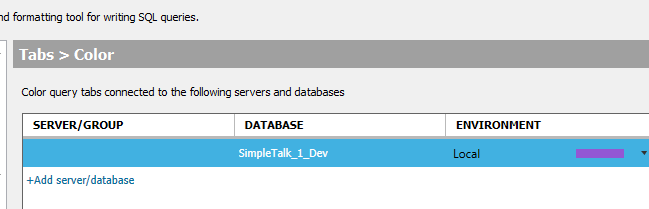
However, I can skip this and just enter a database.

2020-07-11 10_39_51-SQL Prompt – Options

In this configuration, every time I open a query window to a database called SimpleTalk_1_Dev, no matter which instance, it will be colored purple.

I can see this when connecting to my default local instance.

2020-07-11 10_40_01-SQLQuery2.sql - ARISTOTLE.SimpleTalk_1_Dev (ARISTOTLE_Steve (52))_ - Microsoft S

I also test things on a v14 (SQL 2017) instance, and if I connect there, I see the same thing.

2020-07-11 10_41_08-SQLQuery6.sql - ARISTOTLE_SQL2017.SimpleTalk_1_Dev (ARISTOTLE_Steve (60)) - Micr

In some sense, this is an edge case. I demo similar things across instances and versions, and it’s nice to keep colors simple rather than entering dozens of instance names. However, it’s not something many people do, as they often use the same database name on different instances. That’s a more common scenario.

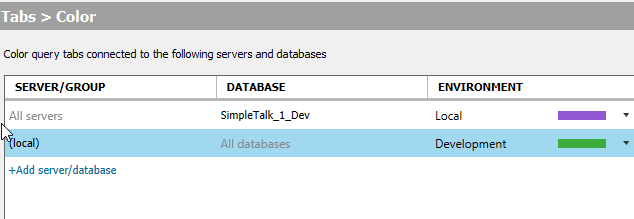
That’s supported as well. Notice here I’ve entered just a server with no database.

2020-07-11 10_47_12-SQL Prompt – Options

Now every database I connect to on this instance will be colored green. Note that the purple still overrides because it is specific to a database. The third tab below is connected to the SimpleTalk_1_Dev database.

2020-07-11 10_47_19-SQLQuery6.sql - ARISTOTLE_SQL2017.SimpleTalk_1_Dev (ARISTOTLE_Steve (60)) - Micr

SQL Prompt has some amazing features, but color coding is one that helps me keep track of which databases and instances I’m connected to in a query window. If you‘ve never configured this, give it a try.

If you’ve never tried SQL Prompt, it’s incredible. Download an eval today and see what you think.

Posted in Blog | Tagged , , | Comments Off on Color Coding a Database on All Servers with SQL Prompt