Sabotage at Work

I caught a link to the OSS’s Simple Sabotage Field Manual from David Perell. It was written as a guide to destroying organizations during WWII to be distributed to citizens of enemy states. The OSS later became the CIA, but their goal was to find ways to disrupt the governments of enemy states.

What was surprising to me was that some of the advice seemed to still be in use in places I worked in my career. Such as the advice for managers: ” To lower morale and production, be pleasant to inefficient workers; give them undeserved promotions. Discriminate against efficient workers; complain unjustly about their work.”

This might seem to be human behavior, and it is, but it also destroys organizations. Too many people in authority don’t seem to do a good job of evaluating those that perform well and drive our software forward. While I do think this is subjective, often the group view from workers and the managerial view of who is efficient can be quite different. Being transparent and open with expectations and evaluations can help here.

Working in committees and large groups is all too common, at least in US organizations. We hold meetings and have discussions with large groups instead of making decisions. I do agree with getting opinions from a large group, but discussions should be relatively short and then decisions made. We don’t want a dictatorship nor a large democracy of debate, but something in between.

Maybe one of the more interesting ideas is the work slowly. I don’t know of many workers that want to work slow. Some do, and sometimes we all struggle to get things done, but so often management doesn’t want to invest in tools for workers. Tools can make a job much easier, and much more efficient. Part of DevOps is learning to use tools and become better. Or fabricate your own tools, something we can do in software easily. Too many managers don’t want to budget time or money or build or buy tools.

It’s easy to self sabotage ourselves, and too often, it’s easy for managers to destroy an organization from within. This might be an interesting manual to review in a meeting and debate if our rules, protocols, and decisions are helping or hurting our organization. Unfortunately, too many managers aren’t willing to perform that self-evaluation.

Steve Jones

Listen to the podcast at Libsyn, Stitcher or iTunes.

Posted in Editorial | Tagged | Comments Off on Sabotage at Work

Daily Coping 1 Jun 2020

I’ve started to add a daily coping tip to the SQLServerCentral newsletter and to the Community Circle, which is helping me deal with the issues in the world. I’m adding my responses for each day here.

Tell someone about an event in your life that was really meaningful.

I’ve been lucky enough to have a very rich and exciting life. Certainly less eventful than others, but also more full than some. I don’t know I’ve had any amazing experiences, but I have had moments that have touched me and stick with me.

I was always a fairly shy kid. I didn’t do much in groups, hated speaking in front of my class for any presentation, and often interacted with only a couple friends at a time. Quite a change from today when I look back at things.

During high school, I enjoyed music, saw many concerts, and learned to play guitar. Eventually I formed a band with a few friends. Somehow, and I’m not sure how, near the end of my senior year, our band was given the chance to play a couple songs for the school, in the gym. I’d played in front of crowds, always nervous, but since I knew few people, this wasn’t too bad. It was also a few dozen people. I was much more anxious about playing in front of my classmates, over 800 of them.

I did it, and things went well, though this was a punk/alternative style band and I think a few of my teachers were shocked.

I survived, and didn’t have to deal with too many comments as this was just a few days before school ended. However, it was an event that stuck with me, helping me to learn that being in front of people wasn’t the worst thing in the world. This was really the first big event for me, even though I didn’t have to speak.

From here, I went on to be better speaking in front of classes in college, bartending and talking with strangers, and eventually to where I am today, giving presentations in front of small and large crowds on a regular basis.

Posted in Blog | Tagged , , | Comments Off on Daily Coping 1 Jun 2020

Setting Up GitHub Desktop (formerly GitHub for Windows)

When I started using Git, I first download GitHub for Windows.

I went searching, and instead found GitHub Desktop, which is the new client from GitHub for working with Git. This replaces GitHub for Windows, and gives a unified experience across Windows and MacOS. I hope it also works better, as I found the GitHub for Windows software to be quite flaky. I abandoned it early and moved to SourceTree and GitFrakken ( I couldn’t decide).

I downloaded the installed and when I clicked the file, the install ran, with no other actions from me. No UAC, no picking files, not EULA, no crazy installer. It just runs. Good and bad, but overall, this is likely a few MB, and I like this.

Installer Notification

When this gets done, I get asked to sign into GitHub. I can skip this, and likely use this as a local git manager, but since I have a GitHub account, I’ll do that. Signing up is easy, it’s free, and since lots of people use GitHub, just sign up.

GitHub Desktop Welcome Screen

Once I sign up, I need to approve permissions. I’m always wary of this, and I think that I should really understand what this means, but for most things, this is fine. If I lose control of my local machine, I have bigger issues.

Authorize GitHub Desktop

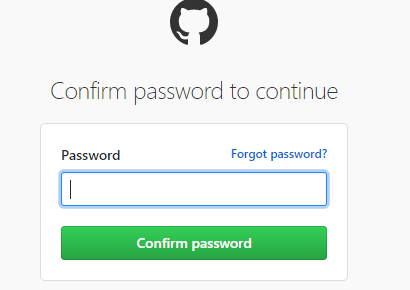
I do have to authenticate, which I think is important. I have two factor set up, which ensures that you can’t just link to my repos and guess my password.
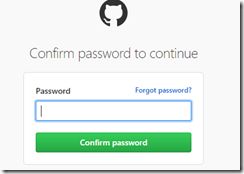
Enter GitHub Password

Once this completes, I get asked to allow my browser to open the app. I agree, and I see a get started view, with my online repos listed.
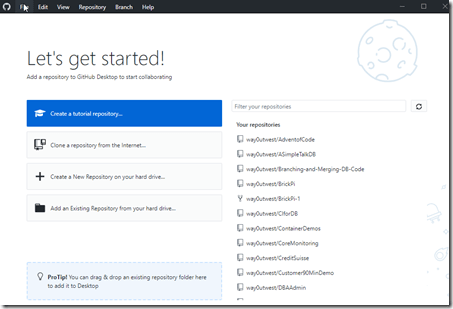
GitHub Desktop Get Started Screen

Trying Out the Interface

I decided to see how well this works, to see if this is more stable. With that in mind, let’s drop an existing repo folder onto the client. I have a git repo that isn’t in GitHub yet, so let’s drag that folder and drop it on the “Pro Tip” section in the lower right (see the image above).

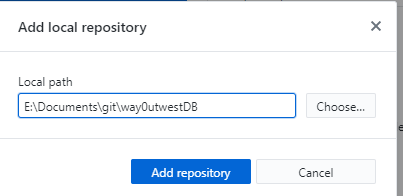
When I do that, I get a pop up.

2020-05-26 18_25_49-Window

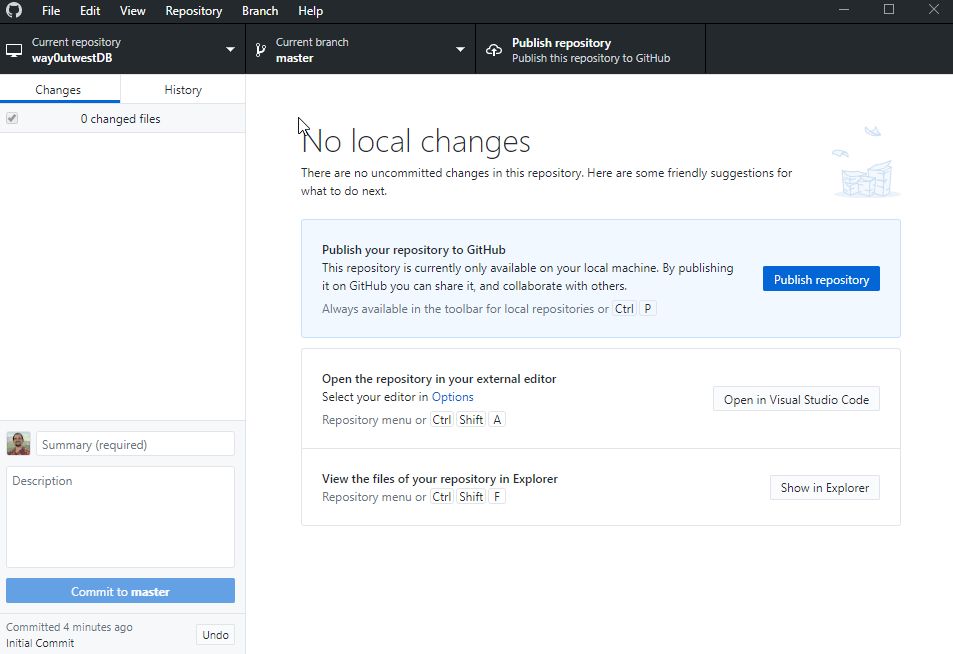
This is the path of the repo. I click “Add”, and it’s added. This becomes my current working repo, and I can see a somewhat standard view of my repo that I see in SourceTree or GitKrakken or any client.
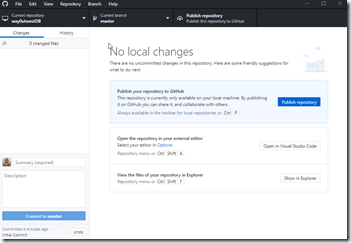
2020-05-26 18_26_58-Window

As you might expect, this is geared towards publishing to GitHub. I have a “publish to GitHub” link. I also have a link to open VS Code.

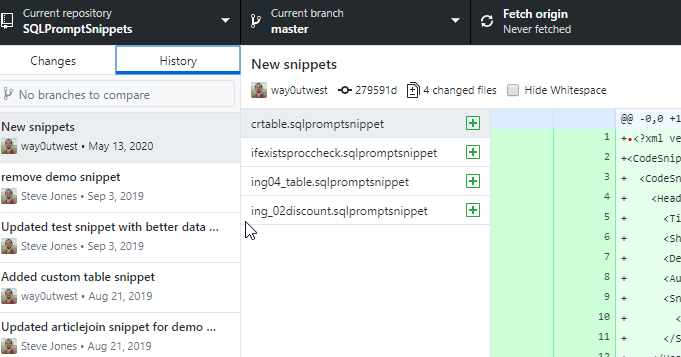
If I click the “History” tab, I see my commit of this repo on the left, the files in the middle, and file contents on the right. Standard stuff, but a nice layout.
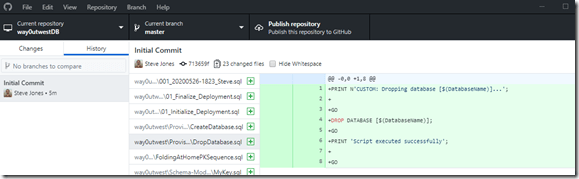
2020-05-26 18_28_42-Window

I wonder what happens if I drop a local repo on here that’s in GitHub? Let’s try that.

The “Getting Started” screen isn’t listed, and I can’t close the repo. At least, I don’t see a close menu item. If I restart the app, I come back to my main repo screen. Let’s try using the “Add repository” menu item. This gives me the same type of dialog I got from a drag and drop repo.

I can cancel that and just drop another repo folder onto the app, and I get the same dialog as well. So drag/drop seems to always work. When I look at history for an older repo, I see lots of commits. No graph, but all the commits and dates.
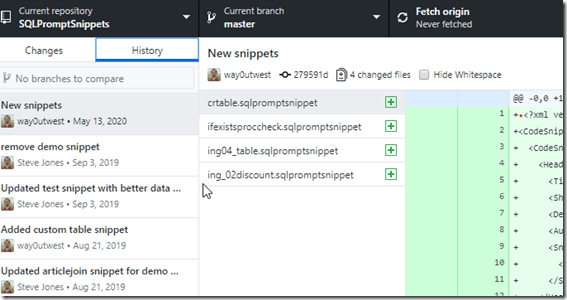
History of older repo

This repo always has a remote at GitHub, so I see the “Open the repository” link on the “Changes” tab.
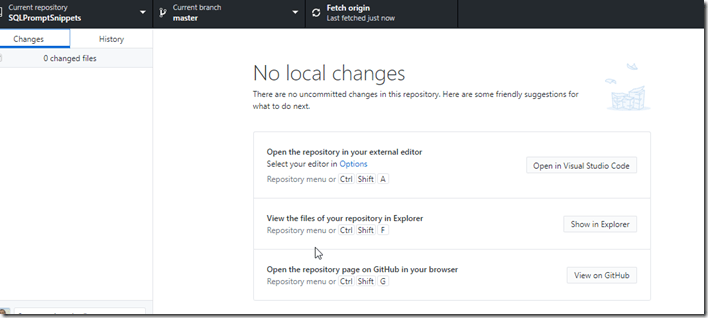
Main repo page with open on GitHub link

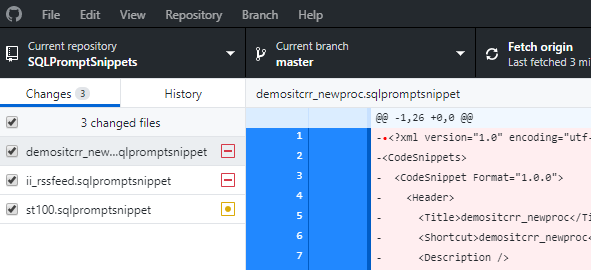
If I make a few changes in this repo, in a few seconds I see the changes reflected on the main page. I deleted two files and edited another. The right side of the filename has a hyphen for a delete and a circle for a chance.

List of Current changes

I committed two changes and that left the third. I don’t see a stage/unstage option here. If I right click the file, I do see a few options. This is likely good enough for me that I can discard the changes. However, the “ignore” feature is nice, as well as the add all of this type option.
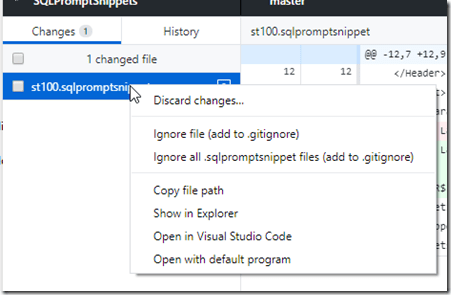
2020-05-26 18_38_20-Window

Opening this in VS Code, Explorer, or a default program is a nice touch as well.

Options

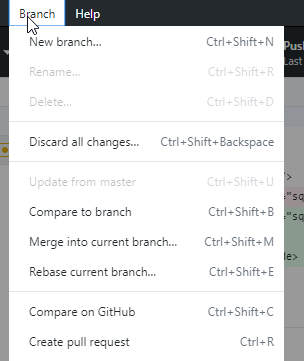
There some interesting options in the tool. I’ll cover a few things I found to be nice items. First, I like that the branch menu has some things beyond the “new branch” and compare. I can merge, or rebase. Those are good things to have in this tool and common tasks.
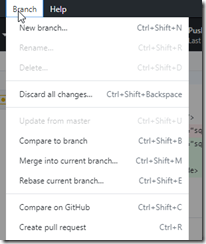
Branch menu items

The Repository menu is what you’d expect, but the “Create issue on GitHub” is really nice. I submit quite a few of those to keep track of work, so it’s nice to be able to get there quickly from here.
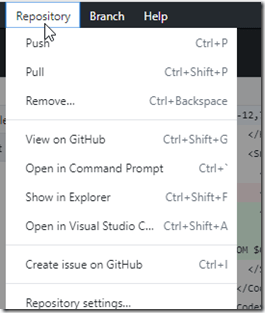
2020-05-26 18_40_35-Window

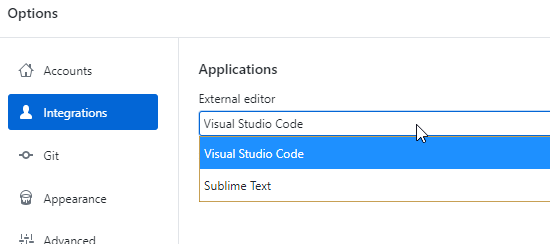
Under File – Options, there are some good, handy things that much software has these days, but much also doesn’t. For Integrations, the app detected I have Sublime Text installed, so I can use that instead of VS Code. I assume notepad++ or other editors might appear here.
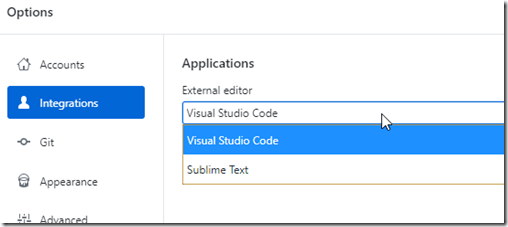
Integration Options

The Appearance option has a light and dark theme. Important to a lot of people, though I’d like the ability to easily modify things here. I find that these pre-defined themes are sometimes hard for me to see. I’d like to alter the colors slightly in many of them, especially as I get older.
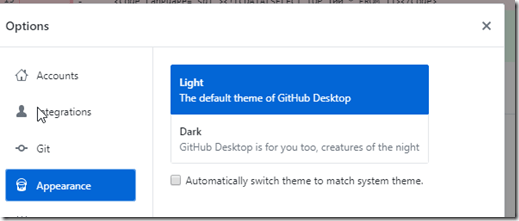
2020-05-26 18_41_05-Window

I like that the Advanced menu lets me choose to get rid of some confirmation dialogs. Overall, I like these, but they do get annoying for some things.I also get a basic default of what to do with changed files when I switch branches. Since I sometimes do this without thinking, it’s a nice feature.
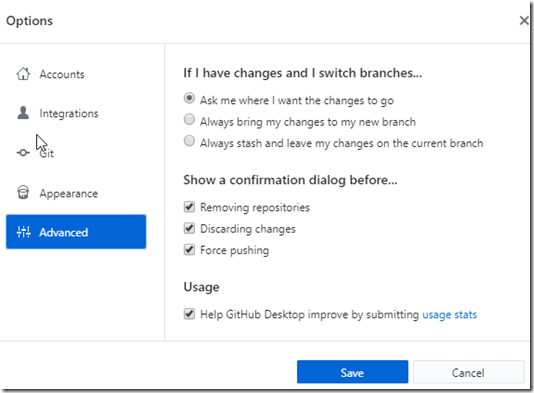
2020-05-26 18_40_59-Window

Impressions

So far my initial impressions are positive, but I need to use this for a bit as my main git tool to see if it works well. I enjoyed GitHub for Windows as well, but I kept having it break with certain changes I’d make, which forced me to learn the command line to fix my repos.

This is a much simpler app, and it provides the basic git functions I mostly need. Time will tell if this feels intuitive, but I like the simple nature and the ability to quickly navigate back to a file in Explorer or VS Code. I don’t know if I need that, since often I have an IDE open when I’m working with files, so I’ll experiment and see how well this works.


Posted in Blog | Tagged , | Comments Off on Setting Up GitHub Desktop (formerly GitHub for Windows)

Daily Coping 29 May 2020

I’ve started to add a daily coping tip to the SQLServerCentral newsletter and to the Community Circle, which is helping me deal with the issues in the world. I’m adding my responses for each day here.

Today’s tip is today link your decisions and choices to your purpose in life.

What’s my purpose in life. I think it’s to be a great partner, help others where I can, and improve my skills in (and outside) of my career for myself. Maybe a bit selfish, but those are what I think.

For the most part, these things drive my life. I work to have a strong marriage, and often give as much as I can for my wife. One of the reason’s I’ve continued to work with SQLServerCentral and Redgate is that this supports my wife in her self employment. Rather than try to be more like a Brent Ozar, whose had amazing success in his career field, I’d rather do the things that provide stability.

I do enjoy those things, so it’s not a great sacrifice.

My mission at SQLServerCentral has always been to help others be better at their jobs. I think about that often as I work through the management of the site. It’s a guiding principle for me, and I think my decisions about the site are with this in mind. I may not always do the best job I can, and I do sometimes beat myself up about that, but I am to help others.

That’s also a part of why I coach. It’s a way to give back and help others grow up. I may do more volunteering, especially if my schedule continues to be strictly at home, since I do believe in giving back to the world.

Lastly, I continue to work on improving myself. I exercise and try to take care of my body. I practice guitar. I try different things in the kitchen. I work on different projects around the house, and I’m trying to do a bit more woodworking. None of these things pay a bill or do more than satisfy my soul, but that’s a part of my purpose.

Posted in Blog | Tagged , , | 2 Comments