Tag: patching

  • The Case for Patching

    Recently I was testing a feature in SQL Server on 2017 and 2019. There was supposed to be an improvement across versions, but I didn’t see it. Then I realized that I was on SQL Server 2019 CU 2 on my laptop, and the current CU is 17. I took a few minutes to download that and install it.

    I have often been a lagging patcher in production environments, often looking to stay a CU or two behind, depending on my workload. SQL Server has been a very security -table platform, so that’s often worked well, though there are security updates at times. For those, I usually prioritize a patch getting applied.

    Windows (Linux, MacOS, etc.) tends to get patched more often than other software, especially by administrators. At least on desktops. Servers sometimes lag a bit, which can be a problem. I saw this week that a lot of attacks in 2022 Q2 were for a vulnerability Microsoft patched in Sep 2021 but hadn’t gotten all their customers to apply the patch. That situation was a problem early in my career with many vulnerabilities, and it’s still apparently an issue now.

    If you’re wondering how big a deal patching can be, remember the Equifax hack? This occurred because administrators hadn’t patched a system. Whether it’s a host OS, a database platform, or some other software system, it’s important that you keep somewhat current with patches. We never know when vulnerabilities will appear, and honestly, for most of us, we can’t spend the time tracking every piece of software and the various vendor disclosures.

    We can, however, patch relatively quickly. While I don’t expect that most, or even many, people will patch within a month, I do think that delaying six months is probably a bit long. That being said, I need to check a few of my servers and make sure my admins are keeping them up to date.

    Steve Jones

  • How Often Do You Patch?

    I saw two things recently. First, CU25 for SQL Server 2017 was released. I realized that I was CU8 locally, so I had work to do. Second, I noticed that SQL Server 2016 fell out of mainstream support on 13 Jul, 2021. Amazing that it’s been around for 5 years already and has moved into Extended support. We’ll still get security updates, but nothing will be fixed from that version, which it seems many people are running.

    Microsoft also announced they will put out a final Service Pack for SQL Server 2016. I am glad to see that, as I’ve often wanted to know there is a final patch that is released for each version, as I can know when I’m done patching.

    Today I’m wondering if you track this at all. Do you actively look to ensure your instances are patched? Are you on a schedule of some sort, maybe matching Microsoft’s every-other-month pace, or perhaps just a few times a year? Or is this more ad hoc?  When I go visit companies, I often find instances at all different levels, often without any reasoning as to why systems aren’t consistently patched.

    I used to try and ensure we patched every quarter, though certainly, I faced resistance from some business owners of systems over the worry that a patch might break something. Valid concerns back then, and still somewhat valid today, though if a patch gets through a few months without reports of issues, it’s probably safe for most systems. Still, make sure you test, especially for business critical workloads.

    These days, with so many hacking attempts, ransomware distribution channels, and no end to phishing, it makes sense to stay on top of patches and make sure you are up to date or at least planning to do so. Some of the high-profile hacks, like the Equifax one, have occurred on systems where patches were available but not applied. I don’t know that many of the patches are closing holes in SQL Server, but there are definitely issues with Windows where you would want to ensure your host OS was patched. Maybe that’s something you ought to check on today and ensure you have a plan to apply those updates.

    Steve Jones

    Listen to the podcast at Libsyn, Stitcher, Spotify, or iTunes.

  • Patching Challenges

    In my career, I’ve had to manage many production database instances. In fact, there was a time when two of us were patching hundreds of instances (600?) when MS released patches. That wasn’t too often back then, unlike the every other month(ish) schedule that we have with 2017/2019 and the Cumulative Updates.

    My process was often to test patches on QA/Test servers and then start to roll out the patches to production. We didn’t quite follow what Brent Ozar recommends, in that we often patched development servers later. We didn’t control those, and unless production was patched, we couldn’t get developers to patch their systems.

    We didn’t patch DR servers first, but that’s a good idea. It’s one I think makes a lot of sense. We did patch secondaries first, ensuring that if there were issues here, we wouldn’t impact production, and these days with Availability Groups, hitting the secondary replicas, especially read-only ones, is a good idea.

    The big thing for me wasn’t so much the type of servers, but in having a series of rings to roll out the patches in groups. We used automated processes (no one wants to click next-next-next) and while we might patch a lot of servers, we never wanted to patch them all. We typically had 3 rings. Ring 1 was test servers, and ring 2 was most of production. Ring 3 was any production servers that got an exemption from initial patching. There were times when some process was important and couldn’t be interrupted or a client needed a few more weeks to test. We’d let them delay a month, but not longer.

    I think it’s important to have a strategy, and as Brent notes, also a protocol for how you handle things. I’ve often depended on our normal backup processes, especially in large environments, and the patches tended to stop the SQL services, so I don’t know how important it is to stop client apps, but think about it.

    One note about backing out changes is that containers make this a lot easier. If you move to production containers (linux, HA challenges, features missing, etc.) you can swap out an updated container with a new (or old) patch level as needed. There are caveats here, and certainly I’d start implementing this in a dev area first to understand the implications, but I expect over time containers will make patch deployment and rollback much easier.

    Steve Jones

    Listen to the podcast at Libsyn, Stitcher, Spotify, or iTunes.

  • Versions and Patches in SQL Monitor

    SQL Monitor has grown from a basic alerting system to an amazing product over the years. From it’s early days as SQL Response, where Brad and I weren’t sure this was a good idea to the current version that has two teams and releases change almost every week. In fact, new features often come out before we bundle them into a major release.

    Not that the other teams aren’t doing well at Redgate Software, but across the last 3-4 years the SQL Monitor group has been the best development team in the company. First under Daniel and now under Ben, they’ve done amazing work and it’s hard to put into words how proud and impressed I am with their results. Lots of kudos to Adam as well, who helps with UX. I enjoy our monthly chats about the progress they’ve made and future directions they’re considering.

    This post covers one of those areas.

    The SQL Estate

    There’s a new tab that’s appeared at monitor.red-gate.com:Estate. Awhile ago we started talking about the idea of scale and how do fewer DBA resources manage all their instances easily. With pressure to be more efficient and still provide rapid responses when there are issues, there has been quite a bit of work over time to help users keep track of all their database resources.

    The Estate tab is one of those areas, which has grown to 4 areas: Installed Versions, Disk Usage, Backups, and SQL Agent Jobs. Some of these are in preview, with more work planned in the future.

    2018-12-20 11_03_16-Installed Versions

    If you have ideas or requests for features, let us know. Our goal is to find ways to better ensure you get alerted to issues, can solve problems, and keep track of work that needs to be done on all your databases, no matter where they are located.

    Installed Versions

    One of the tasks I’ve often had as a DBA or sysadmin is patching systems. It’s a hassle to keep track of versions and current patches, even with resources like the SQLServerCentral Build Lists. I’ve heard similar challenges from other DBAs.

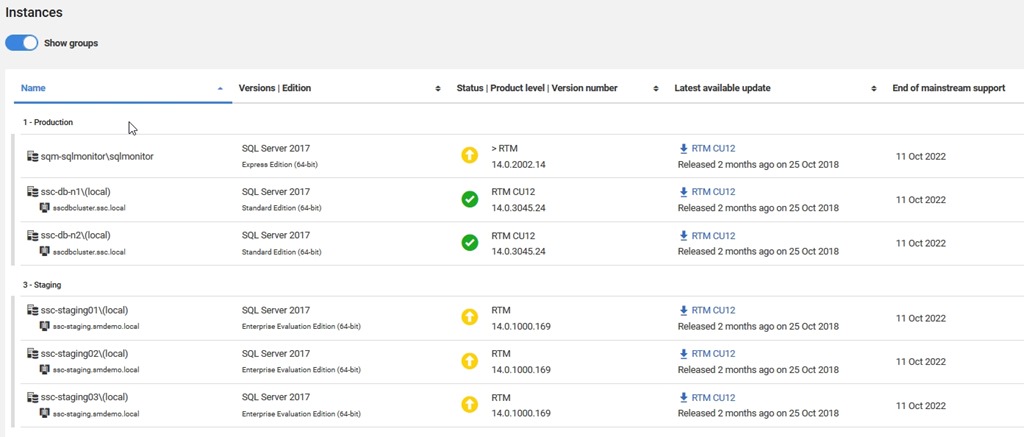
    I made a suggestion to the SQL Monitor team and they came up with the Installed Versions on the Estate tab. This let’s you easily see which versions you have installed in your monitored environment. At a quick view, you can see which SQL Server versions are installed and are up to date.

    2018-12-20 11_05_41-Installed Versions

    You can play with filters to get a quick look at your estate, which is helpful when planning your patching resources.

    If you look below here, you’ll see more details on the instances, broken out into the groups you’ve configured. What’s nice here is that you see each database, as well as the version and an icon to let you know if you are behind in patching.

    2018-12-20 11_05_52-Installed Versions

    Perhaps even more helpful, there’s a link to the download for the latest patch. Makes it easy for you to find the files you need to update an instance. Perhaps even nicer, you can easily see when support ends, and use that to make plans for upgrades if you need to do so.

    This is one of the simpler, but amazingly handy features to have in a monitoring system. I’ve built scripts and tools to do this in the past, and while it’s not hard, it’s also not something that is necessarily a good use of my time. This is a task that’s tedious with limited value add for my salary. Much better to have a tool that gathers and manages this for me.

    If you haven’t tried SQL Monitor, run over to monitor.red-gate.com and give it a run, or even better, download an eval and try it in your environment.