Tag: sql server

  • What Port Should I Use?–#SQLNewBlogger

    Another post for me that is simple and hopefully serves as an example for people trying to get blogging as #SQLNewBloggers.

    This is a quick post on checking the port for your SQL Server instance. It’s in line with Tim Ford’s request for simple, beginning blog posts this year.

    How do you know what port your instance is listening on? Many of you might not know, depending on the SQLBrowser to be running. That’s not necessarily a good idea, as some security protocols insist this be disabled.

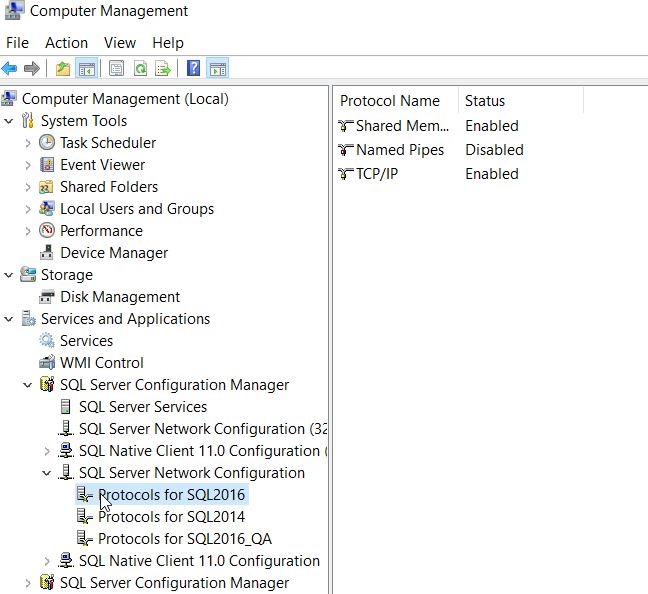
    There are ways to check. First, you could use a the Configuration Manager. On my desktop, this is in the Manage tool for the computer. Once inside, I can select the Server Network Utility.
    2016-11-15 15_06_51-Computer Management

    Notice that I have multiple instances here, so I need to choose one. Once I do, I see the protocols on the right. In this case, I want to look at the properties of TCP/IP, which is where I’ll get the port.

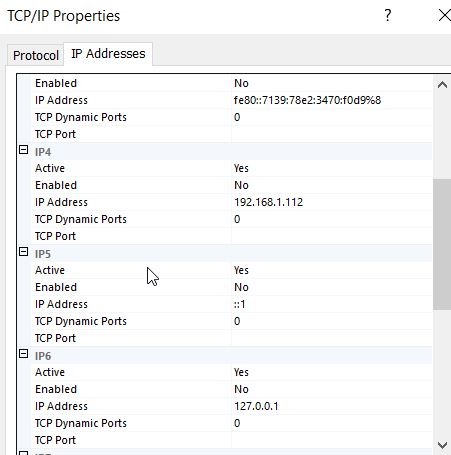
    If I look at properties, I’ll start with the Protocol tab, but I want to switch to the IP Addresses tab. In here, you can see I’ll see an entry for each of the IPs my instance is listening on. I can see which ones are Active as well as the port. In my case, I have these set to dynamic ports.
    2016-11-15 15_07_38-TCP_IP Properties

    This doesn’t help. If I had specific ports, I’d see them listed for each IP.

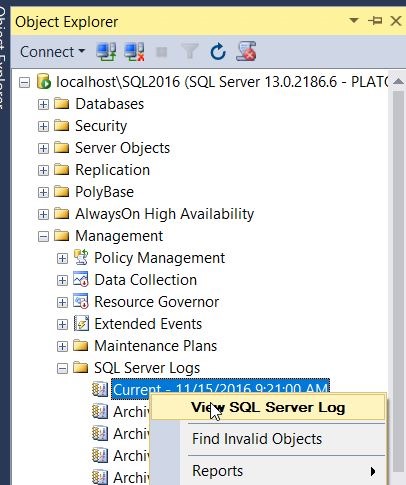
    The way I tend to check the specific port is that I will go to the SQL Server Error log.
    2016-11-15 15_12_28-SQLQuery1.sql - localhost_SQL2016.sandbox (PLATO_Steve (65)) - Microsoft SQL Ser

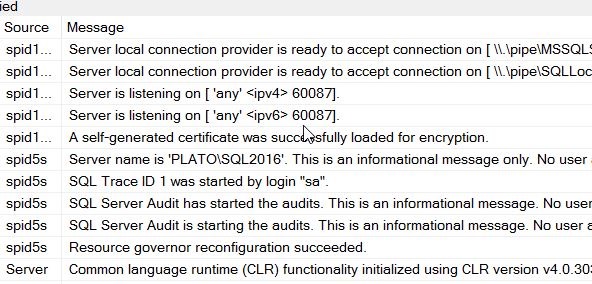
    When I open this up, I see my error log entries. I want to look at the startup of my current session and scroll up slightly. At some point you will see an entry like “Server is listening on…”
    2016-11-15 15_16_37-Log File Viewer - localhost_SQL2016

    In my case, you can see above that I am listening for this instance on 60087. I can verify this with a connection in SSMS.
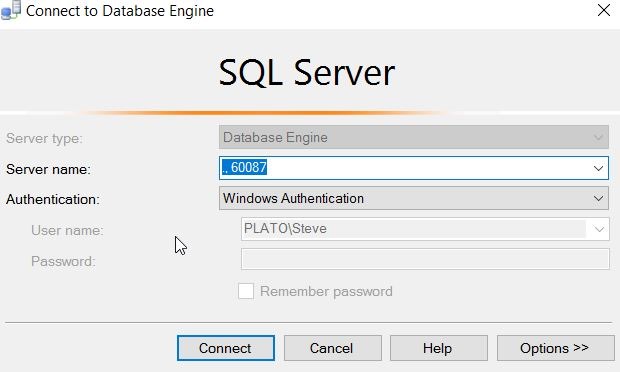
    2016-11-15 15_17_49-Connect to Database Engine

    Note that this is a named instance, and I normally connect to “.\SQL2016”. The SQLBrowser determines the port, since I send the name in, and then get a port back to where I will then connect. However, here the name doesn’t matter. I just send in the port and I can connect.

    #SQLNewBlogger

    Everyone working with SQL Server should know this. It’s a simple item, like checking the printer is plugged in. Know how to check this.

    And blog about it.

  • A Python SQL Server App

    I got a link recently from Microsoft on building apps easily for SQL Server. At the top of the page, they ask you to pick a language and OS. Since I’ve done a little Python and I used Windows, I chose that option.

    The page looks to walk you through a simple app. I decided to try this out and see if it works, following the instructions. Since I already had SQL 2016 installed (and newly upgraded to SP1), I just connected and verified it was there.

    2016-11-22 11_50_06-powershell

    I didn’t want to go back to Python 2.7, and I’d rebuilt this machine for testing, so I used Chocolatey to quickly get Python 3.5. I’ll have to adjust code to match this version.

    2016-11-22 11_52_38-cmd - choco  install python (Admin)

    One python was installed, I needed to get virtualenv and then create a folder. I used my regular git folder since it’s really, really simple to get a project with version control running. Unfortunately, when I went to get pyodbc, I had an error.

    2016-11-22 12_18_53-cmd (Admin)

    This is going to use C++ tools to build the pyodbc files, so I need to get those installed. I can do that from Visual Studio.

    Once I run those and install them, I can now get pyodbc. There is a build error, but I seem to have the module. My next step is to create my db. I also create a login that is db_owner for this.

    2016-11-22 12_41_22-powershell

    Now it’s time for the code. That’s easy enough, so I copy the code into VSCode and change the instance and user information.

    2016-11-22 12_42_11-crud.py - Visual Studio Code

    I also had to replace the print statements with parenthesis around the quoted items, which is required in Python 3.x. Once that’s done, I start the program and it appears to work.

    2016-11-22 12_39_25-cmd (Admin)

    If I check from SSMS, sure enough the program has worked.

    2016-11-22 12_39_54-SQLQuery1.sql - localhost_SQL2016.SampleDB (PLATO_Steve (62))_ - Microsoft SQL S

    The second part of the tutorial uses the Django Web Framework to setup a simple site. Once again, I get a pyodbc error and there’s nothing that works. Fortunately I found the issue is with Python 3.5 and not having the proper binaries in the default PyPI directory. I resolved it with this link.

    2016-11-22 13_26_45-crud.py - Visual Studio Code

    However, there were other errors, which I suspect are related to Python 2.7 v Pyhton 3.5. Rather than solve those, I went on to the columnstore demo. In this, you create a table with 5mm rows and then run a query against it from Python. I did that, then created the columnstore index, then ran it again. The results are below.

    2016-11-22 13_46_23-columnstore.py - Visual Studio Code

    Note: I had to create the variable, tsql, and used this line of code:

    tsql = “SELECT SUM(Price) FROM Table_with_5M_rows”

    Python Works

    Despite some issues, which are probably my fault, this is a good introduction to how you might use Python with SQL Server. Since we now have SQL Server on Linux coming, and there are lots of Python developers, this might be a good place for some of you to learn a bit about connectivity with Python if you ever need troubleshoot that kind of setup.

  • Finally, Create or Alter

    There are lots of reasons to upgrade to SQL Server 2016, but this is the one for me. We finally get a CREATE OR ALTER statement in T-SQL. This not only makes lots of code easier to write, it means that the ways in which you might script and schedule your future deployments will be cleaner. This is an exciting change for implementing a simpler and easier Continuous Integration/Continuous Deployment system in your organization.

    It’s not perfect news for a few reasons. First, this is a SQL Server 2016 addition to T-SQL only. That means until you have most of your applications have moved to SQL Server 2016 SP1+, you won’t be able to use this construct. That’s OK, because it will mean that at some point most of our instances will be on SQL Server 2016 SP1 or later, and much of our code will be cleaner. We won’t resort to including IF statements in our deployment scripts. We won’t need to create stubs of procedures and functions so our code is embedded in an ALTER script. In essence, you won’t need to maintain two separate code constructs to make a change.

    This isn’t perfect, nor is it complete. We still don’t have CREATE OR ALTER for tables. That’s the place where I’d really like to get a consistent way of coding items. What I really want is a complete view of the table each time I change it. By this I mean that if I create a table like this:

    CREATE TABLE Students
    (
        studentname VARCHAR( 200),
        status TINYINT
    );

    Then I want to be able to add a column like this:

    ALTER TABLE Students
    (
        studentname VARCHAR( 200),
        status TINYINT,
        DOB DATE
    );

    Or alter a column like this:

    ALTER TABLE Students
    (
        studentname VARCHAR( 200),
        status BIT,
        DOB DATE
    );

    Or better yet, have a CREATE OR ALTER for tables.

    I know this might be asking for a lot, but I really think that we ought to get a consistent way of coding databases so that we can reduce the mistakes and make our systems easier to understand. I’m sure this may require substantial engineering, not to mention a great deal of understanding of how this would actually affect our systems when run, but it would certainly make our code cleaner.

    I doubt we’ll see these kinds of changes, at least not until we have an ANSI standard that encompasses them, but I would hope that as an industry we would mature and improve the way we work with databases, not remain bound by tradition and history.

    Steve Jones


  • Monitor All the Changes

    Can you monitor every configuration change and setting on all your SQL Server instances? Can you get an alert every time code changes, or even if an option for an object changes, such as the changing of an EXECUTE AS or the rebuild options for an index? Do you want to know about every security change (new logins, grants, revokes, etc.). Can you keep up with every alteration of a SQL Agent job?

    You certainly can, but across any busy enterprise, all these alerts might result in a constant stream of items to review each day. In fact, in some companies, the volume might be high enough that this becomes a full-time job for someone. I’m not sure many of us think that it’s worth an employee’s time to actually review every change.

    Even if you decided it’s worth reviewing every change, is it possible to do a good job actually doing so? Too many alerts usually result in an individual starting to treat all of them as though they are the same priority. It becomes hard to differentiate what’s important to review and what’s not over time if you are always looking at a stream of changes across disparate systems. This is one reason why I never want to get success message, but even failure or change messages can be problematic when the volume is high.

    What can you do in a situation like this? Certainly there are alerts that are critical and need to be addressed right away, aren’t there? There are, but they are probably few. Making the decision about which items are important enough to review daily can be hard. I’ve typically only wanted critical alerts for backup tasks (after some retry) and privileged security alterations (add/change/remove sysadmin/securityadmin/processadmin/serveradmin). Those are items I need to take action on. Most other items, such as failed index rebuilds, job schedule changes, configuration alterations, I just want to capture and log.

    In one of the SQLskills newsletters recently, Paul wrote about an issue where replication settings had changed. The distributor had gone from 72 hours to 72 days, resulting in memory pressure for the workload. While I know this is a problem, is this the type of alert you’d define as critical? I’m not sure I would. In fact, this is the type of alert I’d want logged as a set of changes on this system so that I could review it when it seems that the system is not running as smoothly as it otherwise might be. In fact, this is the type of problem I’d hope I’d catch through performance monitoring, which might pro-actively catch performance degradation that would lead a DBA to review changes and metrics before a user reported the situation.

    Ultimately I want monitoring systems to help me find issues, and only notify me when I might need to take some action. To do this, the system might need to capture everything, but I want most of the items filtered until such time as the information might actually help me solve an issue. This takes some time to setup and tune as you discover holes in your monitoring, or you find that too much data is being passed on. Don’t be more afraid to add more data to capture, but be ruthless about removing extraneous notifications from the system. This is a case when too much information sent to the administrator is as bad as too little.

    Steve Jones