Tag: T-SQL Tuesday

  • T-SQL Tuesday #196: Taking Risks

    This month we have a new host, James Serra. I’ve been trying to find new hosts over the last few years to keep this party going and to expand the ways in which people look at database work.

    There are definitely less bloggers, but in the age of AI, I think the more you can stand out and show that you add value, that you think about things, that you can spot AI mistakes, the better off you are, so keep blogging an encourage others to do so.

    This is a great invite, and I’ll give you my response below.

    A Big Leap

    I had changed jobs a few times after I moved to Colorado. I worked at an established small company, which was still a bit of a startup, and after sleeping in my office 8-10 times in a year, I looked for another job. Another startup, which failed, left me looking again. I got a job at JD Edwards, which turned into PeopleSoft after an acquisition. I was promoted, and in a good place.

    At the time, I’d been running SQL Server Central on the side with Andy and Brian for a couple of years. We were making it work, but it was stressful in that we spent time at night, on weekends, and during breaks keeping it growing. We were feeling the stress and decided someone needed to work at it fulltime. We’d made a big sale, so we had some cash to give us stability, but if things went poorly, this was about a half a year’s salary for any of us.

    We debated it a bit and I decided to make the leap to working for the company fulltime. I took a small pay cut to do so, but we expected a monthly dividends to make up for most of the decrease in pay. Not all, but most. The main reason I decided to make the leap was that my wife was working fulltime and provided our health benefits. That was a cost Andy or Brian would have needed to shoulder themselves.

    This was a risk. At the time, I worried about my skillset. Would they atrophy? If this didn’t work, could I go back to work as a consultant or fulltime DBA? Would I miss out on the learnings and growth that come from being involved fulltime in projects for an organization?

    Looking back, it doesn’t seem like a big risk, but at the time, in the 2003 timeframe, it felt like a major leap away from the security and stability of corporate work. Sure, I’d changed jobs in the past, but I always had a strong track record of delivering results in a position. I was giving some of that up and the longer I was away, the more I was worried about coming back.

    Over time I realized that a lot of what I do here with testing scenarios, mocking situations, and working through the challenges people face is the same type of work that I would do in a corporate environment. I don’t have the pressure from a manager, but I often put that on myself, so it’s very similar.

    This was a calculated risk, but still a work. Fortunately, it was a one that worked out well.

  • Aging Code for T-SQL Tuesday #195

    It’s that time of the month again, with T-SQL Tuesday coming along. I managed to not forget about this and checked with the host. He had an issue, but fortunately I got a friend to step up.

    This month Pat Wright has an interesting question, asking how your code has aged. He and I have had a few conversations lately about getting older and when I asked him to host, this was a perfect choice.

    I’m definitely getting older, but what about my code?

    25 Years Later

    Actually a little more, but I wrote a series called “Tame Those Strings” for Swynk a long time ago. That became Database Journal, but during the switch, they stopped paying us authors. A few of us started SQL Server Central and we went live 25 years ago.

    In that piece, I referenced the oldest article, which is Tame Those Strings Part 4 – Numeric Conversions. There’s also a part 3, but in those pieces, is that code still useful?

    A bit.

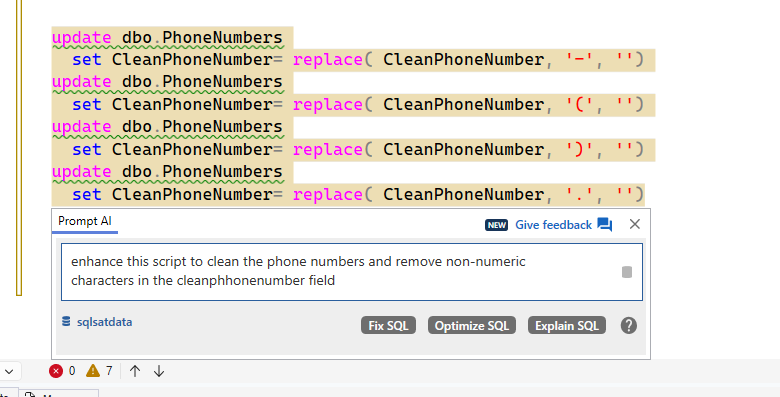
    These are basic articles looking at string functions that are still heavily in use today. The idea of cleaning phone numbers using REPLACE is still something we might do today. If we are using SQL Server 2025, there are additional functions, but I still see a lot of code that still use multiple CHARINDEX+SUBSTRING or REPLACE functions.

    I asked the Prompt AI if it could do better.

    2026-02_0091

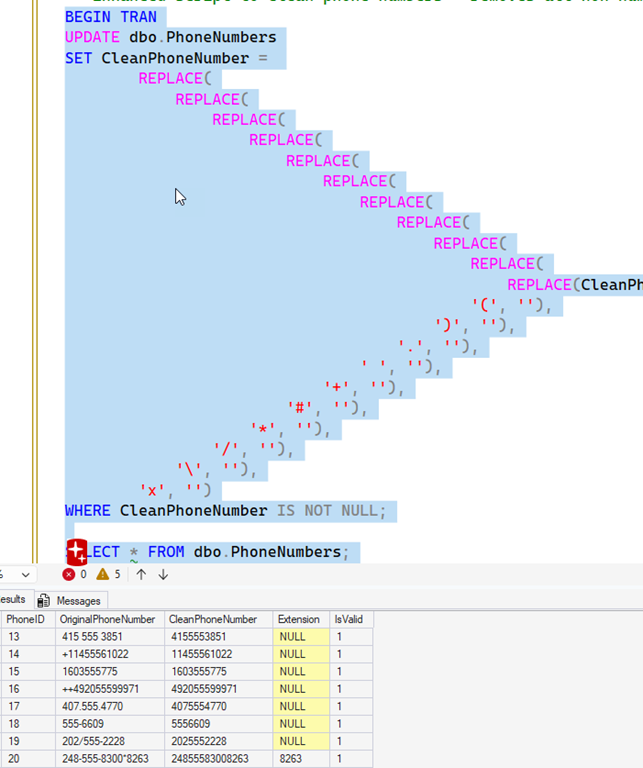
    It gave me two pieces of code. The first is nested REPLACE() statements. This works, but I find this hard to read. I’d rather have separate statements, for ease of maintenance.

    2026-02_0095

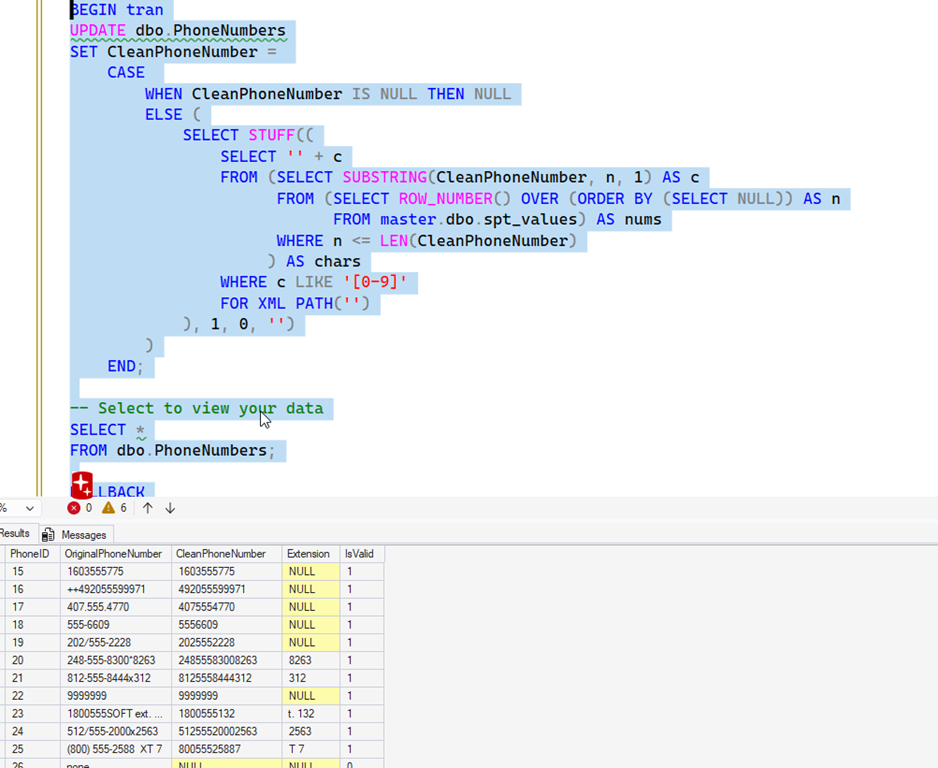
    The second is a single statement, using a CASE and STUFF and XML to clean things. I like this, thought it’s a semi-complex way of doing things. However, it works.

    2026-02_0096

    Has the code aged well? I think it’s OK. There are better ways, as shown with the STUFF/XML version, which wouldn’t have worked in SQL Server 2000. Still, the use of REPLACE is a common technique still used today.

    For part 4, with the use of LTRIM and STR(), today we have FORMAT, which is cleaner. However, it’s likely less performant. In a simple test of 500,000 values, the FORMAT takes over 600ms to return the results while my LTRIM/STR combination consistently runs in the 460ms or quicker range.

    I think my code aged well.

  • Learning from Mistakes: T-SQL Tuesday #194

    We’re a week late, once again my fault. I was still coming out of the holidays and forgot to check on my host. Luckily, Louis Davidson (who did have Feb) agreed to go early. He has a nice invite, and I am glad to answer.

    This is the monthly blog party on something SQL Server/T-SQL/etc. related. I have about half of 2026 covered, but if you would like to host, I’d love to have you. Ping me on X/LinkedIn/BlueSky.

    A Mistake

    Since we aim for T-SQL, I decided to ping something I’ve done a number of times in T-SQL, and sometimes still break. However, a little testing has helped me (mostly) keep this from getting to production.

    Always have testing in place.

    I am good at T-SQL, but not amazing.  I learn things from others all the time, and these days, take help from AIs, though I do test and double check what they do.

    One of the places I’ve struggled with is with outer joins. Usually left/right outer joins where I am trying to get a list of things from a join, but filter out some of the missing items. Here’s an example from Northwind. I want a list of customers joined to orders, but I might have a way where customers filter out those who haven’t been charged freight. There’s likely some business reason, but it escapes me now.

    If I run this query, I get lots of stuff.

    2026-01_0109

    That doesn’t seem right. If I check, I see this:

    2026-01_0111

    What’s the problem here? Well, the main issue is one I keep doing, fortunately, I catch this. If I move the Freight IS NULL to  WHERE instead of the ON, it works. You can see this below.

    2026-01_0112

    If I see too much data, which can be hard to catch in large result sets, I can ask Prompt AI.

    2026-01_0113

    I get the response I’d expect from most AIs.

    2026-01_0114

    How do I test for this? Well, the best way is to have test coverage for queries. For example, I might build a test like this:

    EXEC tsqlt.NewTestClass @ClassName = N’QueryTests’ — nvarchar(max)
    go

    CREATE OR ALTER PROCEDURE [QueryTests].[TestCustomersWithoutOrders]
    AS
    BEGIN
    — Arrange
    — Create temporary table to hold expected results
    DECLARE @Expected TABLE
    (
    CustomerID nchar(5)
    )

    — Insert the expected result – customers with no orders
    INSERT INTO @Expected
    SELECT CustomerID
    FROM dbo.Customers
    WHERE CustomerID NOT IN
    (
    SELECT DISTINCT CustomerID FROM dbo.Orders WHERE CustomerID IS NOT NULL
    )

    — Act
    — Create temporary table to hold actual results
    DECLARE @Actual TABLE
    (
    CustomerID nchar(5)
    )

    — This should be the query that’s being tested
    INSERT INTO @Actual
    SELECT DISTINCT
    Customers.CustomerID
    FROM dbo.Customers
    LEFT OUTER JOIN dbo.Orders
    ON Orders.CustomerID = Customers.CustomerID
    WHERE Orders.CustomerID IS NULL

    — Assert
    — Check that we have exactly 2 results
    DECLARE @ActualCount INT =
    (
    SELECT COUNT(*)FROM @Actual
    )

    IF @ActualCount <> 2
    BEGIN
    EXEC tSQLt.Fail ‘Expected exactly 2 customers without orders, but got ‘,
    @ActualCount;
    RETURN;
    END

    — Check that we got the expected customers
    IF EXISTS
    (
    SELECT 1
    FROM @Expected e
    WHERE NOT EXISTS
    (
    SELECT 1
    FROM @Actual a
    WHERE a.CustomerID = e.CustomerID
    )
    )
    OR EXISTS
    (
    SELECT 1
    FROM @Actual a
    WHERE NOT EXISTS
    (
    SELECT 1
    FROM @Expected e
    WHERE e.CustomerID = a.CustomerID
    )
    )
    BEGIN
    EXEC tSQLt.Fail ‘The actual set of customers without orders does not match the expected set.’;
    END
    END;

    That’s a lot of code, but I can see it works. I get two customers back, which is what I expect. Lines 53-58 have my query being tested above. If I run the test, it passes.

    2026-01_0115

    If I change those lines to put the filter in the ON clause (and remove WHERE), it fails.

    2026-01_0116

    Ideally I’d have this in a proc so I can change/tune this and compare plans, run tests easily, etc.

    This is a mistake I still make at times today, albeit rarely. Now I write some tests to look for my mistake. Maybe that’s the thing I’ve learned the most: have tests for my code.

  • A Note and a Message: T-SQL Tuesday #193

    This month Mike Walsh hosts T-SQL Tuesday. It’s been quite some time since he hosted (back at #4), but he answered my call for hosts and I appreciate that. He has a really good end of year invitation that asks us to look to the past and the future.

    I’m trying to keep T-SQL Tuesday alive, but I’ve been struggling for hosts. I need more of you to host, and more people to blog.

    Blogging is incredible for your career. Take some time to get started, and if you do nothing but respond to these monthly blog parties, you’ll look better than most other candidates for jobs.

    If you want to host, ping me on X or at sjones at sqlservercentral dot ***.

    A Message to Steve in 2015

    The world seems to be changing quite quickly in in our lives. You bought a new Pebble watch this year, database automation is becoming a bigger part of your job, and there’s lots of data analysis you can do.

    Power Bi is a tool from Microsoft that is going to grow in popularity and it’s a place you ought to invest. New places to store data, new features in SQL Server, new platforms for building analytics will appear, but Power BI is a place you should spend more time in and improve your DAX skills.

    Learning to build better visualizations, especially for your volleyball coaching (which is going to continue for some time), is an investment that will really pay off in the future.

    A Word from the Future in 2035

    Steve,

    we spent a lot of time early in our career working with networks, helping manage accounts, users, security, privileges, and more. That knowledge and experience helped us understand SQL Server and other database platforms as well from the security standpoint.

    Starting in 2026, you need to revisit some of those skills, ensure you better understand how authorization and authentication works in the context of AI and agents. AI technology is changing the world, and it’s going to be heavily used by agents, but security and ensuring there are limits placed on them is going to define who has more success with AI and who has more trouble.

    Take the time to ensure that as you engage with MCP servers, task agents with work, and evolve the way you use AI that you include governance in your efforts to protect yourself from runaway agents that might go beyond what you expect, or spend more money than you want them to spend.

    Enjoy the next decade, it’s going to be amazing.