
One of the projects that’s been on my list lately is to programmatically access Twitter for a few ideas I want to play with. Since I’ve been trying to learn some Python, I thought I would take a look using Python to update status and read status.
A quick Google search showed me lots of Python clients, but Tweepy caught my eye for some reason. I’m not sure why, but I ended up popping a command line open and downloading the library.
From there, I saw a short tutorial over at Python Central. I started by creating an app at Twitter for myself, which was very simple. Once that was done, I had a set of consumer tokens (key and secret), that I could use. Another click got me to the access key and secret. Note, the easy way to do this is over at dev.twitter.com.
My first attempt was using this sample code.
import tweepy
consumer_key = “ABCDE”
consumer_secret = “12345”
access_token = ‘asdfasdf’
access_token_secret = ‘98765’
auth = tweepy.OAuthHandler(consumer_key, consumer_secret)
auth.set_access_token(access_token, access_token_secret)
api = tweepy.API(auth)
public_tweets = api.user_timeline()
for tweet in public_tweets:
print(tweet.text)
This gives me a list of my tweets. At least, the last 20.
![2015-11-06 13_30_24-SDTIG - [C__Users_Steve_OneDrive_Documents_Python_SDTIG] - ..._Last_10_twitter_l](https://voiceofthedba.com/wp-content/uploads/2015/11/2015-11-06-13_30_24-sdtig-c__users_steve_onedrive_documents_python_sdtig-_last_10_twitter.png "2015-11-06 13_30_24-SDTIG - [C__Users_Steve_OneDrive_Documents_Python_SDTIG] - ..._Last_10_twitter_l")
That’s progress.
I then went to make an update by using this:
api.update_status('Hello, Pyton')
However that returned an error:
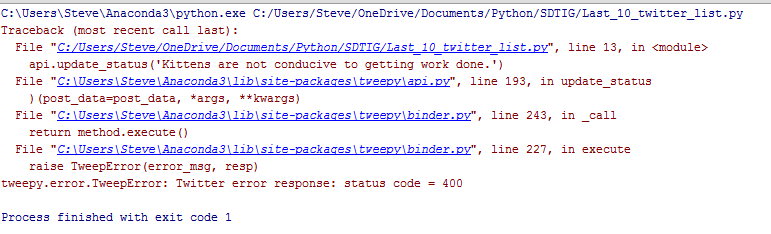
Hmmm, I double checked the API, and this should work, but I’m guessing there’s another issue. I searched, and found there’s a bug. However, I should be using named parameters, so no big deal. Change the code.
api.update_status(status='Hello, Pyton')
Now it works.

This is the first step for me to look at building an app that might send some tweets on my behalf, perhaps with the data stored somewhere, like, I don’t know, maybe a database?




 Voice of the DBA
Interesting. Also, if you want to send tweets based on data in SQL Server, you could do that using the Twitter_* functions in the SQL# library (which I am the author of ). Most of the Twitter functions are available in the Free version ( http://SQLsharp.com/ ). Of course, that doesn’t do much to help you learn Python ;-).
LikeLike
Didn’t know SQL# did this. I’ll check that out.
This was really an exercise in programming and thinking. In terms of doing this in production, I’d have to think about which way I like better. SQL# might fit better.
LikeLike