

Another post for me that is simple and hopefully serves as an example for people trying to get blogging as #SQLNewBloggers.
Someone posted this as a question and I thought it was worth noting. I use SQL Prompt for formatting, and never worry if there are tabs in code, but I know there are people without this amazing tool.
I added some tabs to a script and want to replace them.

I hit CTRL+H for the search and replace toolbar. The tab character is represented by a \t in a regular expression. I enter that, and then enter 4 spaces in the replace text box. I do need to click the “Use Regular Expressions” button, which is the one my arrow is on in the image below. It’s a little box with an asterisk in it

When I do that, tabs are highlighted in SSMS.
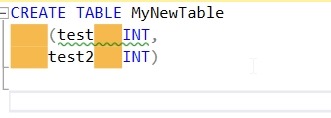
If I click “replace all”, I see 4 replacements, and if I check, the tabs are gone and spaces live.

SQLNewBlogger
This is a quick post, an example of what you can do to show you’re building better work habits and learning about your tools.


