Opening the SQL Prompt Command Palette

A few years ago SQL Prompt added a command palette to let you search the commands available. This is similar to the same concept in Visual Studio Code, ADS, and various other tools. This post looks at how to get to this tool in SSMS.

This is part of a series of posts on SQL Prompt, which is an amazing productivity tool from Redgate Software.

Opening the Palette

You can also open the Command Palette from the menu. In the SQL Prompt menu, it is the first item. You can also see there is a shortcut of ALT+S below here.
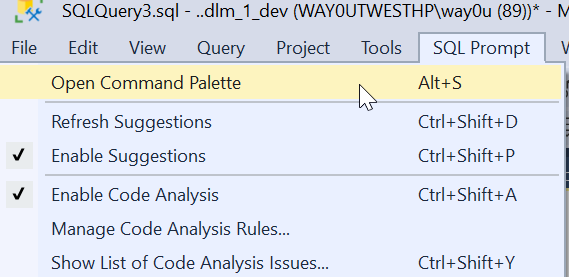
2023-09-04 04_44_26-

When I click this, I’ll see the full list of palette commands. This is a large window, and across the top I can filter things. In the complete list, you see various things: objects, snippets, and refactoring commands. We also have the Prompt behavior settings as well.

2023-09-04 04_44_43-SQL Prompt_ Command Palette

For example, I could look for things with “brackets”. I see a few things that are relevant. I can pick any of them if I want that apply to my code or change the behavior of the tool

2023-09-04 04_52_25-SQL Prompt_ Command Palette

Adding to the Menu

If you can’t remember the shortcut. or don’t want to use the menu, you can add this as a button in the toolbar. Here’s the easy way. When you installed SQL Prompt (or the Toolbelt), there is a Redgate toolbar added. Mine looks like this:

2023-09-04 07_29_16-SQLQuery3.sql - ..dlm_1_dev (WAY0UTWESTHP_way0u (92)) - Microsoft SQL Server Man

I clicked the “Add or Remote buttons ” and got a list of buttons on this toolbar. I can click “Customize if I like. That opens the dialog below.

2023-09-04 07_51_53-Customize

Now click “Add Command”. That gives you a list of items in all the menus in SSMS. Pick the SQL Prompt menu on the left (first one). Then scroll down and find “Open command palette” in the right side. Select it and click OK.

2023-09-04 07_52_16-SQLQuery3.sql - ..dlm_1_dev (WAY0UTWESTHP_way0u (92)) - Microsoft SQL Server Man

Now you have this in your toolbar.

2023-09-04 07_52_25-SQLQuery3.sql - ..dlm_1_dev (WAY0UTWESTHP_way0u (92)) - Microsoft SQL Server Man

Now one click, and you have the palette.

FWIW, you can use this trick to add any menu item to a toolbar that you want.

UPDATE: A comment asked about partial matches, and you can see I see partial matches for “Addre”.

Partial match of a word in the command palette

Posted in Blog | Tagged , , | 4 Comments

Friday Flyway Tips–Flyway Parameters

Flyway is a command line tool with lots of options and parameters. Working with those is a pain, but we’ve made this easier in Flyway Desktop 6.5+. In this tip, see how you can add parameters to your Flyway command.

I’ve been working with Flyway Desktop for work more and more as we transition from older SSMS plugins to the standalone tool. This series looks at some tips I’ve gotten along the way.

Flyway Options

There are a lot of options in Flyway that you can use, and we added a dialog in Flyway Desktop to make it easy to construct a command line call. However, we also made the FWD tool work better recently, removing the need to save your changes.

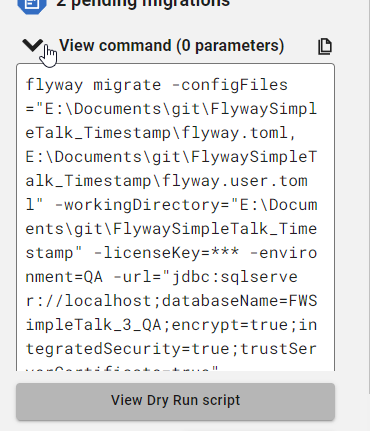
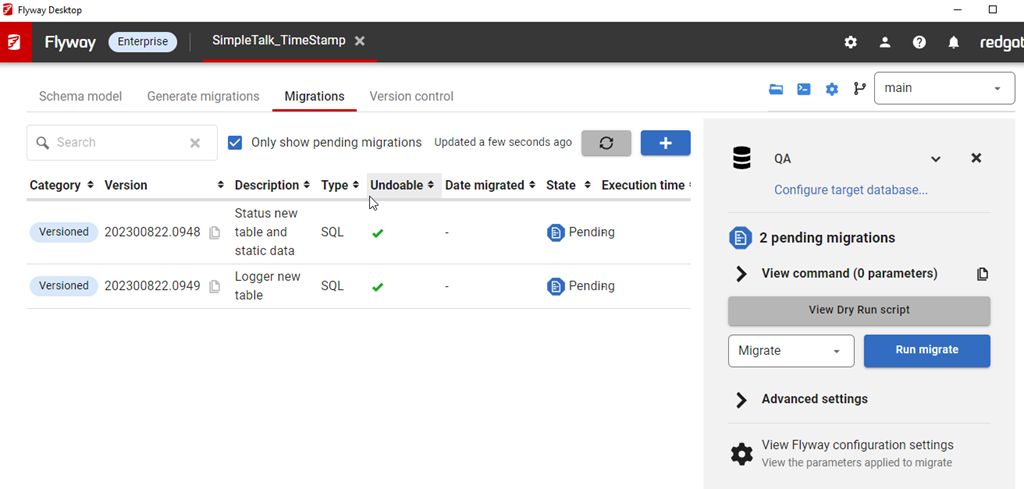
In the migrations tab, I have all my migrations listed, and on the right side, I can see the command that would be run with the Flyway CLI.

2023-09-18 14_11_01-Window

If I click “View command”, I can see this command, which has a number of parameters by default.

2023-09-18 14_11_08-Window

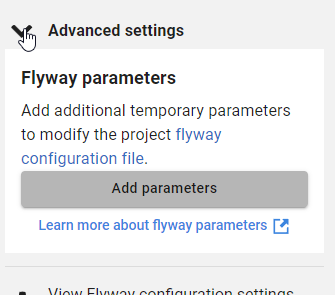
However, often I want to add other parameters. Below this dialog is the Advanced settings area, which is where we add parameters.

2023-09-18 14_11_19-Window

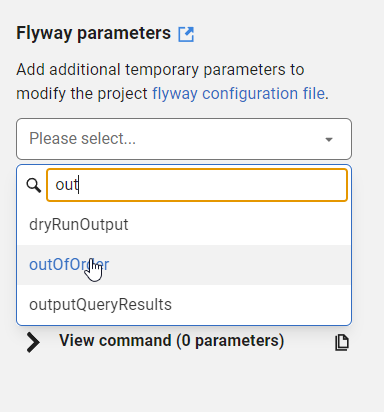
If I click Add parameters, I get a list of all the parameters, and I can type in the list to filter them down. For example, I often want outOfOrder, so if I type “out” I see this listed.

2023-09-18 14_11_42-Window

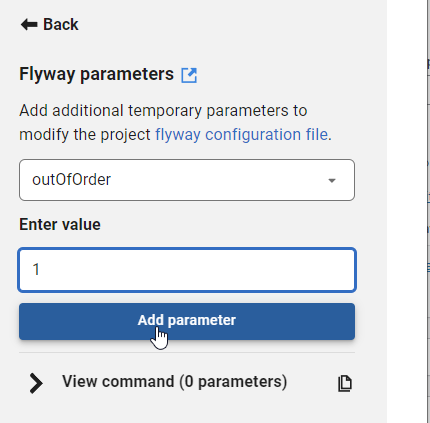
I can select this and then enter a value for the parameter. I showed in a previous tip how you can easily copy migration numbers, which is handy for using in some of these parameter values.

2023-09-18 14_11_49-Window

Once I enter a value, I can click “Add parameter”. Of course, if I’ve done something silly, like enter an integer for a true/false value, the GUI tells me.

2023-09-18 14_11_57-Window

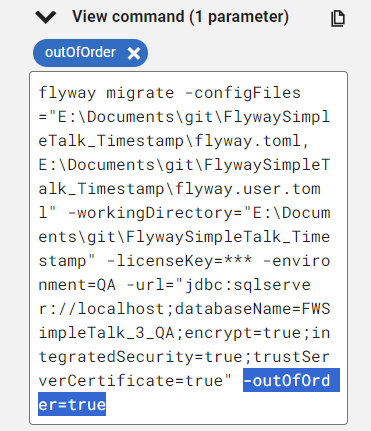
If I add this, then it’s reflected in the command, which is what I’d copy and paste into some deployment tool like Azure DevOps, GitHub Actions, Octopus Deploy, etc.

2023-09-18 14_12_05-Window

Try it out today. If you haven’t worked with Flyway Desktop, download it today. There is a free version that organizes migrations and paid versions with many more features.

Video Walkthrough

I made a quick video showing this as well. You can watch it below, or check out all the Flyway videos I’ve added:


Posted in Blog | Tagged , , , | Comments Off on Friday Flyway Tips–Flyway Parameters

If You Build It, Will They Use Linux?

There’s a great scene in Field of Dreams where James Earl Jones says that people will come. It’s in response to the voices Kevin Costner hears early in the movie. This is the climax of the movie, where Costner makes a financial decision to trust his instincts and hope his farm will be saved.

In many cases, organizations do just this. They build something, assuming people will come. They may have some data, research, or other reasoning as to why why people will use what they build. However, that’s not always the case. Sometimes they build something and hope people will come, much like Field of Dreams.

I wondered about this recently with some friends when discussing SQL Server on Linux. Quite a few people I know haven’t seen any Linux installations inside their organizations. Others are consultants and haven’t experienced any work on Linux, which is interesting. I’ve heard people at Microsoft state there are plenty of installations out there, but I’ve found few people who have moved from Windows.

I know a lot of people who work in the Microsoft data stack aren’t familiar with Linux. This is despite all the articles and writings the last few years trying to teach people about Linux and how SQL Server runs well. I also see articles like this one, which claims Linux uses more CPU. This is despite Red Hat saying Linux runs SQL Server well and leads in benchmarks from TPC, at least the TPC-H results.

I learned at the various command lines in school, with a lot of time spent on Unix systems. Even with X-Windows, I often used the interface to open multiple shells to get work done. However, a lot of people have not worked at the command line very often. Despite the popularity of PowerShell, I find no shortage of Windows-based knowledge that struggles with certain concepts, like quoting and piping results between commands.

I don’t know how many systems run Linux v Windows. Azure states that over 50% of their VMs aren’t Windows, but Linux. I suspect a lot of those are likely web servers or other systems and not database platforms. They don’t seem to publish how many databases are SQL Server on Linux, and I have no idea if Azure SQL Databases (or MI/Synapse/Fabric/etc.) run Windows or Linux. I suspect it could be either, but most likely Windows.

Do you feel comfortable running SQL Server on Linux? Is your organization considering it? I don’t know I think it’s worth the savings in license costs. Not that Windows is cheap, but the effort to train, learn, and work on a second OS might not provide any savings for years. Maybe not ever if you can’t get work done smoothly and quickly.

They built it; now, will you come run it?

Steve Jones

Listen to the podcast at Libsyn, Spotify, or iTunes.

Posted in Editorial | Tagged , | 4 Comments

A New Word:Wildred

wildred –adj. feeling the haunting solitude of extremely remote places – a clearing in the forest, a windswept field of snow, a rest area in the middle of nowhere – which makes you feel like you’ve just intruded on a conversation that had nothing to do with you, where even the gravel beneath your feet, and trees overhead are holding themselves back to a pointed, inhospitable silence.

I rarely find myself in a remote place. Except on planes, then I love looking at the remoteness of the world. I was flying back from Austin to Denver and snapped this shot. I have no idea where it is. Somewhere between Austin and Denver. Texas? Oklahoma? SE Colorado? I didn’t expect this.

2023-08-21 16_55_58-Photo - Google Photos

I enjoy some remoteness. I find myself craving the feeling of wildred, hoping for the chance to be in a place without people, without structures, without anything nearby.

Mostly I get this these days when I have to be somewhere early and no one is up and about. It does happen in winter, snowboarding down trails on a Wednesday in the trees with no one around. I can’t wait for that this next season.

From the Dictionary of Obscure Sorrows

Posted in Blog | Tagged , | Comments Off on A New Word:Wildred