Flexing for the Cloud

Many of us in technology regularly experiment with new tools and technology. We often do this to adopt new skills when we need to solve a problem or we have inherited some code that needs enhancement. The cloud is in many ways no different than things we’ve done before, but the way we do them, or maybe the way the cloud handles some things, means that we need to change how we view a task or perform our jobs.

Migrating to the cloud is something that many of us have had to tackle at some point. I’ve seen a good amount of lift-and-shift, including many companies who just mandated moves to the cloud without much planning. As mentioned in this article, that was cloud migration 1.0. Really, I think this was something that’s been going on for years, and continues to occur today. Lots of management are seduced by the promises of the cloud to make their organization’s IT systems better, so they move everything without thinking.

Then many run into cloud migration 2.0, or maybe that’s coming. I see plenty of customers with things in the cloud they complain about much in the same way they did on-premises. Nothing has changed with regards to how their systems work, and they are likely spending more money on the same services they had on-premises. With the same people. They didn’t plan well, didn’t provision well, and they haven’t changed anything but their costs.

Cloud migration 3.0 is what many tech professionals would like to see. Evaluate apps, decide which benefit from the cloud, and leave the rest alone. Leave them on-premises in a familiar environment. That’s hybrid, but that’s fine.

What many tech professionals worry about are their jobs, so they don’t often consider where the cloud can provide benefits from some apps. The flexibility and scalability are undeniable. You just need to ensure that you understand where the cloud fits, where cloud-native can benefit your org, and then make sensible recommendations.

No matter how your organization approaches the cloud, likely you’ll have engineers from the provider or third-party consultants involved. Do what I do with people I’ve hired: ask a lot of questions. You’ll learn something, flex your knowledge, and even if you never work in the cloud yourself, you’ll be better prepared to make recommendations and evaluate future choices.

Steve Jones

Listen to the podcast at Libsyn, Spotify, or iTunes.
Posted in Editorial | Tagged | 2 Comments

Creating an Empty Repo in GitHub–#SQLNewBlogger

I saw someone struggling with getting started with a Visual Studio project and Azure DevOps. They got a conflict, which I’ll show and then get you started with an empty repo.

Another post for me that is simple and hopefully serves as an example for people trying to get blogging as #SQLNewBloggers.

The Problem with Initialized Repos

I wrote about this recently with Azure DevOps and empty repos.. If I initialize a repo in GitHub, or any online provider, and try to push up a local repo, it returns an error that I have conflicts.

I’ve learned that when I want to start a new project, either I create the repo locally and then make an empty one online, or I create it online, clone it, and then start working.

I try to do the second (create online first), but I don’t always remember.

Creating an Empty Repo

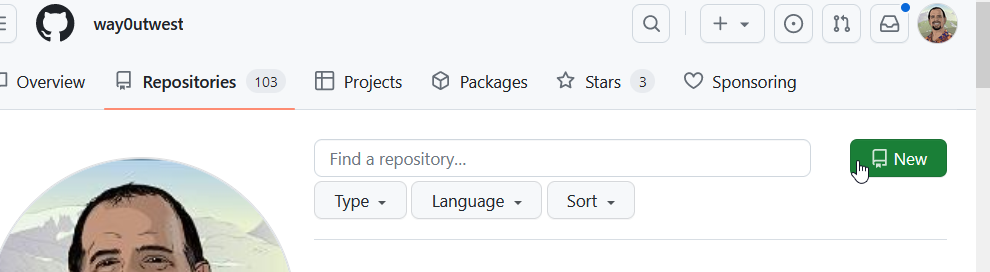
In GitHub, if you go to your repositories page, you can see a “New” button on the right.

2023-08-25 16_56_06-Your Repositories — Mozilla Firefox

Click this and enter a name, as I’ve done below. BTW, I love the suggested name.

2023-08-25 16_56_30-New repository — Mozilla Firefox

If you look at the image above, near the bottom, you can see my mouse pointer.

DO NOT check this box if you want an empty repo. Don’t add a .gitignore either. You’ll be adding code from your own project, which likely has a gitignore file and might have a repo. If not, just create a readme.md file in your local git repo.

Don’t add a license file either.

Pushing My Project

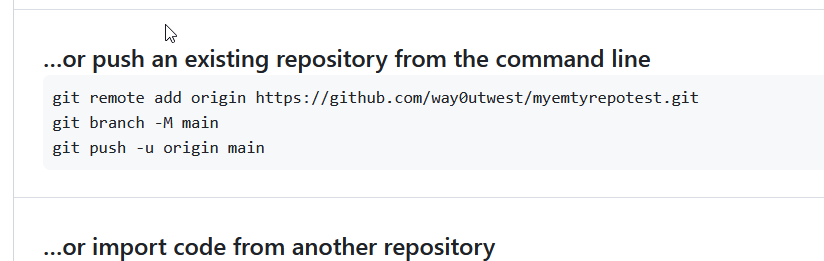
Now when you create this, you get the details of how to push your repository. If you have never used git, just open a command prompt and paste these lines in one by one and run them.

2023-08-25 17_00_57-way0utwest_myemtyrepotest — Mozilla Firefox

That’s it and now you can work and commit in either repo and deal with merges.

SQLNewBlogger

This post was easy for me, but I’ve been in the situation where I’ve made this mistake. In this case, I’d written the other post, so I knew what to do here. I spent another 10 minutes getting GitHub set, taking images, and writing this.

Easy to do, 2 posts from one idea, and showcasing knowledge on another platform. I could do another one with BitBucket or somewhere else, and maybe I will. I have customers that use other platforms.

Maybe you should do this and showcase your versatility to the next person that wants to interview you. If you want to work with software and Git, show them you know the basics. Or even more.

Posted in Blog | Tagged , , , , | Comments Off on Creating an Empty Repo in GitHub–#SQLNewBlogger

The Last Price Bump for the Data Community Summit

This week the cost of the PASS Data Community Summit jumps up to full price, on Sep 21. This is your last chance to save big, so get someone to approve you trip and register this week.

This the the largest and best conference for data professionals. You’ll have experts from all over the world and quite a few Microsoft developers attending. This is a great chance to network with them, learn, and ask questions that might save a support case or help you solve a problem.

Talk to your boss about the event and explain how this benefits your career and helps the company. Many people have found this invaluable over the years as they bring knowledge and contacts back to their organization.

Make a case, get approval, and get registered today and I’ll see you in Seattle this November.

Posted in Blog | Tagged , , | Comments Off on The Last Price Bump for the Data Community Summit

The Importance of Thick Clients

I’ve used a number of clients with SQL Server across the last 30 years. I worked early on with the command line and isql (now SQLCMD and soon Go-SQLCMD). That was handy with DOS and Windows 3.1. However, I soon moved to GUI tools and spent years in ISQL/W,  which was how I ran Query Analyzer. Enterprise Manager was the next evolution, though I used Rapid SQL for awhile to get offline query work while on a plane. This was handy for me in documenting and commenting code without a server. Amazing to think I used to work without a SQL instance on my laptop.

SSMS (Management Studio) has become the de facto way I’ve written queries for over a decade. Microsoft has tried to push people to Azure Data Studio (ADS), but I don’t see a lot of people moving to it. It’s fast, but also, not attractive, at least not to me.

I saw a post recently from Chris Webb, asking if it was possible to do all one’s development in the Power BI Web interface. He asks the question since lots of BI people have Macs and you can’t run Power BI Desktop on MacOS. That’s one reason why ADS was created, to provide a cross-platform tool. Chris says the web isn’t quite up to snuff, though it’s been improving. So for now, you need Windows.

I feel the same way. I do wish SSMS was available cross-platform. When I had a MacBook, I constantly had a Windows VM running to get to SSMS and SQL Server. These days I could run a Linux version of SQL Server on MacOS (or a container), but not SSMS. I could run ADS, but I don’t love it.

I’m not completely sure why ADS bothers me, but I think a big reason is the familiarity of a thick client and Windows GUI controls. I always felt many of the Linux GUI elements feel like cheap imitations of their Windows counterparts. The smoothness of the Win32 applications, the way that grid results come across, the rendering of text, smooth menus, etc. run is just better. Even when it’s not great, it’s better.

I like the thick Windows clients.

I do think there are some nice Electron-based apps that look and work well in Windows and Linux. In fact, Redgate’s own direction has been Flyway Desktop rather than continuing to insist on SSMS, precisely because we find more and more customers aren’t standardized on Windows. This is especially true for RDBMSs other than SQL Server. That UI looks pretty good, though admittedly, I’m not writing queries.

Especially in SSMS, the way a thick client works is much better than ADS. Especially with SQL Prompt. Intellisense in ADS leaves a lot to be desired and the constant need for me to use the command palette for things is annoying. Give me menu items and better shortcuts. I’m not sure why I don’t think it works as well, but it doesn’t. Not for me.

I wonder how many of you feel the same way. I know some people love DataGrip, but that is often because they work cross-platform or they are full-stack people that like Rider for their other work.

I do like VS Code, but I’m almost always just writing code, not looking at results or managing a server instance. When I look at other platform tools, MySQL WorkbenchpgAdmin, SQL Developer, I see why SQL Server and SSMS are preferred by many. Those tools are just poorly built compared to SSMS.

What do you think? I know many of us dislike things about SSMS, but still find it indispensable for daily work. Do you love/hate SSMS or have you found another tool that works well for you?

Steve Jones

Listen to the podcast at Libsyn, Spotify, or iTunes.

Posted in Editorial | Tagged | 6 Comments