Coming Out of the Cloud

Google has launched a version of their AlloyDB that can be installed on-premises. AlloyDB is a PostgreSQL compatible cloud database, a full-managed PaaS service. However, they are giving away a free developer edition and a paid for commercial license that can be installed where a customer wants to run it. The new product is called AlloyDB Omni.

I like Google’s approach here. Obviously Google would prefer lots of their customers would move to the cloud version hosted in GCP (Google Cloud Platform), but they know that’s not realistic. Even for customers that want to move to GCP, the customers might need to keep some workloads on-premises for a period time, so Google is giving them an option to modernize their workload with a new datastore that is PostgreSQL compatible, but running on-premises. Presumably this will be compatible with the cloud version and if customers want to, they can just shift to AlloyDB.

This is similar to what Microsoft is doing as Azure SQL versions, both  database and Managed Instance, are mostly compatible with SQL Server on-premises. There are easy migration paths, but since the cloud and local versions aren’t quite the same, it might not be simple to migrate. There are lots of tools to help, but the biggest problem (in my mind), is having a development environment that mimics what I get in the cloud. I need to be able to work not only offline, but with the unlimited CPU I get on my laptop. I don’t want to pay for developers to stand up cloud instances to experiment with code.

There is the SQL development container (running Edge), but that’s a container and I find far too many people don’t like working with the container versions. They struggle with getting their data set in the container, or keeping it up to date. Plus there’s the fact that the local environment seems linked to database projects, which not everyone uses. Especially those of us using Redgate tooling.

I have been surprised in the last five years by how many companies have moved to the cloud. I’m especially surprised how many have performed lift-and-shift migrations to IaaS services after a mandate by management. I’m also not surprised that many customers find they’re spending too much, and that both Azure and AWS realize they need to help customers spend less before they lose them.

The cloud can be a good place for workloads, but you need to plan for it, and often you need to modernize apps, make them less chatty, and write better code against your data services. To do that, I think you need a local dev environment and I like the way that Google is providing that with AlloyDB Omni. I wish we also had a switch to get a local SQL Server dev edition to act like Azure SQL DB.

Steve Jones

Listen to the podcast at Libsyn, Stitcher, Spotify, or iTunes.

Posted in Editorial | Tagged | Comments Off on Coming Out of the Cloud

Tesla One Year Review at Nineteen Months

Well, not one year. More like 18 months, but close enough. I’m writing this at just over 17 months of ownership, from Sept 2021 to Mar 2023.

This is part of a series that covers my experience with a Tesla Model Y.

The Highlights

I never need gas and I have a full tank of fuel every morning. That’s the practical me, the real highlight is that the car is so fast it’s a lot of fun to drive. I stop by gas stations regularly for my diet Coke addition, and the few times I use a gas car, it’s strange to have to pull up to a pump and get fuel. In fact, I sometimes drive next to the little store and then realize I need to move the X5 because it needs gas.

The car is fast. Acceleration is still exciting when I use it. Mostly I drive in chill mode as I don’t need the speed, it’s surprising to passengers, especially the dogs, and I sometimes bounce my own head off the headrest. However, when I need it, it makes merging into traffic easy because I can quickly match speeds with others.

The car giving me access to data and controlling it from remote places is cool. I could start it for my wife when her phone died. I can heat/cool it from the gym or ski slope before I get to it. I have seen the UI change across 18 months to add features, like dog mode, like moving the camera display for turning, music controls, etc. I like this.

Autopilot is great. I use it in certain places, and it keeps the car moving down the road, through bends, letting me watch the road, but not have to focus so much. It’s really nice when I’m tired that it reduces the stress of driving quite a bit, especially over distances.

However, mostly, it’s just transportation that just works. I enjoy driving it, and there are times my wife and I are both wanting to drive it. I miss it when I’m in the X5, or the Suburban, or in a rental. At times, I wish we’d gotten an electric UTV instead of another gas one, but I’m not 100% sure Polaris has figured out the process of building a reliable electric car, both with batteries, motors, and software.

The Issues

Autopilot isn’t perfect. First, it doesn’t change lanes. I could subscribe and get that feature for a price, and perhaps I’ll do that sometimes, but it also has issues. Phantom breaking is much better, but it still flips out in a few places in Colorado. The stretch of C-470 from I-25 in the South going west to Kipling has a few places where the car reads the exit lane speed limit and slows from 70 to 55 quickly.

There also are a few places with sharp curves of cresting a hill where it doesn’t handle things. It also sometimes accelerates and brakes like a new driver, being late to do both. I tend not to use it with my wife because she gets annoyed. As a driver, I can predict these places and I’m ready.

Climate control isn’t perfect. Overall it matches temp well, but the lack of vents in the back, either in the console or side pillars, mean there isn’t great control in the rear. The lack of two fans or vent controls  in front also means that sometimes either the driver or passenger has to compromise with more or less fan than they might want.

The front defroster also doesn’t work well in sleet. Most of the time it works OK, but my wife struggled with it in a bad sleet/rain/snow storm. I think this wasn’t engineered as well as much of the car.

No having a rear wiper is annoying. It hasn’t been too much of an issue, but a couple times I wish I had one. It rarely rains in CO, so this might be a bigger issue in other places. The view out the rear is poor as well, which is annoying. With the cameras, I haven’t found this to be dangerous.

In line with that, I wish I had a way to pop out the door handles, like the Model S. In snow, or at night, I can’t always find them easily, especially while carrying stuff. Rather annoying.

It rarely happens, but sometimes the app loses connection to the car and I can’t open the doors. I have to kill and restart the app. Not a big deal, but it does happen. I also don’t always have my keycard with me, so I get slightly worried this might cause an issue at some point.

Lastly, a trim piece in the car broke and was replaced under warranty. It needs to be replaced again Sad smile

The Costs

What has this car cost me? Here’s a breakdown:

  • Fuel: $919.80 in electricity (ish, my logger was down a bit). This is for 28k miles. My 100mi cost is $3.28. I’ve also spent about $87.44 at Superchargers.
  • Windshield fluid – 5 bottles at around US$4
  • New Rims – 1058.96 (busted one in a pothole. A single one from Tesla was $400 so I just got a new set aftermarket)
  • Winter Tires – $465.18
  • Flipping tires – $270 (3 slips. summer->winter->summer->winter)

Of these costs, the tire costs would have been roughly what I’d have done in many other cars. Rims, hard to know. I could have bent one in any case, though the weight of the EV probably made this more likely.

Maintenance has been about $20. Fuel is low. My 100mi cost in the BMW is easily $14-15 or more. That would have been around US$4k. That’s $3k savings.

Registration is adding a new $8 sticker for EVs in my county, which I wouldn’t pay for a petrol car.

Summary

My wife and I were driving recently after a snowstorm. The car started beeping because it thought I was getting too close to the curb, but I was far away. However, the white snow had piled up and likely reflected enough to worry the car. Annoying. It also slowed the Autopilot during a light snow storm because it couldn’t see. Again, annoying.

However, we both think the car is still the best one we’ve owned. We enjoy it immensely, even with a few quirks. The dog mode alone has been a large value add for us.

Posted in Uncategorized | Tagged , | Comments Off on Tesla One Year Review at Nineteen Months

The Loss of Knowledge

This article has a great opening quote. It says: “We are drowning in information but starved for knowledge”. It’s from John Naisbitt, who wrote the book, Megatrends in 1988. I think this quote can be very apropo in organizations as we have data, we have plenty of reports deriving information, but sometimes we don’t have a lot of knowledge, especially when there has been turnover in our staff.

We can train new people on many things, but not everything. The knowledge of the culture, of what others know, of the little strange bugs or behaviors that can’t get fixed, the tribal knowledge accumulated by living in an environment. These are the learnings that can’t easily be replaced, and until they are, often new employees are less productive.

Of course, sometimes new employees will view the world in a different light and find solutions others haven’t considered. That happens, but it’s more likely that they will make mistakes, break something, or just be less effective than their predecessors.

There are no shortage of articles, like the one above or this one, that discuss the concerns IT leadership has about employee turnover. Perhaps the leadership does see that as a problem, but often first level managers don’t. Often leadership doesn’t realize how poorly trained or effective first line managers are in working with their technical staffs. I sometimes think that the world in Dilbert is far too prevalent precisely because of very poor management skills. It certainly seems that efforts made to retain employees are relatively rare in many companies.

In my career, we’ve had some boom and bust times in the market for developers. There have been times where anyone with a certification or a hint of experience could get hired (or get a raise). There were other times when people were careful to hold onto their jobs because finding a new one could be hard.

I think employers should not only invest in their staffs, but work to train and upskill them, demand more from them over time, but treat them fairly with more than just a paycheck. The dividends from a hardware allowance, a training budget, and more can easily pay for themselves with better productivity and the lack of fees to recruiters. You should certainly hold staff accountable and responsible for getting work done, but make sure you also treat them fairly and support them.

That’s if you also spend time managing your managers and ensuring they balance the demands they make of employees with the support needed to ensure their staff performs well. If you ignore the managers, you might as well ignore the staff, set aside more recruiter fees in your budget, and hope for the best.

Steve Jones

Listen to the podcast at Libsyn, Stitcher, Spotify, or iTunes.

Posted in Editorial | Tagged , | 4 Comments

Flyway Desktop PoC–Adding a Shadow and Baseline Script

In the last post, I created a baseline marker for Flyway in each database. This set the version in the dev and QA databases to v1. However, I also need a baseline script, at least the tool asks for one, so this is the process if you have objects in your production or other downstream databases.

I’ll do this for SQL Server and then PostgreSQL.

Why do this?

The main reason to create a baseline script is to note which objects already exist in production. For these objects, I don’t want to track these are changes in their current form.

For example, if I already have a CountryCodes table in production, when I create a project, I want to tell Flyway Desktop that this table exists in production, so if the dev version matches, don’t add this to scripts. If it doesn’t, then I’ve done something in development and need an ALTER script deployed to prod.

What was the Other Baseline?

The first baseline in this post, is a version marker. I hate that this is the case, but both Flyway (pre-Redgate) and Flyway Desktop (evolved from SQL Change Automation), had the concept of a baseline, but these were somewhat different things.

Flyway Baseline – The initial version of the database. Don’t deploy any scripts that are <= to this version.

Flyway Desktop Baseline – A script that has the structure and code of all objects that exist in the target database(s).

We can create a baseline script for Flyway, which looks for a B script, but the baseline command expects that you create this script manually. This is used to populate a new database with the baseline migration script prior to running all other scripts.

Setting up the Baseline Script

Flyway Desktop makes it easy to create a baseline script, and in fact, prompts you to do so.

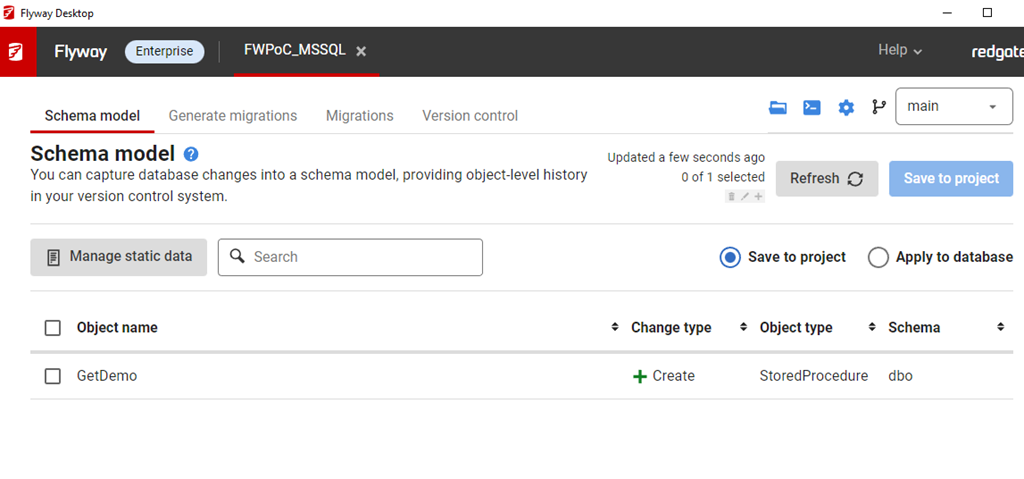
In my project, if I go to the Schema Model (first) tab, I see there is an object in Development. This was the table I created when I set up the database. The goal is to get this table to other environments.

2023-04-04 16_10_58-Flyway Desktop

This table doesn’t exist in QA. I do have the flyway_schema_history table, which was the result of the baseline command.

2023-04-04 16_15_58-SQLQuery4.sql - ARISTOTLE_SQL2022.FWPoc_1_Dev (ARISTOTLE_Steve (77))_ - Microsof

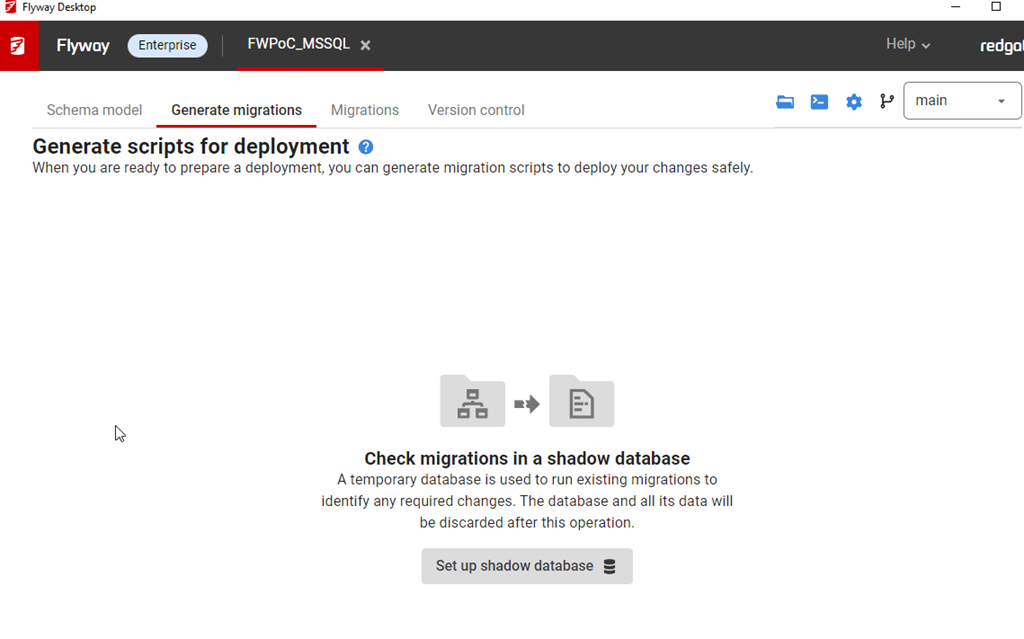
If I go to the Generate Migrations (second) tab, I see this. The first thing that the tool wants is a Shadow database.

2023-04-04 16_12_55-Flyway Desktop

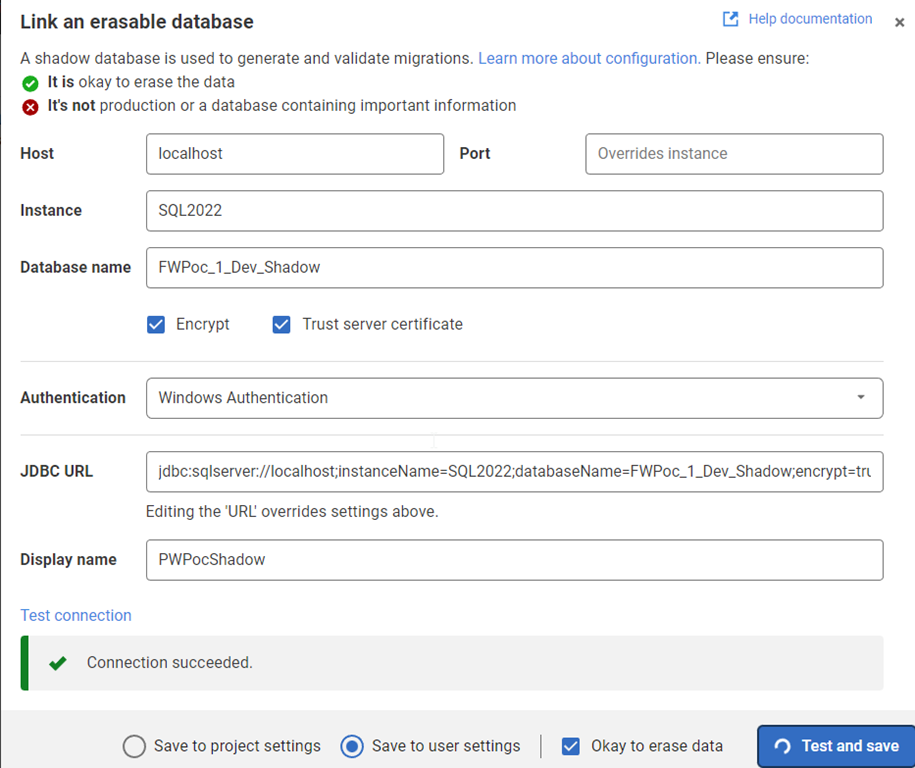
The shadow is essentially a development V-1 (v minus one) version. This is where I test all migrations, compare the state with development, and then determine what’s changed. This is just a regular database, but I create this outside of Flyway Desktop. For me, I created a database (FWPoc_1_Dev_Shadow) and then clicked Set up shadow database to get this dialog. You can name this anything.

I enter details, and test the connection before saving this. In general, this ought to be saved to my user settings as I’ll have my own shadow different from other developers. I DO NEED to click the “ok to erase data” box.

2023-04-04 16_14_09-Flyway Desktop

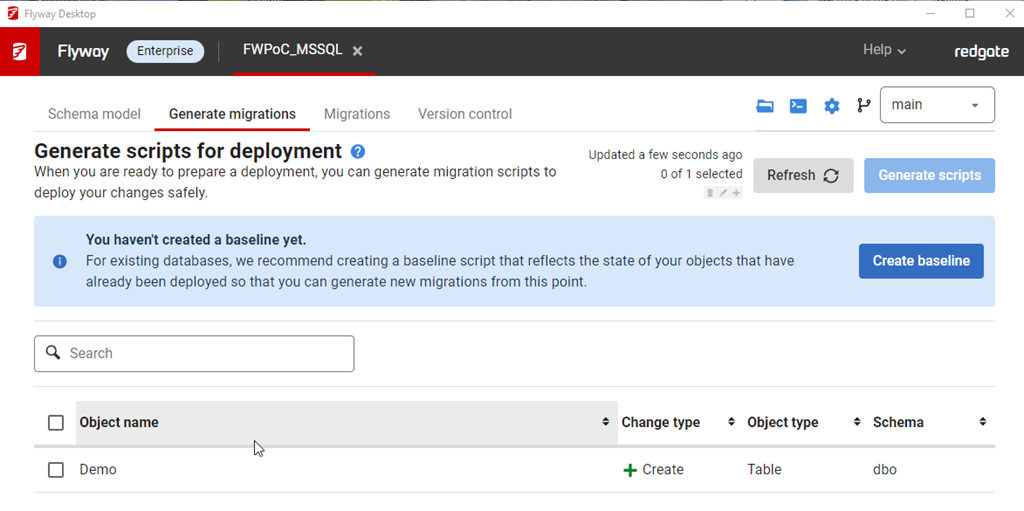
Once this is done, I now see another prompt on the Generate Migrations tab. Now I need a baseline script. I don’t have anything, but I will click the button.

2023-04-04 16_14_28-Flyway Desktop

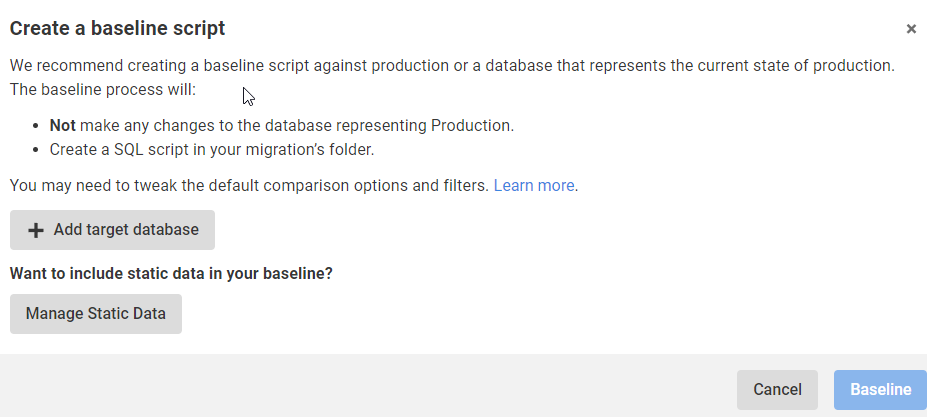
This gives me a dialog to pick a target database. This target is used to get the initial set of objects to populate in the baseline script. You can use production or a copy (recommended) as the target database.

2023-04-04 16_14_41-Flyway Desktop

My QA is the same as prod, so I add that with the proper connection string and then I see the target here for the Baseline. I am ignoring static (or lookup/reference data for now). I’ll click the Baseline button.

2023-04-04 16_15_25-Flyway Desktop

This runs and … nothing.

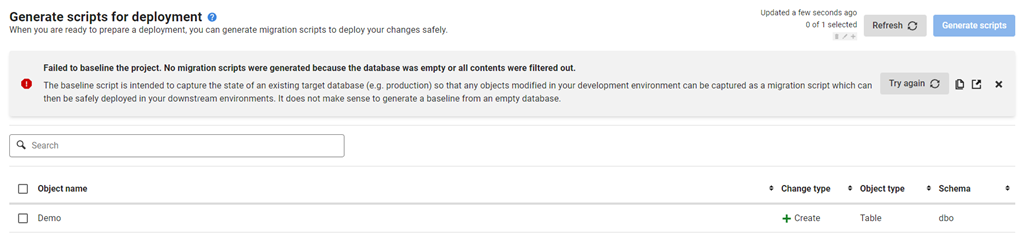
Which makes sense, as there is nothing in my target database. I actually get an error after this, which tells me that it doesn’t make sense to baseline an empty database.

2023-04-10 12_38_51-Flyway Desktop

I wish that were surfaced earlier. In any case, if I close this, I get the same image above, saying I don’t have a baseline. For now, I’ll ignore that.

Summary

Not much happened in this post. I added a shadow database, which I’ll use to generate scripts. I tried to baseline, but that errored, as it should. I really don’t need a baseline, so I’ll come back to this later in another format.

For now, I’ve advanced the SQL Server project. I’ll actually repeat these steps for the PostgreSQL one, but it’s really creating a new database for the shadow and setting a connections string. Everything else looks the same.

The next post will actually generate a script and deploy this to QA.

Posted in Blog | Tagged , , , , | Comments Off on Flyway Desktop PoC–Adding a Shadow and Baseline Script