The Baseline for Flyway

In my previous post, I set up the Flyway Desktop projects for SQL Server and PostgreSQL. I also added a table to each platform for development. In this post, I’ll look at how I let Flyway know what already exists in my system with a baseline.

This is part of a series of working through Flyway and Flyway desktop to demo database changes. Disclosure: I work for Redgate Software

Baseline v Flyway Baseline

I find these terms to be slightly confusing, especially when I look at Flyway vs. Flyway Desktop. In Flyway, there is a “baseline” verb, which you can run at the CLI. This will mark the state of your database at a level and adds the flyway_schema_history table to the schema in which you are working. This baseline causes Flyway to ignore all migrations up to the baseline level.

In my testing, when I run this on my database, it defaults to V1 for the first migration script. That’s usually fine, but as I wrote, this can cause issues.

There is also the concept of a baseline migration, which is a Bxx script, and this contains the definitions of all the objects that already exist in your target databases. This ensures that as FW and FWD track and deploy changes, they don’t try to redeploy those migrations that are at a level lower than the baseline numbering (the xx).

Creating a Baseline

My development database for SQL Server looks like this:

2023-01-25 14_27_21-Window

There is an object in here, but it’s not in any other environment. Both Integration and QA (and the others) have no objects.
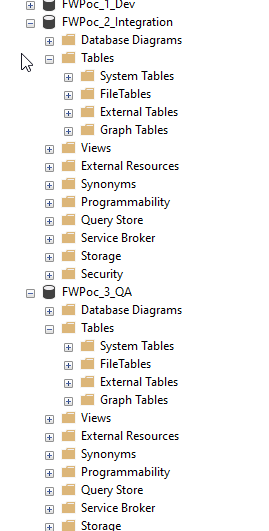
2023-01-25 14_27_43-Window

In this case, I don’t need a baseline script, because I want this table to deploy to the downstream databases.

I do, however, need a baseline. I need the baseline marker in my databases to note that we have a base version. This will give me a starting point, but also ensure that FWD creates migrations that are numbered higher than my baseline.

I’ll add this in two ways. One with Flyway Desktop and one with the Flyway CLI.

The Flyway Baseline

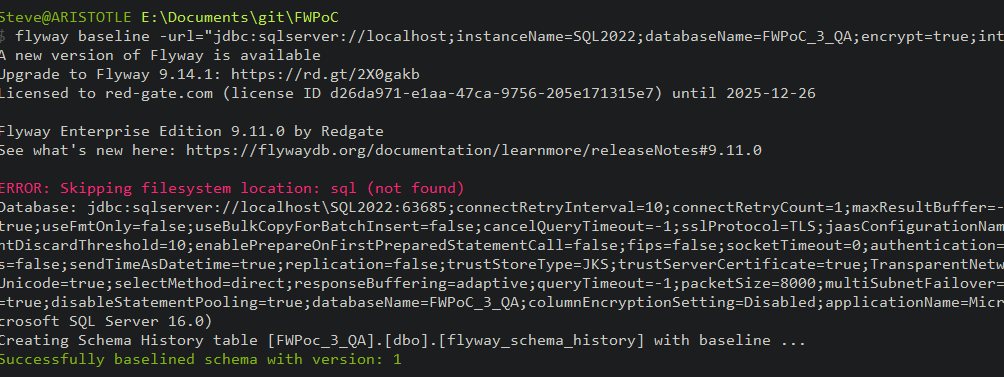
For SQL Server, I don’t need to worry about any objects in downstream databases, so I’m just going to run the Flyway CLI. From a command line, I’ll run this code:

flyway baseline -url="jdbc:sqlserver://localhost;instanceName=SQL2022;databaseName=FWPoC_1_Dev;encrypt=true;integratedSecurity=true;trustServerCertificate=true"

This is run from my project location, though I’m passing in the connection string from Flyway Desktop as I don’t have a flyway.conf file configured for this project. Things work from the FWD gui, but not the CLI.

This works, and I see these results. Note the flyway schema history table is created at the bottom, and the version of the database is set to 1.
2023-02-08 08_55_37-cmd

Now when I run Flyway info with that URL, I get this. There is an entry in the version tracking for this table:

2023-02-08 08_56_03-cmd

I can also see this table in my Object Explorer:

2023-02-08 08_54_54-SQLQuery9.sql - ARISTOTLE_SQL2022.FWPoc_3_QA (ARISTOTLE_Steve (88)) - Microsoft

Flyway Desktop and PostgreSQL

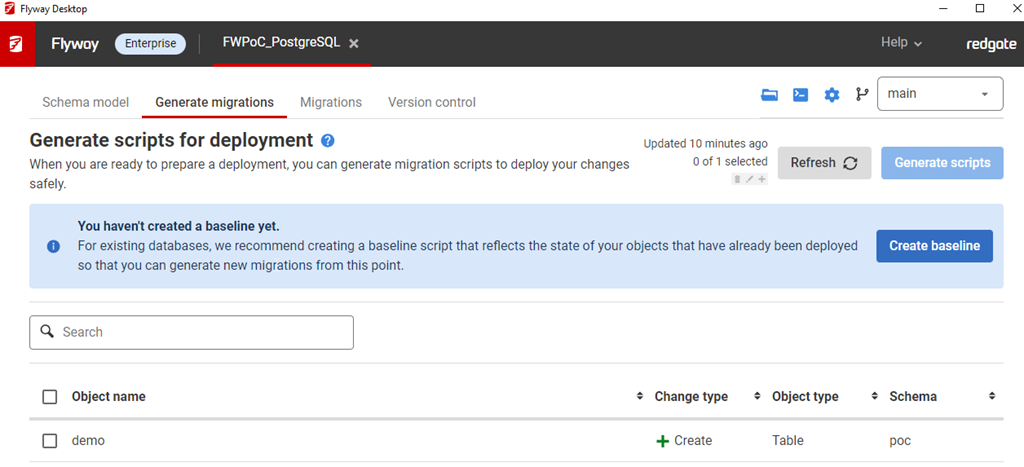
I’m going to use FWD for my PostgreSQL project. This will do some of the work for me and give me the option for a baseline script.

Note: I set up a shadow database first.
2023-01-25 14_45_24-Window

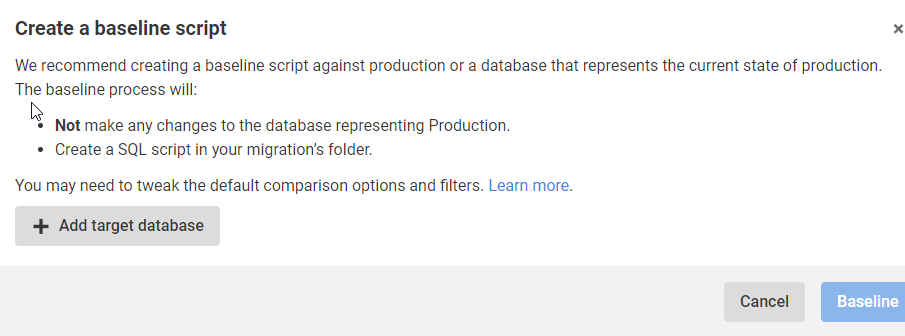
I click “Create baseline” and this asks me for a target. After all, I’m trying to ensure I don’t deploy anything to prod that’s already there.
2023-01-25 14_45_34-Window

When I click Add target database, I get a connection dialog. I fill this in with the credentials for prod. This returns me to this screen below, where I see my prod database, which is at this port with this name.
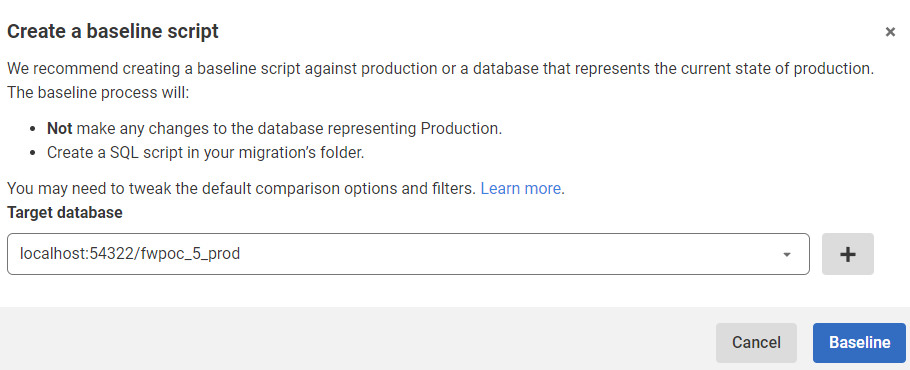
2023-01-25 14_48_12-Window

I click Baseline and it goes to work. There’s nothing there, so this returns back to the blank, Generate Migrations tab.
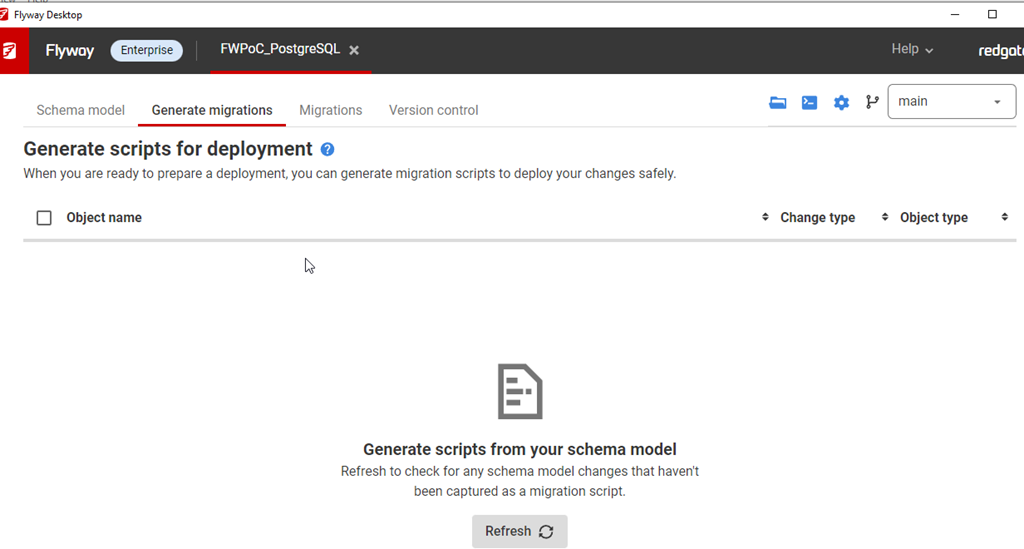
2023-01-25 14_49_02-Window

However, there is no baseline or schema tracking table. I didn’t have a poc schema, so perhaps that’s an issue, but that’s OK. We can fix this.

In the Migrations tab, I see this:
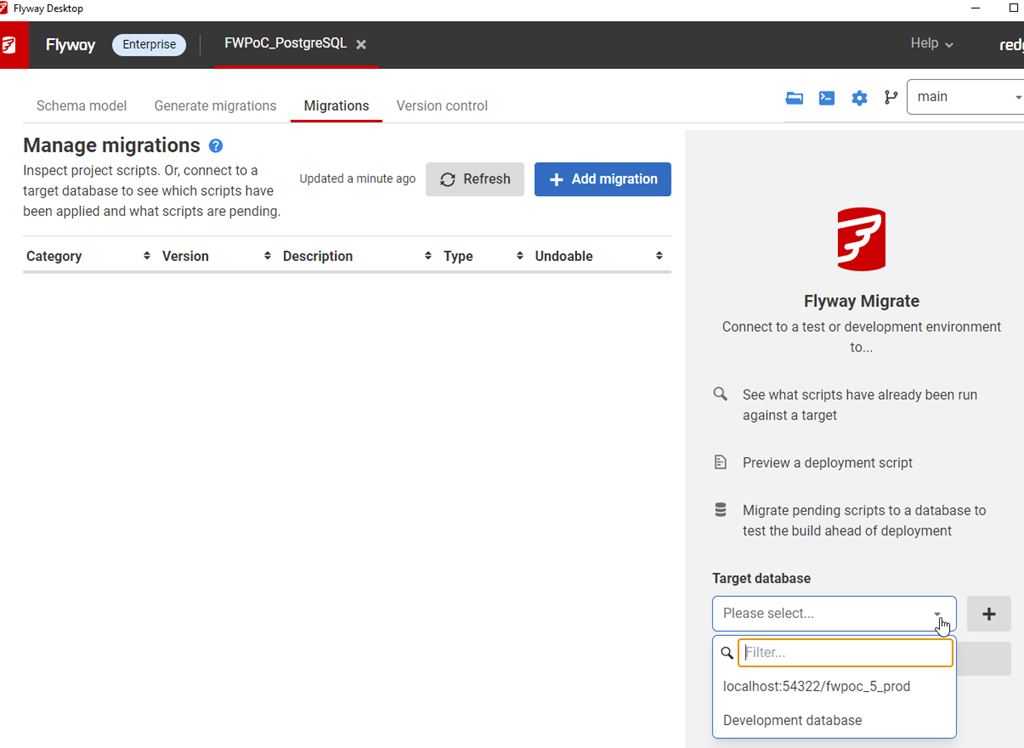
2023-01-25 15_10_52-Window

That configures this tab to look at (and work with) this database.
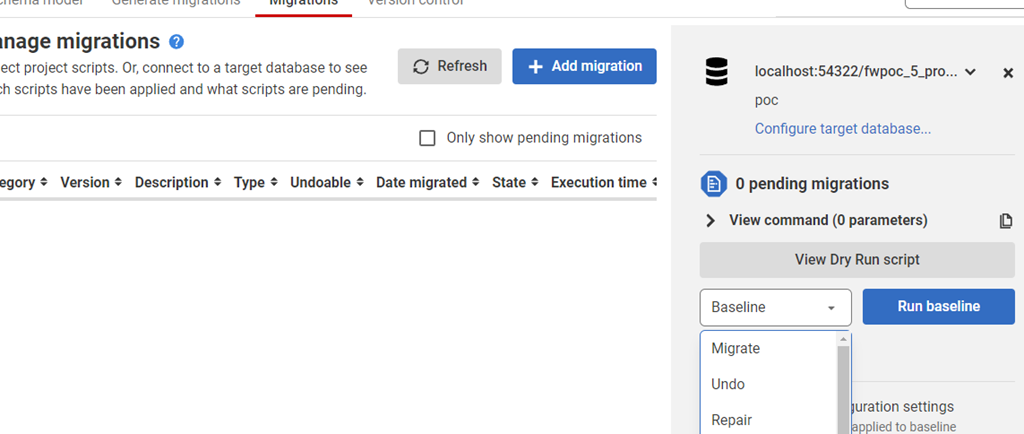
2023-01-25 15_10_44-Window

In general, I know we won’t be able to see production, but this is a PoC. However, this is something that I, in general, don’t want to do. I want to work with dev/test environments, so let’s do that.

I’ll configure my QA environment. I click “configure target database” and I get this screen. These are all the databases for my project. Here I’m going to click “delete” for production and then I’m going to click the Add and configure my QA database. Once I do that, I’ll see this:
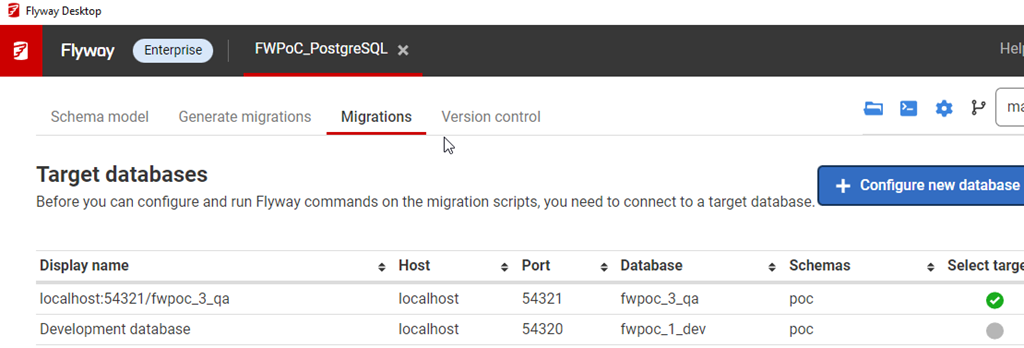
2023-01-25 15_14_52-Window

Baseline added for PostgreSQL.

2023-02-08 08_54_02-● SQLQuery_2 - localhost.postgres (postgres) - DBAScripts - Azure Data Studio

Success.

Posted in Blog | Tagged , , , , | 2 Comments

The Growth of T-SQL

I saw this tweet recently, where Richie Rump asked what has changed in T-SQL since the SQL Server 2012 version. A few people from Microsoft responded that there were changes in all versions, and while I think some versions have few changes, I decided to look.

SQL Server 2012 introduced the window functions with the OVER() clause to SQL Server. This was a huge change in that many aggregate queries were much easier to write without needing complex GROUP BY lists and subqueries or unions to join together different data. While I’m not an expert by any means, I find lots of queries for reporting easier to write with the window functions, and I’ve grown to enjoy using these in code.

Looking across other versions, I’ve seen these changes:

SQL Server 2014

  • UTF-8 for Bulk insert
  • SELECT..INTO works in parallel
  • In-Memory OLTP language enhancements

SQL Server 2016

  • temporal tables
  • JSON support
  • more In-Memory T-SQL changes
  • Security – DDM, RLS, AE T-SQL changes
  • R services

SQL Server 2017

  • graph query
  • CONCAT_WS, TRANSLATE, TRIM, WITHIN GROUP
  • BULK INSERT options
  • Memory-optimized enhancements (CASE, TOP, JSON, computed columns
  • Python language services

SQL Server 2019

  • Graph enhancements
  • UTF-8
  • Java and other language enhancements

Some of these were to support other features, so perhaps these aren’t really T-SQL changes per se. If I look at PostgreSQL release notes, I see enhancements and changes, but relatively few new language changes. Certainly, there are some additions, but lots of improvements, which I think reflect the nature of a mature product. Not a lot of new things, but regular improvements and refinements to existing items.

I’ve been working with SQL Server since 1991, and it feels like T-SQL has grown a lot in that time. Back then it felt like there were relatively few keywords and functions, requiring complex coding for tough problems. Now, with the way the language changed a lot in 2005, 2012, and 2016, it feels like we have a lot of tools at our disposal. We could always use more, and we got some neat ones in SQL Server 2022. I hope to see more useful changes in future versions to come.

Steve Jones

Listen to the podcast at Libsyn, Stitcher, Spotify, or iTunes.

Posted in Editorial | Tagged , | 3 Comments

Daily Coping 13 Feb 2023

Today’s coping tip is to show an active interest by asking questions when talking to others.

I listen more and more these days. I’m trying to input less and hear more, while still being engaged.

However, I know that sometimes I need to carry my weight in a conversation and ensure people know I do care. I want to ask questions, but not those that put them on the defensive or imply judgment. Instead, I want curious questions.

While talking with a kid I coach about their weekend, about which they were very excited, I showed them enthusiasm, but I wanted to keep hearing about what this kid liked. So I asked about the best part, the parts they’re repeat, the reactions from others. Little questions to let them know I was listening and caring.

I started to add a daily coping tip to the SQL Server Central newsletter and to the Community Circle, which is helping me deal with the issues in the world. I’m adding my responses for each day here. All my coping tips are under this tag.

Posted in Blog | Tagged , , | Comments Off on Daily Coping 13 Feb 2023

Daily Coping 10 Feb 2023

Today’s coping tip is to send a message to let someone know you’re thinking of them.

I reached out a friend the other day, someone I know from the SQL Community, but I haven’t talked to for some time. Something made me think of them, so I just sent a note to see how they were doing and let them know.

Didn’t need anything, or want anything, just wanted to touch base. It was a nice feeling I felt from doing so.

I started to add a daily coping tip to the SQL Server Central newsletter and to the Community Circle, which is helping me deal with the issues in the world. I’m adding my responses for each day here. All my coping tips are under this tag.

Posted in Blog | Tagged , , | Comments Off on Daily Coping 10 Feb 2023
