Daily Coping 1 Feb 2023

Today’s coping tip is to decide to lift people up rather than put them down.

This is something I am trying to practice more as a coach, pointing out positive things rather than negative ones. Not that I won’t criticize, but the goal is to find places for improvement rather than point out issues as negatives.

People are hard enough on themselves with mistakes. I should note the action provides a way to move forward.

I started to add a daily coping tip to the SQL Server Central newsletter and to the Community Circle, which is helping me deal with the issues in the world. I’m adding my responses for each day here. All my coping tips are under this tag.

Posted in Blog | Tagged , , | Comments Off on Daily Coping 1 Feb 2023

Daily Coping 31 Jan 2023

Today’s coping tip is to take a small step towards and important goal.

One of my goals this year was to work on a way to score myself with customer interactions. I spent time at the end of last week setting up my scorecard in a spreadsheet to track things. A good thing as I have a customer call this morning where I’ll need to rate myself again.

I started to add a daily coping tip to the SQL Server Central newsletter and to the Community Circle, which is helping me deal with the issues in the world. I’m adding my responses for each day here. All my coping tips are under this tag.

Posted in Blog | Tagged , , | Comments Off on Daily Coping 31 Jan 2023

Flyway Desktop Projects for My PoC

In a previous post, I set up the basic databases for the PoC project I’m working on. In this next post, we’ll get the Flyway Desktop projects set up for the PoC.

This is part of a series of working through Flyway and Flyway desktop to demo database changes. Disclosure: I work for Redgate Software.

Flyway Desktop

Flyway Desktop (FWD) is the GUI that Redgate built on top of Flyway for managing your database project. This replaces the SQL Source Control and SQL Change Automation products that we used to try and integrate into IDEs.

I like Flyway Desktop, which is standalone app for capturing code and committing it to Git. It is a project based app, so you set up a project in a folder for a particular database (and possibly schema). In my case, I’m going to set up two projects to start for my PoC.

Version Control

We work with Git, which has become the de facto VCS for most people.

On GitHub, I set up a public project where I’m putting this repository. It is located at: https://github.com/way0utwest/FWPoC

This is on my local machine as a copy at e:\Documents\Git\FWPoC

MSSQL

The first project I’m setting up is my SQL Server project, in a folder called MSSQL under the root of the git repo. This is a project folder just for Flyway Desktop. Once I create the folder, I’m going to create a new project in FWD.
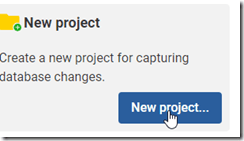
2022-12-28 17_05_51-Flyway Desktop

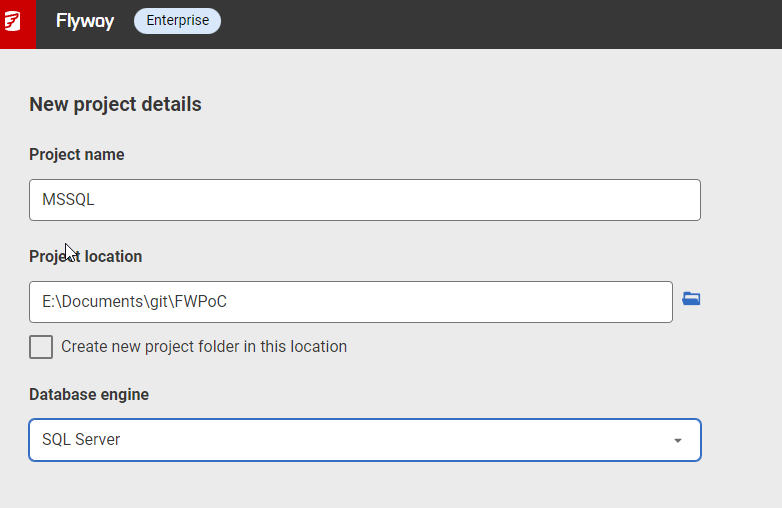
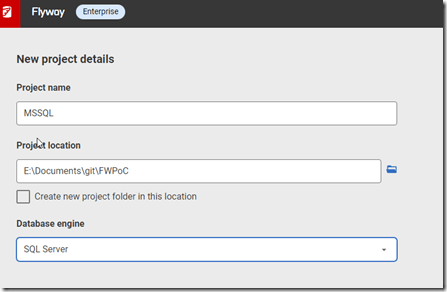
I get a form after clicking New project. I’ll set the name as MSSQL, choose the root folder, and since I created the folder, I uncheck the checkbox. While I appreciate it’s good to put things in a subfolder, at times I’ve had FWD make a subfolder under the folder I choose, so I’m wary of this box. Mostly because I make mistakes.
2022-12-28 17_05_33-Flyway Desktop

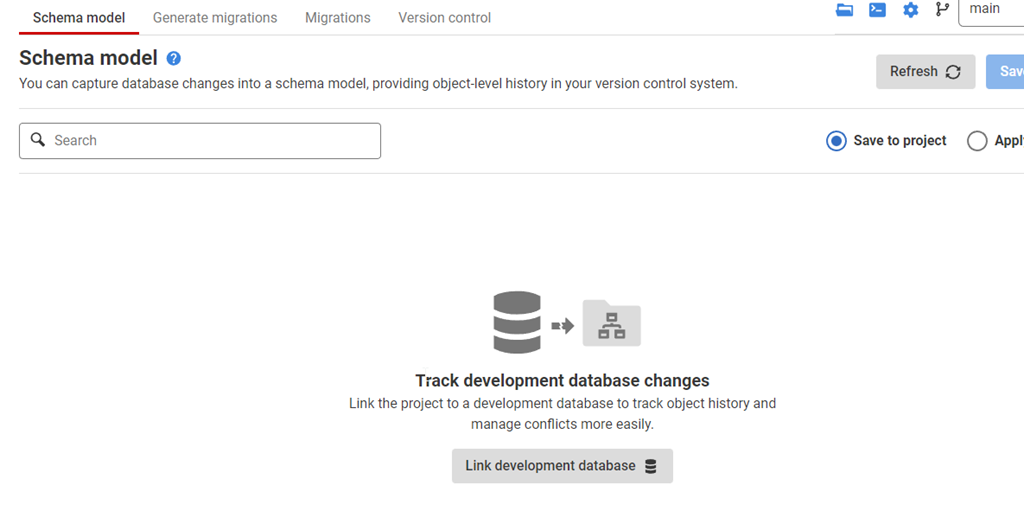
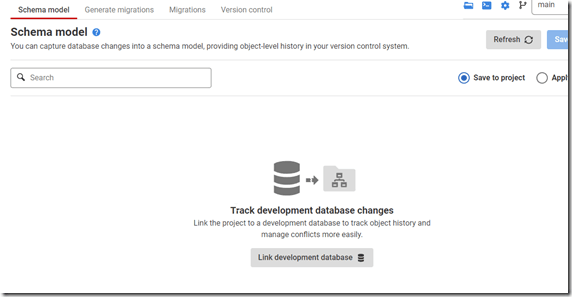
Once this is created, I start in the Schema Model tab. I hate this nomenclature, as it’s weird. This is the list of objects whose code I’m capturing. There’s nothing here, because I need to link this to my development database.
2022-12-28 17_07_44-Flyway Desktop

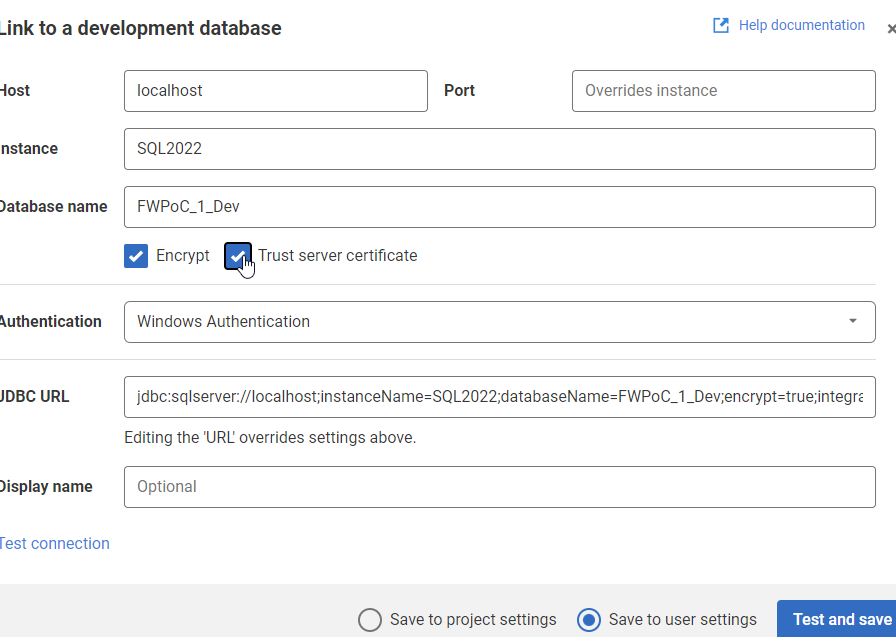
If I click the “Link” button at the bottom, I get a dialog for the JDBC connection string. Don’t worry, you don’t need to know Java. Just fill in the boxes.
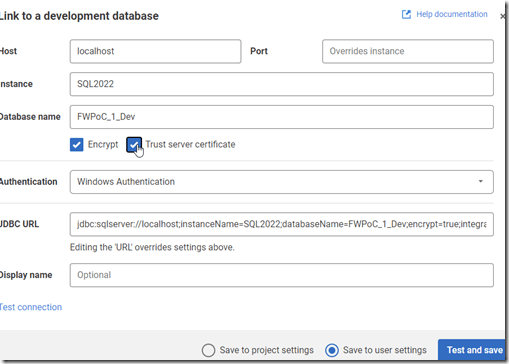
2022-12-28 17_09_47-Flyway Desktop

Two things in the dialog above.

One: Click Trust Server Certificate. Most new installations of SQL and driver upgrades require this. I don’t know why we don’t have this checked by default.

Two: Click “test connection” in the lower left, so if you have issues, this gets found quickly.

Once this is done, I go back to the Schema model and I see this:
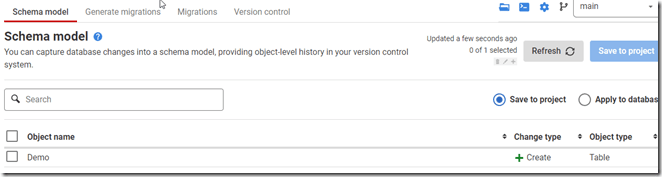
2022-12-28 17_11_44-Flyway Desktop

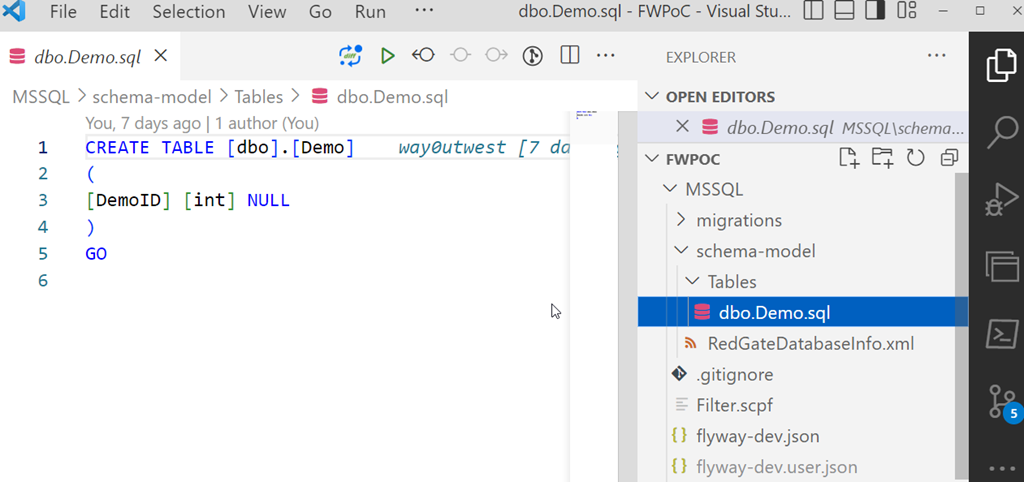
I’ll select this object and save this to the project. This puts the file in the file system for this object, but doesn’t commit this to version control. We can see this in Visual Studio Code below. This is just a git repo, so if I open it in VSCode, I can see the file, the contents, and a note there are changes to be committed in the left icon.
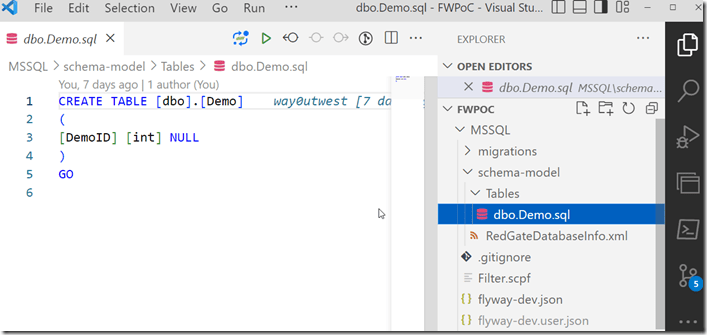
2023-01-03 12_31_22-dbo.Demo.sql - FWPoC - Visual Studio Code

One project complete.

PostgreSQL

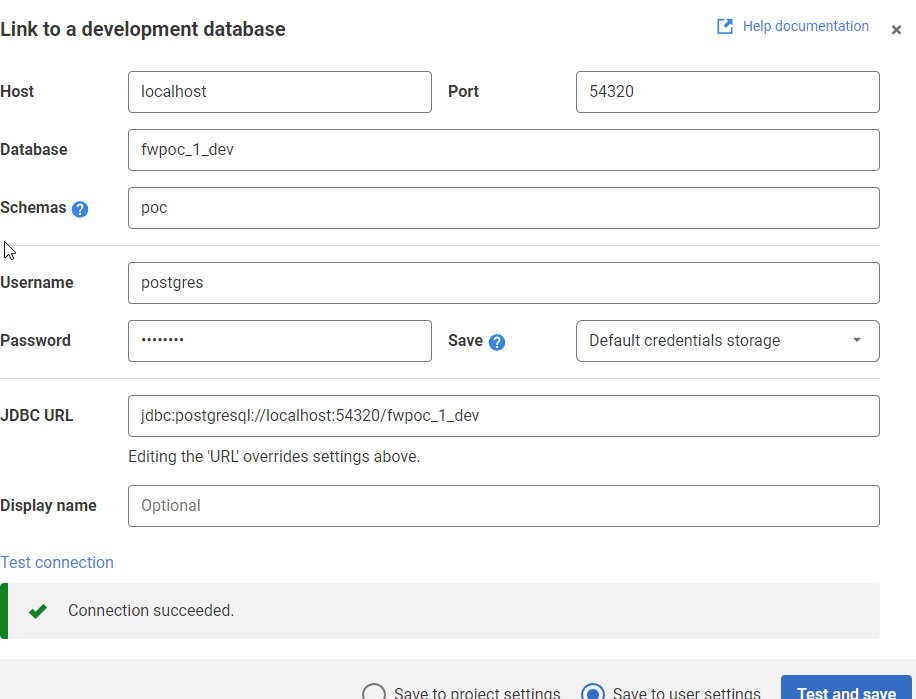
My second project is for PostgreSQL. Same git repo, similar process. I’ll create a new project, but say this is a PostgreSQL project.

2023-01-03 12_33_16-Flyway Desktop

The process is the same. I’ll link this to a dev database. I need to specify the port and database I’m using. I also specify the schema here, as it’s not the default.
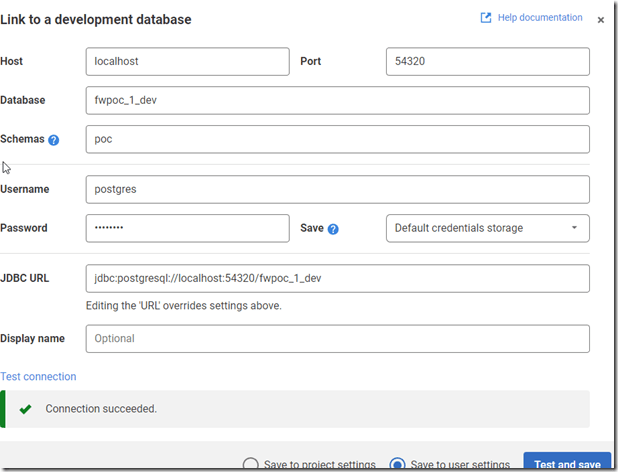
2022-12-27 17_36_50-Flyway Desktop

Once I get the project connected, I see the same as I did above for SQL Server. I save it, and I get a slightly different structure in the project. I see a schema below the schema-model folder. In here, I see my table, but it’s not the code, but a description.
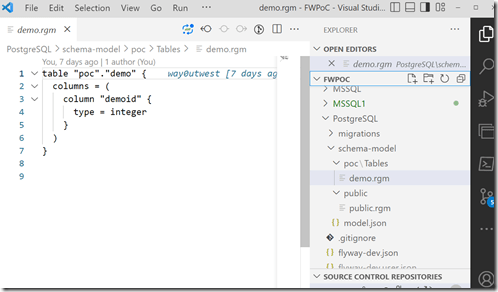
2023-01-03 12_37_14-demo.rgm - FWPoC - Visual Studio Code

From here, I just commit and push this stuff up to the repo. Note that commits and pushes, can push everything from both projects as they are in one repo. I did this on purpose to keep everything organized for me. However, if this were a team, I’d likely separate SQL Server and PostgreSQL into separate repos so individual developers don’t get confused.

The next step here is to get a second database to where I can deploy changes for each project. I’ve got these set up, and in the next post, we’ll work on an initial deployment.

Posted in Blog | Tagged , , , , | 3 Comments

The Complexity of Metrics

Monitoring your SQL Server instances is important to ensure you can meet your SLAs. Availability, performance, reliability, quality, whatever you care about, it’s important that whoever is responsible is looking at how the database is performing. At Redgate, we have multiple teams working on SQL Monitor to enhance and grow it to meet your needs.

A short while ago there was an internal conversation recently about page life expectancy. We’ve had some customers ask about this and setting alerts to watch this value. Our developers and sales engineers asked for a few thoughts from Grant and others on how to respond. There are a variety of opinions, some saying monitor it, some saying don’t bother.

I think both pieces of advice have merit, which is to say that this isn’t a metric that you can look at in isolation. There is no value of PLE that is good or bad, or that says x is wrong or y is right. There is both a subtlety and a complexity to understanding what PLE is telling you about your system. If PLE is growing, you have to look deeper. If it’s falling, same thing. If it suddenly drops, there are multiple possible causes, and you need to examine other things. However, in many cases, this isn’t an actionable metric, but one that provides context about what might be happening in the database when combined with other values you monitor.

This certainly isn’t a metric that you want to set an alert on because it can rise or fall and many times the change isn’t indicative of an acute problem.

This is just one metric of many that are available in SQL Server, and knowing which ones to monitor is something good administrators learn. They know that very few values they instrument have a good or bad value, and often the rate of change needs to be combined with the actual reading to determine if there is a problem. We also often want to know if a high (or low) reading appears for an extended period of time. Having 100% CPU being used for 3 minutes likely isn’t an issue. If it lasts for 3 hours, I might feel differently.

Metrics have more complexity than just having a range in which we ignore them and a limit at which we alert people. They are intended to be combined with each other, with observations by clients, and with the experience of looking at past observations over time. Our systems often develop patterns, and we don’t get too concerned about any values when the pattern repeats. It’s when something new happens and someone complains that we dig in to determine if there is a problem or the start of a new pattern.

We definitely need monitoring of our database metrics, but we also need to understand why values move and the implications of them doing so. That’s something which isn’t as simple as setting alert for each one based on some value we think should never be exceeded.

Steve Jones

Listen to the podcast at Libsyn, Stitcher, Spotify, or iTunes.

Posted in Editorial | Tagged , | Comments Off on The Complexity of Metrics