Thursday is #sqlkilt Day

At the PASS Data Community Summit, Thursday is the day when the Women in Technology (WIT) luncheon takes place. This is an event I’ve come to enjoy as I do feel it is harder for women to deal not only with all the things I do inside of a company, but they also have the sexual overtones. Often it’s not harassment, but in the US, too many men view women very differently, allowing their hormones to affect their judgment.

It’s also #sqlkilt day. This was something started for men to show their support for women at the event. I’ve worn a kilt numerous times, including the first year when only 4 of us were in kilts.

2022-10-25 12_37_19-Pass 2009 _ Flickr

I’m looking forward to the 2022 WIT panel, which has some friends on it, where they’ll talk about many of the same challenge that all of us face, but with their own perspectives. I’m double committed that day (or maybe triple), but I’m going to swing by and listen as much as I can.

Hope to see you there, and in a kilt (if you’re a man).

Posted in Blog | Tagged , | 1 Comment

Daily Coping 10 Nov 2022

Today’s coping tip is to respond to a difficult situation in a different way.

There are plenty of difficult situations I find myself in, some of which create lots of emotion. Anger, fear, frustration, and more.

One thing I tried to do recently was accept the emotion and then let it go. I didn’t express it back to the person and instead made an internal effort to acknowledge there was something I didn’t like and then take a moment. I stepped back and tried to re-examine the situation as if it were happening to someone else.

I asked myself what role should I play, what was the intent of the other party, what part of the situation am I really responsible for? Doing this helped me to realize that while my emotions were valid, they would have had me become defensive or short and overreact to the situation rather than just focus on my part and my role. I learned some of this from Doing Hard Things.

Hard to describe without giving details, and I don’t want to disclose who/what/where as it’s private. The main thing was making an attempt to respond differently to a situation than I had in the past.

I started to add a daily coping tip to the SQL Server Central newsletter and to the Community Circle, which is helping me deal with the issues in the world. I’m adding my responses for each day here. All my coping tips are under this tag.

Posted in Blog | Tagged , , | Comments Off on Daily Coping 10 Nov 2022

Select All in a Power BI Slicer–#SQLNewBlogger

One of the things I’ve been working on this year is a Power BI report for the kids I coaco in volleyball. As a part of this, I want to be able to show all kids, or a few kids, in relation to each other.

This post covers enabling this for a Slicer on a report.

Another post for me that is simple and hopefully serves as an example for people trying to get blogging as #SQLNewBloggers. Here are some hints to get started.

Adding the Slider

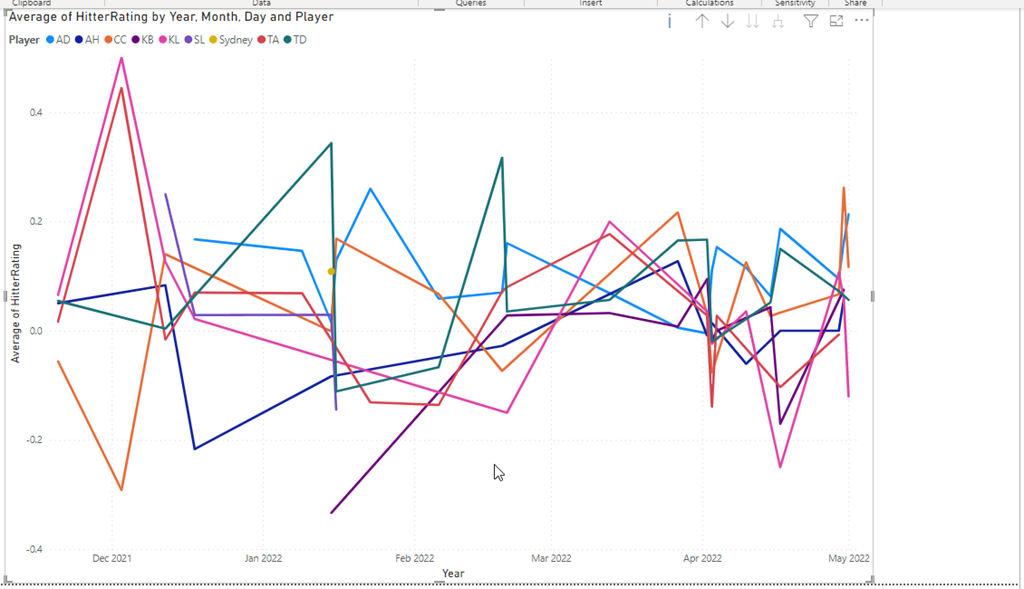
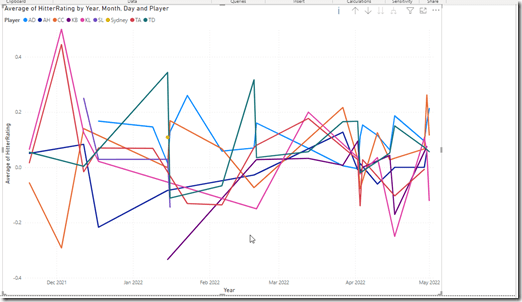
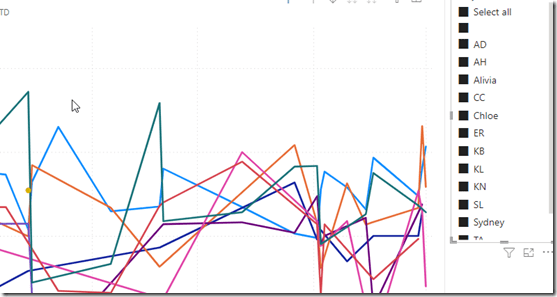
I have a basic report with a line graph. It looks like this once I’ve added in the value to capture at the Y, the date as the X, and the player as the legend.
2022-11-06 10_16_41-2022_16Select_Online - Power BI Desktop

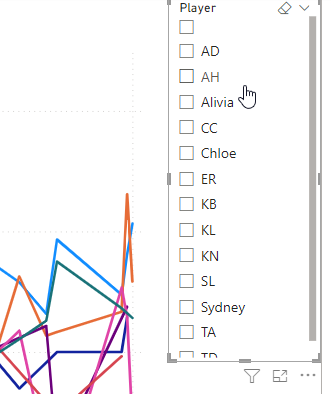
I’ll add a slicer to the report and drop the players in there. I see the players, but I don’t have an easy way to select all of them.
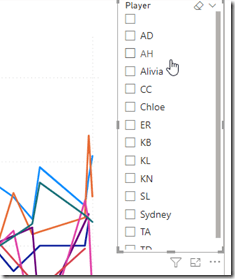
2022-11-06 10_17_00-2022_16Select_Online - Power BI Desktop

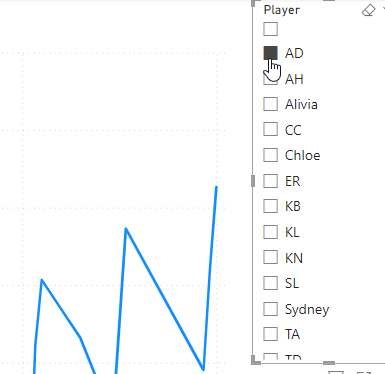
I can select 1, but if I select another, the report changes. I can CTRL+select to get multiple players, but I want to easily get everyone.
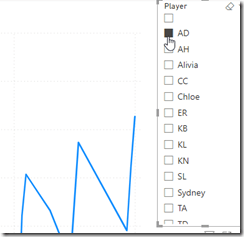
2022-11-06 10_17_14-2022_16Select_Online - Power BI Desktop

I knew this was possible because I’d seen other reports show this. I didn’t see anything obvious, so I actually had to search the docs and found a note that explained how to enable this.

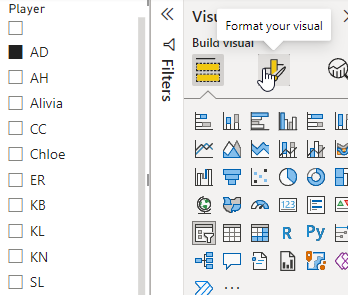
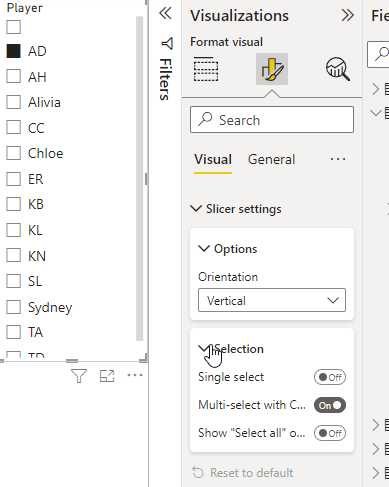
If I click the slicer, I can then select the  Format option on the right, which is the center icon at the top of the visuals pane. You can see the tool tip below.
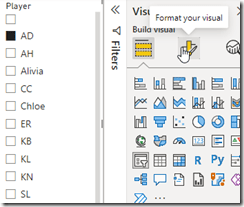
2022-11-06 10_17_22-2022_16Select_Online - Power BI Desktop

Once I do this, I need to expand the Slicer Settings and then the Selection area, as shown here.
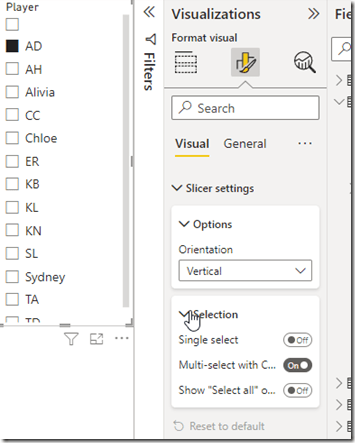
2022-11-06 10_17_30-2022_16Select_Online - Power BI Desktop

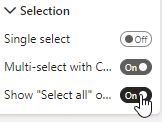
Now I want to click the “Show Select All” button.
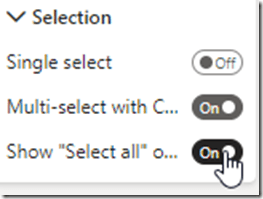
2022-11-06 10_17_35-2022_16Select_Online - Power BI Desktop

Now my slicer show a Select All at the top.
2022-11-06 10_17_45-2022_16Select_Online - Power BI Desktop

Easy.

I found that when I have a few slicers, which I wanted for this report, it was easy to add them all, then do the formatting for one. If I clicked another slicer, I was in the same format spot and could enable SELECT ALL for the next one. For me, I actually had 3 slicers, so it was nice to format them all very quickly to add this option.

SQL New Blogger

This is a really basic post, but it was also something that I didn’t intuitively figure out. I had to research a bit and look around. That’s the skill that many employers need and want.

This also might trigger someone to ask me about Power BI and what I know, which gives me the chance to talk about the learning and experimenting I’ve done.

You could do this as well. It took me about 15-20 minutes to grab screen shots and write this.

Posted in Blog | Tagged , , | Comments Off on Select All in a Power BI Slicer–#SQLNewBlogger

Psychological Safety

One of the biggest challenges to becoming better at building, deploying, and operating software is the culture changes required. DevOps requires we work as a team, which can be hard to do. Often people have competing interests and goals. They don’t trust each other as much as we’d like, and maybe more importantly, management doesn’t trust the people doing the work.

There is plenty of blame thrown around when things don’t work as expected (or aren’t delivered). That’s a poor culture in which to be creative or experimental. In reality, those things are a lot of what we do in software development. We aren’t solving the same problem over and over, building a bridge or house that is mostly constructed as many others are. Instead, we are assembling more complex systems in different ways.

Most of us aren’t building airplanes, but the situations and problems in this article could easily be applied to many software development projects. Ambitious sales, targets set by management, not engineers. A lack of listening to feedback and unstated pressures to just push things through the system, regardless of potential issues. Perhaps the only thing I agree with from Boeing’s side is that they can’t find all defects, just like we can’t find all bugs. However, we can often find many and minimize or eliminate the impact of the critical ones.

The pressure on Boeing engineers and line workers is similar to those in software, both on developers and operations. Development needs to deliver features, whether well-tested or not. Operations need to get these out, regardless of the impact on the system. It’s a gross generalization, but one repeated over and over in a few places I’ve worked.

Culture is critical. Part of DevOps is frequent deployments from a faster speed of deployment. However, that’s only one part. The other is that we continually learn and improve how we do things. We raise the bar of quality. If we are only focused on moving forward without getting better, we get into the position that Boeing was in. No trust, no psychological safety, and no attempt by management to implement DevOps culture. Instead, they’re just pushing for more features with (hopefully) more automated testing, but no real impetus to ensure this is the case.

More and more of the world is run by software. Whether this is in cars, restaurants, or government. When software doesn’t work well, there can be substantial problems that not only impact a bottom line, but can prevent people from getting goods or services they depend on. I know many of you that build and operate software try to do a good job, and I hope you know this means polishing your craft and improving your abilities. I also hope that management will learn that their support in improving quality is as important as the drive for more features in software.

Steve Jones

Listen to the podcast at Libsyn, Stitcher, Spotify, or iTunes.

Posted in Editorial | Tagged | 2 Comments