Flawed Data Integration

I recently had to travel by airplane after a surgery. My mobility was limited and I requested wheelchair assistance, which I used from Denver to Houston to Amsterdam. Across three airports and two countries, the process was interesting, especially the data integration needed to get things to happen in the real world. As often is the case, there are all sorts of ways that systems don’t work well together.

In this case, there are actually multiple digital systems integrated. Since airlines contract with passengers, they record their own data that a particular person needs something. However, the actual service is provided by the airport, and each airport has their own system. A classic case of data transfer being needed between multiple systems, in this case three different airport systems.

Like the digital applications and databases many of us work with, there are disparate ways the data is handled in different systems. In Denver, the young man pushing me had to update his location constantly, so that there was tracking of how I moved through the airport from check-in to security to the train to the gate. I assume some notification gets to a person at the gate, but it was late. Without my wife, I wouldn’t necessarily have had a good way to flag down someone. I assume the delays I had at all gates were more human than digital, but I really don’t know. As a “customer” here, I have no idea when data moves from one application to another, much less when the humans in the real world get notified.

Many of our digital transformations are taking place with the idea of bringing more transparency to various processes, either digital or analog. Our DevOps changes are to make it clearer how we build and deploy software. Many new app features are built to help employees better understand some part of their business. Others are there to inform customers and give them more reasons to stay our customers and not move on to a competitor.

I think it’s important that our software developers and UX designers keep evolving and growing to better meet the needs of our customers. I think it’s amazing how well software has grown and changed from a one-size-fits-all to adapting and customizing for different users. We all might use and react to software a little differently, so allowing the software to meld with the way we work is incredibly helpful to reducing the friction and flaws in the human to computer integration.

This was a good reminder to me of how important data integrations can be between systems, and how much of an impact those friction points can have on a customer. The trip back was much smoother, with people waiting at the airplane doors and showing up in time to get me onto the next plane. That was a wonderful reminder of just how data integration between applications can mesh with humans to create a incredible experience for the customer.

Steve Jones
Posted in Editorial | Tagged | Comments Off on Flawed Data Integration

Refreshing Tables in Data Masker

Data Masker for SQL Server is a product that helps to change data for compliance purposes. It works well, but it isn’t intuitive in a few ways. We bought the product and it has been improved, but it still sometimes throws me for a loop with certain features.

Recently I was editing a masking set and I added a table to the database. In this case, I opened my masking set and went to add a masking rule, but the table wasn’t there. It took me a few minutes to figure out how do to this.

This is documented, but there are a lot more words there than this simple procedure that worked for me.

Refresh the Controller

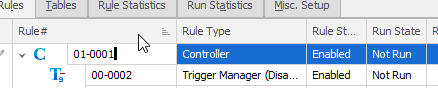
Your masking set has a controller for each schema (essentially). If you pick the controller, you can select “Edit rule”.

2022-06-07 07_23_31-simpletalk_ Data Masker for SQL Server

In this rule, go to the Tools tab. The first button is a refresh button. Pick that.

2022-06-07 07_23_44-Edit Rule Controller

Now, you see more stuff, but in this case since I added a new table, I click the top button. This is Refresh All Tables, under the “ignore exclusion list” section.

2022-06-07 07_23_51-Refresh Database Tables

This runs, and I’ll see my new table(s) in the left list of Known Tables. Click the Save and Update button. You should get a confirmation that tables are updated. You can turn off some of these dialogs, so this might not appear for you. I usually don’t turn these off since I demo things.

2022-06-07 07_24_00-Data Masker

Then update the rule controller. It isn’t intuitive that you need to click “Save” or “Update” on every screen, especially in modern software where we expect changes to just be made on selection. However, this is an older design and needs the confirmation.

Now, you should see the new table in any rules you create/edit.

Data Masker is a great tool for protecting data in non-production environments. It is highly customizable and lets you meet your compliance or regulatory needs. Download an eval today and give it a try.

Posted in Blog | Tagged , , | Comments Off on Refreshing Tables in Data Masker

Daily Coping 13 Jun 2022

I started to add a daily coping tip to the SQLServerCentral newsletter and to the Community Circle, which is helping me deal with the issues in the world. I’m adding my responses for each day here. All my coping tips are under this tag.

Today’s tip is to make of list of what matters most to you this week.

I’m coming off vacation this week. I know, life is hard for me, but I do have a few things to dig into this week. The things that matter are:

  • rehab – get my ankle back in shape
  • rehearsal – I deliver two sessions at VS Live and the audience deserves a well-prepared Steve.
  • work – I need to get SSC in shape for me to travel, and get a presentation ready next week for sales people.
  • life – back to the gym and cooking for the family.
Posted in Blog | Tagged , , | Comments Off on Daily Coping 13 Jun 2022

Tesla Parked for Two Weeks

This is part of a series that covers my experience with a Tesla Model Y.

I went to Europe for two weeks. My wife joined me a week in and left our Tesla at the airport. Once she got on a plane, I double checked that Sentry mode was off and then went about our travels.

When we got back, about 8 days later, we got into the car and it had 64% battery charge. When my wife parked it, it had 65%. The usage shows 0.4kWh for the 8 days, with the car essentially shut down for the time.

Not a amount of usage for a week. I checked a couple times to see how things were changing in the week, but it didn’t seem like the charge was going down.

This was during a period of time when the weather was 70-80F, so that is a temperature that doesn’t affect the battery much. It will be interested to try this in the winter.

Posted in Blog | Tagged , | Comments Off on Tesla Parked for Two Weeks
