Daily Coping 16 Jun 2021

I started to add a daily coping tip to the SQLServerCentral newsletter and to the Community Circle, which is helping me deal with the issues in the world. I’m adding my responses for each day here. All my coping tips are under this tag. 

Today’s tip is to look for something to be thankful for where you least expect it.

Finding joy, pleasure, growth, learning, and gratefulness in life is important. Looking for it is something that matters for me. I’ve often been a “stop and smell the roses” person, even when I’m busy, to enjoy parts of life. I particularly like this when traveling.

For me, I got to go on holiday recently. I was lucky and blessed in life. I appreciate that I was able to do this, and I was vaccinated for safety. I hadn’t expected to be in this spot until July or August.

While I was there, I sat on a beach. It was small (Key West), lots of shells, crowded (relatively) and hot. A little breeze, but not much, and no real amenities for drinks, etc.

All in all not a great beach experience, but I put that aside. I was grateful that I was able to be on holiday, with my wife and friends, and visit a new place I’d never been to.

It would have been easy to be annoyed or upset. Easy to complain. A little more challenging to appreciate the experience.

Posted in Blog | Tagged , , | Comments Off on Daily Coping 16 Jun 2021

A Weekly SQL Clone Image Creation Process

SQL Clone is a neat product from Redgate that I wish I’d have had when I was doing database software development. It lets me have a consistent image for all developers, and create/reset databases to that starting point in seconds.

There are two parts to this process: image creation and clone database creation. I’ve written about both in different places, but in this post I want to tackle a weekly image creation process with some tips and recommendations for how to handle this.

If you want a basic image creation post, read Creating a SQL Clone Agent and a First Image.

The Goal

There are a few goals with a weekly image refresh process for database developers:

  • I don’t want to interrupt developers’ work
  • I want consistency that allows other people’s scripts to just run

In this case, as I create a new image with updated schema and data, I don’t want to require developers to stop working for me to update the image. I also don’t want them to stop while I switch out images. This means I need multiple images for a short period of time.

The other thing, which wasn’t a recommendation early on, was in naming. Lots of early customers, and us Advocates, were naming images with timestamps or some unique value. However, in an ongoing process, this doesn’t work well.

This post is the result of some learning, experiments, and feedback from customers.

The Process Outline

Rather than start at the beginning of a project, let’s assume we are in an ongoing development process. There is an image, and multiple developers are using this in their cloned databases. For simplicity, let’s say I have this setup:

  • A production database – ADW_Prod
  • Developer Kathi, with a cloned database against ADW_Current – AWD_Kathi
  • Developer Grant, with a cloned database against ADW_Current– AWD_Grant
  • An Image, ADW_Current

Given all this in use, how do I update ADW_Current with the latest version of production?

The basic process to follow is this:

  • Create a new image from production, ADW_New
  • Check if there is an ADW_Old image.
    • If so, remove the cloned databases from ADW_Old
    • remove the ADW_Old image
  • Rename ADW_Current to ADW_Old
  • Rename ADW_New to ADW_Current

That’s it. In an ongoing process, I need image rotation, hence the _New->_Current->_Old. If there isn’t an old image, I skip a couple steps.

In this process, developers that are using the current image, ADW_Current, are left alone, though they are now using ADW_Old as the image.

If developers are 2 versions back, on ADW_Old, their databases are dropped. I could deploy new copies of from ADW_Current (or ADW_New), but really, I want developers to be thinking about saving their changes in a VCS often, and not making special little databases they keep for days or weeks.

Really, I want a developer to finish some work, commit it, and then destroy and recreate their dev database. That’s the whole point of SQL Clone. In about 7sec, I have a new copy of the database. I can then pull everyone else’s changes from VCS and be up to date.

The Code

How does this work? Well, I have a single script that I added to a repo on GitHub. I’ll use some images here to show parts, but get the code from there.

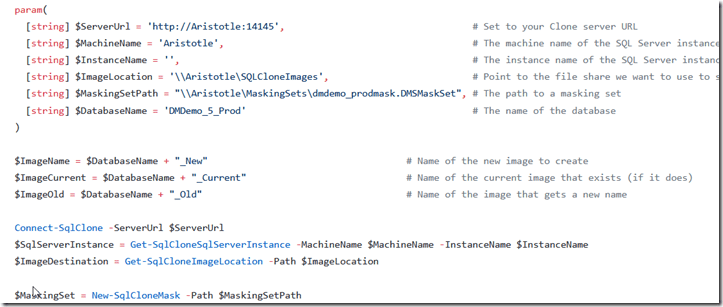
The newimagerotation.ps1 is the script you want. In here, I have some help at the top to give you parameters from PoSh. Then we set some items.I set defaults and then add some standards for my New/Current/Old structure. Feel free to change if that doesn’t make sense to you.
2021-06-15 18_53_55-buildapisqlclone_newimagerotation.ps1 at main · way0utwest_buildapisqlclone — Mo

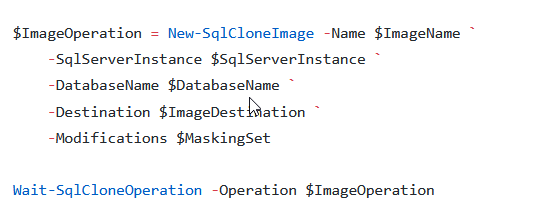
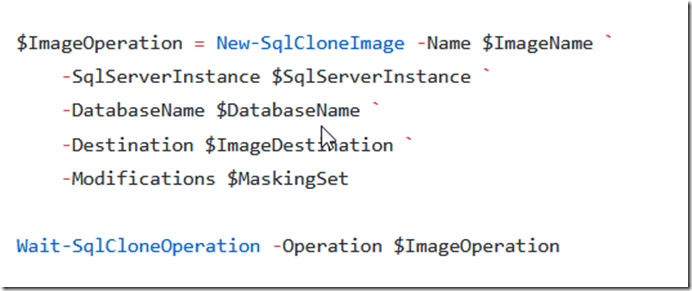
The next part is where I create the New image. If this exists for some reason, like an error, I remove it. Possibly you want to check if there are clones against this and stop, but I never want someone using this.
2021-06-15 18_55_38-buildapisqlclone_newimagerotation.ps1 at main · way0utwest_buildapisqlclone — Mo

After this, we want to rename the current image to old. However, if an old image exists, we remove it. Before we can do that, we need to loop through and remove cloned databases. Protection against someone accidentally removing an image, but I am purposefully doing it here.
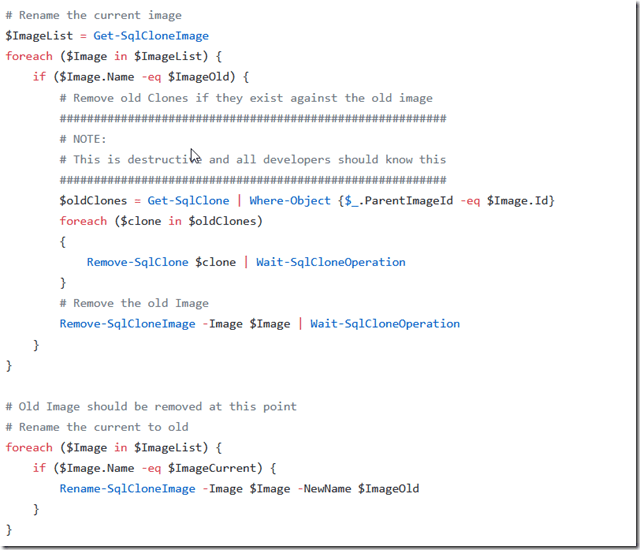
2021-06-15 18_56_35-buildapisqlclone_newimagerotation.ps1 at main · way0utwest_buildapisqlclone — Mo

Once this is done, we rename the new to current, and we’re done.

2021-06-15 18_57_23-buildapisqlclone_newimagerotation.ps1 at main · way0utwest_buildapisqlclone — Mo

Summary

This is an easy process to follow weekly, and it rotates your image so that if people are using scripts or the GUI, they always know to use the _Current image to create a new database.

This also gives developers a grace period that equals your image refresh process for using an old image. If you run this daily, they can use an image for 2 days. If you run it weekly, they can use it for two weeks.

If you want to warn them, add a call in the “rename current to old” section to send a message to developers that there are databases that will be removed when the next image is created.

If you haven’t tried SQL Clone , download an eval and give it a try today. It’s a great way to speed up developer’s experimentation and ensure consistency in dev and test environments.

Posted in Blog | Tagged , , | Comments Off on A Weekly SQL Clone Image Creation Process

Daily Coping 15 Jun 2021

I started to add a daily coping tip to the SQLServerCentral newsletter and to the Community Circle, which is helping me deal with the issues in the world. I’m adding my responses for each day here. All my coping tips are under this tag. 

Today’s tip is to take a light-hearted approach to today. See the funny side.

One of the annoying things that’s happened lately for me is with an author. This individual submitted a few articles, and I gave them feedback for the articles. I got my feedback removed and the original article submitted. I repeated this, thinking they had edited some items (some time passed), and also changed a title. The author repeated.

I deleted the articles. The author resubmitted them. This repeated a few times, including me deleting the user account. This continues to this day, albeit with more effort by the author (new accounts), since we’ve added tooling. The author does not respond to emails.

This was annoying and a time sink for me. After a few weeks, I vented on Twitter one day, mostly curious to see if I was acting poorly. The comments I got let me know this wasn’t the case, but this also helped me appreciate this in a more humorous manner. I could laugh at some of the issues and see this as some sort of game.

It’s the best I can do, but at least I can see a funny side here. I have no idea what the author’s goal is and don’t care at this point. I’m chuckling at my desk most days.

Posted in Blog | Tagged , | Comments Off on Daily Coping 15 Jun 2021

Cleaning Up Stats Data for Volleyball

One of the things I’ve done the last few years is collect statistics as a coach for the kids I work with. Helping them understand how they are performing in competition is important, and it’s a good way to see if we are actually improving play.

I use paper and pencil to gather data, because it’s reliable and quick. Most of the apps I see try to prevent bad data by enforcing certain flows of data, but I find this often means a mis-press on a tablet screen results in lost data because the game moves too fast. The apps aren’t flexible, either, so it’s hard to grab practice data.

Last year I collected data like this:

2021-06-01 14_23_21-TeamStatsByGame.xlsx - Excel

I’d total data and then drop it in the spreadsheet, with a formula to calculate percentages. I report this to athletes and parents, which worked well. However, I wanted to build some graphs, which this format doesn’t make easy to consume.

Putting Data in a Table

My kids and parents don’t have a database tool, so I need to give them raw data in Excel. That works well for all of them and they can read the data. This year, I decided to give them a similar “dashboard” of data for each competition. The format I chose looks like this:

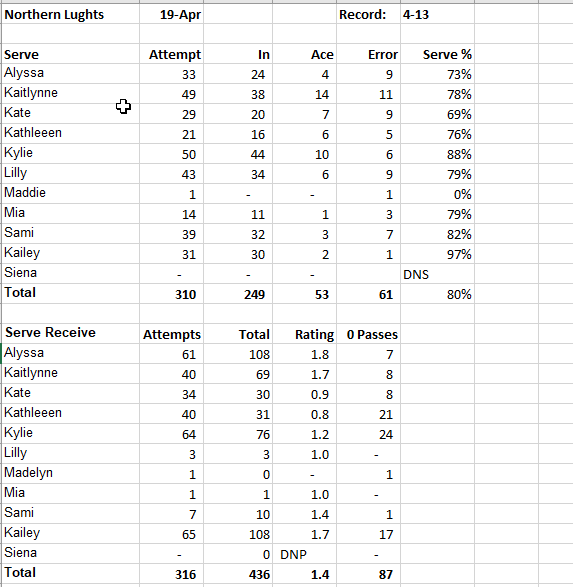
2021-06-01 14_30_42-Stats2021_15Select.xlsx - Excel

Not the best format, but it is easy to print and discuss with players.

For more extensive reporting across the season, however, I need to capture data in a different format.

As a result, when I take data from my paper and enter it, I do so in a separate worksheet in the same file, but in a tabular format. Here’s a sample of one of my sheets. This one captures Serve data.

2021-06-01 14_32_57-Stats2021_15Select.xlsx - Excel

For a particular tournament, I use a formula to add up the data for each player. Since I store the data for players in the same order each time, I can easily create a formula for 1 player and then copy/paste that for other players. It’s a little manual work, but it goes quite quickly as I go through the data after a tournament.

Next Steps

The goal from here was to publish this data as an interactive report. I want to build a PowerBI report and then make it available, but that’s for another post.

Posted in Blog | Tagged , | Comments Off on Cleaning Up Stats Data for Volleyball